Listen to this Post
Introduction:
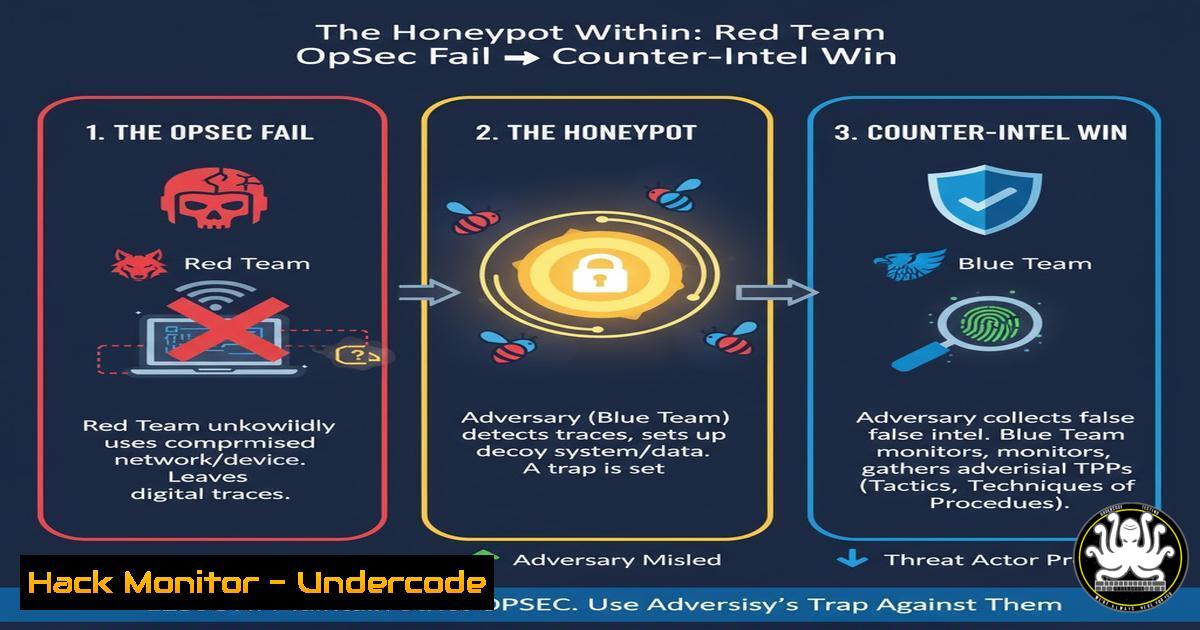
A red team engagement turned into a counter-intelligence operation when a security professional inadvertently compromised his own machine, which was then used by a nation-state actor as a foothold within the network. This incident underscores the critical importance of Operational Security (OpSec) for offensive security professionals and the profound value of a collaborative, non-blaming incident response culture. By choosing to monitor the attacker’s movements instead of immediately containing the compromised account, the security team turned a major breach into a strategic intelligence-gathering opportunity.
Learning Objectives:
- Understand the critical OpSec failures that can lead to red team compromise and how to mitigate them.
- Learn key commands and techniques for detecting compromised systems and monitoring attacker lateral movement.
- Implement proactive hunting and deception strategies to identify advanced persistent threats within your environment.
You Should Know:
1. Detecting Reverse Shells and Unauthorized Network Connections
A primary way attackers maintain access is through reverse shells. Detecting these is crucial.
Linux (Netstat & ss):
 List all network connections, showing process and IP addresses
netstat -tunap
 Modern alternative to netstat
ss -tunap
 Look for ESTABLISHED connections to suspicious foreign IPs
netstat -tunap | grep ESTABLISHED
Windows (Netstat & PowerShell):
 List all network connections with Process IDs
netstat -ano
 PowerShell equivalent for detailed connection information
Get-NetTCPConnection | Where-Object State -Eq Established
Step-by-step guide:
- Regularly run these commands on critical systems, especially jump hosts and red team/workstation machines.
- Filter for `ESTABLISHED` connections and investigate any unknown remote IP addresses. Use threat intelligence feeds to check if the IPs are associated with known malicious actors.
- Correlate the Process ID (PID) with the running process. On Linux, use
ps -p</code>; on Windows, use <code>Get-Process -Id [bash]</code>. Any unknown or suspicious process warrants immediate investigation.</li> </ol> <h2 style="color: yellow;">2. Process and Service Enumeration for Persistence Detection</h2> Attackers often establish persistence via new services or scheduled tasks. <h2 style="color: yellow;">Linux (System Services & Cron):</h2> [bash] List all running services systemctl list-units --type=service --state=running Check for root-owned crontab entries sudo crontab -l Check system-wide cron jobs ls -la /etc/cron./
Windows (Services & Scheduled Tasks):
Get a list of non-Microsoft services Get-WmiObject -Class Win32_Service | Where-Object {$_.PathName -notlike "Microsoft"} | Select-Object Name, State, PathName List all scheduled tasks Get-ScheduledTask | Where-Object State -Eq ReadyStep-by-step guide:
- Establish a baseline of known-good services and scheduled tasks during a period of known cleanliness.
- Use the commands above to periodically scan for new entries. Pay close attention to services running from unusual directories (e.g., `C:\Users\Public\` or
/tmp/). - For any suspicious service or task, immediately investigate the binary path and its digital signature.
3. Advanced Hunting with Sysmon and PowerShell
Microsoft Sysmon provides detailed logging for advanced hunting.
Sysmon Configuration Snippet (XML):
<RuleGroup name="" groupRelation="or"> <ProcessCreate onmatch="include"> <!-- Alert on execution from Temp directories --> <Image condition="end with">\Temp\</Image> <Image condition="end with">\tmp\</Image> </ProcessCreate> <NetworkConnect onmatch="include"> <!-- Alert on connections to high-risk ports --> <DestinationPort condition="is">4444,4443,1337</DestinationPort> </NetworkConnect> </RuleGroup>
PowerHunter Commands:
Parse Sysmon logs for PowerShell script block logging Get-WinEvent -LogName "Microsoft-Windows-Sysmon/Operational" | Where-Object {$<em>.Id -eq 7} | Select-Object TimeCreated, @{Name="Image";Expression={$</em>.Properties[bash].Value}}, @{Name="ImageLoaded";Expression={$_.Properties[bash].Value}}Step-by-step guide:
- Deploy a robust Sysmon configuration across your enterprise, focusing on process creation, network connections, and image loading.
- Use a SIEM or PowerShell scripts to aggregate and analyze these logs.
- Create alerts for the specific conditions in your Sysmon config, such as executions from temporary folders or connections to common C2 ports like 4444.
4. Deploying Canary Tokens and Honeypots
As demonstrated in the article, honeypots can be used defensively to detect attacker movement.
Linux Canary Token (Using curl):
Create a fake SSH private key as a canary token echo "--BEGIN RSA PRIVATE KEY--" > /home/canary/.ssh/id_rsa echo "Canary-Token: $(hostname)-$(date +%Y%m%d)" >> /home/canary/.ssh/id_rsa echo "--END RSA PRIVATE KEY--" >> /home/canary/.ssh/id_rsa chmod 600 /home/canary/.ssh/id_rsa
Windows Canary Token (Using PowerShell Logging):
Create a fake RDP connection file and monitor for access "Full Address:s:192.168.1.99" | Out-File -FilePath "C:\Users\Public\Documents\fake-rdp.rdp" Monitor for file access using File System Auditing or EDR tools.
Step-by-step guide:
- Place canary tokens (fake credentials, sensitive-looking files, network shares) in strategic locations that have no legitimate business use.
- Implement strict file auditing or use a dedicated canary token service to alert you the moment these files are accessed.
- When a token is triggered, do not immediately respond. Instead, initiate controlled monitoring to trace the attacker's origin and objectives.
5. Memory and Credential Dumping Mitigation
Preventing credential dumping is key to stopping lateral movement.
Windows Security Policy (Command Line):
Check if WDigest credential caching is disabled (should be 1) reg query "HKLM\SYSTEM\CurrentControlSet\Control\SecurityProviders\WDigest" /v UseLogonCredential Enable LSA Protection (Requires Reboot) reg add "HKLM\SYSTEM\CurrentControlSet\Control\Lsa" /v RunAsPPL /t REG_DWORD /d 1 /f
Detecting Mimikatz-like Activity (PowerShell):
Hunt for processes with "lsass" in the name that are not the actual lsass.exe Get-Process | Where-Object {$<em>.ProcessName -like "lsass" -and $</em>.Id -ne (Get-Process lsass).Id}Step-by-step guide:
- Harden your systems by disabling WDigest (
UseLogonCredential=0) and enabling LSA Protection via Group Policy or the registry. - Configure your EDR or AV to block and alert on attempts to access the `lsass.exe` process memory from non-trusted processes.
- Use the PowerShell command above as part of your hunting routines to find impersonator processes.
-
API and Cloud Log Auditing for Blended Traffic
Modern attackers blend in with legitimate API and cloud management traffic.
AWS CloudTrail Lookup (AWS CLI):
Look for console logins from unexpected regions aws cloudtrail lookup-events --lookup-attributes AttributeKey=EventName,AttributeValue=ConsoleLogin --region us-east-1 --query 'Events[?Resources[?ResourceType=="AWS::IAM::User"]].CloudTrailEvent' --output text | jq '. | {userIdentity, sourceIPAddress, eventTime}'Azure Activity Log Query (Azure CLI):
Get recent activity logs for a subscription az monitor activity-log list --max-events 100 --query "[?contains(operationName.value, 'Microsoft.Compute/virtualMachines/write')]"
Step-by-step guide:
- Ensure CloudTrail (AWS) or Activity Logs (Azure) are enabled and centrally aggregated.
- Create alerts for high-risk actions like `ConsoleLogin` from new geographies, changes to security groups, or the creation of new IAM users/roles.
- Correlate cloud management activity with on-premises network logs to identify if a compromised identity is being used to pivot into the cloud environment.
What Undercode Say:
- Collaborative IR is a Force Multiplier. The decision to involve the compromised red teamer transformed a disaster into a win. Blame would have only forced the attacker to change tactics, while collaboration provided invaluable intelligence.
- OpSec is Not Optional for Red Teams. Offensive security tools and techniques are inherently risky. Red teams must operate with the assumption that their tools, commands, and machines are themselves high-value targets for counter-attack. Rigorous patching, application whitelisting, and behavioral monitoring on red team assets are non-negotiable.
This incident is a masterclass in modern security leadership. It highlights a shift from a punitive, compliance-focused model to an intelligent, adversary-focused one. The IR lead’s insight—recognizing the attack pattern as nation-state—demonstrates the critical need for deep threat intelligence. By leveraging the attacker's own strategy against them, the team effectively ran a counter-red team operation, proving that the most sophisticated defenses are adaptive, patient, and human-centric. The real vulnerability exploited wasn't just a technical one; it was the potential for internal distrust, which the team wisely avoided.
Prediction:
The future of advanced cyber conflict will increasingly feature these "counter-offensive" maneuvers. Attackers will not only target primary systems but also security teams and their tools directly, using them as camouflage and leverage. We will see a rise in the weaponization of AI within these attacks, where AI-powered red team tools are hijacked and their learning models poisoned to evade detection. Conversely, defensive AI will evolve to identify these "attacks on the attacker," automatically deploying deceptive countermeasures and creating dynamic, intelligent honeypots that learn from and adapt to the intruder's behavior in real-time, turning every intrusion attempt into a potential intelligence goldmine.
🎯Let’s Practice For Free:
IT/Security Reporter URL:
Reported By: Karimi When - Hackers Feeds
Extra Hub: Undercode MoN
Basic Verification: Pass ✅🔐JOIN OUR CYBER WORLD [ CVE News • HackMonitor • UndercodeNews ]
📢 Follow UndercodeTesting & Stay Tuned:


