
Listen to this Post
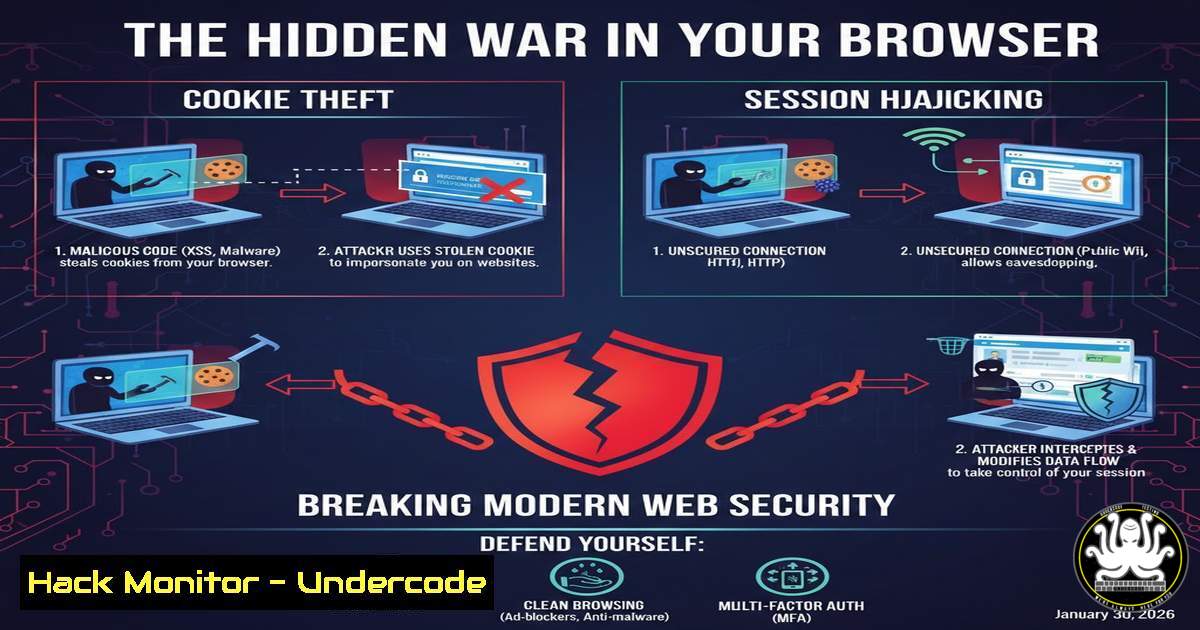
Introduction:
In the architecture of web authentication, cookies and sessions form the fragile bridge between user identity and application state. While fundamental, their implementation is a primary attack vector for credential theft, account takeover, and data breaches. Understanding the mechanics and security of these technologies is not just academic—it’s essential for building defenses against rampant attacks like Cross-Site Scripting (XSS) and Session Hijacking.
Learning Objectives:
- Differentiate between client-side cookie storage and server-side session management, including their respective security postures.
- Implement hardened, secure cookie flags and configure scalable, centralized session storage using Redis.
- Evaluate and implement stateless authentication using JSON Web Tokens (JWTs) as a modern alternative for distributed systems.
You Should Know:
- The Anatomy of a Secure Cookie: Beyond the Basics
A cookie is more than a key-value pair; it’s a set of directives that dictate its lifecycle and accessibility. Insecure flags are an open invitation to attackers.
Step‑by‑step guide explaining what this does and how to use it.
Step 1: Understand the Critical Flags.
HttpOnly: Prevents JavaScript access, mitigating XSS-based cookie theft.
Secure: Ensures the cookie is only sent over HTTPS connections.
SameSite: Controls cross-site request sending. `Strict` or `Lax` prevents CSRF attacks.
`Path` & Domain: Define scope to prevent inadvertent sending to subdomains.
Step 2: Implementation in a Web Framework (Python/Flask Example).
from flask import Flask, make_response

app = Flask(<strong>name</strong>)
@app.route('/login')
def login():
resp = make_response('Logged in')
resp.set_cookie(
'session_id',
value='encrypted_value_here',
httponly=True,
secure=True,  Ensure you are on HTTPS
samesite='Lax',
path='/',
max_age=3600  Session expiry
)
return resp
Step 3: Verification.
Use your browser’s Developer Tools (Application > Storage > Cookies) to verify the flags are correctly set. An insecure cookie missing `HttpOnly` and `Secure` is a visible vulnerability.
2. Implementing Server-Side Sessions with Flask-Session
Sessions move the sensitive data burden to the server. Here’s how to implement them securely using a server-side signed cookie pattern.
Step‑by‑step guide explaining what this does and how to use it.
Step 1: Install the library. `pip install Flask-Session`
Step 2: Configure with filesystem storage (for development).
from flask import Flask, session
from flask_session import Session

app = Flask(<strong>name</strong>)
app.config['SECRET_KEY'] = 'your_very_strong_secret_key_here'
app.config['SESSION_TYPE'] = 'filesystem'
app.config['SESSION_PERMANENT'] = False
app.config['SESSION_USE_SIGNER'] = True  Sign the session ID cookie
app.config['SESSION_COOKIE_HTTPONLY'] = True
app.config['SESSION_COOKIE_SECURE'] = True
app.config['SESSION_COOKIE_SAMESITE'] = 'Lax'

Session(app)

@app.route('/set/')
def set_session():
session['user_id'] = 42  Data stored on server, only ID sent to client
return 'Session set'

@app.route('/get/')
def get_session():
return f"User ID: {session.get('user_id')}"
Step 3: How it Works. The client receives a cryptographically signed cookie containing only the session ID. All actual user data (user_id=42) resides in the server’s memory/filesystem, linked by that ID.
3. Scaling Sessions: Centralized Storage with Redis
The default server-side session storage fails in multi-server (load-balanced) environments. Redis solves this as a fast, in-memory data store.
Step‑by‑step guide explaining what this does and how to use it.
Step 1: Install Redis and Python client.
 On Ubuntu
sudo apt-get install redis-server
sudo systemctl start redis
pip install redis Flask-Session
Step 2: Configure Flask for Redis.
app.config['SESSION_TYPE'] = 'redis'
app.config['SESSION_REDIS'] = redis.from_url('redis://localhost:6379')
 All security cookie configs from previous section remain crucial
Step 3: Verification.
Start your Flask app, log in, and check Redis: `redis-cli` then KEYS. You’ll see the session key. All application servers now connect to this single source of truth.
- The Stateless Frontier: Authentication with JSON Web Tokens (JWTs)
JWTs encode session data directly into a token the client holds, eliminating server-side storage. The server validates its signature.
Step‑by‑step guide explaining what this does and how to use it.
Step 1: Structure of a JWT. Header.Payload.Signature. The payload contains claims (e.g., {"user_id": 42, "exp": 1740323600}).
Step 2: Generating and Validating a Token (Python PyJWT).
import jwt
import datetime

SECRET_KEY = 'your-secret'

Generate Token
payload = {
'user_id': 42,
'exp': datetime.datetime.utcnow() + datetime.timedelta(hours=1)
}
token = jwt.encode(payload, SECRET_KEY, algorithm='HS256')
 Send `token` to client to store (often in localStorage or a cookie)

Validate Token (on subsequent requests)
try:
decoded = jwt.decode(token, SECRET_KEY, algorithms=['HS256'])
user_id = decoded['user_id']
except jwt.ExpiredSignatureError:
 Token expired
pass
Step 3: Critical Security Note. Always validate the signature server-side. Never trust the client’s decoded data. Store JWTs in `HttpOnly` cookies (not localStorage) to mitigate XSS theft.
- The Attacker’s Playbook: Common Exploitation Techniques & Mitigations
Understanding how these mechanisms are broken is key to defending them.
Step‑by‑step guide explaining what this does and how to use it.
Exploit 1: Session Fixation. An attacker forces a known session ID on a user before login.
Mitigation: Regenerate the session ID after authentication. In Flask: `session.clear()` then session['user_id'] = ....
Exploit 2: Cross-Site Scripting (XSS) to steal cookies.
Mitigation: The `HttpOnly` cookie flag is your primary defense, as shown in Section 1.
Exploit 3: Man-in-the-Middle (MitM) interception.
Mitigation: Enforce `Secure` flag and implement HSTS headers on your server.
Exploit 4: CSRF with Session Cookies.
Mitigation: Use the `SameSite=Lax/Strict` cookie attribute. Supplement with CSRF tokens for state-changing operations.
What Undercode Say:
- The Storage Location Dictates the Threat Model. Cookies shift risk to the client (XSS, leakage), sessions shift load and complexity to the server (scaling, persistence). Your choice dictates where you must concentrate your security hardening.
- There Is No Perfect, One-Size-Fits-All Solution. JWTs solve scaling but introduce token revocation challenges. Server-side sessions are secure but require state management. Secure cookies are mandatory regardless of the path chosen. The optimal architecture depends on your application’s specific scale, complexity, and threat profile.
Prediction:
The evolution of web authentication is moving towards a passwordless and context-aware future, heavily reliant on biometrics and hardware security keys (WebAuthn). This will reduce dependency on traditional session/cookie chains for primary authentication. However, cookies and sessions will persist as mechanisms for managing user state and preferences. The key shift will be the mainstream adoption of encrypted, self-contained tokens (like advanced JWTs) for stateless authorization, paired with decentralized identity protocols. Security will focus increasingly on binding sessions to immutable device fingerprints and behavioral analytics for real-time hijacking detection, moving beyond simple token validation to continuous, adaptive trust assessment.
▶️ Related Video (74% Match):
🎯Let’s Practice For Free:
IT/Security Reporter URL:
Reported By: Jafar Muzeyin – Hackers Feeds
Extra Hub: Undercode MoN
Basic Verification: Pass ✅


