Listen to this Post
Introduction:
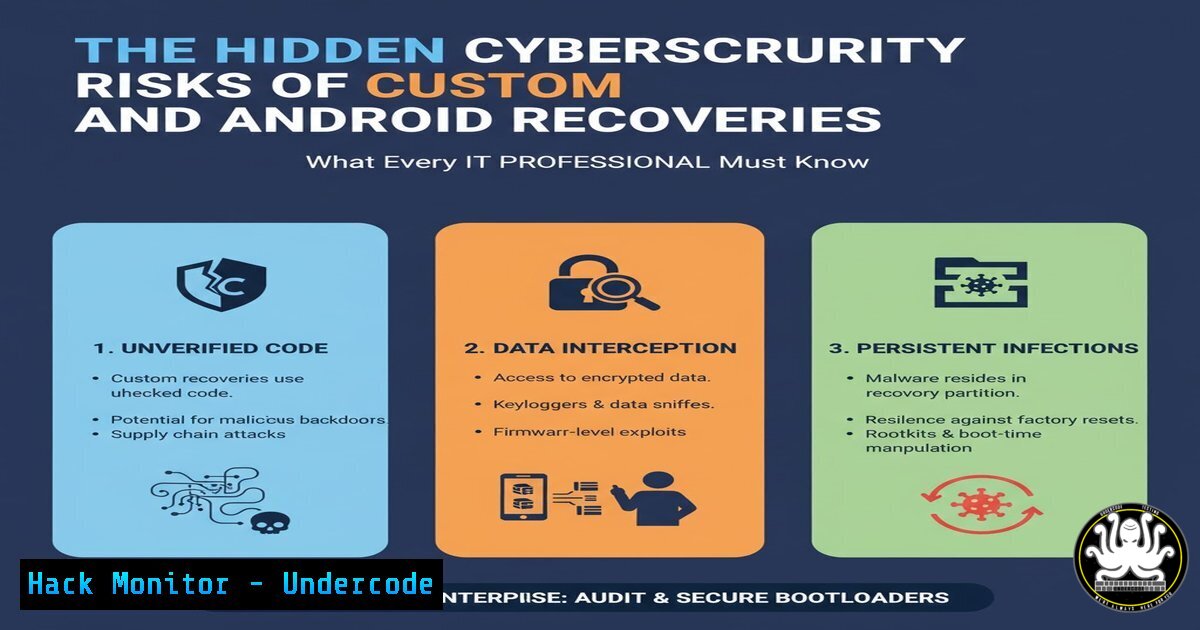
Custom recoveries like TWRP, CWM, and OrangeFox provide advanced control over Android devices but introduce significant security vulnerabilities that threat actors can exploit. These tools, while valuable for developers, can bypass critical security protocols and create entry points for sophisticated malware attacks when implemented without proper safeguards.
Learning Objectives:
- Understand the security mechanisms bypassed by custom recoveries
- Learn to detect and analyze compromised Android devices
- Implement enterprise-level protection against recovery-based attacks
You Should Know:
1. Android Bootloader Security Bypass Detection
`adb devices -l`
`fastboot oem device-info`
`cat /proc/cmdline | grep -i “androidboot.unlocked_kernel”`
Step-by-step guide: These commands help security teams detect whether a device’s bootloader has been unlocked, which is the prerequisite for custom recovery installation. The `adb devices -l` command lists connected Android devices with detailed information, while `fastboot oem device-info` reveals bootloader status. The grep search through kernel parameters confirms if security flags have been modified, indicating potential compromise of the device’s trusted execution environment.
2. Recovery Partition Forensic Analysis
`adb shell ls -la /dev/block/bootdevice/by-name/recovery`
`adb shell cat /system/recovery-from-boot.p | strings`
`adb shell getprop ro.boot.flash.locked`
Step-by-step guide: These forensic commands allow investigators to examine the recovery partition where custom recoveries reside. The directory listing reveals recovery partition metadata and modification timestamps, while the strings command extracts readable text from binary recovery images that might contain malicious code. The property check confirms whether the flash memory remains locked, a critical security indicator for enterprise device management.
3. Custom Recovery Signature Verification
`unzip -l twrp-.img | grep -E “(\.sh|\.py|\.bin)$”`
`sha256sum recovery.img > current_recovery.sha256`
`diff official_recovery.sha256 current_recovery.sha256`
Step-by-step guide: Security teams must verify the integrity of recovery images before deployment. The unzip command with grep filtering identifies executable scripts within recovery packages that could contain backdoors. SHA256 hashing creates a cryptographic fingerprint of the current recovery, while diff comparison against known-good signatures detects unauthorized modifications that indicate tampering or malware injection.
4. Root Privilege Escalation Detection
`adb shell ps -ef | grep -i “su\|superuser”`
`adb shell which su`
`adb shell getprop ro.debuggable`
Step-by-step guide: Custom recoveries often facilitate root access, creating significant security risks. These commands detect privilege escalation attempts by identifying superuser processes (su) active in memory, locating binary installations, and checking if the device is configured for debugging access—all indicators that the device’s security model has been compromised and may be vulnerable to exploitation.
5. Enterprise Device Compliance Checking
`adb shell dumpsys device_policy | grep -A 20 “Active admin”`
`adb shell settings get global adb_enabled`
`adb shell getprop ro.boot.veritymode`
Step-by-step guide: For organizations managing mobile fleets, these commands verify compliance with security policies. The device policy dump reveals active administration configurations, while the settings check confirms if ADB debugging remains enabled (a common attack vector). The veritymode property indicates whether verified boot is active, a critical security feature often disabled by custom recoveries.
6. Memory Forensics for Compromised Devices
`adb shell dumpsys meminfo | grep -E “(TWRP|CWM|OrangeFox)”`
`adb shell cat /proc/mounts | grep -v “^/”`
`adb logcat -d | grep -i “recovery\|bootloader”`
Step-by-step guide: When investigating potentially compromised devices, these memory and system analysis commands identify custom recovery artifacts. The meminfo dump searches for recovery-related processes in memory, while the mounts examination detects unauthorized partition access. Logcat filtering extracts boot and recovery messages that reveal suspicious activity or security bypass attempts.
7. Network Security Hardening for Developer Devices
`iptables -A OUTPUT -p tcp –dport 5555 -j DROP`
`ufw deny out 5555`
`netsh advfirewall firewall add rule name=”Block ADB” dir=out action=block protocol=TCP localport=5555`
Step-by-step guide: Since custom recoveries often require ADB network access, these firewall rules block potentially dangerous external connections. The iptables command provides Linux-based protection, UFW offers simplified management, and Windows netsh commands create enterprise-level firewall policies to prevent unauthorized ADB access that could be exploited through custom recovery backdoors.
What Undercode Say:
- Custom recoveries fundamentally undermine Android’s security model by disabling verified boot and integrity protection
- The convenience of custom recoveries creates unacceptable risk in enterprise environments where device trust is paramount
- Organizations must implement strict MDM policies that detect and block devices with modified recovery partitions
The proliferation of custom Android recoveries represents a growing attack surface that many organizations overlook. While these tools offer legitimate development benefits, they create persistent security vulnerabilities that bypass critical protection mechanisms. The verified boot chain, which ensures each component from bootloader to system partition remains untampered, becomes completely ineffective when custom recoveries are installed. Security teams must treat devices with custom recoveries as potentially compromised, implementing rigorous detection and isolation protocols. As mobile devices continue to handle sensitive enterprise data, the security implications of modified system components cannot be overstated—what begins as a developer convenience can end as a devastating data breach.
Prediction:
Within two years, we anticipate a major enterprise security breach originating from compromised custom recoveries, leading to stricter regulatory requirements for mobile device integrity verification. As threat actors increasingly target the mobile attack surface, custom recoveries will become a primary infection vector for sophisticated persistent malware, forcing organizations to adopt hardware-level security verification and implement zero-trust architectures for all mobile endpoints. The development community will face pressure to create more secure recovery options that maintain functionality without compromising fundamental security principles.
🎯Let’s Practice For Free:
IT/Security Reporter URL:
Reported By: Priyank Gada – Hackers Feeds
Extra Hub: Undercode MoN
Basic Verification: Pass ✅


