
Listen to this Post
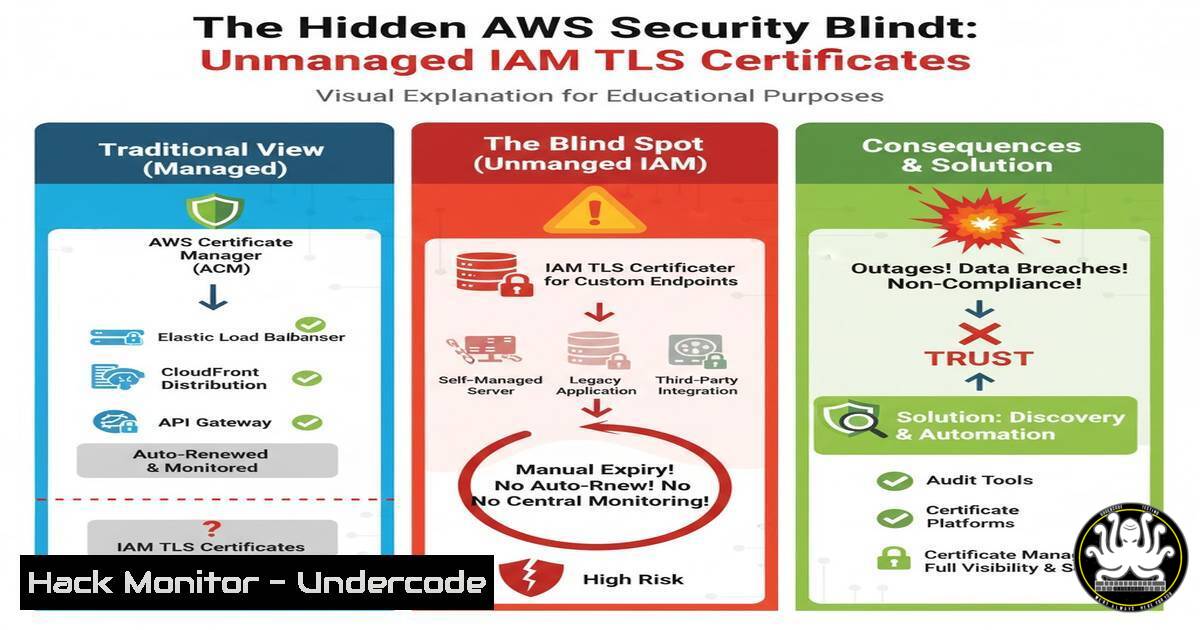
Introduction:
While AWS Certificate Manager (ACM) has become the standard for TLS certificate management, a legacy and often overlooked feature within AWS Identity and Access Management (IAM) poses a significant security risk. IAM’s ability to store and manage server certificates can create hidden attack surfaces, as these certificates do not auto-renew, are not visible in the ACM console, and are frequently forgotten during security audits. Understanding this quirk is essential for robust cloud security posture management.
Learning Objectives:
- Identify the AWS CLI commands for managing TLS certificates within IAM.
- Understand the security risks associated with unmonitored IAM server certificates.
- Learn how to inventory and audit your AWS environment for these hidden certificates.
You Should Know:
1. Discovering Hidden IAM Certificates
Verified AWS CLI command list related to article
`aws iam list-server-certificates`
Step‑by‑step guide explaining what this does and how to use it.
This command returns a list of all server certificates stored in IAM for your AWS account. To use it, first ensure your AWS CLI is configured with appropriate credentials possessing the `iam:ListServerCertificates` permission. Execute the command in your terminal. The output will show metadata for each certificate, including its name, ID, upload date, and expiration. This is the foundational first step for any audit.
2. Retrieving Certificate Details
Verified AWS CLI command related to article
`aws iam get-server-certificate –server-certificate-name YOUR_CERT_NAME`
Step‑by‑step guide explaining what this does and how to use it.
After listing the certificates, use this command to fetch the detailed contents of a specific certificate, including the public key certificate chain and the private key (if it was uploaded with one). Replace `YOUR_CERT_NAME` with the exact name of a certificate from your list. This allows you to inspect the certificate’s specifics, such as its validity period and associated domain names, to assess its current use and risk.
3. The Full IAM Certificate Permission Set
Verified IAM permissions list related to article
`iam:UploadServerCertificate, iam:ListServerCertificates, iam:GetServerCertificate, iam:UpdateServerCertificate, iam:DeleteServerCertificate, iam:ListServerCertificateTags, iam:TagServerCertificate, iam:UntagServerCertificate`
Step‑by‑step guide explaining what this does and how to use it.
These are the core permissions for managing IAM server certificates. When defining IAM policies, adhere to the principle of least privilege. For a developer who only needs to list certificates, grant only iam:ListServerCertificates. An automated security scanner might need `List` and Get. Avoid using wildcards (iam:) or broad permissions like `iam:Certificate` which could grant unnecessary power, such as the ability to upload a new, potentially malicious certificate.
4. Uploading a Certificate to IAM
Verified AWS CLI command related to article
`aws iam upload-server-certificate –server-certificate-name MyCert –certificate-body file://publickey.crt –private-key file://privatekey.pem –certificate-chain file://certchain.pem`
Step‑by‑step guide explaining what this does and how to use it.
This command imports an existing TLS certificate into IAM. The `–server-certificate-name` is a unique identifier you assign. The --certificate-body, --private-key, and `–certificate-chain` parameters point to the respective PEM-encoded files. This is a powerful operation and should be tightly controlled, as it introduces a new certificate into the environment that will not be managed by ACM.
5. Identifying Expired Certificates with a Script
Verified Linux command and script snippet related to article
`aws iam list-server-certificates –query “ServerCertificateMetadataList[?Expiry<\`date -Isec`].{Name:ServerCertificateName, Expiry:Expiry}" --output table`
Step‑by‑step guide explaining what this does and how to use it.
This one-liner uses the AWS CLI with a JMESPath query to filter and list certificates that have already expired. It compares the `Expiry` date against the current date. For a more robust audit, you can write a shell script that loops through `list-server-certificates` output, uses `get-server-certificate` for each, and parses the expiration date, alerting on certificates expiring within the next 30 days.
6. Leveraging CloudTrail for Certificate Activity Monitoring
Verified CloudTrail lookup command related to article
`aws cloudtrail lookup-events –lookup-attributes AttributeKey=EventName,AttributeValue=UploadServerCertificate`
Step‑by‑step guide explaining what this does and how to use it.
All API calls related to IAM certificates are logged in AWS CloudTrail. This command searches CloudTrail for specific events, such as UploadServerCertificate. You can use this to monitor for unexpected or unauthorized certificate management activities. For a comprehensive audit trail, also look for `DeleteServerCertificate` and `UpdateServerCertificate` events. Integrating these checks into your SIEM can provide real-time security alerts.
7. Removing a Stale IAM Certificate
Verified AWS CLI command related to article
`aws iam delete-server-certificate –server-certificate-name MyOldCert`
Step‑by‑step guide explaining what this does and how to use it.
Once you have identified a certificate that is expired or no longer in use, this command will permanently delete it from IAM. Before deletion, always verify with the `get-server-certificate` command and confirm the certificate is not actively being used by any AWS resources (e.g., Elastic Load Balancers or CloudFront distributions) to avoid causing an outage. This is a critical step in reducing your attack surface.
What Undercode Say:
- The primary risk of IAM-managed TLS certificates is their lack of visibility and automated lifecycle management, making them a persistent blind spot.
- Proactive, periodic auditing using CLI commands and CloudTrail is non-negotiable for mature cloud security, as many automated CSPM tools may overlook this legacy feature.
The discussion between industry experts highlights a critical gap in cloud security hygiene. While ACM offers a streamlined, secure modern solution, the legacy IAM certificate pathway remains active and unmonitored. This creates a perfect storm for “shadow IT” certificates that can expire, causing outages, or worse, be exploited if malicious certificates are uploaded by an actor with compromised credentials. The fact that this feature is unknown to many seasoned professionals underscores the need for continuous education and specialized tooling that can comprehensively assess the entire IAM service, not just its primary roles and policies.
Prediction:
The lack of centralized visibility for TLS certificates across AWS services will become a more frequent source of compliance failures and security incidents. As attackers increasingly target cloud identity and access management layers, the ability to hide malicious activity using legacy features like IAM certificate storage presents a low-hanging fruit for exploitation. We predict a rise in tools and native AWS features designed to consolidate and monitor all certificate types, forcing a deprecation or significant overhaul of the IAM certificate store to close this operational and security gap.
🎯Let’s Practice For Free:
IT/Security Reporter URL:
Reported By: Danielgrzelak How – Hackers Feeds
Extra Hub: Undercode MoN
Basic Verification: Pass ✅


