Listen to this Post
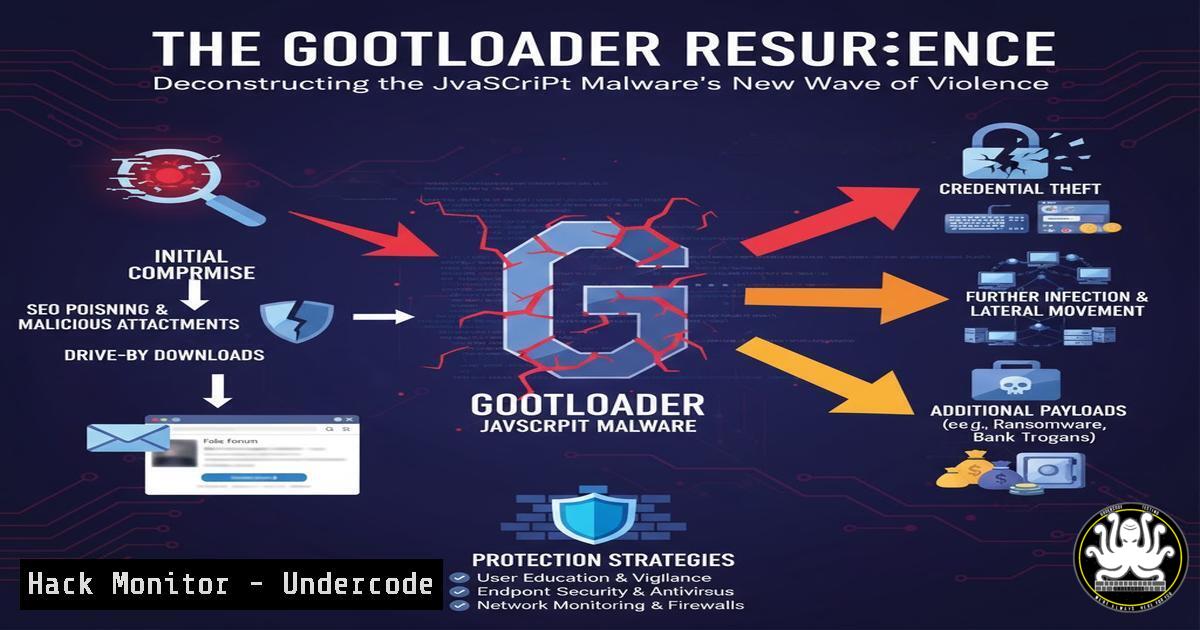
Introduction:
The cyber threat landscape is witnessing a significant resurgence of GootLoader, a sophisticated JavaScript-based malware loader known for its aggressive distribution of ransomware and other payloads. This latest wave, as detailed by Huntress researchers, demonstrates evolved tactics that bypass traditional defenses, making it a critical concern for security teams worldwide. Understanding its infection chain and detection methodologies is paramount for effective defense.
Learning Objectives:
- Deconstruct the multi-stage GootLoader infection chain and its latest techniques.
- Master detection and hunting strategies using EDR queries, YARA rules, and network signatures.
- Implement hardening measures to prevent initial compromise and lateral movement.
You Should Know:
- The GootLoader Infection Chain: From SEO Poisoning to Domain Compromise
GootLoader’s initial access primarily relies on Search Engine Optimization (SEO) poisoning, tricking users into visiting compromised websites that host the malicious JavaScript. The infection is a multi-stage process where a heavily obfuscated JS file acts as the initial downloader, fetching subsequent, more capable payloads that ultimately deploy Cobalt Strike or ransomware like Kronos.
- Hunting with EDR: Process Creation and Network Activity
Effective hunting requires focusing on the process lineage and network calls originating from scripting hosts. The following Splunk query hunts for suspicious `mshta` or `rundll32` processes spawned by msoffice.exe, a common pattern in this campaign.
index=edr_logs (ParentImage="\msoffice.exe" AND (Image="\mshta.exe" OR Image="\rundll32.exe"))
| table _time, ComputerName, User, ParentImage, Image, CommandLine
Step-by-step guide:
- Execute the Query: Run this query in your Splunk EDR environment over a 7-14 day lookback period.
- Analyze Results: Focus on the `CommandLine` field. Look for instances where `mshta` or `rundll32` is executing scripts from unusual locations, especially AppData or Temp folders.
- Triage: Any positive result should be treated as a high-fidelity alert requiring immediate investigation of the host and user.
-
YARA Rule for Static Detection of GootLoader JS Files
YARA rules are essential for scanning file shares and endpoints for the initial dropper. This rule targets common obfuscation patterns and strings found in recent GootLoader samples.
rule GootLoader_JS_Obfuscated {
meta:
description = "Detects obfuscated GootLoader JavaScript files"
author = "ThreatIntel"
date = "2024-05-15"
strings:
$s1 = /var\s+\w+\s=\s\[\]\s;/
$s2 = /function\s+\w+\(\)\s{/
$s3 = /\w+\.split\('\|'\)/
$s4 = "GLOBAL"
condition:
filesize < 500KB and 3 of them
}
Step-by-step guide:
- Create the Rule: Save the text above as
GootLoader_JS_Obfuscated.yar. - Deploy with Scanner: Use a tool like `yara64.exe` to scan directories. Example:
yara64 -r GootLoader_JS_Obfuscated.yar C:\Users\. - Review Matches: Any file that triggers this rule should be quarantined and analyzed further. This is highly effective for catching the initial payload before execution.
-
Windows Command Line Hardening: Monitoring Script Interpreter Abuse
Attackers abuse native Windows tools like `mshta` and `rundll32` to execute malicious code. Monitoring their command-line arguments is crucial. The following PowerShell command helps log these activities via Windows Event Tracing.
 Create a WEC subscription to capture command-line arguments for key processes
New-WinEvent -ProviderName "Microsoft-Windows-PowerShell" | Where-Object { $<em>.Id -eq 400 }
Get-WinEvent -FilterHashtable @{LogName='Security'; ID=4688} | Where-Object { $</em>.Properties[bash].Value -like "mshta" -and $_.Properties[bash].Value -like "http" }
Step-by-step guide:
- Enable Logging: Ensure command-line process auditing is enabled in your Group Policy (Computer Configuration > Administrative Templates > System > Audit Process Creation > Include command line).
- Run the Query: Execute the PowerShell script on a central log collector or SIEM to aggregate events.
- Set Alerts: Configure alerts for any `mshta.exe` or `rundll32.exe` process that has a command line containing a web URL (
http/https), as this is a strong indicator of script-based downloader activity.
5. Network Signature for C2 Communication Detection
GootLoader’s later stages communicate with command-and-control (C2) servers. This Suricata network IDS rule detects the unique HTTP patterns observed in its beaconing traffic.
alert http $HOME_NET any -> $EXTERNAL_NET any (msg:"Suspected GootLoader C2 Beacon";
flow:established,to_server;
http.method; content:"POST";
http.uri; content:"/api/"; fast_pattern;
http.user_agent; content:"Mozilla/5.0"; within:20;
http.host; content:".top"; distance:0;
classtype:trojan-activity;
sid:1000001; rev:1;)
Step-by-step guide:
- Implement the Rule: Add this rule to your Suricata or other compatible IDS/IPS `local.rules` file.
- Test and Deploy: Test the rule in a staging environment to avoid false positives, then deploy to production.
- Monitor Alerts: Any trigger from this rule should be correlated with endpoint data to identify the compromised host. The rule keyes on the `/api/` URI path and a `.top` domain, which is commonly used.
6. Linux/Mac Hunting: Cross-Platform Script Threat
While predominantly a Windows threat, the principles apply to other platforms where attackers may use similar loader scripts (e.g., Python or Bash). This command searches for suspicious, recently modified script files in user writable directories.
find /home /tmp -name ".sh" -o -name ".py" | xargs ls -la | grep "$(date +%Y-%m-%d)"
Step-by-step guide:
- Run the Find Command: Execute this command on Linux or macOS endpoints to locate scripts modified today.
- Analyze File Paths: Scrutinize any scripts found in `/tmp` or user home directories that were recently modified without a known reason.
- Investigate Content: Manually review the contents of these scripts for obfuscation or commands that download and execute remote payloads.
7. Mitigation via Application Control: Blocking Unauthorized Scripts
A primary mitigation for GootLoader is preventing the execution of unauthorized scripts. Using Windows Defender Application Control (WDAC) or AppLocker is highly effective.
AppLocker Policy (XML Snippet):
<RuleCollection Type="Script" EnforcementMode="Enabled">
<FileHashRule Id="abcdefab-1234-5678-abcd-abcdef012345" Name="Block GootLoader Hash" Description="" UserOrGroupSid="S-1-1-0" Action="Deny">
<Conditions>
<FileHashCondition>
<FileHash Type="SHA256" SourceFileHash="E3B0C44298FC1C149AFBF4C8996FB92427AE41E4649B934CA495991B7852B855"/>
</FileHashCondition>
</Conditions>
</FileHashRule>
</RuleCollection>
Step-by-step guide:
- Create a Policy: Use the AppLocker MMC snap-in to create a new script rule collection.
- Implement Hash/Path Rules: Start with a default policy that allows scripts only from `C:\Program Files\` and `C:\Windows\` and denies all others, or add specific hashes from IOCs.
- Deploy via GPO: Link the policy to a Group Policy Object applied to your workstation OU. Test thoroughly to ensure it doesn’t break business applications.
What Undercode Say:
- The Loader is the New Battleground: The focus has shifted from the final payload to the initial loader. Defeating sophisticated loaders like GootLoader disrupts the entire attack chain before the most damaging payloads are deployed.
- SEO Poisoning is a Persistent Weakness: Human factors remain a critical vulnerability. User education on identifying suspicious search results is as important as any technical control.
The analysis from Huntress confirms that GootLoader’s operators are iterating rapidly. Their use of compromised, legitimate websites and heavy obfuscation makes signature-based detection insufficient. A defense-in-depth strategy, combining robust EDR hunting, network traffic analysis, and application control policies, is no longer optional. The “goots” are a formidable adversary because they weaponize trust in search engines and everyday IT tools, making them a persistent and high-impact threat to organizations of all sizes.
Prediction:
GootLoader’s evolution signals a future where fileless and semi-fileless attack chains become the norm, not the exception. We predict a continued rise in the use of legitimate cloud services and compromised websites for staging payloads, forcing a industry-wide shift towards behavior-based detection and Zero Trust principles. The line between commodity malware and APT tradecraft will continue to blur, requiring defenders to adopt more proactive, intelligence-driven hunting routines to identify and neutralize threats at the earliest possible stage.
🎯Let’s Practice For Free:
IT/Security Reporter URL:
Reported By: Tylerbohlmann Gootloader – Hackers Feeds
Extra Hub: Undercode MoN
Basic Verification: Pass ✅


