Listen to this Post
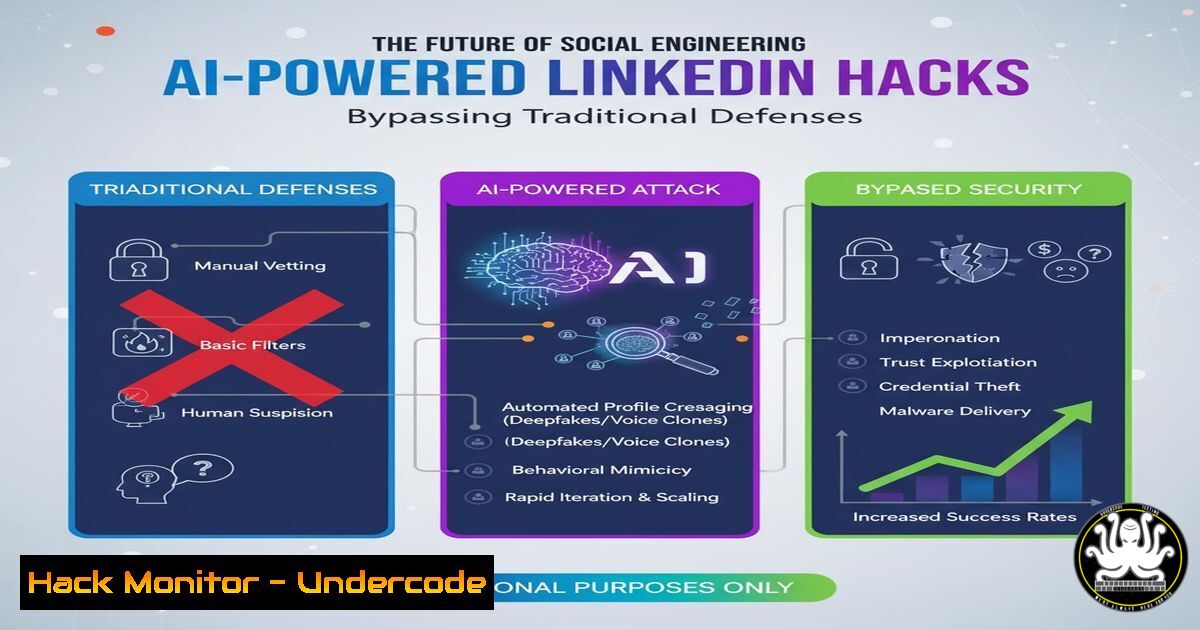
Introduction:
The professional landscape of LinkedIn is becoming the new frontline for sophisticated social engineering attacks. Cybercriminals are now leveraging AI-generated content and fake, highly credible profiles to build trust and bypass the human firewall. This shift from technical exploitation to psychological manipulation demands a new set of defensive skills for IT and cybersecurity professionals.
Learning Objectives:
- Understand the technical methods used to create and identify AI-generated fake profiles.
- Learn command-line and OSINT techniques to investigate potential threats.
- Implement hardening measures for organizational social media policies and technical defenses.
You Should Know:
1. OSINT Profile Investigation with Sherlock
Verified Linux command list or code snippet related to article.
 Install Sherlock (Requires Python3 and Git)
git clone https://github.com/sherlock-project/sherlock.git
cd sherlock
python3 -m pip install -r requirements.txt

Search for a username across hundreds of sites
python3 sherlock.py --csv --folderoutput <username_here>
Step‑by‑step guide explaining what this does and how to use it.
This tool performs Open-Source Intelligence (OSINT) gathering. By cross-referencing a suspicious LinkedIn username against hundreds of other social networks, you can identify if the same persona exists elsewhere. A genuine person typically has a digital footprint across multiple platforms. A fake, AI-generated profile may only exist on LinkedIn, or the username may be found on disreputable sites, indicating a potentially malicious actor.
2. Analyzing LinkedIn Message Headers for Phishing Links
Verified Cybersecurity command or code snippet related to article.
 Using 'curl' to inspect a shortened URL from a LinkedIn message without visiting it
curl -I -L "https://bit.ly/suspicious-link-from-linkedin"
 Using 'whois' to check domain registration
whois suspiciousdomain.com
Step‑by‑step guide explaining what this does and how to use it.
The `curl -I -L` command fetches the HTTP headers of a URL and follows redirects (-L), revealing the final destination of a shortened link without the risk of visiting it in a browser. Look for redirects to unknown or IP-based addresses. The `whois` command queries the domain registration database; a recently created domain for a supposedly “established” contact is a major red flag.
3. Hardening Windows against Credential Harvesting
Verified Windows command list or code snippet related to article.
 Enable Windows Defender Application Guard for Edge (Enterprise Feature) to isolate browsing sessions
Enable-WindowsOptionalFeature -Online -FeatureName Windows-Defender-ApplicationGuard
 Audit PowerShell script block logging to catch malicious scripts
Set-ItemProperty -Path "HKLM:\SOFTWARE\Policies\Microsoft\Windows\PowerShell\ScriptBlockLogging" -Name "EnableScriptBlockLogging" -Value 1
Step‑by‑step guide explaining what this does and how to use it.
Application Guard uses Hyper-V virtualization to open LinkedIn (or any untrusted site) in an isolated container, preventing any malware from reaching the host OS. Enabling Script Block Logging records all PowerShell commands and scripts run on the system, creating an audit trail that can be analyzed for malicious activity following a social engineering attack.
4. Detecting AI-Generated Profile Images with AI
Verified code snippet related to article.
 Conceptual use of the 'ForensicsAI' Python library to detect GAN-generated faces (like StyleGAN)
from forensicsai.photo import ImageForensics

analyzer = ImageForensics()
result = analyzer.analyze('profile_picture.jpg')
if result.is_generated:
print("WARNING: High probability of AI-generated image.")
Step‑by‑step guide explaining what this does and how to use it.
This conceptual code demonstrates how forensic AI tools can analyze profile pictures for artifacts common in AI-generated images, such as those produced by Generative Adversarial Networks (GANs). As AI art improves, these tools are becoming essential for identifying fake profiles that use computer-generated headshots to appear legitimate.
5. Network Monitoring for Data Exfiltration
Verified Linux/Cybersecurity command list related to article.
 Using tcpdump to capture and analyze outbound traffic from a specific host
sudo tcpdump -i any -w linkedin_comms.pcap host <suspicious_internal_IP>
 Analyzing the capture with Wireshark's command-line utility (tshark) for DNS queries to known-bad domains
tshark -r linkedin_comms.pcap -Y "dns.qry.name contains .ml or dns.qry.name contains .ga"
Step‑by‑step guide explaining what this does and how to use it.
If an employee falls for a LinkedIn-based attack and malware is installed, it will likely call home. The `tcpdump` command captures all network traffic from the compromised machine. The subsequent `tshark` command filters that capture for DNS queries to free or suspicious top-level domains (like .ml or .ga), which are commonly used by attackers for command-and-control servers.
6. Implementing API Security for LinkedIn Integrations
Verified code snippet related to article.
 Using jq to audit the OAuth scopes of a connected LinkedIn application from the command line
 First, get the access token (conceptual)
curl -X POST https://www.linkedin.com/oauth/v2/accessToken -d "grant_type=client_credentials&client_id=YOUR_CLIENT_ID&client_secret=YOUR_CLIENT_SECRET" | jq .
 Then, introspect the token to see its permissions
curl -X POST https://www.linkedin.com/oauth/v2/introspectToken -d "client_id=YOUR_CLIENT_ID&client_secret=YOUR_CLIENT_SECRET&token=THE_TOKEN" | jq .
Step‑by‑step guide explaining what this does and how to use it.
Many attacks exploit poorly configured third-party apps that request excessive permissions via LinkedIn’s API. This workflow shows how to use `curl` and `jq` (a JSON processor) to first obtain an OAuth 2.0 token and then introspect it to see what data it can access (e.g., r_liteprofile, r_emailaddress). This ensures integrated apps follow the principle of least privilege.
7. Building a Human Firewall with Phishing Simulation
Verified tool configuration snippet related to article.
 Example configuration snippet for the GoPhish open-source phishing framework (config.yaml)
admin_server:
listen_url: 127.0.0.1:3333
use_tls: false
phish_server:
listen_url: 0.0.0.0:443
use_tls: true
Step‑by‑step guide explaining what this does and how to use it.
The best technical defense is a trained user. GoPhish allows security teams to simulate sophisticated, LinkedIn-themed phishing campaigns. This configuration sets up the admin interface (on localhost) and the phishing server (listening on all interfaces with TLS). By running controlled simulations, you can identify which employees are susceptible to social engineering and provide targeted training.
What Undercode Say:
- The attack vector has fundamentally shifted from system vulnerability to human vulnerability, making traditional perimeter defenses insufficient.
- Proactive OSINT and continuous employee training are no longer optional but are critical components of a modern security posture.
The professional context of LinkedIn grants attackers a false sense of trust that is more potent than any technical exploit. While organizations scramble to patch software, the human element remains the most porous part of the defense. The future of security operations will involve continuous monitoring of the digital personas of key employees and simulating these advanced social engineering tactics to build resilience. Relying solely on automated technical defenses is a recipe for failure in this new landscape.
Prediction:
The next 18-24 months will see a surge in Business Email Compromise (BEC) and wire fraud attacks originating from these AI-crafted LinkedIn personas. As AI generation tools become more accessible, the scale and believability of these attacks will overwhelm conventional security awareness training. We predict the emergence of a new cybersecurity product category: “Digital Persona Integrity” services, which will continuously scan and verify the online identities of executives and key personnel against synthetic impersonations and AI-generated deepfakes.
🎯Let’s Practice For Free:
IT/Security Reporter URL:
Reported By: Alexbsheridan How – Hackers Feeds
Extra Hub: Undercode MoN
Basic Verification: Pass ✅


