Listen to this Post
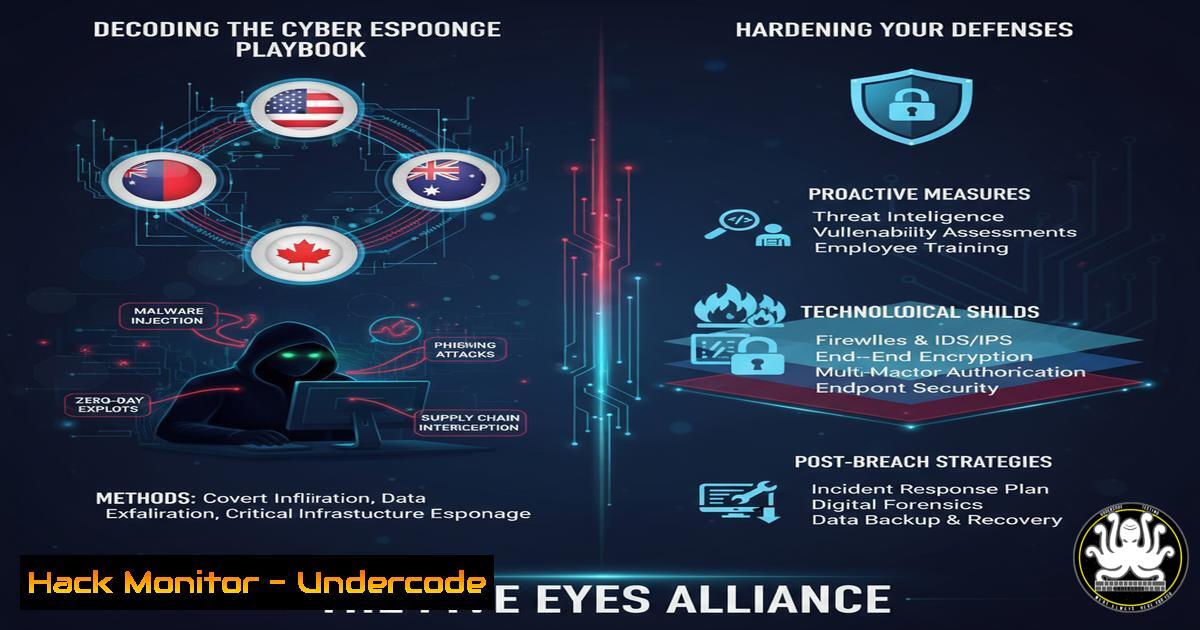
Introduction:
The recent geopolitical discourse surrounding the Five Eyes intelligence alliance underscores a critical reality for cybersecurity professionals: nation-state cyber operations are a persistent and sophisticated threat. This article deconstructs the technical tradecraft associated with advanced threat actors and provides a actionable guide to fortifying systems against intelligence-grade attacks.
Learning Objectives:
- Understand the common TTPs (Tactics, Techniques, and Procedures) employed by nation-state actors.
- Implement advanced hardening techniques for Windows, Linux, and cloud environments.
- Develop proactive monitoring and threat-hunting capabilities to detect sophisticated intrusions.
You Should Know:
1. Network Infrastructure Analysis with `nslookup` & `dig`
Threat actors often reconnoiter and exploit DNS. These commands help you analyze potential domain hijacking or malicious infrastructure.
 Investigate DNS records for a suspicious domain
dig ANY target-domain.com +noall +answer
nslookup -type=MX target-domain.com
Step-by-step guide: Use `dig` to retrieve all DNS record types (ANY) for a domain linked in a phishing email. The `+noall +answer` syntax streamlines output. `nslookup` checks mail exchanger (MX) records, which are often targeted for email interception. Correlate the returned IP addresses with threat intelligence feeds to identify known malicious infrastructure.
2. Process and Network Connection Enumeration
Identifying unauthorized processes and connections is crucial for detecting live intrusions.
 Linux (List all listening TCP ports and associated processes)
sudo netstat -tulnp
sudo ss -tulnp

Windows (List all established connections)
Get-NetTCPConnection -State Established
Step-by-step guide: On a Linux server, run `sudo netstat -tulnp` to see all listening ports (-l) showing numerical addresses (-n), using TCP/UDP (-tu), and including the Process ID/Name (-p). Cross-reference this with your application baseline to spot anomalies like unexpected listeners on port 443.
3. Advanced Windows Audit Policy Configuration
Nation-state actors thrive in environments with poor logging. Enable detailed auditing.
 PowerShell - Enable command line process auditing
Set-ItemProperty -Path "HKLM:\SOFTWARE\Microsoft\Windows\CurrentVersion\Policies\System\Audit" -Name "ProcessCreationIncludeCmdLine_Enabled" -Value 1
Auditpol /set /subcategory:"Process Creation" /success:enable /failure:enable
Step-by-step guide: This two-part configuration is vital. The registry key enables the logging of the command line arguments used to start a process. The `auditpol` command then activates the “Process Creation” audit subcategory. This logs event ID 4688 in the Windows Security log, providing critical forensic data on what was executed.
4. Linux System Hardening with `auditd`
The Linux Audit Daemon (auditd) provides deep system call auditing for threat hunting.
 Monitor access to the /etc/passwd file (Critical for privilege escalation)
sudo auditctl -w /etc/passwd -p wa -k identity_theft

Monitor all execution in /tmp directory (Common staging area)
sudo auditctl -w /tmp -p x -k tmp_execution
Step-by-step guide: The `-w` option watches the specified file or directory. `-p wa` filters for write or attribute change events on /etc/passwd. `-k` assigns a keyname to the rule for easy searching in the logs. Use `ausearch -k identity_theft` to review all related events. This helps detect brute-force attacks or backdoor user creation.
5. Memory Protection via `gcc` and Security Flags
Mitigate exploitation techniques like Return-Oriented Programming (ROP) by hardening compiled binaries.
 Compile a C program with modern exploit mitigations
gcc -o program program.c -fstack-protector-strong -pie -Wl,-z,now,-z,relro,-z,noexecstack -D_FORTIFY_SOURCE=2
Step-by-step guide: This `gcc` command employs multiple hardening techniques: `-fstack-protector-strong` adds canaries to detect stack overflows; `-pie` enables Position Independent Executable for ASLR; `-Wl,-z,now` enables full RELRO to protect the GOT; `-Wl,-z,noexecstack` makes the stack non-executable; `-D_FORTIFY_SOURCE=2` adds compile-time and run-time buffer overflow checks.
- Cloud Instance Metadata Service (IMDS) Exploitation & Defense
Attackers can abuse misconfigured cloud metadata services to steal access tokens and keys.Curl command to query AWS IMDSv1 (Vulnerable to SSRF) curl http://169.254.169.254/latest/meta-data/iam/security-credentials/ Mitigation: Enforce IMDSv2 which requires a token header aws ec2 modify-instance-metadata-options --instance-id i-1234567890abcdef0 --http-tokens required --http-endpoint enabled
Step-by-step guide: A common attack path involves a Server-Side Request Forgery (SSRF) vulnerability in a web app that allows an attacker to force the server to query the internal IMDS endpoint. The first `curl` command shows how trivial this is with IMDSv1. The AWS CLI mitigation command enforces IMDSv2, which requires a `PUT` request to fetch a token before any metadata can be retrieved, effectively blocking simple SSRF attacks.
7. Container Security Scanning with `trivy`
Identify vulnerabilities in container images before deployment.
 Scan a local Docker image for critical vulnerabilities
trivy image --severity CRITICAL,HIGH my-app:latest

Scan a Dockerfile for misconfigurations
trivy config /path/to/Dockerfile
Step-by-step guide: Integrate `trivy` into your CI/CD pipeline. The `image` command scans a built container image for known CVEs in the OS packages and application dependencies, filtering for only CRITICAL and HIGH severity findings. The `config` command analyzes the `Dockerfile` itself for security misconfigurations, like running as root or using outdated base images. This shift-left practice prevents vulnerable code from reaching production.
What Undercode Say:
- Attribution is a Distraction: Focusing on the “who” in a nation-state attack often overshadows the critical work of understanding the “how” and closing the vulnerabilities they exploited.
- Logging is Non-Negotiable: Without comprehensive, centralized logging of process creation, network connections, and authentication events, detecting and investigating an advanced intrusion is nearly impossible. The cost of storage is trivial compared to the cost of a breach.
The dialogue around Five Eyes and geopolitical posturing often serves as noise, obscuring the core technical realities. The tools and techniques used by these actors, while sophisticated, are not magic. They exploit fundamental misconfigurations, weak audit policies, and poor credential hygiene that remain rampant across enterprises. The professional response is not panic but diligent, evidence-based hardening of critical assets, focusing on universal security controls like strict authentication, minimal logging, and proactive vulnerability management. The attribution game is for politicians; our job is to build defensible systems.
Prediction:
The technical line between state-sponsored espionage and sophisticated cybercrime will continue to blur, creating a “Advanced Persistent Threat (APT)-as-a-Service” marketplace. The TTPs detailed by Five Eyes leaks will be commoditized, leading to an increase in false-flag operations and attacks that mimic nation-state signatures. This will make attribution even more difficult and place a greater premium on defense-in-depth strategies that are resilient regardless of the attacker’s motive. Organizations will be forced to adopt a “assume breach” mentality, investing heavily in threat hunting, managed detection and response (MDR), and immutable, recoverable infrastructure to survive the next wave of intelligence-grade attacks.
🎯Let’s Practice For Free:
IT/Security Reporter URL:
Reported By: https://lnkd.in/p/dm54HUpw – Hackers Feeds
Extra Hub: Undercode MoN
Basic Verification: Pass ✅


