Listen to this Post
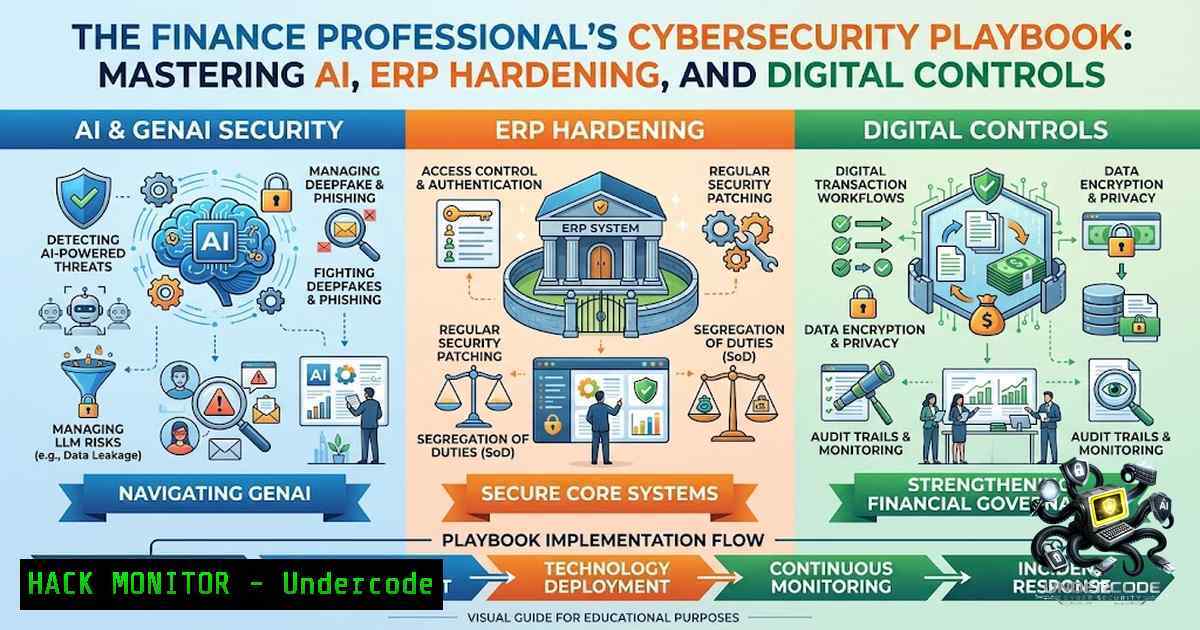
Introduction
The role of the finance professional has undergone a fundamental transformation. The question is no longer simply “Can I prepare the numbers?” but rather “Can I leverage technology to understand the numbers, challenge the business, and drive better decisions?” Automation, Artificial Intelligence (AI), Generative AI (GenAI), advanced analytics, Enterprise Resource Planning (ERP) transformations, and digital controls are reshaping how finance teams operate. However, this digital evolution introduces a complex web of cybersecurity risks, regulatory compliance challenges, and a pressing need for new technical skills. A 2026 report from the London Foundation for Banking and Finance highlights that the top three risks confronting the financial sector are cyber threats, misleading AI outputs, and knowledge gaps. As finance professionals integrate AI and automation into their workflows, they must simultaneously become proficient in the cybersecurity measures required to protect sensitive financial data and ensure system integrity.
Learning Objectives
- Objective 1: Understand the cybersecurity risk landscape introduced by AI and GenAI in financial operations, including data leakage, prompt injection, and automated social engineering.
- Objective 2: Master the implementation of security controls for ERP transformations and financial systems, focusing on zero-trust principles, access control, and segregation of duties.
- Objective 3: Acquire hands-on technical skills, including Linux/Windows commands and Python scripts, to audit, monitor, and secure financial automation pipelines.
You Should Know:
- Securing the AI-Powered Finance Pipeline: From Prompt Injection to Data Exfiltration
The integration of GenAI into finance—for forecasting, research, and analysis—creates new attack surfaces that traditional security perimeters cannot cover. Agentic AI, which can autonomously execute tasks, adds a new dimension of cyber risk. Attackers are now using GenAI to personalize social engineering attacks at scale, conduct deepfake video calls to authorize fraudulent transactions, and generate forged documents that are indistinguishable from real ones. For a finance professional, this means that an AI assistant configured to reconcile accounts or generate reports could be manipulated via prompt injection to exfiltrate sensitive data or execute unauthorized commands.
Step-by-Step Guide: Auditing AI Agent Permissions and Logs
To secure AI tools in a financial environment, implement a strict policy of least privilege and continuous monitoring. The open-source tool `closegate` serves as a policy chokepoint for finance AI agents, enforcing SOX-grade segregation of duties (SoD) and maintaining a tamper-evident audit log.
- Install the Policy Gate: On a Linux server or secure workstation, install the policy library.
pip install closegate-policy
- Define a Security Policy: Create a policy file that restricts which financial datasets the AI can access and what actions it can perform (e.g., read-only access to general ledger, no execution of system commands).
- Audit User and AI Permissions: On a Windows domain controller or Linux system with
auditd, review permissions for service accounts used by AI agents.
– Linux: `sudo auditctl -w /path/to/financial/data -p rwxa -k ai_access`
– Windows (PowerShell): `Get-Acl -Path “C:\FinanceData” | Format-List` to check folder permissions, and use `Get-WinEvent -LogName Security | Where-Object { $_.Id -eq 4663 }` to audit file access attempts.
4. Review Logs for Anomalies: Use `grep` on Linux or `Select-String` in PowerShell to search logs for unauthorized access patterns or suspicious data transfers (e.g., large outbound data flows from the AI server).
- ERP Transformation and Cloud Hardening: Embedding Controls from Day One
ERP transformations are a cornerstone of financial modernization, but migrating financial components to the cloud introduces significant risks if controls are not embedded from the start. A robust ERP security strategy must move beyond traditional role-based access control (RBAC) to incorporate Attribute-Based Access Control (ABAC) and zero-trust principles. This ensures that access to sensitive financial data is dynamically authorized based on context, such as user location, device health, and data sensitivity.
Step-by-Step Guide: Implementing Granular Data Security in ERP
To protect sensitive financial data like payroll, M&A details, or trial balances, implement data segmentation and filtering.
- Map Data Sensitivity: Classify financial data by sensitivity (e.g., Public, Internal, Confidential, Restricted). Use this classification to drive security policies.
- Configure ABAC Policies: In your ERP or identity management system, define policies that enforce least-privilege access. For example, a policy might state:
IF user.department == "Finance" AND user.location == "US" AND data.classification == "Confidential" THEN allow.read. - Enforce Data Filtering: Implement row- and column-level security to control visibility. For example, a regional finance manager should only see data for their specific geography.
– SQL Example (for ERP database auditing):
CREATE VIEW Regional_Financials AS
SELECT column1, column2 FROM Financial_Data
WHERE Region = USER_REGION();
4. Automate Audit Trails: Ensure your ERP automatically logs all system activity, capturing who accessed what data and when. On a Windows server hosting ERP components, use PowerShell to verify audit policies:
auditpol /get /category:"Object Access"
- Navigating the Regulatory Labyrinth: AI, SOX, and GDPR Compliance
There is no AI exemption for regulatory frameworks. HIPAA, GDPR, SOX, FedRAMP, and SOC 2 apply fully to AI systems that access regulated data. SOX Section 302, for instance, requires management to certify the effectiveness of internal controls over financial reporting—a certification that now extends to AI-driven processes. Financial institutions must ensure that AI systems can recognize and label sensitive data, provide encryption policies, track information movement, and identify suspicious access patterns in compliance with regulations like GDPR.
Step-by-Step Guide: Automating Compliance Monitoring with AI
Leverage AI to automate the tedious process of compliance monitoring and data classification.
- Deploy a Data Classification Tool: Implement an AI-powered tool that automatically scans financial documents, emails, and databases to classify data based on regulatory requirements (e.g., PII, PCI, SOX-relevant data).
- Set Up Automated Alerts: Configure the system to alert the compliance team when sensitive data is accessed outside of normal patterns or by unauthorized users.
- Generate Compliance Reports: Use scripting to pull audit logs and generate reports for regulators.
– Linux (Bash): `grep “ERROR\|UNAUTHORIZED” /var/log/finance_app.log > compliance_report_$(date +%Y%m%d).txt`
– Windows (PowerShell): `Get-EventLog -LogName Security -EntryType FailureAudit -After (Get-Date).AddDays(-30) | Export-Csv -Path “SOX_Audit.csv”`
4. Integrate with SOX Controls: Map these automated controls directly to SOX requirements, ensuring that any AI model used for financial reporting has a clear, auditable trail of its inputs, processing, and outputs.
- Defending Against Ransomware and Social Engineering in Financial Operations
The financial sector is a prime target for ransomware. In 2025, ransomware incidents targeting financial services reached 451 cases, up from 269 the prior year. Furthermore, 12.8% of B2B finance organizations were affected by ransomware. These attacks are increasingly sophisticated, often leveraging AI to evade detection. Finance professionals must implement robust endpoint protection, network segmentation, and employee training to combat these threats.
Step-by-Step Guide: Hardening Endpoints and Network Against Ransomware
- Implement Application Control: Restrict which applications can run on finance workstations. On Windows, use AppLocker or Windows Defender Application Control.
– PowerShell (to view AppLocker rules): `Get-AppLockerPolicy`
2. Enable Network Segmentation: Isolate critical financial systems (e.g., payment processing, ERP) from the general corporate network using VLANs and firewalls.
3. Deploy Endpoint Detection and Response (EDR): Install EDR solutions on all endpoints to monitor for suspicious behavior, such as mass file encryption or unusual outbound connections.
4. Conduct Regular Backup and Recovery Drills: Ensure that critical financial data is backed up offline and that recovery procedures are tested regularly.
– Linux Backup Script (Rsync): `rsync -avz /finance_data /backup_drive/`
– Windows Backup (PowerShell): `Start-Backup -BackupTarget “E:” -BackupPolicy “FinanceBackupPolicy”`
5. Mastering Automation: Python and PowerShell for Financial Security and Reconciliation
Automation is key to efficiency and security. Python scripts can automate 3-way reconciliation, while PowerShell is invaluable for managing Windows-based financial systems. However, these scripts themselves must be secured to prevent them from becoming attack vectors.
Step-by-Step Guide: Securing and Running Financial Automation Scripts
- Script Security Review: Before deploying any script, conduct a security review to ensure it does not contain hardcoded credentials, insecure file operations, or vulnerable dependencies.
- Use a Secure Execution Environment: Run scripts in a controlled environment with limited permissions.
– Linux: Use a dedicated service account with restricted `sudo` privileges.
– Windows: Use Task Scheduler with a managed service account.
3. Implement Logging: Ensure all scripts log their actions for audit purposes.
– Python Example:
import logging
logging.basicConfig(filename='reconciliation.log', level=logging.INFO)
logging.info('Reconciliation script started.')
4. Schedule Automated Reconciliation:
- Windows (PowerShell trigger in Task Scheduler): Create a task that runs the Python script nightly.
$Action = New-ScheduledTaskAction -Execute "python.exe" -Argument "C:\Scripts\reconcile.py"
$Trigger = New-ScheduledTaskTrigger -Daily -At 2am
Register-ScheduledTask -TaskName "NightlyReconciliation" -Action $Action -Trigger $Trigger -User "SERVICE_ACCOUNT" -Password "SecurePassword"
What Undercode Say:
- Key Takeaway 1: The convergence of finance and technology is non-1egotiable. Finance professionals must evolve from number-crunchers to technology-enabled business partners who understand the strategic implications of AI, automation, and cybersecurity.
- Key Takeaway 2: Security and compliance are not roadblocks to digital transformation but are foundational pillars. Embedding controls into AI and ERP systems from the outset is far more effective and less costly than retrofitting them after a breach or audit failure.
Analysis: The post by Anshul Ojha accurately captures the zeitgeist of the modern finance function. The “12 Things Finance Professionals Should Focus On” serve as a crucial checklist for upskilling. However, the cybersecurity angle cannot be overstated. As finance teams rush to adopt GenAI for forecasting and analytics, they must simultaneously build the technical and governance frameworks to prevent data leakage, model hallucination, and regulatory non-compliance. The real competitive advantage will belong to finance professionals who can not only deploy these technologies but also secure them, ensuring that their organizations benefit from innovation without becoming victims of it.
Prediction:
- -1: The rapid, ungoverned adoption of GenAI in finance will lead to a surge in regulatory fines and data breaches over the next 18-24 months, as organizations struggle to apply existing compliance frameworks (SOX, GDPR) to AI systems.
- +1: Finance professionals who proactively acquire cybersecurity and AI governance skills will become invaluable strategic assets, commanding premium salaries and leading their organizations’ digital transformation efforts.
- -1: The “ecosystem risks” of interconnected AI systems will create systemic vulnerabilities, where a single compromised AI agent in one financial institution could cascade into a broader sector-wide failure.
- +1: The development and adoption of open-source policy gates like `closegate` will democratize AI security, enabling even mid-sized firms to implement SOX-grade controls on their AI agents.
- -1: Ransomware attacks targeting financial automation scripts and APIs will increase, as attackers realize these are often less protected than core ERP systems.
▶️ Related Video (74% Match):
🎯Let’s Practice For Free:
🎓 Live Courses & Certifications:
Join Undercode Academy for Verified Certifications
🚀 Request a Custom Project:
Secure, high-velocity infrastructure and disruptive technological engineering. Contact our engineering team for high-tier development and proprietary systems:
[email protected]
💎 Smart Architecture | 🛡️ Secure by Design | ⭐ Trusted by Thousands
IT/Security Reporter URL:
Reported By: Ca Anshul – Hackers Feeds
Extra Hub: Undercode MoN
Basic Verification: Pass ✅


