Listen to this Post
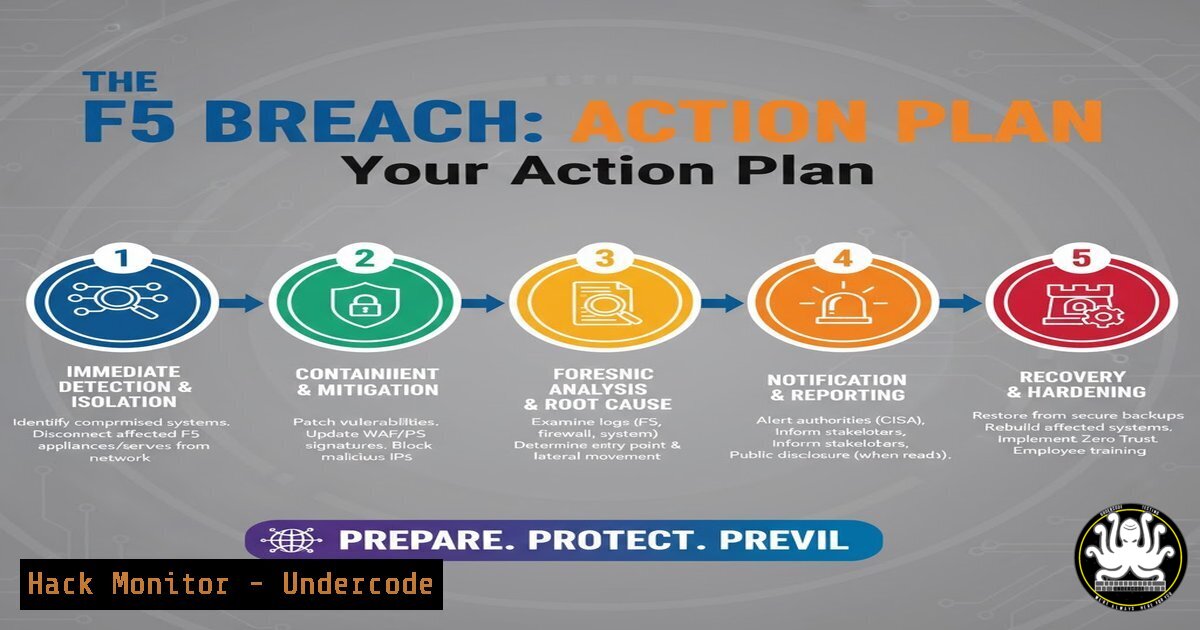
Introduction:
The recent F5 breach underscores the persistent threat to critical network infrastructure components. As threat actors increasingly target foundational enterprise technologies, security teams must pivot from reactive posturing to proactive, intelligence-driven defense. This article provides a technical action plan to investigate, contain, and harden your environment against exploits stemming from such supply-chain and infrastructure attacks.
Learning Objectives:
- Understand the immediate investigative commands to run on F5 BIG-IP and other network appliances.
- Learn how to hunt for lateral movement and credential harvesting post-compromise.
- Develop a hardening checklist to mitigate future infrastructure attacks.
You Should Know:
1. Immediate F5 BIG-IP Integrity Checks
The first step is to verify the integrity of your F5 BIG-IP systems. Compromise often involves backdoored binaries and unauthorized configuration changes.
 Check for modified system binaries on F5 BIG-IP (Linux-based)
find /usr/lib /bin /sbin -type f -exec sha1sum {} \; | sort > /tmp/current_hashes.txt
diff /tmp/current_hashes.txt /path/to/known/good_hashes.txt

List recently modified files (last 7 days)
find / -type f -mtime -7 -ls | grep -v "/var/log"

Verify the integrity of the F5 configuration
b config save all
b load
Step-by-step guide: The `find` command scans critical directories for any files, generating SHA1 hashes. Comparing these against a known-good baseline (which should be created during a trusted state) will reveal unauthorized modifications. The `b config` commands are F5-specific and are used to save and validate the running configuration. Regularly monitor for recently modified files outside of standard log directories to spot attacker activity.
2. Hunting for Credential Access and Dumping
Attackers frequently target F5 appliances to harvest credentials stored in memory or configuration files. These credentials are then used for lateral movement.
 On F5 BIG-IP, check for active TMUI (Management UI) sessions
tmsh show sys connection ss

Search the configuration for encoded or plaintext passwords
grep -ri "password" /config/ | more
strings /config/bigip.conf | grep -i pass

On a Windows system, use Mimikatz to check for credential exposure (For defensive forensics)
privilege::debug
sekurlsa::logonpasswords
Step-by-step guide: The `tmsh` command displays active management sessions, helping identify unauthorized access. Grepping the configuration files for “password” can reveal if credentials are stored insecurely. The Mimikatz commands, while often used offensively, are critical for defensive teams to audit what credentials are exposed in memory on connected Windows systems, allowing you to force password resets for compromised accounts.
3. Network Isolation and Traffic Analysis
Containing a potentially compromised appliance requires analyzing and controlling its network traffic.
 On a security onion or analysis machine, analyze F5-related traffic
tshark -r f5_capture.pcap -Y "ip.addr == <F5_IP>" -T fields -e frame.time -e ip.src -e ip.dst -e tcp.port

Use tcpdump on the F5 itself to capture real-time traffic (use with caution)
tcpdump -i 0.0 -s 0 -w /var/tmp/capture.pcap host <SUSPICIOUS_IP>

Check for unexpected listening ports on the F5
netstat -tulnp | grep LISTEN
Step-by-step guide: The `tshark` command is used for offline analysis of a packet capture, filtering for traffic to and from the F5’s IP address. The `tcpdump` command, when run directly on the F5, captures live traffic for analysis, which is useful for confirming C2 communication. Always check listening ports to identify any backdoors or unauthorized services.
4. API Security Hardening
F5 and similar appliances often have management APIs that are prime targets. Hardening these interfaces is critical.
 Use curl to audit your F5 iControl REST API exposure
curl -sku "admin:password" -X GET https://<f5_ip>/mgmt/tm/ltm/node | jq .

Check API access logs for brute force attempts
grep "POST /mgmt/shared/authn/login" /var/log/restjavad-audit.0.log | awk '{print $1}' | sort | uniq -c | sort -nr

Harden the API: Disable weak TLS versions via tmsh
tmsh
modify /sys httpd ssl-protocol "all -SSLv2 -SSLv3 -TLSv1"
Step-by-step guide: The `curl` command tests the accessibility of the F5’s API, which should be restricted to management networks. The `grep` command on the audit log helps identify source IPs attempting to authenticate repeatedly. Finally, the `tmsh` command is used to disable outdated and insecure TLS protocols on the management interface.
5. Cloud Metadata Service Exploitation Mitigation
Attackers can use a compromised F5 instance to access the cloud metadata service and harvest IAM credentials.
 Check F5 access to the cloud metadata service from a shell
curl -H "X-aws-ec2-metadata-token: $TOKEN" http://169.254.169.254/latest/meta-data/
curl http://169.254.169.254/latest/meta-data/iam/security-credentials/

Block metadata service access via F5 iRules (Example Snippet)
when CLIENT_ACCEPTED {
if { [IP::addr [IP::remote_addr] equals 169.254.169.254] } {
reject
}
}
Step-by-step guide: The `curl` commands simulate an attacker querying the AWS metadata service for instance role credentials. The iRule code provides a defensive measure, blocking any connection attempts from the F5 to the metadata service IP address, thereby preventing credential theft.
6. Lateral Movement Prevention with Windows Command Audits
Once credentials are stolen from F5, attackers move laterally to Windows Active Directory.
 Use Windows PowerShell to audit for suspicious sign-ins
Get-EventLog -LogName Security -InstanceId 4624 -After (Get-Date).AddHours(-24) | Where-Object { $_.ReplacementStrings[bash] -eq 3 } | Format-List TimeGenerated, ReplacementStrings

Query for Kerberos ticket-granting activity (potential golden ticket)
klist sessions

Enable detailed logging for WMI and PowerShell activities
wevtutil.exe set-log "Microsoft-Windows-PowerShell/Operational" /enabled:true
Step-by-step guide: The PowerShell command filters the Security event log for successful network logons (Event ID 4624, Logon Type 3) which could indicate lateral movement using stolen credentials. `klist` displays Kerberos tickets, which can help identify malicious golden tickets. Enabling PowerShell logging is crucial for detecting subsequent attacker actions.
7. Vulnerability Scanning and Patch Enforcement
Proactively identifying and patching vulnerable versions of F5 BIG-IP is non-negotiable.
 Use Nmap to scan your network for F5 BIG-IP management interfaces
nmap -p 22,443,8443 --script http-title,ssl-cert 192.168.1.0/24

Check the F5 version for known vulnerabilities from the CLI
tmsh show sys version

Automate patch validation with a script
!/bin/bash
CURRENT_VERSION=$(tmsh show sys version | grep -i version | head -1)
KNOWN_VULN_VERSIONS="15.1.0 14.1.0"
if [[ $KNOWN_VULN_VERSIONS =~ $CURRENT_VERSION ]]; then
echo "CRITICAL: Vulnerable F5 version detected!"
fi
Step-by-step guide: The `nmap` command scans the network for devices with F5’s common management ports open, helping to build an asset inventory. The `tmsh` command displays the current software version, which should be checked against F5’s security advisories. The bash script provides a simple automation to flag known vulnerable versions.
What Undercode Say:
- Intelligence Consolidation is Non-Negotiable: The difference between a minor incident and a major breach is often the speed of response. Having a platform that consolidates OSINT and dark web signals, like the one mentioned by Jonathan Cran, allows teams to move from awareness to action instantly, contextualizing global threats to their specific environment.
- Communicate Up and Down the Chain: A critical takeaway is the need to tailor the message. Technical teams need raw commands and IOCs, while C-level leadership needs risk assessments and business impact analysis. A successful response plan bridges this gap, ensuring decisive action is authorized and understood at all levels. The technical commands provided are the “how,” but they must be executed within a framework that understands the “why” from a business continuity perspective. The F5 breach is not an isolated event but a template for future attacks on foundational infrastructure, from SD-WAN to cloud security groups. Proactive hardening, credential hygiene, and robust monitoring are the only defenses.
Prediction:
The F5 breach is a precursor to a wave of sophisticated attacks targeting the “plumbing” of enterprise IT—network appliances, hypervisors, and cloud control planes. Future attacks will leverage AI to automatically identify and exploit version-specific vulnerabilities in these critical systems, reducing the attacker dwell time from months to minutes. Defensive strategies will be forced to evolve beyond manual patching cycles to embrace fully automated, intelligence-driven patch and configuration management systems, where AI-powered defense will be required to counter AI-powered offense. The integrity of every network device will no longer be assumed but must be continuously validated.
🎯Let’s Practice For Free:
IT/Security Reporter URL:
Reported By: Jcran If – Hackers Feeds
Extra Hub: Undercode MoN
Basic Verification: Pass ✅


