
Listen to this Post
Introduction:
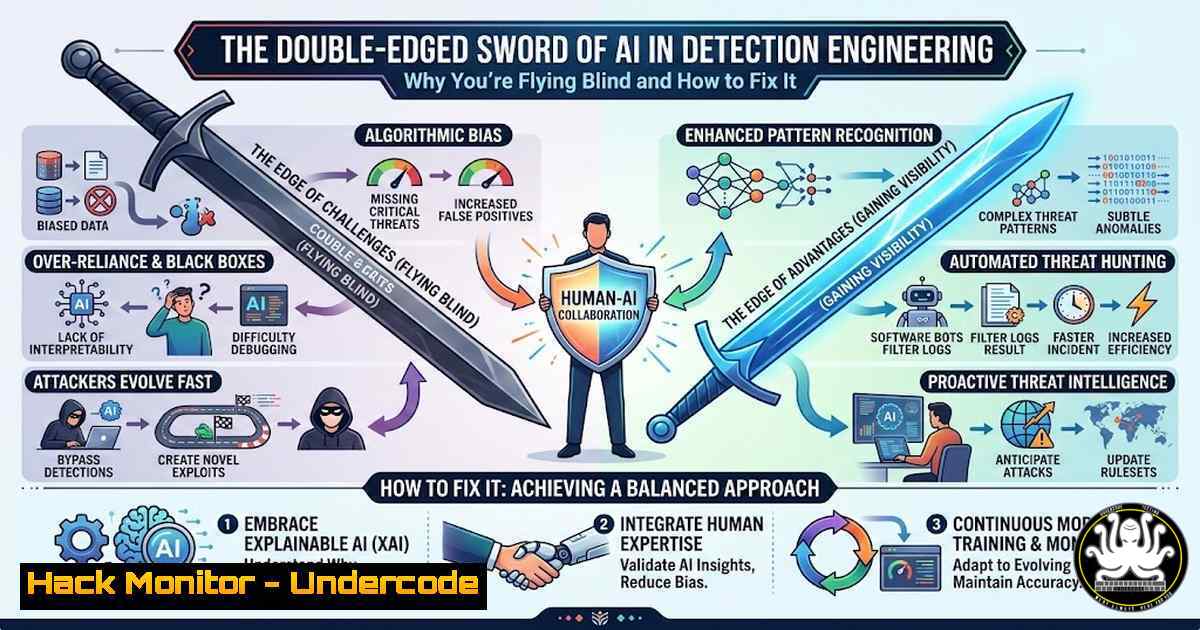
Modern security teams are drowning in data but starving for context, particularly as organizations rapidly adopt SaaS and cloud technologies. While managed telemetry sources promise a simplified security posture, they often create a dangerous blind spot where defenders lose visibility and control. This article explores the critical gaps in modern detection engineering, from statistical baselining and cloud-native security operations to the hidden risks of eventual consistency and exposed API keys, providing actionable steps to reclaim your defensive edge.
Learning Objectives:
- Understand the limitations of managed telemetry and how to audit your log sources for completeness.
- Learn to apply statistical methods like Median Absolute Deviation (MAD) and Z-scores to establish dynamic behavioral baselines.
- Master the architecture of threat detection at scale, inspired by how major platforms like Reddit operate.
- Identify and mitigate security gaps caused by eventual consistency design patterns in distributed systems.
- Execute hands-on commands to detect exposed API keys and simulate CI/CD pipeline attacks.
- Flying Blind with Managed Telemetry: The SaaS and Cloud Visibility Crisis
As highlighted by Lydia G., relying solely on managed telemetry from SaaS platforms (like Office 365, Salesforce, or cloud providers) can leave detection engineers “flying blind.” These sources often sample data, delay log delivery, or omit critical raw events to reduce costs and complexity for the vendor, but this creates a gap for defenders.
Step-by-step guide to auditing your log sources:
To verify you are not operating with blind spots, you must compare vendor-provided logs against host-generated or network-level telemetry.
Linux Command (Ingress Comparison):
Use `tcpdump` to capture raw metadata and compare it to what your SIEM received from a managed source.
 Capture traffic to a specific SaaS endpoint for 5 minutes for baseline comparison
sudo tcpdump -i eth0 host api.saasprovider.com -w raw_traffic.pcap
 After capture, use tscark to analyze packet counts vs. log counts in your SIEM
tshark -r raw_traffic.pcap -Y "http.request.method == POST" | wc -l
Windows PowerShell (Event Log Depth):
Check if critical Windows event IDs are being suppressed by default forwarding rules, a common issue in managed endpoints.
 Check the last 100 security logs for Event ID 4688 (Process Creation) to ensure verbosity isn't throttled
Get-WinEvent -FilterHashtable @{LogName='Security'; ID=4688} -MaxEvents 100 | Format-Table TimeCreated, Message -AutoSize
Cloud (Azure CLI):
Verify diagnostic settings are exporting all logs, not just the default category.
az monitor diagnostic-settings list --resource /subscriptions/{sub-id}/resourceGroups/{rg}/providers/Microsoft.Compute/virtualMachines/{vm-name} --query "[].logs[?enabled==true].category" -o table
What this does: This ensures your “managed” telemetry isn’t a filtered, useless version of reality.
- Building Detection Baselines with Statistical Methods (MAD and Z-scores)
Brandon L.’s series on detection baselines moves beyond static thresholds. Using statistical methods like Median Absolute Deviation (MAD) and Z-scores allows you to detect anomalies based on historical patterns rather than arbitrary numbers, automatically adapting to peak times and quiet periods.
Step-by-step guide to implementing Z-score analysis in a SIEM (or Python):
This method identifies outliers by measuring how many standard deviations a data point is from the mean.
Python Script for Z-score Calculation on Auth Logs:
Assume you have a CSV (auth_logs.csv) with a column `failed_attempts` per hour.
import pandas as pd
import numpy as np
from scipy import stats

Load data
df = pd.read_csv('auth_logs.csv')

Calculate Z-scores for the last 24 hours of data
df['z_score'] = np.abs(stats.zscore(df['failed_attempts']))

Define anomaly threshold (commonly 3 or 3.5)
anomalies = df[df['z_score'] > 3]

Output potential brute-force or scanning activity
print(f"Potential anomalies detected at: {anomalies['timestamp'].tolist()}")
What this does: It automates the detection of spikes in failed logins that deviate significantly from the user’s or system’s normal behavior.
- Threat Detection Architecture: How Reddit Secures its Platform
Austin Jackson’s insights into Reddit’s threat detection reveal the need for a multi-layered approach in high-scale environments. They combine real-time stream processing with batch analytics to catch both immediate threats and long-term, low-and-slow attacks.
Conceptual Step-by-step guide to Reddit-like architecture:
- Stream Ingestion: Use Apache Kafka or AWS Kinesis to ingest all user and system actions in real-time.
- Rule Execution: Deploy a stream processing engine (like Apache Flink or Spark Streaming) to run immediate, low-latency rules (e.g., “More than 5 upvotes from new accounts in 1 second”).
- Graph Analysis: For detecting botnets or collusion (e.g., on voting or commenting), run periodic graph queries (using Neo4j or similar) to find tightly connected clusters of suspicious accounts.
- Batch Processing: Use hourly/daily MapReduce or Spark jobs to run complex behavioral models (like the Z-scores from Section 2) that are too resource-intensive for real-time.
-
The Race Condition: How Eventual Consistency Breaks Your Containment
Eduard Agavriloae’s point about eventual consistency is critical. In distributed systems (like cloud IAM or multi-region databases), a “delete” or “disable” command isn’t instantaneous. Attackers can exploit the milliseconds or seconds it takes for the command to propagate to all nodes to execute a final malicious action.
Step-by-step exploitation and mitigation simulation (Linux):
Simulate a scenario where you disable a user, but the auth token is still valid in another region.
Exploitation Concept:
1. Attacker compromises a cloud VM.
- Defender disables the IAM user via the console (Eventual consistency begins).
- The Race: Attacker immediately attempts to use an existing, cached API token before the disable command propagates globally.
Simulate a "stale token" attack using curl
Assume $TOKEN is cached from before the account was disabled
curl -H "Authorization: Bearer $TOKEN" https://api.target.com/sensitive/endpoint
Mitigation – Immediate Token Revocation:
Instead of just disabling the user, you must revoke all active sessions and keys first.
 AWS CLI Example: Immediately deactivate and rotate keys before disabling user
aws iam update-access-key --access-key-id AKIA... --status Inactive --user-name compromised_user
aws iam delete-user --user-name compromised_user  This now only succeeds after keys are dead, but the race window shrinks.
- The Supply Chain Attack: CI/CD Pipeline Compromise (Hackerbot-claw)
Varun Sharma’s analysis of hackerbot-claw targeting CI/CD pipelines highlights how attackers inject malicious code directly into the build process. This bypasses traditional application security controls.
Step-by-step guide to auditing your CI/CD for compromise (GitHub Actions):
Check for exposed secrets or malicious modifications in your workflow files.
GitHub CLI Command:
List all secrets to see if unexpected ones exist.
gh secret list -R organization/repository
Linux Command (Malicious Code Scan):
Recursively grep your `.github/workflows/` directory for suspicious outbound connections or encoded scripts.
grep -r -E "(curl|wget|base64|powershell -e|bash -i)" .github/workflows/
What this does: It identifies if an attacker has modified your pipeline to exfiltrate environment variables or download a second-stage payload during the build phase.
- The API Key Apocalypse: Public Exposure Leading to Data Breach
Joseph Leon’s finding about “intentionally public” API keys turning into sensitive credentials is a wake-up call. Developers often leave keys in client-side code (mobile apps, SPAs) thinking they are low-risk, only for attackers to use them to access backend services like Gemini (Google’s AI) or cloud storage.
Step-by-step guide to hunting for exposed keys in your environment:
Use open-source tools to scan your own repositories and file systems.
Linux Command (Local File System Scan):
Use `grep` with regex patterns to find hard-coded AWS keys.
grep -r --include=".{py,js,java,properties,env}" -E "AKIA[0-9A-Z]{16}" /path/to/project/codebase
Tool Configuration (TruffleHog):
Install and run TruffleHog to find high-entropy strings that look like keys.
 Install TruffleHog
pip3 install truffleHog

Scan a local git repository for historical secrets
trufflehog --regex --entropy=True file:///path/to/git/repo
Mitigation: Implement a secret scanning pre-commit hook to prevent keys from being committed in the first place.
7. Automating Detection with AI Agents (Cotool)
The post mentions Cotool, an AI agent platform automating the detection lifecycle. While tools like this are powerful, they require proper tuning. An AI agent running “blind” on incomplete telemetry (Section 1) will simply automate your ignorance faster.
Conceptual Guide to Configuring an AI Agent:
- Data Source Validation: Before connecting the AI, ensure it has access to raw logs, not just pre-digested summaries.
- Context Sharing: Configure the agent to correlate identity data (from Okta/Azure AD) with network data (from VPC flow logs). A command to fetch this context for the agent’s API might look like:
Hypothetical API call to feed an AI agent context curl -X POST https://cotool-agent.internal/api/v1/context \ -H "Authorization: Bearer $AGENT_TOKEN" \ -d '{"source": "vpc_flow_logs", "time_range": "last_5m", "format": "json"}' - Playbook Automation: Use the agent to automatically run the key revocation commands from Section 4 when it detects a “potential token theft” anomaly.
What Undercode Say:
- Visibility is a prerequisite, not a feature. Before adopting any new AI tool or statistical model, audit your raw data sources. If you cannot see the raw packet or the raw process tree, you are trusting the vendor’s interpretation of security, not your own.
- Automation amplifies both efficiency and error. AI agents (like Cotool) and statistical models are force multipliers. However, if your baseline data is polluted by eventual consistency gaps or missing logs, these tools will automate the wrong response with devastating speed.
- The perimeter is now the API and the Pipeline. The threats highlighted—from CI/CD attacks to exposed API keys—show that traditional network defenses are obsolete. Detection engineering must focus on the behavior of code, identities, and the build process itself.
Prediction:
In the next 12-18 months, we will see a major breach caused not by a zero-day vulnerability, but by an AI-powered defense system autonomously misconfiguring a cloud environment based on incomplete, eventually-consistent telemetry. This will force a regulatory push for “human-on-the-loop” mandates for all autonomous cybersecurity responses in critical infrastructure, emphasizing that the final mile of security must remain a human decision.
▶️ Related Video (74% Match):
🎯Let’s Practice For Free:
IT/Security Reporter URL:
Reported By: Zack Allen – Hackers Feeds
Extra Hub: Undercode MoN
Basic Verification: Pass ✅


