
Listen to this Post
Introduction:
Browser extensions have long been a weak link in web security, and the `postMessage` API adds a new layer of risk when misused. This article dissects a real-world vulnerability: an AI‑powered email reply extension that inadvertently exposed its internal API via postMessage, allowing any malicious website to manipulate a user’s Gmail session. We’ll explore the mechanics of postMessage, how this specific flaw can be exploited, and the steps developers must take to secure their extensions against such attacks.
Learning Objectives:
- Understand the `postMessage` API and its role in cross‑origin communication within Chrome extensions.
- Learn how an AI email extension can inadvertently leak functionality, enabling remote attackers to control Gmail.
- Gain practical skills to identify, exploit, and mitigate `postMessage` vulnerabilities in browser extensions.
You Should Know:
- The postMessage API – How Extensions Communicate Across Origins
The `postMessage` method enables safe cross‑origin communication between `Window` objects (e.g., between a web page and an iframe, or between a page and a browser extension’s background script or content script). Chrome extensions often use `postMessage` to let their content scripts talk to the extension’s background page or to embed external websites.
How it works:
- A script calls `targetWindow.postMessage(message, targetOrigin)` where `message` can be any structured data.
- The receiving window listens for the `message` event via
window.addEventListener('message', handler). - The handler receives the message and can optionally check the `event.origin` to verify the sender.
In a typical extension, a content script might inject a UI into Gmail and use `postMessage` to ask the background script for an AI‑generated email reply. The background script then sends the reply back using `postMessage` again. This two‑way channel is essential for functionality, but if not properly locked down, it becomes an open door.
- The AI Email Extension Vulnerability – Exposed API Endpoint
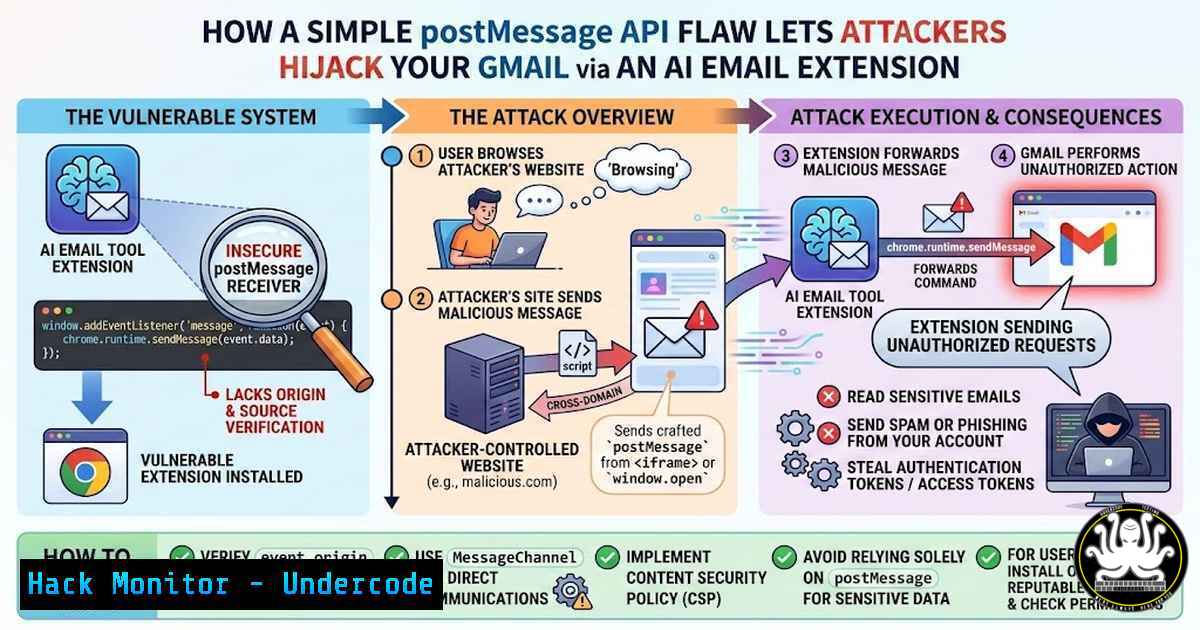
The example in the blog post describes an AI email assistant that injects a button into Gmail’s compose window. When clicked, it sends a `postMessage` to the extension’s background script requesting an AI‑generated reply. The background script processes the request and posts a message back to the content script, which then fills the email body.
The flaw: The extension’s background script did not validate the origin of incoming `postMessage` requests. It blindly trusted that any message came from its own content script. Consequently, any website could embed a hidden iframe or run JavaScript on the same page and send a crafted `postMessage` to the background script. Worse, the background script exposed methods that could directly manipulate the Gmail DOM – e.g., reading the email subject, inserting text, or even sending the email without user interaction.
This is a classic case of “confused deputy” attack: the extension acts on behalf of an untrusted caller because it fails to enforce proper origin checks.
- Step‑by‑Step Exploitation – Controlling Gmail from Any Website
An attacker can host a malicious website that, when visited by a victim who has the vulnerable extension installed, silently takes over the user’s Gmail. Here’s a simplified proof‑of‑concept:
a. Enumerate the exposed API
First, the attacker needs to know the expected message format. They can guess or use social engineering to trick the victim into visiting a page that listens for `postMessage` responses while sending various messages. Many extensions use predictable message structures like { action: "getReply", emailThread: "..." }.
b. Craft the malicious page
Create an HTML page that includes a script to send a `postMessage` to the extension’s background script. Because the extension runs in a privileged context, the message must be sent to the correct window. In Chrome, content scripts run in an isolated world, but `postMessage` from a web page can still reach an extension’s content script if the content script listens for messages from the page. If the content script forwards them to the background, the background may process them.
Example malicious JavaScript:
// Attempt to send a message to the extension's content script
// The target origin must be '' or the extension's origin (often chrome-extension://<id>)
window.postMessage({
action: "getReply",
emailThread: "Sensitive email content stolen via DOM"
}, "");
If the content script blindly forwards this to the background, and the background accepts it, the attacker can now trigger AI replies, read email content, or even send emails.
c. Hijack Gmail
By repeatedly sending crafted messages, the attacker could:
- Exfiltrate the entire Gmail inbox (if the extension can access the DOM).
- Send phishing emails from the victim’s account.
- Modify email drafts.
All this happens invisibly while the victim browses the malicious site.
4. Detecting postMessage Vulnerabilities in Extensions
Security testers and developers can audit their own extensions using Chrome’s Developer Tools:
- Inspect listeners: Open the page (e.g., Gmail) where the extension runs. In the console, run:
// List all message listeners on the window
// (This works in the page context, not the isolated world)
getEventListeners(window);
Look for listeners that do not check `event.origin`.
- Monitor network traffic: Use the Network tab to see if any extension makes unexpected requests.
-
Dynamic analysis: Write a simple HTML page that sends various `postMessage` payloads and observe if the extension reacts.
-
Source code review: If the extension is open‑source or unpacked, look for `addEventListener(‘message’, …)` in content scripts and background scripts. Check if `event.origin` is validated against a whitelist (e.g.,
if (event.origin !== 'https://mail.google.com') return;).
5. Mitigation – Securing Your Extension’s postMessage Channels
Developers must treat `postMessage` as an untrusted input. Follow these best practices:
- Always verify
event.origin:window.addEventListener('message', function(event) { // Only accept messages from your own content script's origin if (event.origin !== 'https://mail.google.com' && !event.origin.startsWith('chrome-extension://')) { return; } // Also verify that the message structure is expected if (typeof event.data !== 'object' || !event.data.action) return; // Process safely }); -
Use `targetOrigin` when sending messages:
When calling `postMessage` from a content script to the background, always specify the exact `chrome-extension://` instead of “. -
Implement message validation: Define a strict schema for messages. Reject any message that does not match exactly.
-
Minimize exposed functionality: The background script should not directly manipulate web page DOM. Instead, it should only return data, and the content script should apply it securely.
-
Leverage Manifest V3: Chrome’s new extension platform restricts some capabilities and encourages service workers over background pages, reducing the attack surface.
6. Real‑World Impact and AI‑Specific Risks
AI‑powered extensions are particularly attractive targets because they often handle sensitive data (emails, messages, documents) and have privileged access to web applications. An attacker who compromises such an extension can:
– Steal training data or personal information used by the AI.
– Manipulate AI‑generated responses to include malicious links or phishing content.
– Use the extension as a pivot to attack other services the user is logged into.
The convergence of AI and browser extensions creates a new class of threats that require security by design, not afterthought.
What Undercode Say:
- Key Takeaway 1: `postMessage` is a powerful but dangerous API. Without strict origin and message validation, it turns browser extensions into open relays for attackers.
- Key Takeaway 2: AI‑enhanced extensions amplify risk because they operate on high‑value data and often have broad permissions. Developers must apply defense‑in‑depth, treating every message as potentially hostile.
Analysis: The incident highlights a systemic issue: many extension developers are unaware of the security implications of cross‑origin messaging. As AI tools become more integrated into daily workflows, we can expect attackers to shift focus toward these new, often overlooked attack surfaces. The extension ecosystem must adopt rigorous security reviews, and browser vendors should consider additional sandboxing or permissions for `postMessage` usage. Until then, users should be cautious about installing extensions that request access to sensitive sites like Gmail.
Prediction:
In the near future, we will see a rise in targeted attacks against AI‑powered browser extensions, leading to large‑scale data breaches. Browsers may introduce new APIs that require explicit user consent for cross‑origin messaging, similar to the permissions model for extensions. Meanwhile, security researchers will develop automated scanners to detect `postMessage` vulnerabilities in the Chrome Web Store, forcing developers to patch or face removal. The cat‑and‑mouse game will continue, but the underlying lesson remains: never trust a message’s origin.
▶️ Related Video (72% Match):
🎯Let’s Practice For Free:
IT/Security Reporter URL:
Reported By: Melvinlammerts Browser – Hackers Feeds
Extra Hub: Undercode MoN
Basic Verification: Pass ✅


