
Listen to this Post
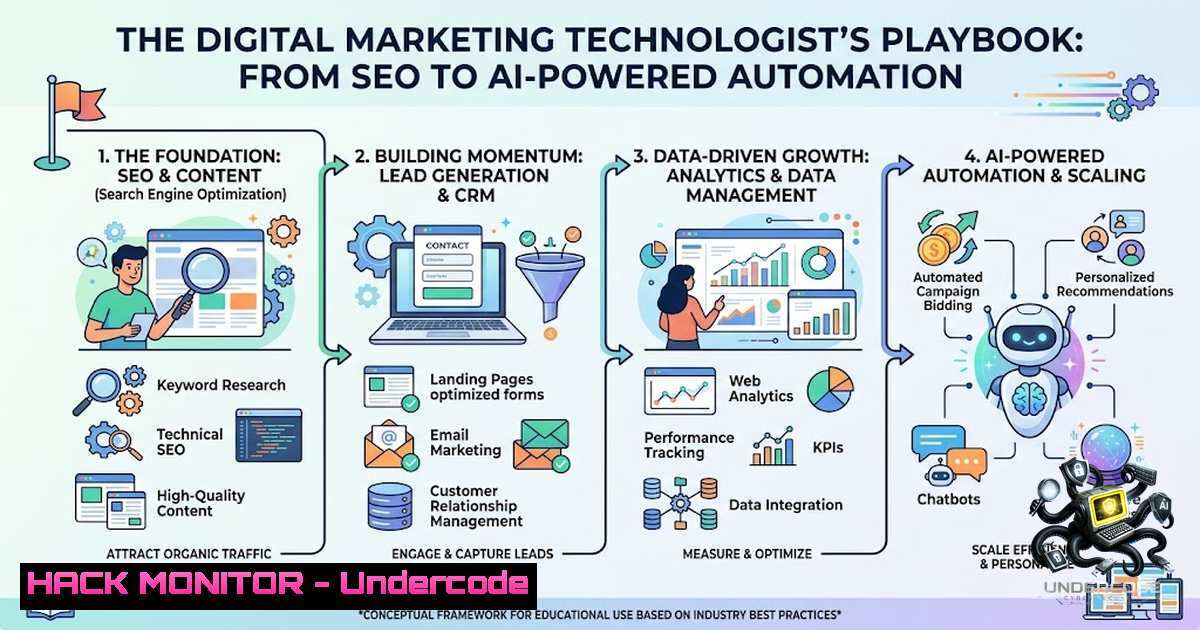
Introduction:
Digital marketing has evolved from a creative discipline into a technology-driven field that demands proficiency in analytics, automation, and security. Modern marketers must navigate SEO optimization, customer data platforms, AI-driven campaign management, and marketing automation APIs—all while ensuring data privacy and system integrity. This article provides a technical roadmap for building a career in digital marketing, with actionable commands, code snippets, and configuration guides for Linux, Windows, and cloud-based marketing tools.
Learning Objectives & Secrets:
- Objective 1: Master Technical SEO & Site Performance Optimization – Learn to configure web servers (Apache/Nginx) for SEO-friendly URL structures, implement HTTPS redirects, and use CLI tools like Lighthouse to audit and improve page speed and Core Web Vitals.
- Objective 2 Secret Tip: Leverage AI for Marketing Analytics & Automation – Unlock the power of Python scripts and AI-powered platforms (HubSpot, Salesforce, Mailchimp) to automate campaign reporting, customer segmentation, and real-time decision-making.
- Objective 3 Secret Tip: Secure Marketing APIs & Customer Data – Implement OAuth 2.0 and private app authentication for CRM and marketing automation APIs (HubSpot, Salesforce) to prevent data breaches and ensure compliance with privacy regulations.
You Should Know:
1. Technical SEO: Server Configuration & Performance Auditing
Search engines prioritize fast, secure, and well-structured websites. Technical SEO involves configuring your web server to enforce HTTPS, create SEO-friendly URLs, and optimize delivery.
Step-by-Step Guide (Linux – Apache/Nginx):
Apache (Ubuntu/Debian):
 Enable mod_rewrite for URL rewriting
sudo a2enmod rewrite
sudo systemctl restart apache2

Create/Edit .htaccess for SEO-friendly URLs (remove www, force HTTPS)
sudo nano /var/www/html/.htaccess
Add the following to `.htaccess`:
RewriteEngine On
 Force HTTPS
RewriteCond %{HTTPS} off
RewriteRule ^(.)$ https://%{HTTP_HOST}/$1 [R=301,L]
 Remove www
RewriteCond %{HTTP_HOST} ^www.(.)$ [bash]
RewriteRule ^(.)$ https://%1/$1 [R=301,L]
 SEO-friendly URL rewriting (WordPress-style)
RewriteCond %{REQUEST_FILENAME} !-f
RewriteCond %{REQUEST_FILENAME} !-d
RewriteRule ^([^/]+)/?$ index.php?page=$1 [L,QSA]
This configuration solves two major SEO pain points: enforcing HTTPS and removing www.
Nginx:
server {
listen 80;
server_name yourdomain.com www.yourdomain.com;
return 301 https://yourdomain.com$request_uri;
}

server {
listen 443 ssl http2;
server_name yourdomain.com;
 SSL certificate configuration here

location / {
try_files $uri $uri/ /index.php?$args;
}
}
Performance Auditing with Lighthouse (CLI):
 Install Lighthouse CLI
npm install -g lighthouse

Run SEO audit (generates JSON/HTML report)
lighthouse https://yourdomain.com --output=html --output-path=./seo-report.html

Run with specific categories
lighthouse https://yourdomain.com --only-categories=performance,seo
Lighthouse analyzes performance, accessibility, and SEO, providing actionable recommendations.
- Google Analytics 4 (GA4) Setup & Event Tracking
GA4 is the foundation of modern marketing analytics. Proper setup ensures accurate data collection for campaign measurement.
Step-by-Step Guide:
1. Create GA4 Property:
- Log in to Google Analytics → Admin → Create Property
- Enter property name, reporting time zone, and currency
- Select your industry and business objectives
2. Add Data Stream:
- In the property, click “Data Streams” → “Add stream” → “Web”
- Enter your website URL and stream name
- Enable “Enhanced Measurement” for automatic tracking of scrolls, outbound clicks, site search, and video engagement
3. Install GA4 via Google Tag Manager (GTM):
- Create a GTM account and container
- In GTM, click “Tags” → “New” → “Tag Configuration” → “Google Analytics: GA4 Configuration”
- Enter your Measurement ID (found in GA4 Data Stream details)
- Set trigger to “All Pages” and publish
4. Mark Events as Conversions:
- In GA4, navigate to “Configure” → “Conversions”
- Click “New conversion event” and enter the event name (e.g.,
purchase,form_submit) - Save to begin tracking
Verify Tracking (Browser Console):
// Check if gtag is loaded
console.log(typeof gtag);

// Send a test event
gtag('event', 'test_event', {
'test_param': 'value'
});
3. Marketing Automation with HubSpot API (Python)
Marketing automation platforms like HubSpot enable personalized customer journeys. Securely integrating with their API is critical.
Step-by-Step Guide:
1. Create a Private App (Internal Integration):
- In HubSpot, navigate to Settings → Integrations → Private Apps
- Click “Create a private app”
- Name your app and assign required scopes (e.g.,
crm.objects.contacts.read,crm.objects.contacts.write) - Copy the generated access token (store securely)
2. Install HubSpot Python Client:
pip install hubspot-api-client
3. Authenticate and Fetch Contacts:
from hubspot import HubSpot
from hubspot.crm.contacts import ApiException

Initialize client with access token
api_client = HubSpot(access_token='your_access_token_here')

try:
 Fetch all contacts (paginated)
contacts = api_client.crm.contacts.get_all()
for contact in contacts:
print(f"Email: {contact.properties.get('email')}")
except ApiException as e:
print(f"Exception: {e}")
4. Create a New Contact:
from hubspot.crm.contacts import SimplePublicObjectInputForCreate

contact_input = SimplePublicObjectInputForCreate(
properties={
"email": "[email protected]",
"firstname": "Test",
"lastname": "User"
}
)
created_contact = api_client.crm.contacts.create(contact_input)
print(f"Created contact ID: {created_contact.id}")
For OAuth 2.0 flows, use `client_id` and `client_secret` to obtain tokens.
4. AI-Powered Marketing Analytics with Python
AI is transforming marketing analytics. Python libraries like `advertools` and custom scripts can automate campaign analysis and ROI calculation.
Step-by-Step Guide (Campaign ROI Calculator):
import pandas as pd
import numpy as np

Sample campaign data
data = {
'campaign': ['Email', 'Social', 'PPC', 'SEO'],
'spend': [5000, 3000, 7000, 2000],
'revenue': [15000, 8000, 21000, 6000],
'clicks': [1200, 800, 2500, 400]
}
df = pd.DataFrame(data)

Calculate KPIs
df['ROI'] = ((df['revenue'] - df['spend']) / df['spend'])  100
df['CTR'] = (df['clicks'] / 10000)  100  Assuming 10k impressions
df['CPC'] = df['spend'] / df['clicks']

print(df[['campaign', 'ROI', 'CTR', 'CPC']])
Automated Attribution Modeling (Multi-Touch):
 Linear attribution example
def linear_attribution(conversion_value, touchpoints):
weight = 1 / len(touchpoints)
attribution = {tp: conversion_value  weight for tp in touchpoints}
return attribution

Example: User touched Email, Social, and PPC before converting
touchpoints = ['Email', 'Social', 'PPC']
attribution = linear_attribution(100, touchpoints)
print(attribution)
 Output: {'Email': 33.33, 'Social': 33.33, 'PPC': 33.33}
5. Conversion Rate Optimization (CRO) with AI Tools
CRO focuses on turning visitors into customers. AI-powered platforms like Pathmonk, VWO, and CROLabs automate A/B testing and personalization.
Step-by-Step Guide (VWO A/B Testing Setup):
1. Create VWO Account & Project:
- Sign up at VWO.com and create a new project
- Add your website URL and install the VWO tracking code (provided as a JavaScript snippet)
2. Install VWO Smart Code:
- Copy the VWO code snippet (similar to GA4)
- Paste it in the `` section of your website (before closing
</head>) - Verify installation using browser console: `typeof window._vwo_code`
3. Create an A/B Test:
- In VWO dashboard, click “New Campaign” → “A/B Test”
- Define the test URL and variations (e.g., change button color, headline)
- Set traffic allocation (e.g., 50% control, 50% variation)
- Define conversion goal (e.g., form submission, purchase)
- Launch and monitor statistical significance in real-time
Alternative: Pathmonk AI (No-Code CRO):
 Pathmonk requires only a JavaScript snippet installation
 Add to <head>:
<script async src="https://cdn.pathmonk.com/loader.js" data-key="YOUR_API_KEY"></script>
Pathmonk automatically analyzes user behavior and suggests conversion fixes, with claims of up to +50% conversion increases.
6. Social Media & Content Marketing Automation
Automating social media posting and content creation saves time and ensures consistency.
Step-by-Step Guide (Twitter/X API with Python):
1. Create Twitter Developer App:
- Go to developer.twitter.com and create a project
- Generate API Key, API Key Secret, Access Token, and Access Token Secret
2. Install Tweepy:
pip install tweepy
3. Post a Tweet (Python):
import tweepy

Authenticate
auth = tweepy.OAuth1UserHandler(
'API_KEY', 'API_SECRET',
'ACCESS_TOKEN', 'ACCESS_TOKEN_SECRET'
)
api = tweepy.API(auth)

Post tweet
api.update_status("This is an automated tweet from our marketing system! DigitalMarketing")
print("Tweet posted successfully!")
Content Creation with AI (Jasper/Copy.ai):
- Use platforms like Jasper or Copy.ai to generate blog outlines, social captions, and email subject lines
- Integrate with Zapier to automate content distribution across channels
7. Email Marketing Automation (Mailchimp API)
Email marketing remains a high-ROI channel. Automating campaigns via API ensures timely, personalized communication.
Step-by-Step Guide (Mailchimp API with Python):
1. Get Mailchimp API Key:
- In Mailchimp, navigate to Account → Extras → API Keys
- Create a new API key
2. Install Mailchimp Marketing Library:
pip install mailchimp-marketing
3. Add a Subscriber to a List:
from mailchimp_marketing import Client
from mailchimp_marketing.api_client import ApiClientError

mailchimp = Client()
mailchimp.set_config({
"api_key": "YOUR_API_KEY",
"server": "usX"  Replace with your server prefix (e.g., us1)
})

try:
response = mailchimp.lists.add_list_member(
list_id="YOUR_LIST_ID",
body={
"email_address": "[email protected]",
"status": "subscribed",
"merge_fields": {
"FNAME": "First",
"LNAME": "Last"
}
}
)
print(f"Added subscriber: {response['email_address']}")
except ApiClientError as error:
print(f"Error: {error.text}")
AI-Powered Email Analytics (Mailchimp’s Analytics AI):
- Mailchimp now offers conversational AI analytics to interpret marketing performance and make data-driven decisions in real time
8. Cybersecurity & Data Privacy in Marketing
Marketing systems handle sensitive customer data. Securing APIs and complying with GDPR/CCPA is non-1egotiable.
Key Security Practices:
- Use Environment Variables for Secrets:
Linux/macOS
export HUBSPOT_ACCESS_TOKEN="your_token"
export MAILCHIMP_API_KEY="your_key"

Windows (Command Prompt)
set HUBSPOT_ACCESS_TOKEN=your_token
- Implement Rate Limiting: Most marketing APIs have rate limits. Use exponential backoff in your scripts.
- Encrypt Data in Transit: Always use HTTPS for API calls (verify endpoints start with `https://`).
- Audit Access Scopes: In HubSpot, only assign necessary scopes to private apps to minimize breach impact.
- Regularly Rotate API Keys: Set reminders to rotate keys every 90 days.
What Undercode Say:
- Key Takeaway 1: Digital marketing is now a technology discipline. Success requires proficiency in SEO server configuration, analytics setup, API integration, and AI-powered automation—not just creative content.
- Key Takeaway 2: Security and privacy are marketing responsibilities. Protecting customer data through proper API authentication, encryption, and access controls is essential for compliance and brand trust.
Analysis:
The digital marketing landscape has shifted dramatically. Marketers who embrace technical skills—Linux commands for server optimization, Python for analytics automation, and API security best practices—will outperform those relying solely on traditional marketing tactics. The courses listed (Google Digital Marketing, UC Davis SEO, Meta Social Media Marketing, etc.) provide foundational knowledge, but true mastery comes from hands-on implementation. As AI tools like Salesforce’s Agentforce and Shopify’s Campaign Autopilot become mainstream, the ability to configure, secure, and integrate these systems will define the next generation of marketing leaders. Investing in technical skills today is not optional—it’s the baseline for career growth in an increasingly automated and data-driven industry.
Prediction:
- +1 AI-powered marketing agents will replace 40% of routine campaign management tasks by 2028, shifting marketer roles toward strategy, system integration, and ethical AI governance.
- +1 Demand for marketers with Python, API, and cloud security skills will outpace generalist roles, with salaries for “Marketing Technologists” rising 25-30% above traditional marketing positions.
- -1 Marketing teams that fail to adopt AI and automation will face declining ROI and increased operational costs, potentially losing budget to more tech-savvy competitors.
- -1 Data privacy regulations (GDPR, CCPA, and emerging AI-specific laws) will increase compliance costs, requiring dedicated roles for marketing data protection and audit trails.
- +1 The convergence of SEO, analytics, and AI will create new job titles like “AI Marketing Engineer” and “Conversion Rate Optimization Architect,” blending traditional marketing with software engineering.
- +1 Open-source marketing analytics tools (Python-based) will gain enterprise adoption, reducing dependency on expensive proprietary platforms and democratizing access to advanced analytics.
- -1 Cybersecurity threats targeting marketing APIs and customer databases will escalate, with phishing and credential-stuffing attacks becoming more sophisticated—making API security training critical for all marketing teams.
- +1 Real-time personalization powered by AI will become the industry standard, with platforms like Bloomreach’s Loomi Marketing Agent delivering individual-level customer engagement at scale.
- +1 The integration of conversational AI (ChatGPT, Claude) into marketing automation tools will enable natural language campaign creation, lowering the barrier to entry for complex multi-channel campaigns.
- +1 Marketers who combine technical SEO, analytics, and AI skills will command premium positioning in the job market, as companies seek “full-stack” marketers capable of owning the entire customer acquisition and retention lifecycle.
▶️ Related Video (88% Match):
🎯Let’s Practice For Free:
🎓 Live Courses & Certifications:
Join Undercode Academy for Verified Certifications
🚀 Request a Custom Project:
Secure, high-velocity infrastructure and disruptive technological engineering. Contact our engineering team for high-tier development and proprietary systems:
[email protected]
💎 Smart Architecture | 🛡️ Secure by Design | ⭐ Trusted by Thousands
IT/Security Reporter URL:
Reported By: https://lnkd.in/p/egaNCNja – Hackers Feeds
Extra Hub: Undercode MoN
Basic Verification: Pass ✅


