Listen to this Post
Introduction:
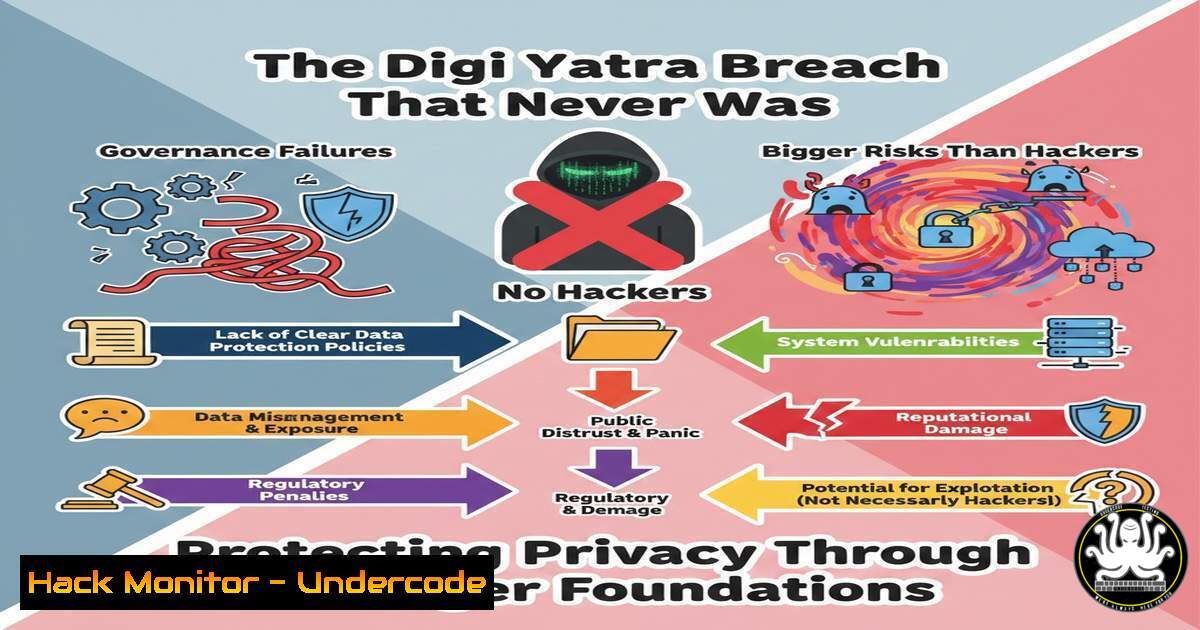
The Digi Yatra controversy exposes a critical flaw in modern cybersecurity: the most dangerous vulnerabilities are often not technical, but organizational. A legal dispute over platform ownership and backend control has revealed that millions of passengers’ immutable biometric data was potentially exposed not by a malicious hack, but by a fundamental lack of clear governance, transparency, and accountability. This incident serves as a stark case study in why security frameworks must prioritize provable data custody and independent audits, especially for permanent identifiers like facial recognition data.
Learning Objectives:
- Understand the specific governance and technical control failures that led to the Digi Yatra data custody crisis.
- Learn to implement technical controls for audit logging, access management, and vendor security to prevent similar incidents.
- Develop a framework for assessing and hardening systems that handle sensitive biometric and personal data.
You Should Know:
1. The Imperative of Comprehensive Audit Logging
The first line of defense in a governance crisis is an immutable record of all actions. The Digi Yatra dispute hinges on questions of “who had access” and “who controlled the backend.” Without detailed, tamper-proof audit logs, answering these questions becomes a matter of argument, not evidence. Comprehensive logging provides the forensic trail needed for accountability.
Step‑by‑step guide explaining what this does and how to use it.
Objective: Implement system-level auditing to track all user and process activity on critical servers handling sensitive data.
Linux (using auditd):
- Install and enable the audit daemon: `sudo apt-get install auditd && sudo systemctl enable –now auditd`
2. Add a rule to watch a critical directory (e.g., where biometric templates are processed): `sudo auditctl -w /opt/digiyatra/processing/ -p rwxa -k digiyatra_data`
3. Query the logs for specific events: `sudo ausearch -k digiyatra_data | tail -20`
Windows (using PowerShell):
- Enable detailed command line logging for Process Creation events (Event ID 4688):
New-ItemProperty -Path "HKLM:\SOFTWARE\Microsoft\Windows\CurrentVersion\Policies\System\Audit" -Name "ProcessCreationIncludeCmdLine_Enabled" -Value 1 -PropertyType DWord
- Use `Get-WinEvent` to filter logs: `Get-WinEvent -FilterHashtable @{LogName=’Security’; ID=4688} | Where-Object {$_.Properties
.Value -like "passenger_data"} | Select-Object -First 10`
</li>
</ol>

<h2 style="color: yellow;">2. Enforcing Strict Access Control and Least Privilege</h2>

The conflict between the Digi Yatra Foundation and its vendor highlights the risk of excessive or poorly defined access. The principle of least privilege must be enforced technically to ensure individuals and systems can only access data necessary for their defined role.

Step‑by‑step guide explaining what this does and how to use it.
 Objective: Configure role-based access control (RBAC) and enforce strict file system permissions on data stores.

<h2 style="color: yellow;"> Linux:</h2>

<ol>
<li>Create a dedicated group for data access: `sudo groupadd digiyatra_operators`
2. Change ownership of the data directory to a system user and the new group: `sudo chown -R sys_operator:digiyatra_operators /opt/digiyatra/data/`
3. Set permissions so only the group can read/write: `sudo chmod -R 770 /opt/digiyatra/data/`
4. Consider mandatory access control with SELinux: `semanage fcontext -a -t digiyatra_data_t "/opt/digiyatra/data(/.)?" && restorecon -Rv /opt/digiyatra/data/`
</li>
</ol>

<h2 style="color: yellow;"> Windows:</h2>

<ol>
<li>Use PowerShell to assign permissions via Access Control Lists (ACLs):
[bash]
$Acl = Get-Acl "D:\DigiYatra\PassengerDB"
$AccessRule = New-Object System.Security.AccessControl.FileSystemAccessRule("Vendor_Admins","ReadAndExecute","Allow")
$Acl.SetAccessRule($AccessRule)
Set-Acl -Path "D:\DigiYatra\PassengerDB" -AclObject $Acl
3. Conducting Technical Vendor Security Assessments
When third-party vendors control critical backend systems, their security posture becomes your own. Proactive, technical assessments are non-negotiable to move beyond trust-based promises.
Step‑by‑step guide explaining what this does and how to use it.
Objective: Perform a credentialed vulnerability scan and configuration review of a vendor-managed system component.
Process & Commands:
- Scope & Agreement: Define the exact IP/URL of the vendor-controlled system (e.g.,
api.vendor.digiyatra.in) and obtain written authorization. - Authenticated Scanning: Use a tool like Nessus or OpenVAS with provided credentials to find misconfigurations and missing patches specific to the application stack.
- Service Enumeration: From a trusted jump host, enumerate open ports and services on the vendor system: `nmap -sV -sC –script ssl-enum-ciphers api.vendor.digiyatra.in -p 443,8443`
4. Review Findings: Demand evidence of remediation for critical/high findings, such as outdated TLS protocols or unpatched application servers, before granting data access. -
Implementing Data Protection at Rest and In Transit
Authorities stated Digi Yatra data was “stored locally and deleted,” but the technical enforcement of encryption and deletion is key. Data must be protected throughout its lifecycle, especially when custody is disputed.
Step‑by‑step guide explaining what this does and how to use it.
Objective: Encrypt sensitive data volumes and ensure all API communications use strong TLS.
Data at Rest (Linux LUKS Encryption):
1. Encrypt a partition: `sudo cryptsetup luksFormat /dev/sdb1`
- Open and map it: `sudo cryptsetup open /dev/sdb1 secure_data_volume`
3. Create a filesystem and mount: `sudo mkfs.ext4 /dev/mapper/secure_data_volume && sudo mount /dev/mapper/secure_data_volume /mnt/secure`
Data in Transit (OpenSSL Check & Cipher Enforcement): - Test a vendor endpoint for weak ciphers: `openssl s_client -connect api.vendor.digiyatra.in:443 -cipher ‘HIGH:!aNULL:!MD5’`
2. Configure web servers (e.g., nginx) to use only strong ciphers and TLS 1.2+: `ssl_ciphers ECDHE-RSA-AES256-GCM-SHA384:ECDHE-RSA-AES128-GCM-SHA256;`
5. Establishing Breach Detection and Data Integrity Monitoring
In scenarios of unclear access, you must be able to detect unauthorized changes or exfiltration attempts. File integrity monitoring (FIM) and anomaly detection are critical.
Step‑by‑step guide explaining what this does and how to use it.
Objective: Deploy tools to monitor critical directories for unauthorized changes and network traffic for anomalies.
Linux (AIDE for FIM):
1. Initialize the AIDE database: `sudo aideinit`
- Copy the new database: `sudo cp /var/lib/aide/aide.db.new /var/lib/aide/aide.db`
3. Run a daily check via cron: `sudo aide –check`
Network Anomaly Detection:
- Use a tool like `fail2ban` to monitor auth logs and block IPs with too many failures: `sudo fail2ban-client status sshd`
2. Implement Zeek (formerly Bro) on a network tap to generate protocol-level logs of all traffic to and from data storage servers, looking for large, unexpected transfers.
6. Building a Legal-Technical Compliance Framework
The matter is before the Delhi High Court because the rules of engagement were unclear. Technical controls must be mapped to legal and regulatory requirements from the outset.
Step‑by‑step guide explaining what this does and how to use it.
Objective: Create a Data Processing Agreement (DPA) annex that specifies exact technical controls.
Process & Artifacts:
- Control Mapping: In your DPA, require the vendor to provide evidence (screenshots, config files, logs) for controls like:
`grep ‘”DELETE FROM passenger_faces’ /opt/digiyatra/logs/app.log | tail -5` (Proof of deletion)
Output of `sudo ausearch -m USER_LOGIN -ua vendor_admin_username` (Proof of access logging) - Right-to-Audit Clause: Ensure the contract grants you the right to perform the technical assessments in Section 3, with defined frequency and scope.
- Data Custody Diagram: Mandate and maintain an up-to-date architectural diagram signed by both parties, detailing every data flow, storage location, and access point.
What Undercode Say:
- Governance is a Technical Control. The Digi Yatra incident proves that unclear ownership and access policies are not just legal issues—they are root vulnerabilities exploitable by insiders and malicious actors alike. Security architecture must encode governance rules into system design through enforceable RBAC, audit trails, and cryptographic data custody seals.
- Transparency Must Be By Design, Not By Promise. The claim that “data is stored locally and deleted” is meaningless without publicly verifiable, technical mechanisms. Systems handling immutable biometric data must implement verifiable deletion (e.g., cryptographic sharding with key destruction) and transparent audit logs that can be independently reviewed by trusted third parties, moving from blind trust to provable security.
Prediction:
The Digi Yatra case will catalyze a significant shift in how governments and enterprises procure and manage identity systems. We predict a move away from monolithic, vendor-controlled biometric platforms toward decentralized identity models. In these models, biometric data remains encrypted on a user’s device, with only verifiable credentials or zero-knowledge proofs shared with authorities. This technologically enforces privacy-by-design and minimizes mass data custody risks. Furthermore, expect stringent, technically-specific regulations mandating open audits of source code and infrastructure configurations for public-facing biometric systems. The era of trusting promises in closed systems is ending, ushering in an age where trust is built on verifiable, cryptographic proof and enforced by code. Vendors who cannot demonstrate this technical accountability will face obsolescence.
▶️ Related Video (78% Match):
🎯Let’s Practice For Free:
IT/Security Reporter URL:
Reported By: Cybernara Cybersecurity – Hackers Feeds
Extra Hub: Undercode MoN
Basic Verification: Pass ✅


