Listen to this Post
Introduction:
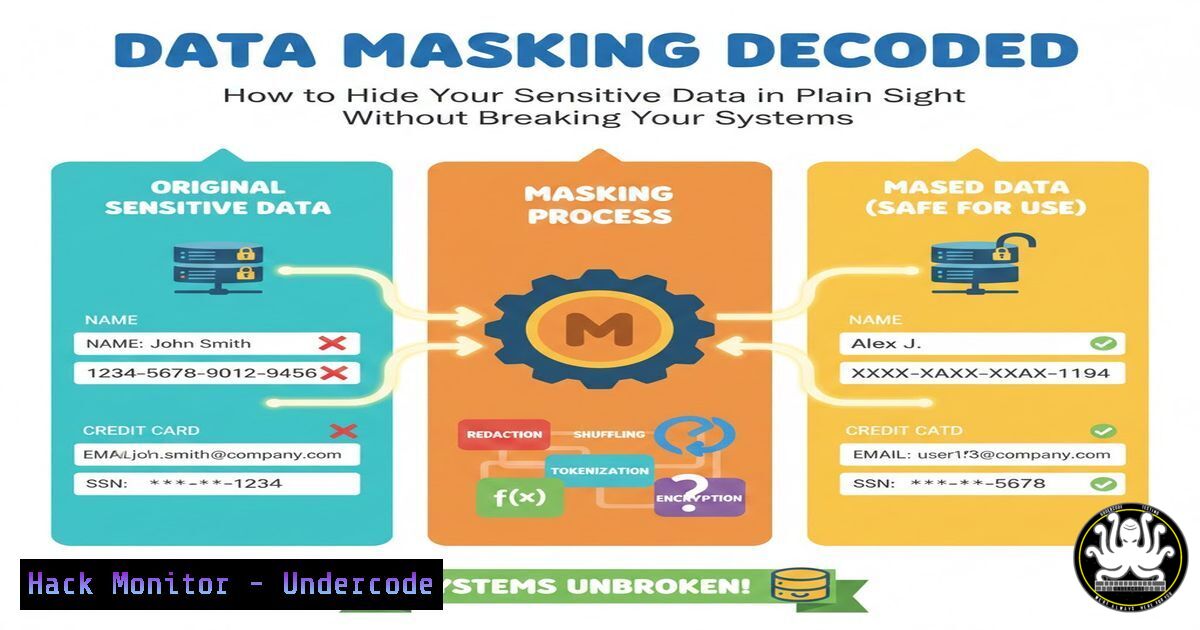
In an era of rampant data breaches and stringent privacy regulations, exposing real sensitive data in non-production environments is an unforgivable risk. Data masking, or data obfuscation, is the critical cybersecurity practice of creating a structurally similar but inauthentic version of your data. This sanitized dataset can be safely used for development, testing, analytics, and training, protecting Personally Identifiable Information (PII) and Payment Card Information (PCI) while maintaining data utility.
Learning Objectives:
- Understand the core principles and irreversible techniques of static data masking.
- Implement basic data masking scripts using native Linux/Windows commands and SQL.
- Evaluate and apply enterprise-grade masking tools for cloud and database security.
You Should Know:
1. The Foundation: Static vs. Dynamic Masking
Static Data Masking (SDM) irreversibly alters data in a copy of the database, creating a safe subset for testing. Dynamic Data Masking (DDM) alters data on-the-fly for queries based on user roles, leaving the underlying database intact. For most security use cases, especially rendering data safe for third-party developers, static masking is the gold standard.
Step-by-step guide:
- Identify Sensitive Fields: Catalog columns holding PII/PCI (e.g.,
customer.name,payment.card_number). - Extract a Subset: Create a copy of your production data. Never mask directly on production.
- Apply Masking Rules: Transform the data in this copy using deterministic or non-deterministic methods.
- Validate and Distribute: Ensure referential integrity is maintained (e.g., a masked customer ID still matches related orders) and distribute the sanitized dataset.
-
Hands-On: Basic Masking with Linux `sed` and `awk`
For quick masking of exported CSV or log files, command-line tools are invaluable. These methods are ideal for one-off data sanitization.
Step-by-step guide:
- Redacting Email Domains: `sed -E ‘s/@[a-zA-Z0-9.-]+/@masked.com/g’ sensitive_data.csv > masked_data.csv`
– What it does: Finds the `@` symbol and the following domain name, replacing it with@masked.com. - Masking Credit Card Middle Digits: `awk -F’,’ ‘BEGIN{OFS=”,”} {gsub(/[0-9]{4}-[0-9]{4}-[0-9]{4}/, “XXXX-XXXX-XXXX-” substr($2, length($2)-3, 4), $2); print}’ payment_data.csv`
– What it does: For a comma-separated file where the second field is a 16-digit card number, it replaces the first 12 digits with Xs, preserving only the last 4.
3. Database-Centric Masking with SQL
Within databases, you can use SQL functions to generate masked copies of tables.
Step-by-step guide (PostgreSQL Example):
-- Create a masked copy of a customer table
CREATE TABLE customer_masked AS
SELECT
customer_id,
-- Partial mask for name: 'John Doe' -> 'J D'
overlay(name placing '' from 2 for length(name)-4) as masked_name,
-- Hash email for consistent joining but non-reversible value
encode(digest(email, 'sha256'), 'hex') as hashed_email,
-- Full redaction of SSN
'--' as masked_ssn,
-- Preserve last 4 of card
'---' || RIGHT(card_number, 4) as masked_card
FROM customer_prod;
What it does: Creates a new table using string functions, hashing, and concatenation to obfuscate data while preserving format and joinability for hashed fields.
4. Advanced Technique: Format-Preserving Encryption (FPE)
FPE encrypts data into a ciphertext that retains the original format (e.g., a 16-digit number stays a 16-digit number). This is crucial for legacy systems that validate data formats.
Step-by-step guide (Conceptual):
- Choose a library like `libffx` or use database-native features (e.g., Oracle Data Safe).
- Define your format (e.g., `[0-9]{16}` for a card).
- Use a strong encryption key, managed in a Hardware Security Module (HSM) or cloud KMS.
4. Encrypt: `ciphertext = FPE_encrypt(key, plaintext_card_number)`
- The `ciphertext` can be used in place of the real number in test databases without breaking application logic.
5. Integrating Masking into CI/CD Pipelines
To ensure every test database is safe, automate masking in your deployment pipeline.
Step-by-step guide (Using a Shell Script in Jenkins/GitLab CI):
!/bin/bash
 Step 1: Dump production data (using a backup/restricted snapshot)
pg_dump -h prod-db --no-owner --data-only --table=customer > prod_dump.sql

Step 2: Apply masking script
python3 data_masking_script.py prod_dump.sql masked_dump.sql

Step 3: Import masked data into staging database
psql -h staging-db -d app_db -f masked_dump.sql
What it does: Automates the extract-mask-load cycle, ensuring developers automatically get a recent, safe dataset with every deployment to a staging environment.
- Enterprise & Cloud Solutions: AWS Glue DataBrew & Microsoft SQL Server DDM
For large-scale cloud ETL pipelines and enterprise databases, use managed services.
– AWS Glue DataBrew: Provides no-code recipes for masking (e.g., redact, hash, encrypt) as part of a data preparation workflow. You can apply these recipes to datasets in S3 before they are loaded into Redshift for analytics.
– Microsoft SQL Server Dynamic Data Masking: Allows real-time masking without changing the stored data.
-- Alter table to add a dynamic mask
ALTER TABLE Customer
ALTER COLUMN Email ADD MASKED WITH (FUNCTION = 'email()');
ALTER COLUMN CreditCard ADD MASKED WITH (FUNCTION = 'partial(0,"XXXX-XXXX-XXXX-",4)');
What it does: A user without the `UNMASK` permission will see `[email protected]` and XXXX-XXXX-XXXX-1234.
7. Compliance and Validation: The Final Step
Masking must align with standards like GDPR, HIPAA, and PCI-DSS. Validation involves:
1. Irreversibility Test: Attempt to reverse the masked data using known methods; it should be cryptographically impossible.
2. Referential Integrity Check: Run joins between masked tables to ensure relationships hold.
3. Utility Test: Confirm the masked data still works for its intended use (e.g., application testing, load testing).
What Undercode Say:
- Security is Not Secrecy: Data masking enables responsible data sharing, turning data from a liability into a secure asset for innovation. It is the cornerstone of a “zero-trust” data architecture.
- Automate or Fail: Manual masking processes are error-prone and unsustainable. Integrating masking into automated data pipelines and CI/CD is non-negotiable for modern DevOps (DataSecOps) practices.
Prediction:
Data masking will evolve from a niche compliance task to a fundamental, AI-integrated layer of the data stack. We will see the rise of “smart masking” engines that use machine learning to auto-detect sensitive data patterns across petabytes of unstructured data and apply context-aware obfuscation policies. Furthermore, with the increase in AI training on private datasets, differential privacy combined with masking will become standard to prevent model memorization and inversion attacks, making masked data the primary fuel for both internal and third-party AI development.
▶️ Related Video (74% Match):
🎯Let’s Practice For Free:
IT/Security Reporter URL:
Reported By: Prkdevelops What – Hackers Feeds
Extra Hub: Undercode MoN
Basic Verification: Pass ✅


