Listen to this Post
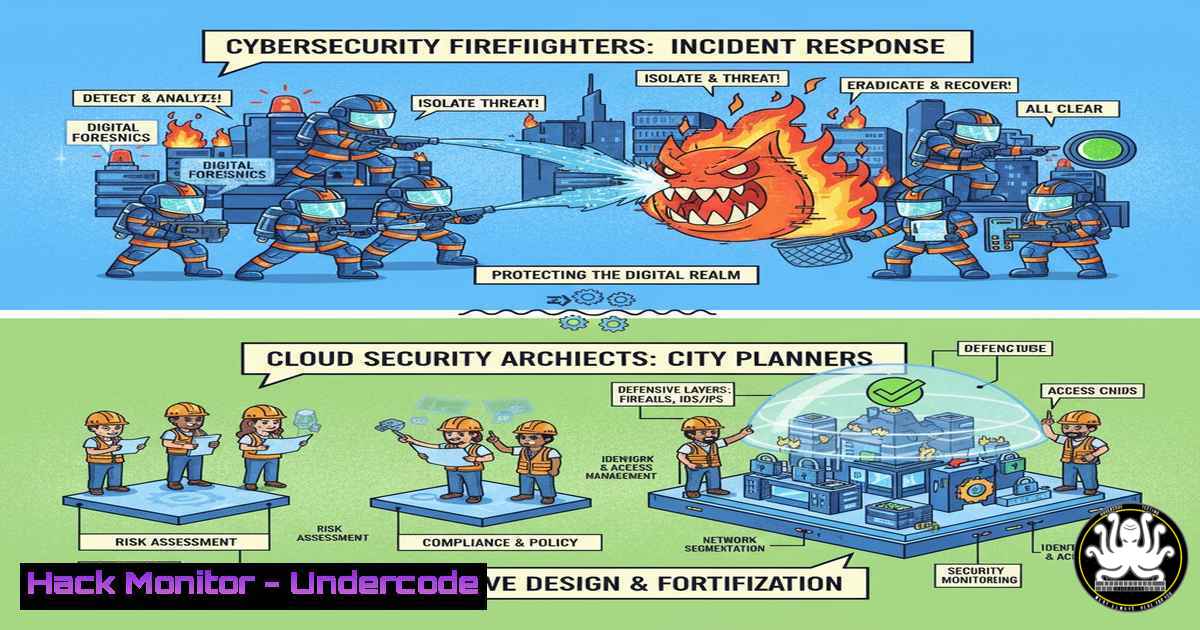
Introduction:
In the modern cybersecurity battleground, two roles stand as critical pillars of defense: the Incident Responder, who acts as the emergency firefighter during an active breach, and the Cloud Security Architect, who serves as the strategic city planner building resilient infrastructures. Understanding the tools and methodologies of these roles is essential for any robust security program, blending reactive precision with proactive design to protect digital assets.
Learning Objectives:
- Differentiate between the core responsibilities and required skill sets of an Incident Responder and a Cloud Security Architect.
- Master over 25 essential commands and configurations for digital forensics, incident containment, and cloud infrastructure hardening.
- Implement practical steps to analyze compromised systems and architect secure cloud environments based on industry standards like the CIS Benchmarks and Zero Trust.
You Should Know:
1. Initial Triage and Host Analysis
When an incident is declared, the first step is to perform rapid triage on a potentially compromised host. The following commands provide a snapshot of system activity.
Linux/MacOS:
ps aux --sort=-%mem | head -20  List top 20 processes by memory usage
netstat -tulnpe  List all listening ports and associated processes
lsof -i -P -n  List all open network connections and files
ss -tulwnp  Modern socket statistics, showing listeners
last -10  Show last 10 logins
sudo ls -lat /var/log/  Check recent log files
Windows (CMD/PowerShell):
tasklist /svc /fo table  List running processes and services
netstat -ano | findstr LISTENING  Show listening ports and Process IDs
powershell "Get-NetTCPConnection -State Listen"  PowerShell equivalent for network connections
wmic process get name,processid,commandline  List processes with full command line
Step-by-step guide:
Begin by running the process listing command (ps aux or tasklist) to identify any suspicious or resource-heavy applications. Cross-reference this with the network connection commands (netstat or Get-NetTCPConnection) to pinpoint unknown processes listening on network ports. The `last` command on Linux or reviewing Windows Event Logs (Get-EventLog -LogName Security -Newest 50 in PowerShell) can reveal unauthorized access. This initial triage helps contain the incident by identifying the initial point of compromise.
2. Memory Forensics and Malware Detection
Volatile memory can contain critical evidence of malware and attacker techniques. These commands help capture and analyze system memory.
Linux:
sudo dd if=/dev/mem of=/tmp/memdump.img bs=1M count=1024  Create a memory dump (first 1GB)
sudo avscan /tmp/memdump.img  Scan dump with ClamAV
strings /tmp/memdump.img | grep -i "passw|mimikatz"  Search for suspicious strings
Windows (Using Sysinternals Suite):
PsList.exe -t -x  Show process tree with details
Autoruns.exe -ct  Check for persistent malware auto-start locations
ProcDump.exe -ma <PID> <output.dmp>  Dump memory of a specific process
Step-by-step guide:
After identifying a suspicious Process ID (PID) from your initial triage, use `ProcDump.exe -ma` on Windows to capture that process’s memory to a file. On Linux, use `dd` to image a section of physical memory. Use the `strings` command piped into `grep` to search for clear-text passwords, tool names like “mimikatz,” or known malware signatures. Tools like `Autoruns` are critical for finding persistence mechanisms, such as Registry entries or scheduled tasks, that an attacker may have established.
3. Cloud Infrastructure Hardening with IaC
A Cloud Security Architect ensures security is baked in via Infrastructure as Code (IaC). This Terraform snippet for AWS creates an encrypted S3 bucket with no public access.
Terraform (AWS):
resource "aws_s3_bucket" "secure_logs" {
bucket = "my-company-secure-logs"

server_side_encryption_configuration {
rule {
apply_server_side_encryption_by_default {
sse_algorithm = "AES256"
}
}
}
}

resource "aws_s3_bucket_public_access_block" "secure_logs" {
bucket = aws_s3_bucket.secure_logs.id

block_public_acls = true
block_public_policy = true
ignore_public_acls = true
restrict_public_buckets = true
}
Step-by-step guide:
This Terraform code defines a secure S3 bucket. The `server_side_encryption_configuration` block mandates that all objects are encrypted at rest with AES-256. The `aws_s3_bucket_public_access_block` resource is a critical security control that overrides any bucket policies that might accidentally make data public. To use this, save it as main.tf, run `terraform init` to initialize, and `terraform apply` to provision the secure infrastructure. This embodies the “city planner” approach by preventing misconfigurations from the outset.
4. Identity and Access Management (IAM) Auditing
Over-permissive identities are a primary cloud attack vector. These commands help audit IAM configurations.
AWS CLI:
aws iam list-users --query 'Users[].UserName'  List all IAM users
aws iam list-attached-user-policies --user-name <username>  List policies attached to a user
aws iam simulate-custom-policy --policy-input-list file://policy.json --action-names "s3:GetObject"  Test a policy's permissions
Azure CLI:
az ad user list --query "[].displayName"  List Azure AD users
az role assignment list --all --assignee <user-email>  List role assignments for a user
Step-by-step guide:
Regularly run `aws iam list-users` to get an inventory of all identities. For each user, use `list-attached-user-policies` to see what permissions they have. The `simulate-custom-policy` command is powerful for testing new policies before deployment, ensuring you adhere to the principle of least privilege. In Azure, use `az role assignment list` to audit for excessive rights, a common finding in cloud environments.
5. Kubernetes Security Hardening
With the proliferation of containers, securing Kubernetes is paramount for a Cloud Security Architect.
kubectl Commands:
kubectl get pods --all-namespaces -o jsonpath="{.items[].spec.containers[].image}" | tr -s '[[:space:]]' '\n' | sort | uniq  List all container images in use
kubectl auth can-i create pods --all-namespaces  Check if current credentials can create pods
kubectl get networkpolicies --all-namespaces  List all network policies for micro-segmentation
Security Context in a Pod YAML:
apiVersion: v1
kind: Pod
metadata:
name: secured-pod
spec:
containers:
- name: app
image: nginx:latest
securityContext:
runAsNonRoot: true
runAsUser: 1000
allowPrivilegeEscalation: false
capabilities:
drop:
- ALL
Step-by-step guide:
The `kubectl` commands provide immediate visibility. The first command lists every container image, helping to identify outdated or unauthorized images. The `auth can-i` command checks your permissions, a key part of assessing privilege. The Pod YAML demonstrates a hardened security context: it forces the container to run as a non-root user (runAsUser: 1000), prevents privilege escalation, and drops all Linux capabilities, drastically reducing the attack surface if the container is compromised.
6. Network Containment and Forensics
During an incident, an IR must quickly isolate a host and analyze network traffic.
Linux:
sudo iptables -A INPUT -s <MALICIOUS_IP> -j DROP  Block an IP via iptables
sudo tcpdump -i any -w capture.pcap host <TARGET_IP>  Capture all traffic to/from a host
Windows:
netsh advfirewall firewall add rule name="Block Attacker" dir=in action=block remoteip=<MALICIOUS_IP> Create a Windows Firewall block rule
Step-by-step guide:
Upon identifying a malicious external IP, immediately block it at the host level. On Linux, use the `iptables` command to add a rule to the `INPUT` chain that `DROP`s all packets from that source. On Windows, use `netsh` to create a new inbound firewall rule. Simultaneously, initiate a packet capture with `tcpdump` to record all traffic for later analysis, which can reveal the full scope of communication with the attacker’s infrastructure.
7. Post-Incident Analysis and Log Auditing
After containment, a deep log analysis is required to understand the root cause and impact.
Linux (Using journalctl):
journalctl --since "2023-10-01 09:00:00" --until "2023-10-01 10:00:00" _PID=<SUSPECT_PID>  View logs for a specific process and time
sudo grep -r "Failed password" /var/log/  Search for failed SSH login attempts
Windows (PowerShell):
Get-WinEvent -FilterHashtable @{LogName='Security'; ID=4625,4648; StartTime=(Get-Date).AddHours(-24)} | Format-Table -Wrap Get failed logon and logon attempt events from the last 24 hours
Step-by-step guide:
Use these commands to perform a forensic timeline. On Linux, `journalctl` allows for precise filtering by time and process ID. The `grep` command scans all log files for patterns like “Failed password,” which can indicate brute-force attacks. On Windows, the PowerShell command filters the massive Security event log for specific Event IDs: 4625 (failed logon) and 4648 (a logon was attempted using explicit credentials). Correlating these findings with your initial triage data builds a complete story of the attack.
What Undercode Say:
- The modern defender must be ambidextrous, capable of both the high-pressure, tactical execution of an Incident Responder and the strategic, long-term planning of a Cloud Security Architect. The tools and commands are merely extensions of this mindset.
- Proactive cloud security, enforced through code and configuration, is no longer a luxury but a fundamental requirement. The most effective incident is the one that never happens because the architecture made it impossible.
The dichotomy between these two roles is more perceptual than practical; they are two sides of the same coin. An Incident Responder’s findings from a breach directly inform the security controls a Cloud Security Architect must implement. For instance, discovering an attack that leveraged over-permissive IAM roles leads an architect to enforce stricter, just-in-time access models. The rise of AI in security is poised to augment both roles significantly, with AI-driven threat detection providing faster initial alerts for IR and AI-powered code analysis helping Architects identify vulnerable patterns in IaC templates before deployment. The future belongs to professionals who can bridge this gap, using the reactive lessons from the front lines to build more proactively resilient systems.
Prediction:
The convergence of AI and cybersecurity will lead to the development of autonomous security operations centers (SOCs) within five years. These systems will leverage machine learning to not only detect anomalies with greater accuracy, drastically reducing the time from detection to containment for Incident Responders, but will also power “self-healing” cloud architectures. Cloud Security Architects will design systems where AI agents can automatically apply patches, rotate credentials, and reconfigure network security groups in real-time in response to threat intelligence, moving from a model of human-led response to one of automated resilience. This will fundamentally shift both roles towards more strategic oversight and complex threat modeling against adaptive AI-powered attacks.
🎯Let’s Practice For Free:
IT/Security Reporter URL:
Reported By: Michael Eru – Hackers Feeds
Extra Hub: Undercode MoN
Basic Verification: Pass ✅


