
Listen to this Post
Introduction:
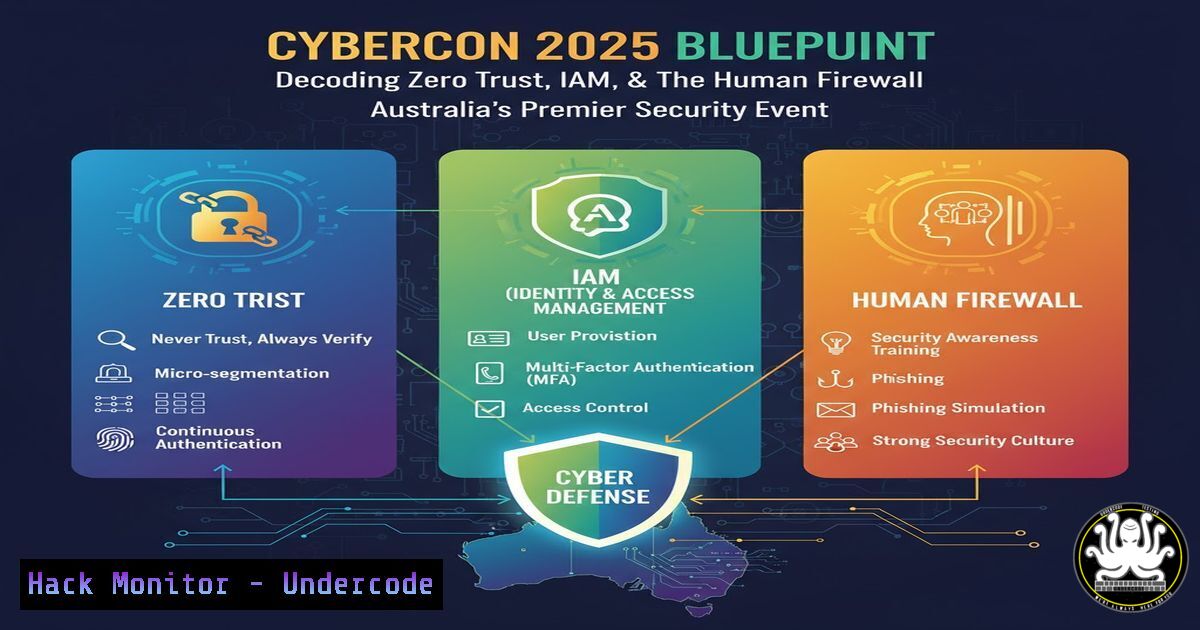
The insights from AISA CyberCon 2025 highlight a critical evolution in cybersecurity, moving beyond perimeter-based defenses towards an identity-centric and resilient architecture. The conference themes, from Zero Trust to the fusion of project management with security delivery, provide a actionable roadmap for organizations aiming to fortify their defenses in an increasingly complex threat landscape.
Learning Objectives:
- Deconstruct the principle of “Identity as the new control plane” and implement core Identity and Access Management (IAM) commands.
- Integrate project management discipline into security operations to improve tool deployment and vulnerability management.
- Apply practical command-line and cloud security techniques to enforce Zero Trust principles and harden critical assets.
You Should Know:
- Identity is the New Perimeter: Mastering Core IAM Concepts
The keynote on “Identity First” underscores that identity is the foundational control plane in a Zero Trust model. Verifying and securing user identities is paramount before granting access to any resource.
Azure AD PowerShell: Get User Sign-In Logs
 Connect to Azure AD
Connect-AzureAD

Retrieve sign-in logs for a specific user to audit access patterns
Get-AzureADAuditSignInLogs -Filter "userDisplayName eq 'John Doe'"
Step-by-step guide:
1. Open PowerShell as an Administrator.
- Install the `AzureAD` module using `Install-Module -Name AzureAD` if not already present.
- Run `Connect-AzureAD` and authenticate with an administrator account.
- Execute the `Get-AzureADAuditSignInLogs` command, filtering by userPrincipalName, appDisplayName, or status to investigate login activity. This is crucial for detecting anomalous sign-ins that could indicate compromised credentials.
2. Enforcing Zero Trust with Conditional Access
A Zero Trust strategy requires strict access controls that adapt to risk. Conditional Access policies in cloud environments are the enforcement mechanism for “never trust, always verify.”
Microsoft Graph API Call: Create a Conditional Access Policy
 This is a template for a Graph API POST request. Requires a valid Bearer token.
curl -X POST "https://graph.microsoft.com/v1.0/identity/conditionalAccess/policies" \
-H "Authorization: Bearer {token}" \
-H "Content-Type: application/json" \
-d '{
"displayName": "Require MFA for all admins",
"state": "enabled",
"conditions": {
"applications": { "includeApplications": ["All"] },
"users": { "includeUsers": ["All"] },
"locations": { "includeLocations": ["All"] }
},
"grantControls": {
"operator": "OR",
"builtInControls": ["mfa"]
}
}'
Step-by-step guide:
- Obtain an access token with the `Policy.ReadWrite.ConditionalAccess` permission for the Microsoft Graph API.
- Use a tool like `curl` or Postman to send the HTTP POST request.
- The JSON body defines the policy: it applies to “All” applications, users, and locations, and the grant control requires Multi-Factor Authentication (MFA). This automates the enforcement of strong authentication, a core tenet discussed at CyberCon.
-
Linux Server Hardening: The First Line of Defense
Before deploying complex IAM systems, ensuring your underlying servers are hardened is a non-negotiable baseline. This involves configuring systems to reduce the attack surface.
Linux Command: Audit SSH Authentication Attempts
 Check for failed SSH password attempts, which can indicate brute-force attacks
sudo grep "Failed password" /var/log/auth.log

Alternatively, on systems using journald
sudo journalctl _SYSTEMD_UNIT=ssh.service | grep "Failed password"
Step-by-step guide:
1. Open a terminal on your Linux server.
- Use `sudo` to elevate privileges for reading log files.
- The `grep “Failed password”` command filters the authentication log (
/var/log/auth.logorsecure) to show only failed login attempts. - Monitor the output for source IP addresses with a high number of failures, which should be investigated and potentially blocked via a tool like
fail2ban.
4. Windows Security Auditing with PowerShell
Understanding who is accessing what and when is critical for detecting lateral movement and privilege escalation within a Windows environment.
Windows PowerShell: Query Security Log for Specific Event ID
 Get all Event ID 4624 (successful logon) and 4625 (failed logon) from the security log
Get-WinEvent -FilterHashtable @{LogName='Security'; ID=4624,4625} -MaxEvents 50
Step-by-step guide:
1. Open PowerShell as an Administrator.
- The `Get-WinEvent` cmdlet is used to query Windows event logs.
- The `-FilterHashtable` parameter specifies the log name (‘Security’) and the Event IDs to retrieve. ID 4624 is a successful logon, and 4625 is a failed logon.
- The `-MaxEvents` parameter limits the output. Analyzing these events helps track user access patterns and identify potential brute-force attacks or account misuse.
5. Cloud Asset Discovery and Inventory
You cannot secure what you do not know you have. In cloud environments, maintaining an accurate and real-time inventory of assets is the first step towards governance and protection.
AWS CLI: List All S3 Buckets and Their Encryption Status
 List all S3 buckets
aws s3api list-buckets --query "Buckets[].Name"

Check the encryption status for each bucket
aws s3api get-bucket-encryption --bucket YOUR_BUCKET_NAME
Step-by-step guide:
- Ensure the AWS CLI is installed and configured with credentials that have `s3:ListAllMyBuckets` and `s3:GetEncryptionConfiguration` permissions.
- The first command lists all S3 buckets in the account. The `–query` parameter formats the output to show only bucket names.
- For each bucket identified, run the second command, replacing
YOUR_BUCKET_NAME, to verify if default encryption is enabled. Unencrypted buckets holding sensitive data represent a critical misconfiguration and data exposure risk.
6. Vulnerability Assessment with Nmap
Active reconnaissance of your own network is essential to understand the attack surface from an adversary’s perspective.
Nmap Command: Basic Service and OS Discovery Scan
 Perform a TCP SYN scan with service version and OS detection
sudo nmap -sS -sV -O target_ip_or_subnet
Step-by-step guide:
- Install `nmap` on your Linux or Windows machine.
- Run the command with `sudo` (on Linux) or Administrator privileges (on Windows) for OS detection (
-O). - The `-sS` flag initiates a TCP SYN scan, which is stealthier than a full connect scan.
- The `-sV` flag probes open ports to determine service and version information.
- The output provides a map of live hosts, open ports, and running services, which is the foundational data for any vulnerability management program.
7. Container Security: Scanning for Vulnerabilities
The shift to cloud-native technologies demands security integration into the DevOps pipeline. Scanning container images for known vulnerabilities is a critical step.
Docker & Grype Command: Scan a Local Image
 First, pull an image or build your own
docker pull nginx:latest

Use Grype (a vulnerability scanner by Anchore) to scan the image
grype docker:nginx:latest
Step-by-step guide:
1. Ensure Docker is running on your system.
2. Install `grype` from the Anchore GitHub repository.
- Pull a container image from a registry or use one you have built locally.
- Run `grype docker:IMAGE_NAME:TAG` to scan the image layers against a database of known vulnerabilities.
- The report will list CVEs, severities, and affected packages, allowing developers to remediate issues before deployment—a practice that aligns project management and security discipline.
What Undercode Say:
- Identity is the Primary Attack Vector: The consolidation of security controls around identity means that compromised credentials are more devastating than ever. Investing in robust MFA and continuous access monitoring is no longer optional.
- Process Discipline is a Force Multiplier: The integration of project management into cyber teams, as highlighted at CyberCon, is a silent superpower. It ensures that security tools are deployed effectively, maintained properly, and deliver measurable value, moving beyond ad-hoc implementations to a programmatic approach.
The overarching narrative from CyberCon 2025 is that technological controls, while advanced, are only as strong as the human and process frameworks that support them. The “M&Ms to sell MFA” anecdote perfectly encapsulates this: the most technically perfect solution will fail without executive buy-in and user adoption. The future of cybersecurity is not in finding a single silver bullet but in weaving together strong identity foundations, automated and sensible technical controls, and a culture of resilience driven by clear processes.
Prediction:
The themes of AISA CyberCon 2025 foreshadow a future where AI-powered identity attacks will become the norm, with adversaries using generative AI to craft highly personalized phishing campaigns and mimic behavioral biometrics. Organizations that fail to adopt the adaptive, identity-first security models championed at the conference will face an onslaught of automated, intelligent attacks that easily bypass traditional, static defenses. The convergence of AI in both attack and defense will define the next era of cyber conflict, making the human-element of security awareness and process discipline the ultimate differentiator.
🎯Let’s Practice For Free:
IT/Security Reporter URL:
Reported By: Markcross Cyberconmelbourne25 – Hackers Feeds
Extra Hub: Undercode MoN
Basic Verification: Pass ✅


