
Listen to this Post
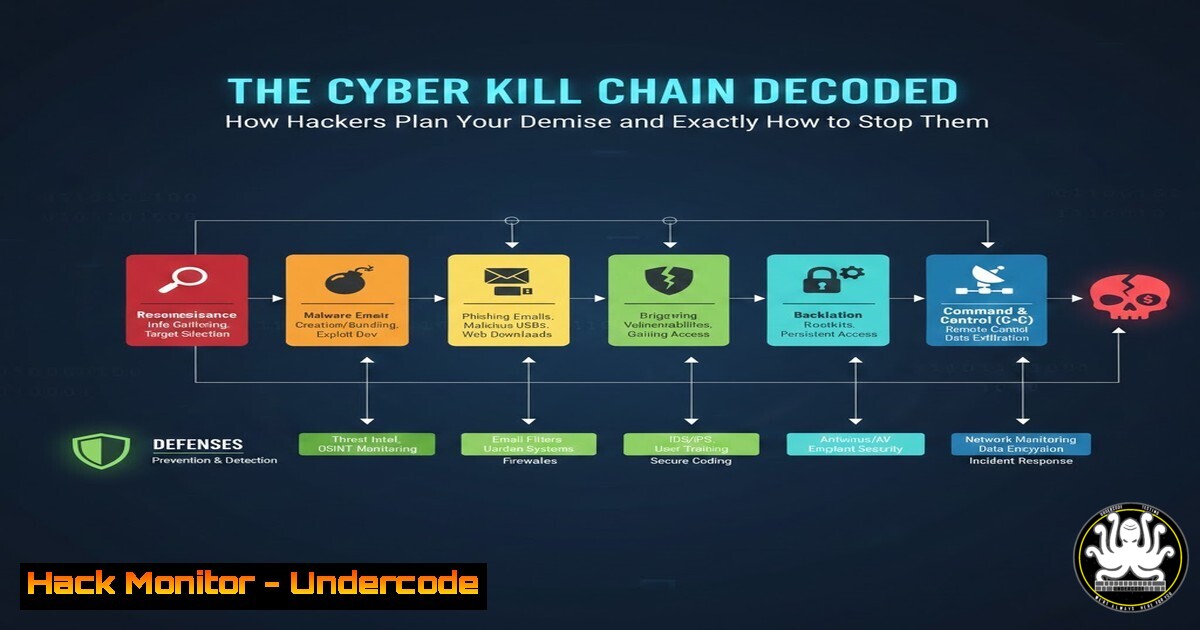
Introduction:
The Cyber Kill Chain, a military-originated framework adapted by Lockheed Martin, provides a critical lens through which to view cyber-attacks not as random events, but as orchestrated campaigns. Understanding this seven-stage model is fundamental for transitioning from reactive security to proactive defense, enabling IT and SOC teams to disrupt adversaries long before they achieve their final objectives.
Learning Objectives:
- Understand the function and technical implications of each stage in the Cyber Kill Chain.
- Apply practical, hands-on commands and configurations to detect and break the chain at multiple points.
- Develop a layered defense strategy that aligns security controls with specific adversary tactics.
You Should Know:
1. Reconnaissance: The Digital Footprint Hunt
This is the information-gathering phase. Attackers use passive (OSINT) and active techniques to map your digital presence. This includes identifying employee emails via LinkedIn (as seen in the source post), scanning for open ports, and enumerating subdomains.
Step‑by‑step guide explaining what this does and how to use it:
Offensive View (OSINT): Use `theHarvester` to collect emails and subdomains.
theHarvester -d example.com -b google,linkedin
Defensive Action (Active Scanning Detection): Monitor your firewall and IDS logs for scanning patterns. Use `fail2ban` on Linux servers to block IPs performing repetitive scans.
 Monitor fail2ban logs for SSH scan bans
sudo tail -f /var/log/fail2ban.log
Mitigation: Implement strict social media policies, use generic contact emails on public websites, and deploy threat intelligence feeds to know when your assets are being scanned.
2. Weaponization: Crafting the Digital Trojan Horse
Here, attackers pair a remote access Trojan (RAT) or other payload with an exploit into a deliverable weapon, like a malicious PDF or a weaponized Office document.
Step‑by‑step guide explaining what this does and how to use it:
Offensive View (Understanding the Artifact): Analysts can safely examine weaponized files in a sandbox like ANY.RUN or Cuckoo Sandbox.
Defensive Action (Endpoint Hardening):
Windows: Use AppLocker or Windows Defender Application Control to enforce whitelisting of allowed executables.
Open Local Security Policy to configure AppLocker (secpol.msc)
Linux: Implement mandatory access control with `SELinux` or `AppArmor` to restrict process capabilities.
 Check SELinux status
getenforce
Mitigation: Deploy advanced endpoint protection (EDR) that uses behavioral analysis to detect weaponization artifacts, not just signature-based detection.
3. Delivery: The Phishing Hook Cast
The weapon is transmitted to the victim via email, USB, web drive-by, or other means. This stage is highly visible to defenders.
Step‑by‑step guide explaining what this does and how to use it:
Defensive Action (Email & Web Filtering):
Configure DMARC, DKIM, and SPF to prevent email spoofing.
Use secure email gateways (SEGs) with sandboxing for attachments.
Deploy web proxies with SSL inspection to block access to known malicious URLs.
Technical Check (SPF Record):
 Use dig to check a domain's SPF record
dig TXT example.com | grep spf
Mitigation: Conduct regular, simulated phishing training. Enforce macro blocking in Office documents and disable auto-execute for removable media.
4. Exploitation: Triggering the Breach
The exploit code is executed, taking advantage of a vulnerability in the target software (e.g., a browser, Adobe Reader, an OS kernel).
Step‑by‑step guide explaining what this does and how to use it:
Offensive View (Metasploit Example): This demonstrates how an attacker might leverage a known vulnerability.
 Start Metasploit console
msfconsole
use exploit/windows/smb/ms17_010_eternalblue
set RHOSTS <target_ip>
exploit
Defensive Action (Vulnerability Management): This is your most critical control. Prioritize patching based on exploitability.
Linux Patch Check: `sudo apt update && sudo apt list –upgradable`
Windows: Enforce regular updates via Group Policy (gpedit.msc > Computer Config > Admin Templates > Windows Components > Windows Update).
Mitigation: Implement a robust patch management cycle. Use intrusion prevention systems (IPS) with virtual patches for critical, unpatched vulnerabilities.
5. Installation: Establishing the Foothold
After exploitation, malware installs itself to maintain persistence, often via registry keys, scheduled tasks, or malicious services.
Step‑by‑step guide explaining what this does and how to use it:
Defensive Action (Persistence Hunting):
Windows (PowerShell): Check for common persistence locations.
 Check scheduled tasks
Get-ScheduledTask | Where-Object {$_.TaskPath -notlike "\Microsoft\"}
 Check run keys
reg query HKCU\Software\Microsoft\Windows\CurrentVersion\Run
Linux: Check cron jobs, user startup folders, and systemd services.
 Check for user cron jobs
crontab -l
 List systemd services
systemctl list-unit-files --state=enabled
Mitigation: Use EDR tools with continuous monitoring to detect changes to persistence mechanisms. Employ allow-listing to prevent unauthorized binaries from executing.
6. Command & Control (C2): The Attacker’s Lifeline
The compromised host establishes an outbound connection to the attacker’s server to receive instructions. This is often hidden in DNS or HTTPS traffic.
Step‑by‑step guide explaining what this does and how to use it:
Defensive Action (Network Monitoring & Filtering):
Use firewalls to restrict outbound traffic to only necessary ports/protocols.
Deploy a secure DNS resolver (like Cisco Umbrella, OpenDNS) that blocks known C2 domains.
Analyze network flows with tools like `Zeek` (formerly Bro) or Suricata.
 Check for unusual outbound connections with netstat
netstat -antp | grep ESTA | grep -v :443 | grep -v :80
Mitigation: Implement network segmentation to limit lateral movement. Use threat intelligence to block IPs and domains associated with C2 infrastructure. Consider egress filtering.
7. Actions on Objectives: The Final Payoff
The attacker executes their goal: data exfiltration, ransomware encryption, or system destruction. Detection here is often too late to prevent damage.
Step‑by‑step guide explaining what this does and how to use it:
Defensive Action (Data Loss Prevention & Integrity Monitoring):
Deploy Data Loss Prevention (DLP) solutions to monitor and block large unauthorized data transfers.
Use File Integrity Monitoring (FIM) to alert on critical file changes (e.g., mass encryption by ransomware).
 Linux: Use auditd to monitor a sensitive directory
sudo auditctl -w /etc/ -p wa -k etc_monitor
Maintain secure, offline backups and regularly test restoration procedures.
What Undercode Say:
- The Kill Chain is a Blueprint, Not a Prison: While the model is linear, modern attacks are often looping and iterative. Defenders must use the chain to identify weak points but remain agile against adaptive threats.
- Early Disruption is Cost-Effective: The financial and operational cost of disrupting an attack at the Reconnaissance or Delivery stage is exponentially lower than during Data Exfiltration. Invest in layered controls focused on the left side of the chain.
Analysis:
The Cyber Kill Chain remains a vital pedagogical and operational tool because it forces a shift in mindset from “incident response” to “campaign denial.” By mapping defensive controls to each stage, organizations can build a resilient security posture that raises the adversary’s cost and likelihood of failure. However, its limitation lies in its linearity; modern, sophisticated attacks involving lateral movement and living-off-the-land techniques (LotL) may oscillate between stages. Therefore, it should be used in conjunction with other models like MITRE ATT&CK, which provides a more granular, tactic-and-technique-based view of adversary behavior.
Prediction:
The future of the Cyber Kill Chain will be defined by AI and automation on both sides. Attackers will use AI to conduct hyper-realistic reconnaissance and spear-phishing at scale, while also developing adaptive malware that can change its C2 patterns autonomously. Defensively, AI-powered Security Orchestration, Automation, and Response (SOAR) platforms will become essential. These systems will automatically correlate weak signals across the kill chain—like a scan from a new IP followed by a suspicious email spike—to identify and break attack sequences in real-time, compressing the “dwell time” from months to minutes. The framework will evolve from a manual checklist to the core logic of autonomous cyber defense systems.
▶️ Related Video (76% Match):
🎯Let’s Practice For Free:
IT/Security Reporter URL:
Reported By: Ogbo Miracle – Hackers Feeds
Extra Hub: Undercode MoN
Basic Verification: Pass ✅


