Listen to this Post
Introduction:
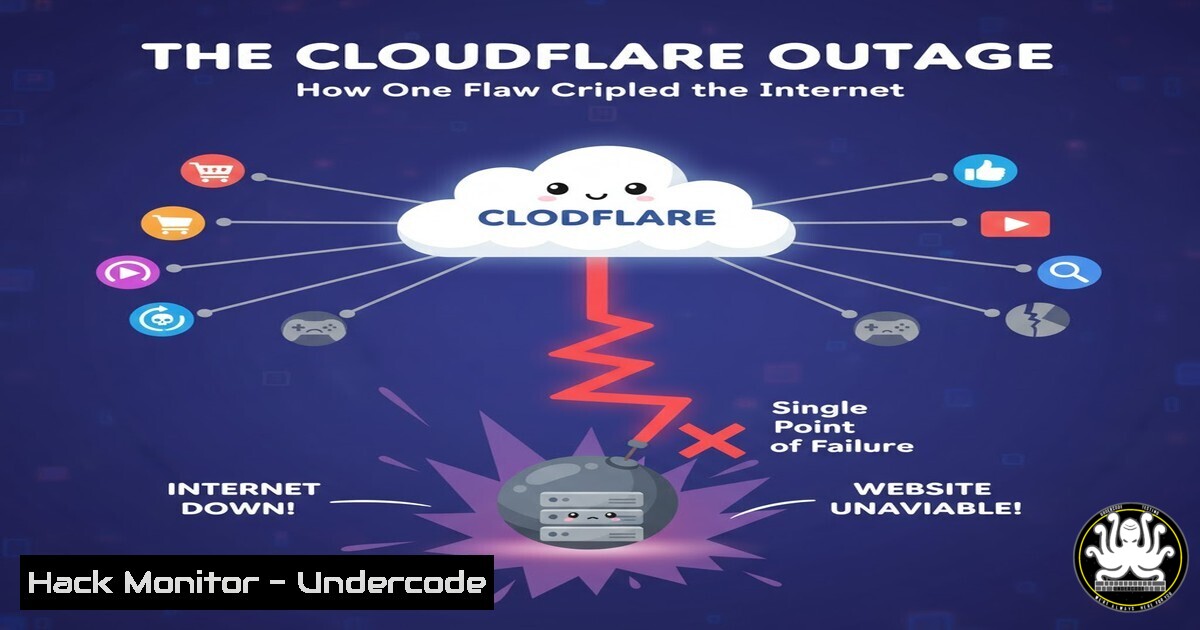
A recent global Cloudflare outage sent ripples across the internet, demonstrating the profound fragility of our interconnected digital world. This incident, which rendered countless websites and services inaccessible, serves as a stark reminder of the critical importance of resilient, multi-layered infrastructure. For cybersecurity and IT professionals, it underscores the urgent need to architect systems that can withstand the failure of even the most robust third-party providers.
Learning Objectives:
- Understand the technical causes and cascading effects of a major CDN and DNS outage.
- Learn immediate diagnostic commands and steps to identify and troubleshoot dependency failures.
- Develop strategies for building resilience and redundancy to mitigate the impact of third-party service disruptions.
You Should Know:
- The Anatomy of a Global Outage: More Than Just a “Glitch”
The Cloudflare outage was not a simple server reboot; it was a systemic failure in a critical piece of internet plumbing. Cloudflare provides Content Delivery Network (CDN), Distributed Denial of Service (DDoS) mitigation, and, most critically, Domain Name System (DNS) services. When their infrastructure experiences a fault, it doesn’t just take down one website—it breaks the pathway that translates human-readable domain names (like google.com) into machine-readable IP addresses. This is a classic single point of failure (SPOF) scenario on a global scale. The internet’s reliance on a handful of major providers like Cloudflare, AWS, and Google Cloud creates a concentration of risk.
- Immediate Diagnostics: Is It You, or Is It the Internet?
When services suddenly become unreachable, your first step is to diagnose the scope of the problem. This helps determine if the issue is local to your network, the specific service, or a broader internet outage.
Step-by-step guide:
Step 1: Check Your Local Network. Verify your device has a valid IP address and can reach your local gateway. Basic connectivity is the first thing to rule out.
Step 2: Use Command-Line Tools to Isolate the Failure.
Ping: Start by pinging a well-known, reliable IP address to test basic connectivity, then try a domain name.
 Linux/macOS/Windows (Command Prompt)
ping 8.8.8.8  Tests basic internet reachability via Google's DNS
ping google.com  Tests DNS resolution AND reachability
If the first command works but the second fails, DNS is likely the problem.
Dig / Nslookup: These tools query DNS servers directly and are the definitive way to check DNS health.
 Linux/macOS (using 'dig')
dig cloudflare.com
 Check a specific DNS resolver (e.g., Google's)
dig @8.8.8.8 cloudflare.com

Windows (using 'nslookup')
nslookup cloudflare.com
nslookup cloudflare.com 8.8.8.8
A `SERVFAIL` or timeout response from dig, or a “Can’t find” message in nslookup, indicates a DNS failure.
Traceroute: This shows the path your traffic takes and can identify where it’s failing.
 Linux/macOS
traceroute cloudflare.com

Windows
tracert cloudflare.com
If the trace dies at a Cloudflare-owned IP block, it confirms the issue is on their end.
3. Architecting for Resilience: Redundancy is Not Optional
Relying on a single provider for critical services like DNS is a significant risk. The core mitigation strategy is redundancy.
Step-by-step guide:
Step 1: Implement Multi-Provider DNS. Use at least two different DNS providers. For your public domains, use one as your primary and another as your secondary nameserver. For your internal clients and resolvers, configure multiple upstream DNS servers.
Example for a domain’s DNS settings: Use both Cloudflare and AWS Route53 nameservers.
Example for a local resolver (Linux): Edit `/etc/resolv.conf` to include multiple `nameserver` entries.
nameserver 1.1.1.1  Cloudflare
nameserver 8.8.8.8  Google
nameserver 9.9.9.9  Quad9
Step 2: Deploy a Secondary CDN. For critical assets, use a multi-CDN strategy. This involves configuring your application to pull content from an alternative CDN (like AWS CloudFront or Fastly) if your primary CDN is unreachable. This can be managed via intelligent DNS (DNS-based failover) or within your application’s logic.
4. Leveraging AIOps for Proactive Outage Detection
Artificial Intelligence for IT Operations (AIOps) can transform how organizations respond to outages. By analyzing massive streams of telemetry data, AI models can detect anomalies that precede a full-blown outage.
Step-by-step guide:
Step 1: Ingest Metrics and Logs. Use tools like Prometheus, Grafana, or commercial SIEM/SOAR platforms to collect performance data (latency, error rates, traffic volume) from your applications and infrastructure.
Step 2: Configure Anomaly Detection. Set up alerts based on deviations from baseline behavior, not just static thresholds. For example, a sudden 300% spike in DNS `SERVFAIL` responses from a specific provider is a critical anomaly.
Step 3: Automate Response Playbooks. When an anomaly is detected, automated playbooks can be triggered. For instance, an AIOps system could automatically shift a percentage of traffic to a standby CDN or fail over DNS, potentially mitigating user impact before the outage is even widely reported.
- Cloud Hardening: Securing Your Perimeter When the Guard is Down
An outage in a security provider like Cloudflare can expose your origin servers to direct attack if they are not properly hardened.
Step-by-step guide:
Step 1: Restrict Access to Origin IPs. Ensure your web server (e.g., nginx, Apache) only accepts traffic from your CDN’s IP ranges. If Cloudflare goes down, this blocks all direct-to-origin attacks.
Example for nginx:
allow 173.245.48.0/20;  Cloudflare IP range
allow 103.21.244.0/22;  Cloudflare IP range
deny all;
Step 2: Implement Geo-Blocking and Rate Limiting at the Origin. As a secondary layer, configure your firewall or web server to block traffic from geographic locations you don’t serve and to rate-limit connections to prevent DDoS attacks.
Step 3: Use API Gateways for Microservices. For API-based services, an API Gateway can provide authentication, rate limiting, and caching, protecting your backend services even if the primary CDN is unavailable.
What Undercode Say:
- The Illusion of Uptime: No third-party service, regardless of its reputation, offers 100% uptime. Architectures must be designed with an explicit assumption of failure.
- The Shared Responsibility Model Extends to Resilience: Security is a shared model; so is availability. It is the client’s responsibility to build redundancy, not the provider’s to be infallible.
This outage is a powerful case study in systemic risk. The internet’s centralized nature around a few key platforms creates a “too big to fail” dynamic that is inherently unstable. The jokes about a single bug report taking down the internet, while humorous, point to a deeper truth: our digital ecosystem is more interdependent and fragile than many businesses realize. Proactive investment in multi-vendor strategies, zero-trust architectures that minimize implicit trust in any single entity, and advanced AI-driven monitoring is no longer a luxury for large enterprises; it is a fundamental requirement for operational continuity.
Prediction:
The Cloudflare outage will accelerate the adoption of “chaos engineering” practices in mainstream IT, where companies intentionally inject failures into their systems to test resilience. We will see a rapid growth in the multi-CDN and multi-cloud market, with new services emerging to automate failover between providers seamlessly. Furthermore, this event will fuel the development of more decentralized web protocols (like IPFS and Solid) as a long-term countermeasure to the centralization of critical internet infrastructure, pushing the industry toward a more federated and fault-tolerant model.
🎯Let’s Practice For Free:
IT/Security Reporter URL:
Reported By: Nagendratiwari01 Cloudflare – Hackers Feeds
Extra Hub: Undercode MoN
Basic Verification: Pass ✅


