Listen to this Post
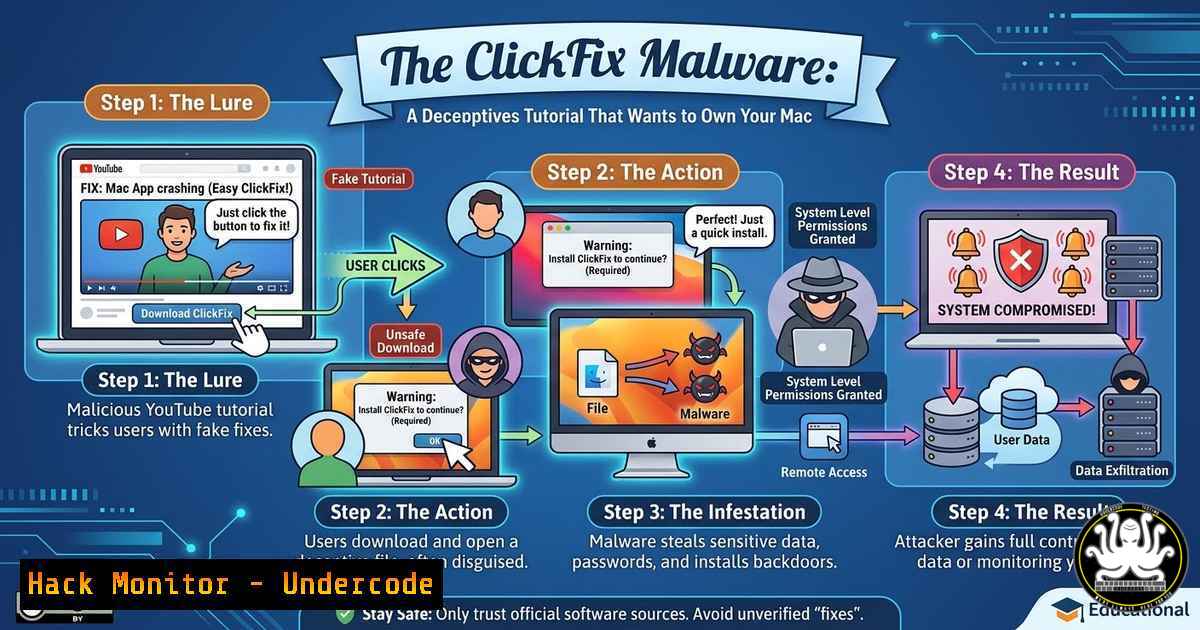
Introduction:
Cybercriminals are leveraging a devious new tactic: malicious ads that redirect users to YouTube tutorials masquerading as helpful guides, only to deliver the “ClickFix” stealer malware. This technique exploits user trust in both advertising networks and legitimate-looking video platforms, turning a search for a solution into a direct infection vector.
Learning Objectives:
- Identify the ClickFix technique and understand how malicious ads use YouTube redirects to deliver payloads.
- Analyze the specific indicators of compromise (IoCs) for the SHubStealer malware associated with this campaign.
- Implement defensive measures, including command-line checks on macOS and Linux, to detect and block such threats.
You Should Know:
1. Unpacking the ClickFix Malware Campaign
The post highlights a sophisticated social engineering campaign where attackers purchase ads that appear legitimate. When clicked, these ads redirect users to YouTube videos. The video itself, however, is a trap; it often contains a description or a link that instructs the user to run a command or download a file, claiming it’s a “fix” for a common problem. In this context, the “ClickFix” is a stealer malware—likely the SHubStealer variant mentioned in the comments—designed to exfiltrate credentials, browser data, and cryptocurrency wallets from macOS systems.
The initial access vector relies on malvertising. Attackers exploit ad networks to display convincing ads that bypass basic security filters. The redirection to YouTube adds a layer of legitimacy; users are more likely to trust a link leading to a well-known platform. The subsequent social engineering is precise: the video title and description instruct the user to open the Terminal (on macOS) and paste a command, often disguised as a script to activate software, fix an error, or verify system integrity. This command, in reality, downloads and executes the stealer payload.
Step‑by‑step guide to analyze and detect this activity:
1. Monitor Process Execution on macOS:
To detect if a user has inadvertently executed such a script, check for unusual curl, wget, or `bash` processes launched from browser directories.
 On macOS/Linux, check running processes for suspicious commands
ps aux | grep -E "curl|wget|bash.http"
 Look for processes originating from the browser's cache or downloads folder
ps aux | grep "[bash]ownloads"
2. Check for Launch Agents (Persistence):
SHubStealer often establishes persistence to survive reboots. Use the following command to list all launch agents and daemons, paying close attention to newly created plist files.
 List all LaunchAgents for the current user
ls -la ~/Library/LaunchAgents/
 Check for recently modified plist files
find ~/Library/LaunchAgents/ -type f -name ".plist" -mtime -1
3. Analyze Network Connections:
After execution, the stealer will attempt to communicate with a command-and-control (C2) server. Use `lsof` to identify any suspicious outbound connections.
 List all open network connections and the associated process
sudo lsof -i -P | grep ESTABLISHED
 Specifically check for connections to known malicious IPs or domains (replace with actual IoCs from threat intel)
netstat -an | grep -E ":{PORT_NUMBER}"
2. Defensive Hardening Against Malvertising and Stealers
Preventing this type of infection requires a multi-layered approach that combines user education with technical controls. The core of the issue lies in the abuse of legitimate platforms (ad networks and YouTube) to deliver malicious instructions. Defenders must focus on disabling the initial execution pathway and containing the payload if it slips through.
From a technical perspective, organizations and individuals can implement Group Policy Objects (GPOs) on Windows, configuration profiles on macOS, and browser policies to restrict the execution of downloaded files or scripts directly from the browser’s context. On macOS, the `quarantine` attribute is a critical line of defense. When a file is downloaded via a browser or email, macOS attaches a quarantine flag, and Gatekeeper checks the file before execution. Attackers often try to bypass this by instructing users to remove the quarantine attribute with xattr -d com.apple.quarantine. Monitoring for the use of `xattr` is a key detection strategy.
Step‑by‑step guide to harden endpoints:
1. Enforce Script Execution Policies (Windows):
On Windows, use PowerShell to restrict script execution to signed scripts only. This prevents a user from inadvertently running a malicious script from a YouTube tutorial.
 Set execution policy to restricted or allsigned
Set-ExecutionPolicy -ExecutionPolicy Restricted -Scope LocalMachine
 Log script execution for audit
Get-WinEvent -FilterHashtable @{LogName='Windows PowerShell'; ProviderName='PowerShell'} | Select-Object -First 10
2. Harden Browser Security on macOS/Linux:
Configure browser policies to disable automatic downloads and prompt for save location. Use command-line tools to block known malicious ad domains at the hosts file or DNS level.
 On Linux/macOS, add malicious domains to /etc/hosts to null route them
echo "0.0.0.0 malicious-ad-domain.com" | sudo tee -a /etc/hosts
 Flush DNS cache (macOS)
sudo dscacheutil -flushcache; sudo killall -HUP mDNSResponder
3. Deploy and Configure Sysmon (Windows):
System Monitor (Sysmon) is an invaluable tool for logging process creation and network connections, allowing you to detect the patterns associated with malvertising and stealer payloads.
<!-- Sysmon config snippet to capture suspicious process creation -->
<Sysmon schemaversion="4.22">
<EventFiltering>
<ProcessCreate onmatch="exclude">
<!-- Exclude known good processes -->
<Image condition="is">C:\Windows\System32\svchost.exe</Image>
</ProcessCreate>
<ProcessCreate onmatch="include">
<!-- Include any process launched from user temp or downloads -->
<Image condition="contains">AppData\Local\Temp</Image>
<Image condition="contains">Downloads</Image>
</ProcessCreate>
</EventFiltering>
</Sysmon>
4. Implement Application Allowlisting:
Use tools like `fseventer` (macOS) or `Software Restriction Policies` (Windows) to prevent execution from common download folders.
 On macOS, create a configuration profile to block execution from Downloads folder
 This is a simplified version using tccutil (requires MDM for full enforcement)
tccutil reset SystemPolicyAllFiles
 Monitor for attempts to execute from Downloads using fs_usage
sudo fs_usage -w -f filesys | grep "Downloads"
3. Incident Response and Threat Intelligence
When a potential infection is detected, swift incident response is required to contain the breach and collect intelligence. The campaign described uses “ClickFix” as a lure, and threat actors often reuse infrastructure. By analyzing the artifacts left behind—such as the specific command in the YouTube video description, the hashes of downloaded files, and the C2 domains—organizations can build indicators to protect their network.
Reporting the malicious ads to platforms like Google (as noted in the post) is a critical step in disrupting the campaign. However, internal response must focus on isolating the affected system, extracting the payload for analysis, and hunting for lateral movement if credentials were stolen.
Step‑by‑step guide for response:
1. Collect Memory and Disk Artifacts (Linux/macOS):
If a system is suspected of running the SHubStealer, capture a memory image for analysis.
 Use dd to capture memory (Linux)
sudo dd if=/dev/mem of=~/memory.dump bs=1M
 For macOS, use the built-in 'heap' command or third-party tools
sudo heap -s > ~/heap_dump.txt
 Gather running processes and network connections
ps aux > ~/process_list.txt
sudo lsof -i > ~/network_connections.txt
2. Extract Browser Data for Analysis:
Since the payload is a stealer, examining browser artifacts can reveal the scope of data exfiltration.
 On macOS/Linux, examine the browser local storage for malicious extensions or data
ls -la ~/Library/Application\ Support/Google/Chrome/Default/Local\ Storage/
 For Firefox, check the profile directory
ls -la ~/Library/Application\ Support/Firefox/Profiles//storage/
3. Utilize YARA for Payload Detection:
Once a sample is obtained, use YARA rules to scan the system for known SHubStealer patterns.
rule SHubStealer_Indicator {
meta:
description = "Detects SHubStealer based on string patterns"
strings:
$s1 = "shub_stealer" wide ascii
$s2 = "com.apple.quarantine" wide ascii
$s3 = "exfiltrate_data" wide ascii
condition:
any of them
}
What Undercode Say:
- Key Takeaway 1: Malvertising remains a potent initial access vector. Trusting platform reputation alone (e.g., YouTube, LinkedIn) is insufficient; security controls must operate at the endpoint execution level.
- Key Takeaway 2: The “ClickFix” technique is a hybrid social engineering and technical attack. Defenders must prioritize user training that specifically warns against copying and pasting commands from online tutorials without verification.
This campaign underscores a critical shift in attacker methodology: leveraging the trust users place in well-known platforms to bypass traditional network defenses. The use of YouTube as a delivery mechanism for malware instructions makes the attack chain difficult to detect with conventional URL filtering alone. Security teams must pivot towards endpoint detection and response (EDR) solutions that monitor process creation, command-line arguments, and the use of system utilities like curl, wget, and xattr. The incident also highlights the importance of reporting—each reported ad helps disrupt the attacker’s ROI. In the future, we can expect these campaigns to become more sophisticated, possibly integrating AI-generated video content to automate the creation of convincing tutorials, making the social engineering layer even more difficult to distinguish from legitimate content.
Prediction:
As platforms like YouTube and LinkedIn tighten their content moderation, attackers will pivot to abusing new collaboration tools and AI chatbots as delivery mechanisms for malicious commands. The future of such attacks will likely involve AI-generated tutorials that appear hyper-legitimate, coupled with automated, context-aware phishing that personalizes the “fix” based on the user’s operating system and browser fingerprint. Defenders will need to integrate behavioral analytics that detect anomalies in command-line execution patterns, moving beyond simple signature-based detection to identify the intent behind user-driven actions.
▶️ Related Video (84% Match):
🎯Let’s Practice For Free:
IT/Security Reporter URL:
Reported By: Jeromesegura Clickfix – Hackers Feeds
Extra Hub: Undercode MoN
Basic Verification: Pass ✅


