Listen to this Post
Introduction:
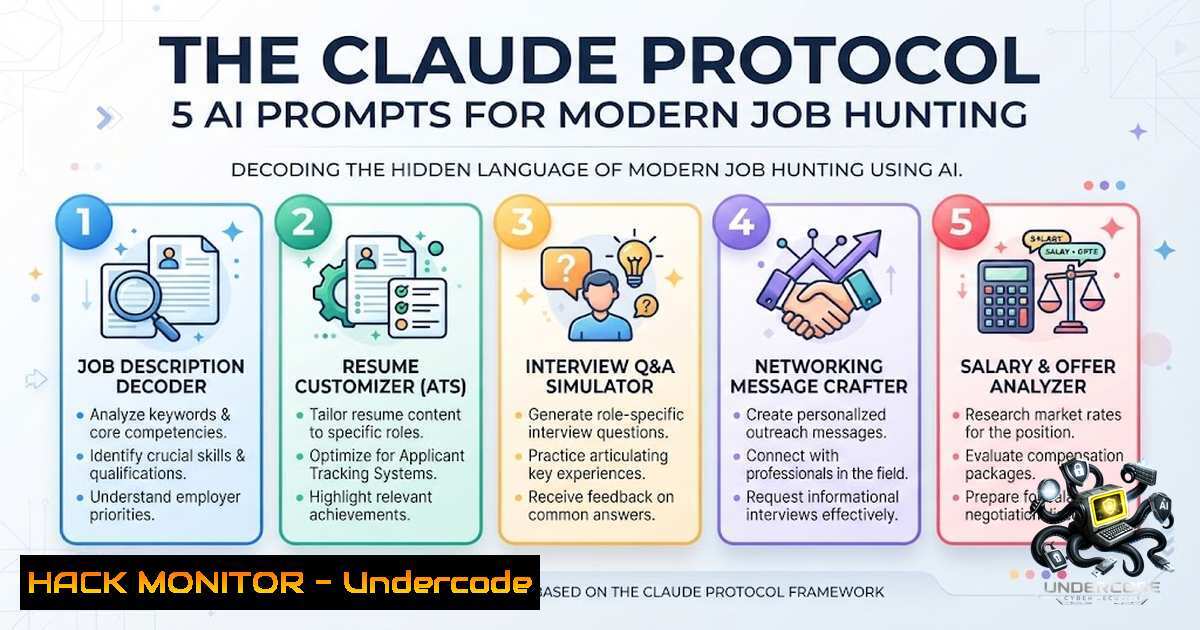
In an increasingly saturated professional landscape, the difference between a candidate who gets 8 interviews in 5 days and one who gets radio silence often isn’t experience, but translation. Leveraging AI, specifically large language models like Claude, has emerged as a critical technical skill for modern career navigation—a form of “prompt engineering” applied to human capital. This article dissects a documented 5-prompt workflow that transforms standard resumes into ATS-optimized assets, treating the job search as a data parsing and output optimization problem.
Learning Objectives:
- Understand how to utilize Claude’s natural language processing to re-engineer resumes for Applicant Tracking Systems (ATS).
- Master the prompt structures required to map existing experience onto specific job description keywords.
- Learn to generate high-impact cover letters and interview preparation scripts that mirror algorithmic expectations.
You Should Know:
- The ATS Parsing Engine & The Resume Rewriter
Applicant Tracking Systems function as the first filter in modern recruitment, scanning documents for specific density of keywords and quantifiable outcomes. The “Resume Optimizer” prompt converts a basic CV into a document designed for machine readability and human impact.
Step‑by‑step guide explaining what this does and how to use it:
1. Input Preparation: Open Claude and paste your current resume in plain text. Ensure formatting is clean to avoid parsing errors.
2. Execute Use the specified prompt: “You are a senior recruiter in [bash]. Rewrite this resume to pass ATS filters, use strong action verbs, and quantify achievements where possible. Keep it truthful to my actual experience.”
3. Action: Claude analyzes the text for weak language and replaces them with industry-standard metrics (e.g., “Responsible for” becomes “Architected” or “Deployed”).
4. Verification: Review the output. Claude invents nothing; it enhances existing data. Count the number of new action verbs and quantify metrics suggested.
5. Implementation: Copy the new bullet points. Save the output as a `.txt` or `.docx` file named Resume_Optimized_v2.
2. The Semantic Keyword Mapper (Job Match Optimizer)
Recruiters and ATS systems use keyword matching to rank candidates. This prompt functions as a semantic mapping tool, aligning your experience language with the specific lexicon of a job description.
Step‑by‑step guide explaining what this does and how to use it:
1. Data Collection: Copy the full text of the Job Description (JD) and your optimized resume.
2. Execute Paste both into Claude and enter: “Here is the job description: [paste JD]. Here is my resume: [paste resume]. Rewrite my bullet points to mirror the language and keywords in this job description without lying.”
3. Action: Claude performs a lexical alignment. If the JD mentions “Stakeholder Management,” Claude will adjust your “Coordinated with teams” bullet to “Managed stakeholder expectations.”
4. Technical Check: Verify that the output maintains truthfulness. This is a translation, not fabrication.
5. Application: Generate a new document for each specific job application you target.
3. The Executive Summary Generator (LinkedIn Optimizer)
Beyond resumes, your LinkedIn “About” section and headline are crucial for searchability. This prompt functions similarly to a meta tag generator for your professional identity.
Step‑by‑step guide explaining what this does and how to use it:
1. Data Input: Paste your current resume summary into Claude.
2. Execute Use: “Convert my resume into an ‘About’ section and Headline. Focus on outcomes, not responsibilities. Include relevant keywords for [job title] roles.”
3. Action: Claude restructures the “I did X” statements into “I achieved Y” narratives.
4. Optimization: Refine the headline to focus on specific technical stacks (e.g., “Cloud Architect | AWS | Kubernetes”) rather than generic titles.
5. Upload: Replace your current LinkedIn summary with the generated text.
4. The Concise Cover Letter Builder
Modern cover letters are short and punchy, often evaluated for specific keyword density. This prompt ensures you hit key requirements without meandering.
Step‑by‑step guide explaining what this does and how to use it:
1. Context Setup: Provide Claude with the final optimized resume and the specific job description.
2. Execute Instruct: “Write a concise cover letter for this role using my resume. Tone: confident but not arrogant. Mention exactly one specific achievement that maps to the job requirements. Max 250 words.”
3. Action: Claude utilizes a “Retrieval-Augmented Generation” approach internally to pull the most relevant achievement from your resume that matches the JD.
4. Refinement: Check for structure (Intro, Specific Achievement, Closing).
5. Export: Save as `Cover_Letter_[bash].txt`.
5. The Simulation Engine (Interview Coach)
This prompt transforms Claude into a scenario-based simulation engine, prepping you for the specific cognitive load of an interview.
Step‑by‑step guide explaining what this does and how to use it:
1. Data Consolidation: Paste the Job Description and your aligned resume into the chat.
2. Execute Enter: “I have an interview for this role. Based on my resume and the job description, ask me the 10 most likely interview questions and help me improve my answers.”
3. Action: Claude analyzes the competencies listed in the JD and generates questions designed to probe those areas.
4. Iteration: Answer the questions in the chat. Claude will provide feedback, suggesting the “STAR” method improvements.
5. Spaced Repetition: Repeat the simulation daily until your answers are fluid and concise.
- Advanced Linux/Windows Commands for the Tech Role (Bonus)
If you are applying for IT, Security, or DevOps roles, your resume must reflect hands-on tooling. Use these commands to verify your technical background before applying.
- Linux (Bash): `grep -r “stakeholder” .` (Used to search for specific keywords in your local files, mimicking ATS behavior).
- Windows (Powershell): `Get-ChildItem -Recurse | Select-String “Achievement”` (Similar search functionality).
- Docker Verification: `docker –version` (Check if you have the necessary containerization tools installed to claim proficiency).
- API Security (Curl): `curl -I https://example.com` (Check headers for security compliance like X-Frame-Options, a common interview question). Use this to secure your online portfolio.
7. The Security Hardening Mindset
In the context of a job search, “security” means ensuring your data is safe during sharing. If you are asked to share your resume with recruiters, utilize IT best practices:
– Email Security: Ensure your email uses TLS encryption.
– File Naming: Use standardized naming (e.g., Lastname_Firstname_Resume.pdf) to avoid malicious file detection issues on corporate servers.
– Link Safety: If sharing a portfolio link, use HTTPS and verify the SSL certificate is valid.
– Cloud Hardening: Ensure you aren’t leaving sensitive personal data in public S3 buckets.
What Undercode Say:
- Key Takeaway 1: Treating the resume as a data structure to be parsed and optimized for an ATS is the baseline for passing the initial screening filter.
- Key Takeaway 2: The use of Claude doesn’t fabricate experience but amplifies the clarity and impact of “hidden” skills through robust language modeling.
- Analysis: The efficiency demonstrated in the anecdote (8 interviews in 5 days) highlights a shift from “searching” to “positioning.” The strategy aligns with algorithmic fairness—ensuring that candidates with less polished writing skills are not unfairly disadvantaged. However, the ultimate risk is the “Homogenization of Voice.” As more users utilize these prompts, there is a danger that resumes will start sounding identical. The key is to use the generated output as a base and inject your unique personality back into the top 10%. This approach is technically sound for the first stage of application, but the “human touch” remains the differentiator in the final round.
Prediction:
- -1: The widespread adoption of these AI prompts will lead to a saturation of identically structured resumes, forcing HR departments to develop more sophisticated behavioral testing to filter candidates.
- +1: The gamification of AI prompt engineering in job searches will level the playing field, allowing candidates with excellent technical skills but poor “salesmanship” to finally secure opportunities.
- -1: The reliance on AI to “get in the door” will increase the demand for in-person interviews that test actual skills, potentially increasing anxiety for those who relied solely on the AI for communication.
- +1: We will likely see the rise of “Resume AI Security” tools, where candidates use AI to “attack” their own resumes to find and fix vulnerabilities before they are filtered out.
- +1: This technical application of LLMs bridges the gap between Human Resources and IT, making it a mandatory skill for modern career progression.
▶️ Related Video (76% Match):
🎯Let’s Practice For Free:
🎓 Live Courses & Certifications:
Join Undercode Academy for Verified Certifications
🚀 Request a Custom Project:
Secure, high-velocity infrastructure and disruptive technological engineering. Contact our engineering team for high-tier development and proprietary systems:
[email protected]
💎 Smart Architecture | 🛡️ Secure by Design | ⭐ Trusted by Thousands
IT/Security Reporter URL:
Reported By: Harishkumar Sh – Hackers Feeds
Extra Hub: Undercode MoN
Basic Verification: Pass ✅


