Listen to this Post
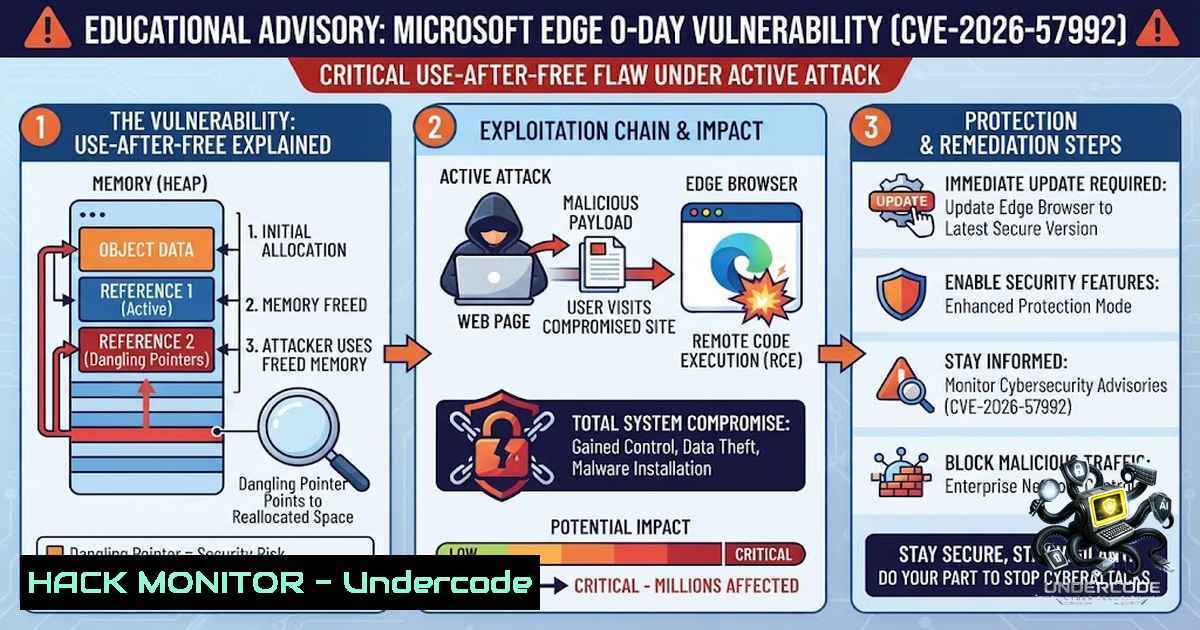
Introduction:
A newly disclosed critical Use-After-Free (UAF) memory corruption vulnerability in Microsoft Edge (Chromium-based) – tracked as CVE-2026-57992 – is sending shockwaves through the cybersecurity community. With a CVSS score of 7.5 (High), this flaw allows an unauthorized remote attacker to execute arbitrary code on affected systems simply by tricking a user into visiting a specially crafted webpage. As of publication, no official patch is available, leaving millions of enterprise and consumer systems exposed to potential compromise.
Learning Objectives:
- Understand the technical mechanics of Use-After-Free (CWE-416) memory corruption vulnerabilities in Chromium-based browsers
- Master the attack chain – from social engineering to memory corruption and arbitrary code execution
- Implement practical, immediate mitigation strategies – including registry-based autofill disablement, Enhanced Security Mode, and enterprise Group Policy controls
You Should Know:
1. Anatomy of the CVE-2026-57992 Use-After-Free Vulnerability
At its core, CVE-2026-57992 is a classic Use-After-Free (UAF) vulnerability – classified under CWE-416. In simple terms, the browser’s memory management system frees a memory region (thinking it is no longer needed), but a dangling pointer continues to reference that now-freed memory. If an attacker can control the content that gets re-allocated into that memory space before the original pointer is used again, they can hijack execution flow and inject malicious code.
The vulnerability resides within Microsoft Edge’s Chromium rendering engine. When a victim visits a malicious webpage, the attacker’s JavaScript and HTML payloads trigger the UAF condition – but not passively. The attack requires user interaction: the victim must perform two sequential tap gestures that inadvertently activate Edge’s autofill functionality. This interaction requirement increases attack complexity (CVSS:AC:H) but does not eliminate the risk.
Why this matters: Unlike many memory corruption bugs that can be triggered without user engagement, this one requires deliberate (though unwitting) victim action. That said, social engineering campaigns – phishing emails, malicious instant messages, or fake update prompts – can easily coerce users into performing these gestures.
Technical Deep Dive – Memory Corruption in Action:
When a browser renders a webpage, it allocates memory for DOM elements, JavaScript objects, and autofill form data. The UAF condition occurs when:
1. Memory is allocated for an autofill-related object
- The object is freed prematurely due to a race condition or improper reference counting
- A dangling pointer still points to the freed memory
- The attacker’s page re-allocates that memory with attacker-controlled data (e.g., a shellcode payload)
- The browser subsequently uses the dangling pointer, now executing the attacker’s code
2. Affected Versions – Who Is at Risk?
Microsoft has confirmed that Edge versions up to 150.0.4078.48 are vulnerable. The fixed version – when released – will be 150.0.4078.48 or later. As of early July 2026, no patch has been made available.
| Microsoft Edge Version | Release Date | Vulnerability Status |
|-||–|
| ≤ 149.0.4022.68 | Prior to 07/2026 | Vulnerable |
| 150.0.4078.48 | 07/03/2026 | Patched (pending official release) |
| > 150.0.4078.48 | Future | Fixed |
Organizations still running older Edge versions (especially those with delayed update cycles) are at heightened risk. Enterprise environments using legacy Windows builds that do not receive automatic browser updates should prioritize this vulnerability immediately.
- The Attack Chain – From Phishing to Full Compromise
Step-by-step attacker methodology:
- Reconnaissance – Attacker identifies target organizations using Microsoft Edge as their primary browser.
- Malicious Page Hosting – Attacker sets up a webpage containing obfuscated JavaScript that triggers the UAF condition in Edge’s autofill mechanism.
- Social Engineering – Victim receives a phishing email, instant message, or malicious ad directing them to the attacker-controlled page.
- User Interaction – Victim visits the page and performs two tap gestures (on touch-enabled devices) or clicks on deceptive form elements, activating autofill.
- Memory Corruption – The UAF condition is triggered, and the attacker’s shellcode is executed within the browser’s process context.
- Arbitrary Code Execution – The attacker gains the ability to run arbitrary code with the privileges of the Edge browser process.
- Post-Exploitation – Depending on the attacker’s objectives, they may:
– Exfiltrate sensitive data (passwords, cookies, session tokens)
– Deploy ransomware or backdoors
– Move laterally across the network
Real-world impact: If successfully exploited, this vulnerability can lead to complete system compromise. The browser process often runs with user-level privileges, but modern sandboxing may limit the scope – though UAF flaws frequently allow sandbox escape when chained with other vulnerabilities.
- Immediate Mitigation Strategies – No Patch? No Problem (For Now)
Since no official patch is currently available, organizations and individual users must adopt defense-in-depth measures.
4.1 Disable Autofill Functionality (Temporary Workaround)
The attack vector relies on Edge’s autofill feature. Disabling autofill significantly reduces the attack surface.
For Windows Registry (Enterprise Deployment):
[HKEY_LOCAL_MACHINE\SOFTWARE\Policies\Microsoft\Edge]
"AutofillAddressEnabled"=dword:00000000
"AutofillCreditCardEnabled"=dword:00000000
For Individual Users (Edge Settings):
1. Open Edge and navigate to `edge://settings/personalinfo`
2. Toggle off “Save and fill address information”
3. Toggle off “Save and fill payment information”
Group Policy (Windows Server / Domain Environments):
- Download the Microsoft Edge ADMX templates
- Navigate to `Computer Configuration > Administrative Templates > Microsoft Edge > Autofill`
– Enable “Disable autofill for addresses” and “Disable autofill for credit cards”
4.2 Enable Enhanced Security Mode
Edge’s Enhanced Security Mode applies additional hardening to the browser’s rendering engine, making exploitation more difficult.
To enable:
1. Navigate to `edge://settings/privacy`
- Under “Security,” select “Enhanced” under the security level options
3. Alternatively, deploy via Group Policy:
Computer Configuration > Administrative Templates > Microsoft Edge > Security > Configure the level of security for Microsoft Edge
Set to "Enhanced"
4.3 Application Guard and Sandboxing
For enterprise environments, Microsoft Defender Application Guard isolates Edge sessions in a hardware-virtualized container, preventing compromise from affecting the host system.
Enable via Group Policy:
Computer Configuration > Administrative Templates > Microsoft Edge > Configure Microsoft Defender Application Guard
Set to "Enabled" with "Isolate Microsoft Edge for both browsing and application Guard mode"
4.4 User Awareness Training
Since the attack requires user interaction, security awareness training is critical. Educate users to:
– Avoid clicking on suspicious links in emails, messages, or social media
– Verify the legitimacy of websites before entering any information
– Report any unusual browser behavior (crashes, pop-ups, unexpected redirects) to IT security teams
- Detection and Monitoring – How to Spot an Exploit Attempt
While no public Proof-of-Concept (PoC) is available as of publication, security teams can monitor for indicators of compromise (IoCs) associated with UAF exploitation.
Windows Event Log Monitoring:
- Event ID 1000 (Application Error) – Edge crashes may indicate memory corruption attempts
- Event ID 1001 (Windows Error Reporting) – Look for Edge.exe crash dumps
- Event ID 4688 (Process Creation) – Monitor for suspicious child processes spawned from Edge.exe
PowerShell Command to Monitor Edge Crashes:
Get-WinEvent -FilterHashtable @{LogName='Application'; ID=1000,1001} |
Where-Object {$_.Message -like 'msedge.exe'} |
Select-Object TimeCreated, Message |
Out-File -FilePath "C:\Logs\Edge_Crashes.log"
Network Monitoring:
- Monitor outbound connections from Edge processes to suspicious domains
- Use a web proxy or firewall to block access to known malicious IPs and domains
- Implement DNS sinkholing for threat intelligence feeds
Endpoint Detection and Response (EDR):
- Deploy EDR solutions that detect unusual memory allocation patterns
- Enable heap spray detection and memory corruption heuristics if supported by your security stack
6. Linux and Cross-Platform Considerations
While Microsoft Edge is primarily associated with Windows, the Chromium-based Edge browser is also available on Linux and macOS. The vulnerability affects the Chromium engine itself – meaning Linux and macOS users are not immune.
For Linux users (Ubuntu/Debian):
 Check current Edge version
edge --version

If vulnerable, monitor for updates
sudo apt update
sudo apt list --upgradable | grep microsoft-edge

Disable autofill via command line (temporary workaround)
edge --disable-autofill
For macOS users:
 Check version
/Applications/Microsoft\ Edge.app/Contents/MacOS/Microsoft\ Edge --version

Disable autofill via defaults
defaults write com.microsoft.edgemac AutofillEnabled -bool false
7. What to Do When the Patch Arrives
Microsoft is expected to release a security update via the Microsoft Security Response Center (MSRC). Once available:
Immediate Patching Steps:
1. Check for updates manually:
- Navigate to `edge://settings/help`
– Edge will automatically check for and download the latest version
2. Enterprise deployment via WSUS or SCCM:
- Approve the Edge security update in your update management console
- Deploy to pilot groups first, then to production
3. Verify patch installation:
- After updating, confirm the version is 150.0.4078.48 or later
- Run a vulnerability scanner to confirm CVE-2026-57992 is no longer detected
4. Re-enable autofill (if disabled as a workaround):
- Remove the registry keys or Group Policy settings that disabled autofill
- Or keep them disabled if your organization prefers the security posture
Verification Script (Windows PowerShell):
$edgeVersion = (Get-ItemProperty "C:\Program Files (x86)\Microsoft\Edge\Application\msedge.exe").VersionInfo.FileVersion
if ($edgeVersion -ge "150.0.4078.48") {
Write-Host "Edge is patched against CVE-2026-57992" -ForegroundColor Green
} else {
Write-Host "Edge is still vulnerable. Update immediately!" -ForegroundColor Red
}
What Undercode Say:
- Key Takeaway 1: CVE-2026-57992 is a high-severity Use-After-Free vulnerability in Microsoft Edge’s Chromium engine that enables remote code execution through network-based attacks requiring user interaction – specifically, two tap gestures triggering autofill.
-
Key Takeaway 2: No official patch is available as of publication, but organizations can immediately mitigate risk by disabling autofill, enabling Enhanced Security Mode, deploying Application Guard, and reinforcing user security awareness training.
Analysis: This vulnerability is particularly concerning because it targets a core browser feature (autofill) that billions of users rely on daily. The attack complexity is rated high – meaning successful exploitation is not trivial – but the potential impact (full system compromise) justifies the CVSS score of 7.5. The absence of a public PoC is a small mercy, but threat actors are undoubtedly reverse-engineering the patch once it drops, so the window between patch release and widespread exploitation will be narrow.
Enterprises should treat this as a critical incident and prioritize the temporary mitigations outlined above. The autofill workaround is particularly effective because it directly breaks the attack chain. However, disabling autofill may impact user productivity – a trade-off that security teams must communicate clearly to stakeholders.
Prediction:
- -1 The delay in patch availability – combined with the vulnerability’s critical nature – will likely attract sophisticated threat actors, including ransomware gangs and nation-state APT groups, who will race to develop exploits once the patch is reverse-engineered.
-
-1 Expect an increase in phishing campaigns specifically designed to exploit this vulnerability, with attackers crafting emails that mimic legitimate business communications to lure victims into performing the required tap gestures.
-
+1 The disclosure of CVE-2026-57992 will accelerate Microsoft’s investment in memory-safe technologies for Edge, potentially leading to faster adoption of Rust-based components in the Chromium engine – a positive long-term outcome for browser security.
-
-1 Organizations with slow patch management cycles (typical in healthcare, government, and industrial sectors) will remain exposed for weeks or even months, creating a significant attack surface for opportunistic threat actors.
-
+1 The vulnerability highlights the importance of defense-in-depth – organizations that implement the mitigations outlined in this article will not only protect against CVE-2026-57992 but also build resilience against future UAF vulnerabilities in Chromium-based browsers.
-
-1 As Edge shares its codebase with Google Chrome, similar vulnerabilities may exist in other Chromium-based browsers – including Chrome, Brave, Opera, and Vivaldi – potentially expanding the attack surface beyond Edge alone.
-
+1 Security researchers and the broader infosec community will likely develop memory corruption detection tools and fuzzing frameworks specifically targeting browser autofill mechanisms, leading to earlier discovery and remediation of similar flaws in the future.
▶️ Related Video (76% Match):
https://www.youtube.com/watch?v=5E2dTCAXbA0
🎯Let’s Practice For Free:
🎓 Live Courses & Certifications:
Join Undercode Academy for Verified Certifications
🚀 Request a Custom Project:
Secure, high-velocity infrastructure and disruptive technological engineering. Contact our engineering team for high-tier development and proprietary systems:
[email protected]
💎 Smart Architecture | 🛡️ Secure by Design | ⭐ Trusted by Thousands
IT/Security Reporter URL:
Reported By: Cybersecuritynews Share – Hackers Feeds
Extra Hub: Undercode MoN
Basic Verification: Pass ✅


