Listen to this Post
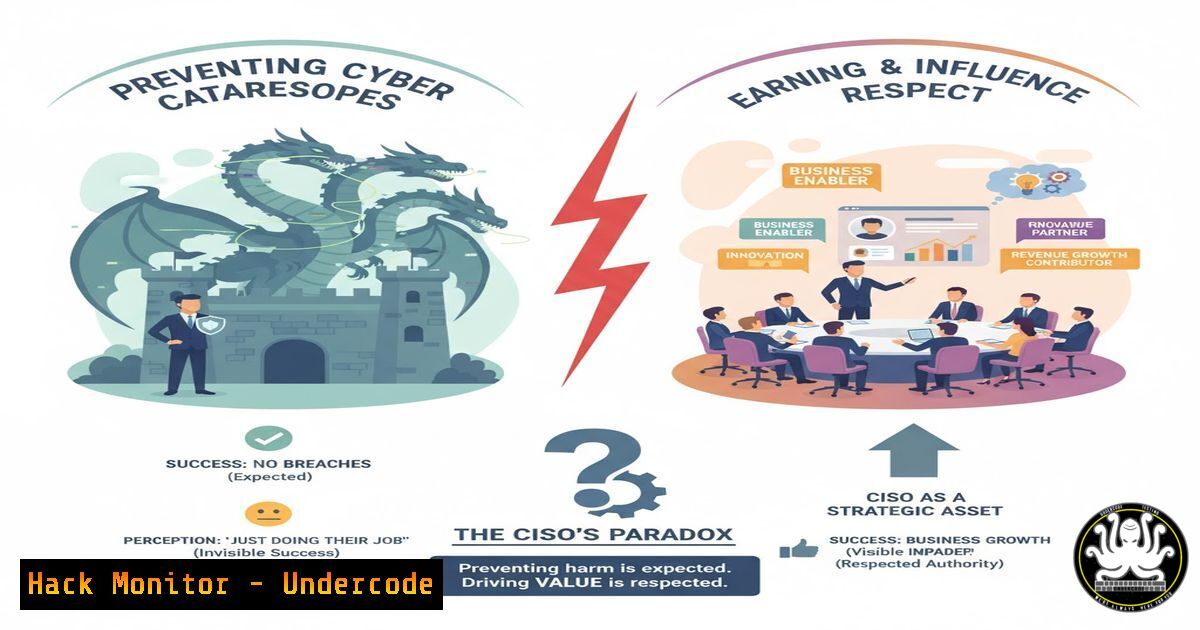
Introduction:
In the high-stakes world of cybersecurity, a Chief Information Security Officer’s (CISO) greatest success—preventing a disaster—is often their most invisible achievement. This creates a dangerous paradox where consistent, effective security is undervalued, while the dramatic response to a breach is celebrated. The core issue lies in communication and perception, where the normalization of constant threats desensitizes leadership to the very victories that keep the organization safe.
Learning Objectives:
- Understand the communication gap between technical security successes and executive board perception.
- Learn key metrics and reporting strategies to quantify and visualize prevented attacks.
- Master technical controls for ransomware mitigation and incident response documentation.
You Should Know:
1. Quantifying Prevented Threats with SIEM Queries
Security Information and Event Management (SIEM) systems are critical for documenting attack attempts. Use these verified queries to demonstrate the volume of threats blocked daily.
Splunk Query for Blocked Attacks:
index=firewall action="denied" OR action="blocked" | stats count by src_ip dest_ip dest_port | sort -count
Step-by-step guide:
This Splunk search queries firewall logs for denied connection attempts. It counts and sorts the blocked attempts by source IP, destination IP, and port. Running this daily provides tangible data on prevented attacks, which can be visualized in dashboards for board presentations.
Elasticsearch Query for Threat Intelligence:
GET /logs-/_search
{
"query": {
"bool": {
"must": [
{ "match": { "event.action": "blocked" } },
{ "range": { "@timestamp": { "gte": "now-1d/d" } } }
]
}
},
"aggs": {
"threats_by_category": {
"terms": { "field": "threat.indicator.type.keyword" }
}
}
}
2. Ransomware Mitigation: Windows Group Policy Hardening
Proactive configuration prevents the very incidents that CISOs are judged by. Implement these Group Policy settings to harden Windows environments.
Verified PowerShell Commands for AppLocker Deployment:
 Create AppLocker base policy
New-AppLockerPolicy -Service -User Everyone -Xml -FilePath C:\Security\AppLocker_Base.xml

Enable AppLocker enforcement
Set-AppLockerPolicy -XmlPolicy C:\Security\AppLocker_Base.xml -Merge -Ldap "LDAP://CN={GUID},CN=Policies,CN=System,DC=domain,DC=com"
Step-by-step guide:
AppLocker restricts which applications can run, preventing ransomware execution. The first command generates a base policy, while the second applies it to Active Directory. Combine with SRP (Software Restriction Policies) and controlled folder access for layered defense.
3. Linux Integrity Monitoring with AIDE
Advanced Intrusion Detection Environment (AIDE) creates a database of file integrity, alerting to unauthorized changes—critical for detecting early breach indicators.
Verified AIDE Configuration Commands:
 Initialize AIDE database
sudo aide --init

Move database to active location
sudo mv /var/lib/aide/aide.db.new.gz /var/lib/aide/aide.db.gz

Perform integrity check
sudo aide --check

Update database after authorized changes
sudo aide --update
Step-by-step guide:
AIDE creates a cryptographic hash of critical system files. After initialization, regular checks compare current states against the baseline. Any discrepancies trigger alerts, providing evidence of attempted system compromises.
4. Cloud Security Hardening: AWS S3 Bucket Policies
Misconfigured cloud storage is a common attack vector. These AWS CLI commands ensure proper S3 bucket security.
Verified AWS CLI Commands:
 Block public access at account level
aws s3control put-public-access-block \
--account-id 123456789012 \
--public-access-block-configuration BlockPublicAcls=true,IgnorePublicAcls=true,BlockPublicPolicy=true,RestrictPublicBuckets=true

Apply bucket policy requiring encryption
aws s3api put-bucket-policy \
--bucket my-secure-bucket \
--policy file://encryption-required-policy.json
Step-by-step guide:
The first command enables account-wide S3 blocking, while the second applies a bucket-specific policy requiring SSL/TLS and encryption. This prevents data exfiltration through misconfigured cloud storage.
5. API Security Testing with OWASP ZAP
APIs are increasingly targeted in modern attacks. The OWASP ZAP tool provides automated security testing.
Verified ZAP Docker Commands:
 Run automated baseline scan
docker run -v $(pwd):/zap/wrk/:rw -t owasp/zap2docker-stable zap-baseline.py \
-t https://api.example.com -g gen.conf -r testreport.html

Perform full active scan
docker run -v $(pwd):/zap/wrk/:rw -t owasp/zap2docker-stable zap-full-scan.py \
-t https://api.example.com -g gen.conf -r testreport.html
Step-by-step guide:
These commands run security scans against APIs, with the baseline being passive and the full scan including active testing. The reports generated provide evidence of vulnerabilities remediated before exploitation.
6. Incident Response Documentation with TheHive
Proper documentation of security incidents provides tangible evidence of the CISO team’s value during crises.
Verified Cortex Analyzer API Calls:
 Query for incident metrics
GET /api/analyzer/{id}
Authorization: Bearer $API_KEY

Create case for security event
POST /api/case
{
"title": "Prevented Ransomware Attack",
"description": "Blocked Phishing campaign targeting accounting department",
"severity": 2,
"tags": ["prevented", "phishing", "ransomware"],
"tasks": [
{"title": "Forensic analysis"},
{"title": "IOC extraction"}
]
}
Step-by-step guide:
TheHive and Cortex provide structured incident management. Creating cases for prevented attacks, even when unsuccessful, creates an auditable trail of security wins.
7. Network Segmentation with iptables
Proper network segmentation contains breaches and demonstrates sophisticated security architecture.
Verified Linux iptables Rules:
 Create segmented zones
iptables -N SEGMENT_ACCOUNTING
iptables -A FORWARD -s 10.1.1.0/24 -d 10.1.2.0/24 -j SEGMENT_ACCOUNTING

Restrict lateral movement
iptables -A SEGMENT_ACCOUNTING -p tcp --dport 445 -j DROP
iptables -A SEGMENT_ACCOUNTING -p tcp --dport 135 -j DROP

Allow only necessary business traffic
iptables -A SEGMENT_ACCOUNTING -p tcp --dport 443 -j ACCEPT
iptables -A SEGMENT_ACCOUNTING -p tcp --dport 80 -j ACCEPT
Step-by-step guide:
These iptables rules create a segmented network environment that prevents lateral movement—a key ransomware propagation technique. Documenting these controls demonstrates proactive risk reduction.
What Undercode Say:
- Prevention Requires Different Metrics: CISOs must transition from technical alerts to business-risk quantified metrics that resonate with executive leadership.
- The Boy Who Cried Wolf is Real: Constant alerts without business context create alert fatigue and desensitization at the board level.
The fundamental challenge identified is a translation problem between technical success and business perception. When a CISO reports preventing “50,000 attacks daily,” this abstract number lacks business context. Instead, security leaders must reframe prevented incidents in terms of financial impact, regulatory avoidance, and brand protection. The technical controls—from SIEM reporting to cloud hardening—provide the evidence, but the narrative must focus on business value creation through risk mitigation rather than technical threat prevention alone.
Prediction:
The evolving regulatory landscape, including SEC disclosure rules and cyber insurance requirements, will force boards to take proactive security more seriously. Within two years, we predict that CISOs who can quantitatively demonstrate risk reduction through prevented incidents will see a 30-50% increase in budget allocation and organizational influence. The era of needing a “cyber dragon” slaying for respect will diminish as preventative metrics become tied to executive compensation and corporate governance scores.
🎯Let’s Practice For Free:
IT/Security Reporter URL:
Reported By: Schumanevan Why – Hackers Feeds
Extra Hub: Undercode MoN
Basic Verification: Pass ✅


