Listen to this Post
Introduction:
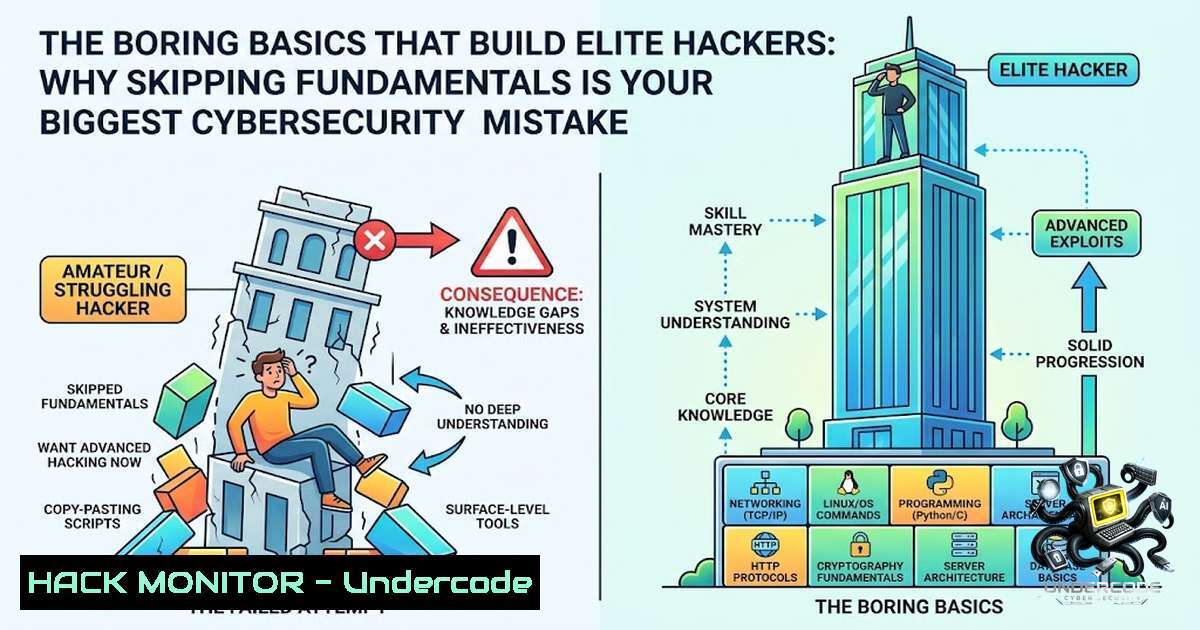
The cybersecurity industry’s obsession with penetration testing tools and “hacker” aesthetics has created a generation of aspiring professionals who can run automated exploits but cannot explain how a TCP handshake works. This fundamental disconnect between tool usage and technological understanding represents the single greatest barrier to entry for beginners, leading to frustration, skill stagnation, and ultimately, failure in the field. As one aspiring specialist recently highlighted, the path to mastery requires abandoning the allure of Kali Linux in favor of the unglamorous but essential foundations of networking, operating systems, and system architecture.
Learning Objectives:
- Understand why foundational networking and Linux knowledge is critical before touching any security tools
- Develop a systematic approach to learning that prioritizes depth over breadth
- Implement a daily practice routine using accessible resources like home labs and free platforms
You Should Know:
- The Networking and Linux Prerequisite: Building Your Foundation Before Automating Attacks
Before you can effectively use tools like Nmap, Wireshark, or Metasploit, you must understand the underlying protocols and operating system principles these tools interact with. The biggest mistake beginners make is attempting to use network scanners without comprehending the OSI model or packet structure, leading to blind vulnerability assessments that produce false positives and missed critical threats.
Extended Knowledge: Networking fundamentals require understanding how websites communicate with servers through DNS resolution, HTTP/HTTPS protocols, and stateful inspection. Linux system administration involves mastering file permissions, process management, and the terminal environment where most security tools operate. This understanding transforms a beginner from a “script kiddie” into a potential professional who can identify anomalies and customize tool behavior based on the specific environment.
Step-by-Step Guide for Networking Fundamentals:
- Master the OSI Model: Study each layer (Physical to Application) and identify which protocols operate at each level. Understand that Wireshark captures at Layer 2 (Data Link) while firewalls typically operate at Layers 3 and 4.
- Practice Command-Line Networking: Begin with basic Linux commands to test connectivity and routing:
Check network interfaces and IP addresses
ip a
ifconfig

Test connectivity and measure response times
ping -c 4 google.com

Trace the network path to a destination
traceroute google.com

Show active network connections and listening ports
netstat -tulpn
ss -tulpn

Check DNS resolution
dig google.com
nslookup google.com
- Configure a Virtual Network: Set up a virtual lab using VirtualBox or VMware with two Linux VMs and practice configuring static IP addresses, setting up routing tables, and establishing SSH connections between machines.
- Capture and Analyze Traffic: Install Wireshark and capture traffic during a simple web request, identifying the TCP three-way handshake, HTTP GET request, and response packets.
For Windows systems, similar network diagnostics can be performed using:
 Display network configuration
ipconfig /all

Test connectivity
ping -1 4 google.com

Trace route
tracert google.com

Show active connections
netstat -ano

Check DNS resolution
nslookup google.com
- The Systematic Learning Approach: Mastering One Domain at a Time
Attempting to learn security, Python, cloud computing, and AI simultaneously creates cognitive overload and prevents deep understanding in any area. The professional approach involves sequential learning, where each skill builds upon the previous one. This methodology has been proven effective by countless security professionals who attribute their success to focused, deliberate practice in single domains.
Step-by-Step Guide for Sequential Mastery:
- Select Your First Domain: Choose one foundational area—either networking basics, Linux administration, or Python scripting. Allocate 3-6 months exclusively to this topic before expanding.
- Create a Learning Roadmap: For Linux administration, start with file system navigation, move to user and group management, then progress to service configuration and security hardening:
User and group management
sudo useradd -m -s /bin/bash securitystudent
sudo passwd securitystudent
sudo usermod -aG sudo securitystudent

File permissions and ownership
chmod 755 /path/to/script.sh
chown securitystudent:securitystudent /path/to/file

Service management
sudo systemctl status sshd
sudo systemctl stop unnecessary-service
sudo systemctl disable vulnerable-service

Firewall configuration with iptables or ufw
sudo ufw allow 22/tcp
sudo ufw enable
sudo ufw status verbose
- Implement a Project-Based Learning Structure: Build a practical project like setting up a secure web server with Apache or Nginx, implementing SSL/TLS certificates, and configuring a firewall to restrict access to specific IP ranges.
-
Document Everything: Maintain a knowledge base with commands, configuration files, and troubleshooting steps. This serves both as a learning reinforcement tool and a reference for future challenges.
-
Cloud Security Fundamentals: Hardening Your First Virtual Environment
Cloud security has become the most critical skill for modern cybersecurity professionals, as most organizations now operate in hybrid or cloud-1ative environments. Understanding how to securely deploy, configure, and monitor cloud resources is essential. Start with a free-tier account from AWS, Azure, or Google Cloud to practice security configurations without financial risk.
Step-by-Step Guide for Cloud Security Implementation:
- Set Up IAM Policies: Implement the principle of least privilege by creating specific roles and policies that restrict access to only necessary resources.
- Configure Network Security Groups (NSGs): On Azure or AWS security groups, restrict inbound and outbound traffic to only necessary ports:
AWS CLI commands for security group management
aws ec2 create-security-group --group-1ame MySecurityGroup --description "SSH and HTTP only"
aws ec2 authorize-security-group-ingress --group-id sg-12345678 --protocol tcp --port 22 --cidr 203.0.113.0/24
aws ec2 authorize-security-group-ingress --group-id sg-12345678 --protocol tcp --port 80 --cidr 0.0.0.0/0
- Enable Logging and Monitoring: Configure CloudTrail on AWS or Azure Monitor to track all API calls and administrative actions, enabling detective controls against unauthorized activities.
- Implement Encryption: Enable server-side encryption for storage services (S3 bucket encryption, Azure Blob encryption) and enforce HTTPS for all web endpoints.
-
The Home Lab Advantage: Breaking and Fixing Your Own Systems
Building and breaking your own homelab provides the most effective hands-on experience possible. Unlike organized CTF challenges, a personal homelab presents real operational complexity, including system failures, configuration errors, and security misconfigurations that mirror production environments.
Step-by-Step Guide for Homelab Setup:
- Acquire Suitable Hardware: A Raspberry Pi or an old desktop works perfectly for learning purposes, as the resource constraints force you to optimize configurations and understand performance limitations.
- Deploy Multiple Operating Systems: Install both Linux distributions (Ubuntu Server, CentOS) and Windows Server to understand different security models:
Install and configure SSH server for remote access
sudo apt update
sudo apt install openssh-server
sudo systemctl enable ssh
sudo systemctl start ssh

Set up a basic firewall
sudo ufw allow from 192.168.1.0/24 to any port 22
sudo ufw enable

Configure fail2ban to prevent brute force
sudo apt install fail2ban
sudo systemctl enable fail2ban
sudo systemctl start fail2ban
- Create Vulnerability Scenarios: Intentionally misconfigure services (open SSH with weak passwords, outdated Apache versions) and practice detection, exploitation, and remediation.
- Integrate Monitoring Solutions: Deploy ELK stack (Elasticsearch, Logstash, Kibana) or Splunk Free to practice log analysis and SIEM fundamentals.
5. The Python Scripting Edge: Automating Security Analysis
While many beginners rush to use pre-built tools, custom scripting capabilities differentiate elite professionals from tool-dependent analysts. Python provides the most accessible entry into security automation, allowing you to scan networks, parse log files, and implement custom detection logic.
Step-by-Step Guide for Python Security Scripting:
- Master Python Fundamentals: Focus on file I/O, network programming, and data parsing. Build simple scripts that read Apache log files and identify suspicious patterns:
import re
from collections import Counter</li>
</ol>

def parse_apache_logs(log_file_path):
"""Parse Apache access logs to identify potential attacks"""
ip_addresses = []
sql_injection_pattern = re.compile(r'(union|select|exec|insert|drop|delete|update|%27|%22|;--)', re.IGNORECASE)

with open(log_file_path, 'r') as log_file:
for line in log_file:
if sql_injection_pattern.search(line):
 Extract IP address
ip_match = re.search(r'^(\d+.\d+.\d+.\d+)', line)
if ip_match:
ip_addresses.append(ip_match.group(1))

return Counter(ip_addresses)

Usage example
suspicious_ips = parse_apache_logs('/var/log/apache2/access.log')
print("Suspicious IP addresses:", suspicious_ips)
2. Create Automation Scripts for Security Monitoring: Build a script that checks system services, verifies file integrity, and sends alerts on configuration changes.
3. Integrate with APIs: Connect your scripts to threat intelligence platforms to enrich security events and automate response workflows.- The Daily Practice Discipline: Building Your Security Muscle
Consistent, focused practice—even as little as one hour per day—produces superior results compared to sporadic multi-hour study sessions. This compound effect builds muscle memory for security concepts, enabling faster identification of threats and more efficient problem-solving during real incidents.
Step-by-Step Guide for Daily Practice:
- Establish a Routine: Dedicate the same time each day to security practice, whether early morning or evening, to build a consistent habit.
- Follow a Practice Structure: Use 10 minutes for reviewing new concepts, 40 minutes for hands-on labs or CTF challenges, and 10 minutes for summarizing key learnings.
- Engage with Labs: Platforms like TryHackMe, HackTheBox, and BlueTeamLabs offer structured environments for both offensive and defensive practice.
- Break and Fix Cycle: Purposely break your homelab environment (delete critical files, remove network configurations) and work to restore functionality, developing resilience and creative problem-solving.
What Undercode Say:
Key Takeaway 1: The foundation of effective cybersecurity practice lies not in the tools you use but in the understanding you build about systems, networks, and how they operate. Tools are merely force multipliers; without the underlying knowledge, they become ineffective crutches that provide false confidence.
Key Takeaway 2: The modern cybersecurity landscape demands specialization over generalization. By mastering one domain at a time, professionals build transferable skills that eventually enable them to connect diverse concepts like cloud security, AI threat detection, and automated response systems.
Undercode’s analysis highlights that the journey to cybersecurity expertise mirrors the path of any technical discipline: fundamentals first, followed by specialization, and sustained through consistent practice. The emphasis on free resources and lab-based learning demonstrates that expensive courses and certifications are secondary to genuine hands-on experience. The caution against attempting to learn multiple advanced topics simultaneously resonates with cognitive science research, which consistently demonstrates that spaced learning and interleaved practice produce superior retention and application capabilities. The daily practice recommendation aligns with the “10,000-hour rule” concept, though cybersecurity mastery requires deliberate, structured practice rather than mere repetition. The Raspberry Pi homelab approach offers an accessible entry point for learners on any budget, democratizing security education. Most importantly, the focus on breaking and fixing systems develops the troubleshooting mindset essential for cybersecurity roles.
Prediction:
+1: The increasing availability of free, high-quality cybersecurity resources and accessible platforms will democratize security education, allowing talented individuals from diverse backgrounds to enter the field without traditional degree requirements, accelerating innovation in the sector.
-1: The overwhelming flood of security tools and “instant hacker” applications will continue to produce a generation of cybersecurity professionals who possess script execution skills without diagnostic or analytical capabilities, creating vulnerabilities in organizations that rely on automation without understanding.
-1: As AI-powered security tools become more prevalent, professionals who lack fundamental system understanding will become increasingly reliant on automated recommendations, potentially missing sophisticated attacks that require human intuition and deep technical comprehension to detect.
▶️ Related Video (78% Match):
🎯Let’s Practice For Free:
🎓 Live Courses & Certifications:
Join Undercode Academy for Verified Certifications
🚀 Request a Custom Project:
Secure, high-velocity infrastructure and disruptive technological engineering. Contact our engineering team for high-tier development and proprietary systems:
[email protected]
💎 Smart Architecture | 🛡️ Secure by Design | ⭐ Trusted by ThousandsIT/Security Reporter URL:
Reported By: Arushsengar Cybersecurity – Hackers Feeds
Extra Hub: Undercode MoN
Basic Verification: Pass ✅🔐JOIN OUR CYBER WORLD [ CVE News • HackMonitor • UndercodeNews ]
📢 Follow UndercodeTesting & Stay Tuned:


