Listen to this Post
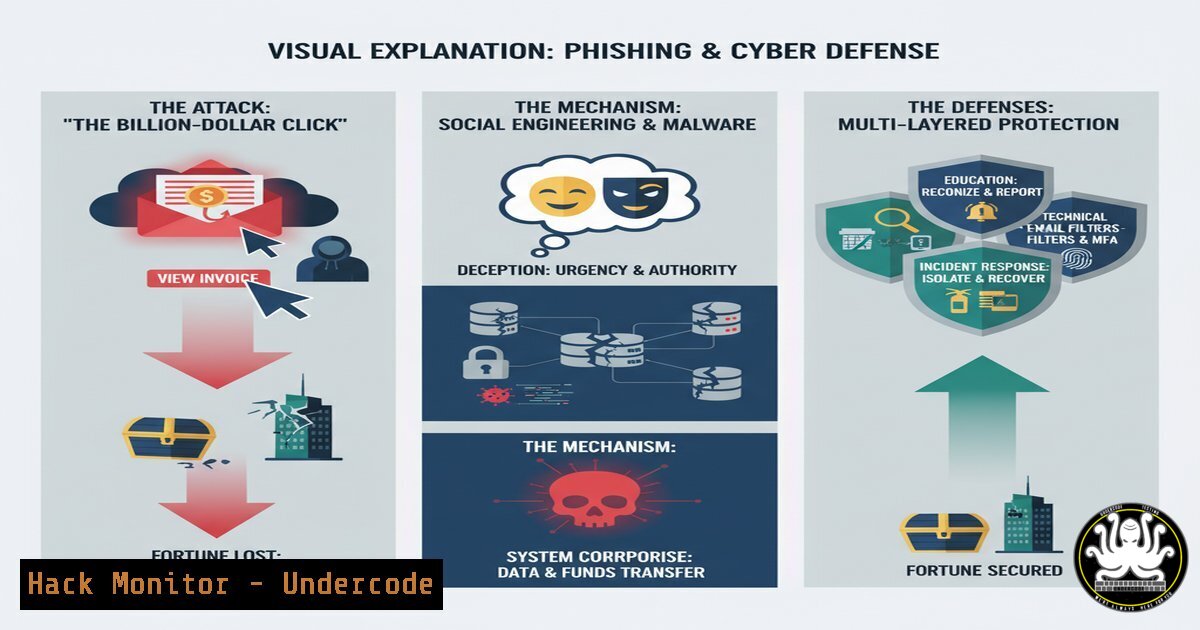
Introduction:
In an era where digital assets dwarf physical ones, a single cyberattack can indeed wipe out billions in market value overnight. The recent discourse surrounding major breaches highlights a critical truth: the initial attack vector is often deceptively simple. This article deconstructs the anatomy of a multi-billion dollar cyber incident, moving from the initial phishing email to full-scale network compromise, and provides the essential command-line and technical controls to fortify your defenses at every stage.
Learning Objectives:
- Understand the Kill Chain of a major cyberattack, from initial access to data exfiltration.
- Master critical commands for threat detection on Windows and Linux systems.
- Implement proactive security hardening measures for endpoints, networks, and cloud environments.
You Should Know:
1. The Lure: Analyzing the Phishing Payload
The first step in a multi-stage attack is often a malicious email attachment or link. Security professionals need tools to analyze these payloads without triggering them on live systems.
Command/Tool: `python3 oletools.py
What it does: Oletools is a suite of Python scripts to analyze Microsoft Office documents, which are frequently used in phishing campaigns. The `oleid` script specifically checks for indicators of malicious macros or embedded exploits.
Step-by-Step Guide:
1. Install Oletools via pip: `pip install oletools`
- Download the suspicious email attachment to an isolated, sandboxed environment (e.g., a VM with no network access).
3. Run the analysis: `oleid suspicious_document.doc`
- Review the output. Pay close attention to lines like “Macros: YES,” “VBA strings: …”, and any indicators related to known exploits. A high number of suspicious VBA strings is a major red flag.
-
Initial Foothold: Detecting Lateral Movement with Windows Command Line
Once an attacker gains a foothold on one machine, they attempt to move laterally across the network. Detecting anomalous network connections is key.
Command: `netstat -ano | findstr ESTABLISHED` (Windows)
What it does: This command displays all active network connections (netstat), filters for established sessions (ESTABLISHED), and shows the Process ID (PID) (-ano) associated with each connection. This helps identify unknown services or applications communicating with external or internal IPs.
Step-by-Step Guide:
1. Open Command Prompt as Administrator.
2. Run: `netstat -ano | findstr ESTABLISHED`
- Analyze the output columns: Protocol, Local Address, Foreign Address, State, PID.
- Note any connections to unfamiliar external IP addresses or on unusual ports. Use `tasklist | findstr
` to identify the process behind a suspicious connection.
3. Privilege Escalation: Auditing User Privileges on Linux
Attackers constantly seek to elevate their privileges to those of an administrator (root) or a highly privileged service account.
Command: `sudo -l` and `find / -perm -4000 2>/dev/null` (Linux)
What it does: `sudo -l` lists the commands the current user is allowed to run with elevated privileges. The `find` command searches for files with the SUID (Set User ID) permission bit set, which allows a program to run with the permissions of its owner (often root).
Step-by-Step Guide:
- If you have sudo access, run `sudo -l` to review your privileges. Look for any obscure or unnecessary commands that can be run as root.
- To audit the entire system for potential SUID privilege escalation vectors, run: `find / -perm -4000 2>/dev/null`
3. Research any unfamiliar binaries in the output. Common legitimate SUID binaries include `passwd` andsudo, but a malicious one or a misconfigured legitimate one is a critical finding.
4. Persistence: Hunting for Rootkits and Bootkits
Sophisticated attackers install malware that survives reboots. Rootkit hunters scan for modifications to core system components.
Command/Tool: `rkhunter –checkall` (Rootkit Hunter on Linux)
What it does: Rkhunter performs a comprehensive check of the local system for known rootkits, backdoors, and possible local exploits by comparing hashes of critical files against known good values and checking for suspicious system modifications.
Step-by-Step Guide:
- Install rkhunter: `sudo apt install rkhunter` (on Debian/Ubuntu)
2. Update its database: `sudo rkhunter –update`
- Perform a full system scan: `sudo rkhunter –checkall`
4. Review the report carefully. Pay attention to warnings about hidden files, suspicious PROMISC mode network interfaces, and changes to system commands. -
Command and Control (C2): Blocking Malware Communication with Firewall Rules
Malware needs to communicate with its operator’s server (C2). Blocking unauthorized outbound connections is crucial.
Command: `netsh advfirewall firewall add rule name=”Block Malicious IP” dir=out remoteip=192.0.2.100 action=block` (Windows)
What it does: This command uses the Windows Advanced Firewall (netsh advfirewall) to create a new rule that blocks (action=block) any outbound (dir=out) traffic to a specific malicious IP address (192.0.2.100).
Step-by-Step Guide:
- Identify a malicious IP from your threat intelligence feeds or internal logs.
2. Open Command Prompt as Administrator.
- Run the command, replacing `192.0.2.100` with the actual IP.
- Verify the rule is active with: `netsh advfirewall firewall show rule name=”Block Malicious IP”`
6. Cloud Hardening: Securing S3 Buckets in AWS
Billions in data have been wiped out or stolen due to misconfigured cloud storage. Ensuring S3 buckets are not publicly accessible is a baseline requirement.
AWS CLI Command: `aws s3api put-public-access-block –bucket my-bucket –public-access-block-configuration BlockPublicAcls=true,IgnorePublicAcls=true,BlockPublicPolicy=true,RestrictPublicBuckets=true`
What it does: This command applies a public access block configuration to an S3 bucket, effectively making it private and preventing any accidental public exposure of data.
Step-by-Step Guide:
- Ensure the AWS CLI is installed and configured with appropriate credentials.
2. Identify the bucket name (`my-bucket`).
- Run the command above. This is a critical, one-step hardening measure.
- Verify the setting in the AWS Management Console under the S3 service for the bucket.
-
API Security: Testing for Broken Object Level Authorization (BOLA)
APIs are a prime target. BOLA flaws allow an attacker to access data they are not authorized to see by manipulating object IDs in API requests.
cURL Command: curl -H "Authorization: Bearer <USER_A_TOKEN>" https://api.example.com/v1/users/123/orders`123
What it does: This command tests an API endpoint. The core test is to replace the object ID (e.g.,) with another user's ID (e.g.,456`) while using a low-privileged user’s authentication token. If the API returns data for user 456, it has a critical BOLA vulnerability.
Step-by-Step Guide:
- Obtain a valid authentication token for a standard user (USER_A).
- Using a tool like cURL or Postman, make a request to an endpoint that includes an object ID (like a user ID, order ID).
- Change the object ID in the request to one belonging to a different user.
- If the request is successful and returns data, the vulnerability is confirmed. This simple test can prevent a massive data breach.
What Undercode Say:
- The Perimeter is Human: The most sophisticated firewall is useless against a well-crafted phishing email that tricks a single user. Continuous security awareness training is not an optional expense; it is a direct ROI on protecting billions in valuation.
- Detection Over Perfection: It is impossible to prevent every single intrusion. The focus must shift to rapid detection and response. The commands provided for
netstat,rkhunter, and firewall logging are the bread and butter of cutting an incident off before it becomes a catastrophe.
The analysis of recent cyber incidents reveals a pattern of cascading failures, not a single point of weakness. A phishing email bypasses a filter, the malicious macro executes because macros aren’t blocked by policy, lateral movement goes undetected due to insufficient endpoint monitoring, and critical data is exfiltrated from a misconfigured cloud bucket. The commands and steps outlined here are actionable controls that break this kill chain at multiple points. The lesson is clear: defense must be layered, and proficiency with these fundamental tools is non-negotiable for modern IT and security teams. The difference between a minor security event and a billion-dollar headline often comes down to the effective application of these basic, yet powerful, defensive techniques.
Prediction:
The future of high-impact cyberattacks will leverage AI not just for defense, but for offense. We will see AI-powered social engineering campaigns capable of generating hyper-personalized phishing content at an unprecedented scale, making traditional detection methods obsolete. Furthermore, AI will be used to autonomously probe networks for vulnerabilities and orchestrate complex attacks at machine speed. The defense will require AI-driven security platforms that can analyze user behavior, network traffic, and application logs in real-time to identify these subtle, automated attacks. The battleground is shifting from human-vs-human to AI-vs-AI, with the victors being those who can integrate these technologies most effectively into their security operations.
🎯Let’s Practice For Free:
IT/Security Reporter URL:
Reported By: Kmjahmed A – Hackers Feeds
Extra Hub: Undercode MoN
Basic Verification: Pass ✅


