Listen to this Post
Introduction:
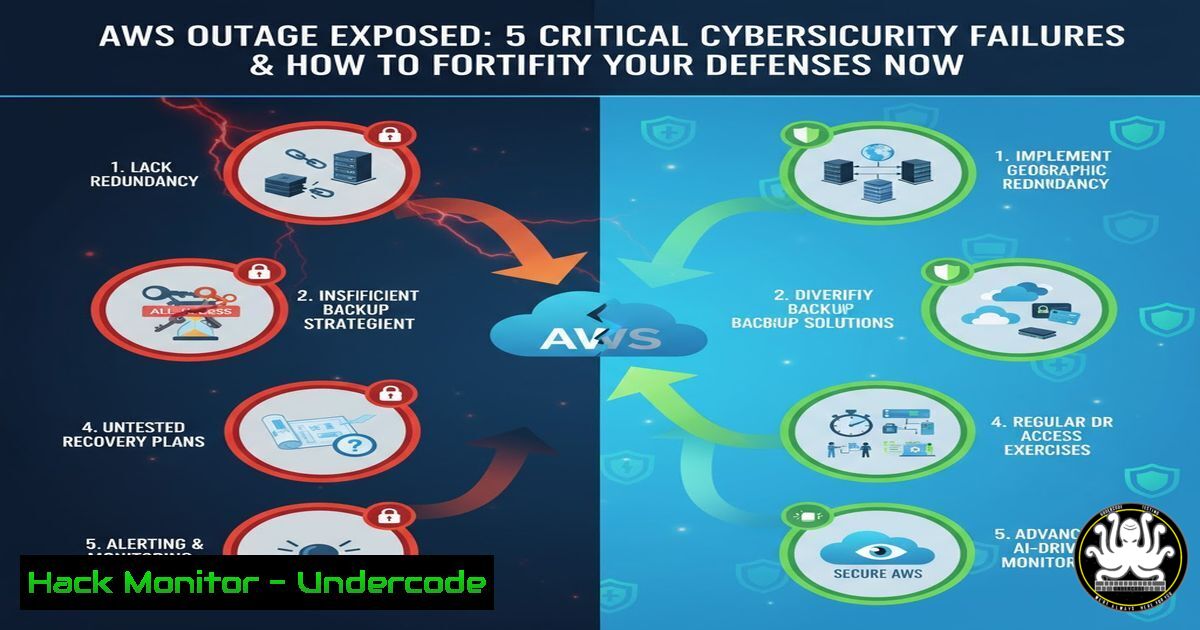
The recent AWS outage was not merely a technical glitch; it was a systemic failure highlighting profound gaps in modern cybersecurity leadership and infrastructure resilience. This incident underscores the critical need for integrated leadership and technical proficiency to defend against escalating threats from state actors and supply chain vulnerabilities.
Learning Objectives:
- Understand the technical misconfigurations and single points of failure that lead to catastrophic cloud outages.
- Learn practical, command-level hardening for AWS, Linux, and Windows environments to mitigate similar risks.
- Develop a strategy for achieving cyber sovereignty through enhanced visibility and control over your digital infrastructure.
You Should Know:
- Auditing Your AWS IAM Configuration for Over-Privileged Roles
A single over-privileged Identity and Access Management (IAM) role can lead to a cascade failure. Use the AWS CLI to list policies and identify risky permissions.
 List all IAM users and their attached policies
aws iam list-users

For each user, get their attached user policies
aws iam list-attached-user-policies --user-name <user-name>

Get the policy document for a specific managed policy
aws iam get-policy-version --policy-arn <policy-arn> --version-id <version-id>
Step-by-step guide:
- Install and configure the AWS CLI with appropriate read-only credentials.
- Run `aws iam list-users` to get a complete inventory of all IAM users in your account.
- For each user, execute `list-attached-user-policies` to see which managed policies are attached.
- Use `get-policy-version` to retrieve the actual JSON policy document. Scrutinize it for overly permissive actions like `””` or `”iam:”` which grant full administrative access.
- Adhere to the Principle of Least Privilege (PoLP) by replacing broad policies with specific, action-level permissions.
2. Implementing Linux Filesystem Integrity Monitoring with AIDE
Advanced Intrusion Detection Environment (AIDE) creates a database of file checksums and alerts on unauthorized changes, a critical control for detecting post-breach persistence.
 Install AIDE on a Debian-based system
sudo apt update && sudo apt install aide -y

Initialize the AIDE database (this creates a baseline)
sudo aideinit

Copy the new database to the active location
sudo cp /var/lib/aide/aide.db.new /var/lib/aide/aide.db

Perform a manual check against the baseline
sudo aide.wrapper --check
Step-by-step guide:
1. Install AIDE using your distribution’s package manager.
- Run `sudo aideinit` to generate the initial baseline database of critical system files, binaries, and configuration files.
- Securely store the generated database (
aide.db.new) by copying it to its active location. - Schedule a daily `aide –check` command via cron. Any changes reported in the output must be investigated immediately to determine if they are authorized (e.g., software updates) or indicate a compromise.
3. Hardening Windows Server with PowerShell Auditing Policies
Enable detailed logging for PowerShell script block logging to capture the contents of all scripts executed, which is vital for detecting malicious in-memory activity.
 Enable PowerShell Script Block Logging
Set-ItemProperty -Path "HKLM:\SOFTWARE\Policies\Microsoft\Windows\PowerShell\ScriptBlockLogging" -Name "EnableScriptBlockLogging" -Value 1

Enable Process Creation Auditing (includes command-line arguments)
auditpol /set /subcategory:"Process Creation" /success:enable /failure:enable

Force a Group Policy update to apply changes immediately
gpupdate /force
Step-by-step guide:
1. Open PowerShell with Administrator privileges.
- Execute the `Set-ItemProperty` command to enable Script Block Logging. This will write event 4104 to the Windows Event Log (Microsoft-Windows-PowerShell/Operational).
- Use the `auditpol` command to enable auditing for process creation, which captures the command-line arguments—a key source of threat intelligence.
- Run `gpupdate /force` to apply the new auditing policies. Regularly review Event IDs 4688 (process creation) and 4104 (PowerShell script blocks) in your SIEM.
-
Detecting DNS Vulnerabilities and Cache Poisoning with Dig
Domain Name System (DNS) is a foundational but often-attacked protocol. Use `dig` to audit your DNS security posture and check for configuration errors.
 Check for DNSSEC validation on a resolver
dig @8.8.8.8 www.example.com A +dnssec

Query for a zone transfer (should be refused)
dig @<nameserver> <domain> AXFR

Check the TTL values and authoritative name servers
dig <domain> NS
dig <domain> A
Step-by-step guide:
- The `+dnssec` flag in a query will return RRSIG records if DNSSEC is properly validated. A lack of these signatures indicates a potential vulnerability.
- Attempt a zone transfer (
AXFR) against your primary nameserver. If it returns all the zone records, this is a critical misconfiguration that must be fixed immediately by restricting AXFR requests. - Use `dig NS` and `dig A` to verify your domain’s authoritative name servers and record TTLs. Inconsistent or unexpectedly long TTLs can exacerbate outage recovery times.
-
Container Security Scanning with Trivy in CI/CD Pipelines
Integrate vulnerability scanning directly into your development pipeline to prevent vulnerable container images from being deployed to production environments.
 Install Trivy (example for MacOS via Homebrew)
brew install aquasecurity/trivy/trivy

Scan a local Docker image for vulnerabilities
trivy image <your-image-name:tag>

Scan a filesystem (e.g., your application code) for misconfigurations
trivy fs --security-checks config ./

Generate an HTML report
trivy image --format template --template "@contrib/html.tpl" -o report.html <your-image-name:tag>
Step-by-step guide:
- Install Trivy on your local machine or CI/CD runner.
2. Build your Docker image as usual.
- Before pushing the image to a registry, run `trivy image` against it. The scan will identify CVEs in the operating system packages and application dependencies.
- Integrate this command into your CI pipeline. Configure the build to fail if critical or high-severity vulnerabilities are detected above a certain threshold, enforcing a “shift-left” security model.
-
Exploiting and Mitigating SSRF with a Proof-of-Code Concept
Server-Side Request Forgery (SSRF) flaws can allow attackers to reach internal AWS metadata endpoints. Understanding the exploit is key to building the mitigation.
 Curl command an attacker might use from a vulnerable web server to steal AWS IAM role credentials.
curl http://169.254.169.254/latest/meta-data/iam/security-credentials/<role-name>

Mitigation: Network-level blocking using iptables on the vulnerable host
sudo iptables -A OUTPUT -d 169.254.169.254 -j DROP
Step-by-step guide:
- The Exploit: A vulnerable web application with an SSRF flaw (e.g., a feature that fetches a user-supplied URL) could be tricked into making the `curl` request to the internal AWS metadata endpoint. This returns temporary credentials for the IAM role attached to the EC2 instance.
- The Mitigation (Network): As a immediate containment measure, use the `iptables` command to block all outbound traffic from the host to the metadata IP address
169.254.169.254. - The Mitigation (Application): The proper long-term fix is input validation. The application must sanitize all user input intended for URL fetching, whitelist allowed domains, and reject requests to internal, private, or loopback IP addresses.
-
Cloud Hardening: Encrypting an EBS Volume with a Customer-Managed Key
Using default AWS-managed keys provides less granular control. Creating and using your own Customer Master Keys (CMKs) in AWS KMS is a fundamental sovereignty control.
 Create a new KMS key (Note: Specify a description and policy)
aws kms create-key --description "My EBS Encryption Key"

Note the returned KeyId. Then create an alias for it.
aws kms create-alias --alias-name alias/my-ebs-key --target-key-id <key-id>

Launch a new EC2 instance with EBS encryption enabled using your key
aws ec2 run-instances --image-id ami-xxxxxxxxx --count 1 --instance-type t3.micro --key-name MyKeyPair --block-device-mappings DeviceName=/dev/xvda,Ebs={VolumeType=gp3,Encrypted=true,KmsKeyId=alias/my-ebs-key}
Step-by-step guide:
- Use the `aws kms create-key` command. The output will include the KeyId and KeyArn. Implement a strict key policy to control access.
- Create a human-readable alias for your key using
create-alias. - When launching a new instance via CLI, ensure the `Ebs` block includes `Encrypted=true` and references your KMS key alias or ARN via
KmsKeyId. This ensures all attached EBS volumes are encrypted with a key you fully control and can audit.
What Undercode Say:
- The convergence of leadership failure and technical debt creates a brittle attack surface that state actors are actively exploiting.
- Achieving cyber sovereignty is not about isolationism; it’s about implementing verifiable security controls and reducing critical dependencies on single vendors.
The AWS incident is a microcosm of a larger systemic crisis. The technical failures—over-privileged roles, poor monitoring, and fragile architectures—are symptoms of a deeper leadership and strategic deficit, as highlighted in the source post. The “laissez-faire” attitude towards cybersecurity, coupled with a loss of digital sovereignty, means organizations are building critical infrastructure on foundations they do not control and do not fully understand. The commands and techniques outlined provide a tactical starting point, but they are meaningless without the “Mixed Reality Leadership” that can integrate technical execution with business-level risk strategy. The future is not just about writing better firewall rules; it’s about developing C-Suite leaders who can conceptually grasp the operational chain from a line of code to a national security threat.
Prediction:
The AWS outage is a precursor to more sophisticated, multi-vector attacks that will simultaneously target technical cloud misconfigurations and organizational leadership gaps. We predict a rise in “sovereignty hacking,” where nation-states will not just attack systems directly but will leverage geopolitical pressure to manipulate or disrupt the US-owned tech supply chain that much of the world depends on. Organizations that fail to decouple their critical security controls from a single vendor’s ecosystem and who do not invest in building deep, internal technical expertise at the board level will face existential disruptions within the next 18-24 months.
🎯Let’s Practice For Free:
IT/Security Reporter URL:
Reported By: Drmaitlandhyslop Aws – Hackers Feeds
Extra Hub: Undercode MoN
Basic Verification: Pass ✅


