Listen to this Post
Introduction:
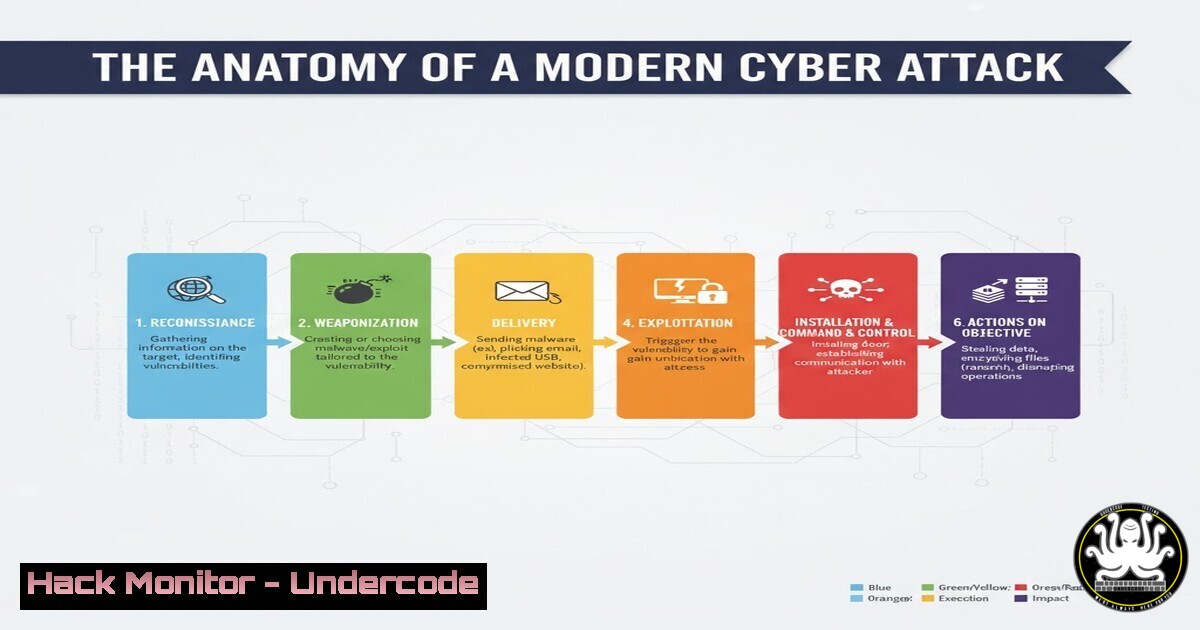
The digital battleground is constantly shifting, with threat actors employing sophisticated techniques to compromise networks. Understanding the full attack lifecycle, from initial reconnaissance to final payload execution, is no longer optional for cybersecurity professionals. This deep dive provides the technical commandos and network defenders with the verified tools and knowledge to dissect and defend against these advanced threats.
Learning Objectives:
- Master essential commands for network reconnaissance and vulnerability scanning across Linux and Windows environments.
- Implement critical hardening techniques for DNS, cloud, and API security postures.
- Develop proficiency in analyzing attack chains and deploying immediate mitigations.
You Should Know:
1. Network Reconnaissance with Nmap
Nmap is the quintessential network discovery and security auditing tool. It identifies live hosts, open ports, and running services, forming the foundation of any penetration test or threat hunt.
 Basic TCP SYN Scan (Stealth Scan)
nmap -sS 192.168.1.0/24

Version Detection and OS Fingerprinting
nmap -sV -O 192.168.1.10

Aggressive Scan with Scripting
nmap -A 192.168.1.10
Step-by-step guide:
The `-sS` flag initiates a SYN scan, the default and most popular scan method. It is relatively fast and unobtrusive, completing the TCP handshake without establishing a full connection. The `-sV` probe enables version detection, interrogating open ports to determine service and application names and versions. The `-O` switch enables OS detection based on TCP/IP stack fingerprinting. Always ensure you have explicit authorization before scanning any network.
2. DNS Interrogation and Hardening
As hinted at in the online discussion, DNS is a common attack vector. Interrogating DNS records can reveal information about an organization’s infrastructure, while misconfigurations can lead to subdomain takeover or cache poisoning.
 Enumerate DNS Records
dig example.com ANY
nslookup -type=any example.com

Zone Transfer Attempt
dig axfr @ns1.example.com example.com
Step-by-step guide:
The `dig ANY` command requests all known DNS records for a domain, potentially exposing mail servers (MX), name servers (NS), and other subdomains (A, AAAA, CNAME). A zone transfer (axfr) is a legitimate mechanism for replicating DNS databases between primary and secondary servers. If a misconfigured server allows a zone transfer to an unauthorized client, it can divulge the entire internal network layout. Mitigation involves restricting zone transfers to trusted secondaries only.
3. Windows Command Line Forensics and Monitoring
Attackers often leverage built-in Windows utilities to perform “living-off-the-land” attacks. Understanding these commands is crucial for both offensive and defensive operations.
 Check for Established Network Connections
netstat -ano | findstr ESTABLISHED

Query System for Scheduled Tasks (Persistence)
schtasks /query /fo LIST /v

Audit User Accounts and Privileges
net user
net localgroup administrators
Step-by-step guide:
`netstat -ano` displays all active network connections and the Process ID (PID) that owns them, allowing you to trace a connection back to a specific application. The `schtasks` command is vital for discovering persistence mechanisms, as attackers often create scheduled tasks to maintain access or execute payloads at regular intervals. Regularly auditing user accounts and group memberships helps identify unauthorized privilege escalation.
4. Cloud Instance Metadata Exploitation and Defense
Cloud instances often have a metadata service accessible from within the instance that can contain sensitive credentials, keys, and configuration data. Attackers who achieve code execution can query this endpoint.
 Attempt to query AWS EC2 Metadata Service
curl http://169.254.169.254/latest/meta-data/
curl http://169.254.169.254/latest/meta-data/iam/security-credentials/

Attempt to query Azure Instance Metadata Service
curl -H "Metadata:true" http://169.254.169.254/metadata/instance?api-version=2021-02-01
Step-by-step guide:
The IP address `169.254.169.254` is a link-local address used by major cloud providers for their metadata services. An unauthenticated command injection vulnerability or a compromised web application could allow an attacker to curl this endpoint and steal the instance’s IAM role credentials. Mitigation involves hardening applications against injection flaws and using services like IMDSv2 (AWS) which requires a token for all requests.
5. API Security Testing with curl
APIs are the backbone of modern applications and a prime target. Manual testing with `curl` allows for precise manipulation of requests to uncover vulnerabilities like Broken Object Level Authorization (BOLA).
 Testing for IDOR by manipulating an object ID
curl -H "Authorization: Bearer <token>" https://api.example.com/v1/users/12345
curl -H "Authorization: Bearer <token>" https://api.example.com/v1/users/12346

Testing for SQL Injection via a query parameter
curl -X GET "https://api.example.com/v1/products?category=Gadgets' OR '1'='1"
Step-by-step guide:
The first set of commands tests for Insecure Direct Object Reference (IDOR). If an authenticated user can access another user’s data by simply changing the user ID in the URL (from 12345 to 12346), a critical authorization flaw exists. The second command attempts to inject a SQL payload through a query string parameter. A successful injection might return all products instead of just those in the ‘Gadgets’ category. Always use parameterized queries and robust access control checks in your APIs.
6. Linux Process and Log Analysis
Identifying malicious processes and analyzing system logs is a core function of incident response on Linux systems.
 List all running processes in a tree format
ps auxf

Search for specific keywords in log files
grep -i "failed" /var/log/auth.log
journalctl -u ssh --since "1 hour ago"

Monitor system calls for a suspicious process
strace -p <PID>
Step-by-step guide:
The `ps auxf` command provides a forest-style view of running processes, making it easier to identify parent-child relationships, which is useful for spotting malware that has spawned a shell. The `grep` command is used to filter log files for specific events, such as failed login attempts in the auth.log. `strace` is a powerful debugging tool that intercepts and records the system calls made by a process, revealing its file, network, and memory activities.
7. Vulnerability Scanning with OpenVAS
While Nmap discovers services, vulnerability scanners like OpenVAS probe them for known security weaknesses, providing a risk assessment.
 Starting the OpenVAS services (Kali Linux)
sudo systemctl start openvas-scanner
sudo systemctl start openvas-manager
sudo gvm-setup

Initiating a basic scan via command line (after setup)
gvm-cli socket --xml "<create_task><name>My Scan</name><target>192.168.1.10</target><config>Full and fast</config></create_task>"
Step-by-step guide:
OpenVAS (now part of Greenbone Vulnerability Management) is a full-featured vulnerability management system. After initial setup, which generates user credentials and synchronizes with the vulnerability feed, you can configure and launch scans. The scanner will probe the target IPs for thousands of known vulnerabilities, providing a detailed report with CVSS scores and remediation advice. It is critical to integrate these scans into a regular patching and hardening cycle.
What Undercode Say:
- The Human Element is the Ultimate Vulnerability. Technical controls are futile if social engineering, insider threats, or professional disputes (as alluded to in the source text) create openings. Security awareness and strict HR protocols are as important as any firewall rule.
- Visibility is Non-Negotiable. You cannot defend what you cannot see. Comprehensive logging, network monitoring, and process auditing are the bedrock of detection and response. The commands provided are the lenses through which you achieve this visibility.
- Assume Breach, Validate Continuously. The modern security posture operates on the assumption that adversaries are already inside the network. The techniques for forensics, API testing, and cloud hardening are not one-time tasks but ongoing processes of validation and control verification.
The interplay between technical skill and professional ethics defines the cybersecurity field. The online call for evidence highlights that reputational damage and internal conflict can be as damaging as a technical exploit. A defender’s toolkit must therefore include not just commands and code, but also the integrity to protect the legacy and integrity of the profession itself.
Prediction:
The convergence of AI-powered offensive tools and deeply interconnected, API-driven cloud ecosystems will accelerate the speed of attacks, shrinking the time from reconnaissance to full compromise from days to minutes. However, this will be met with an equal rise in AI-driven defensive systems capable of autonomous threat hunting and real-time patch deployment. The future battleground will be a war of algorithms, where the defender’s ability to automate continuous validation and hardening at scale, using the foundational principles and commands outlined above, will be the decisive factor between a contained incident and a catastrophic breach.
🎯Let’s Practice For Free:
IT/Security Reporter URL:
Reported By: Accountreset Nohashtagstoday – Hackers Feeds
Extra Hub: Undercode MoN
Basic Verification: Pass ✅


