
Listen to this Post
Introduction:
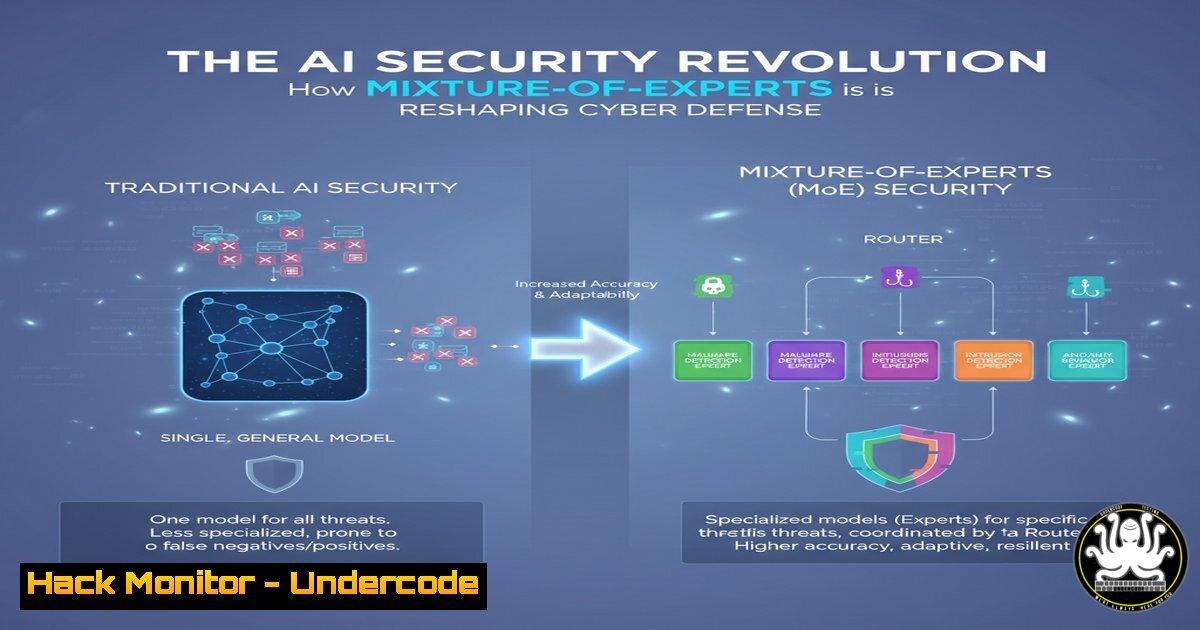
The relentless evolution of cyber threats demands equally sophisticated defense mechanisms, pushing the security industry toward Artificial Intelligence. The Mixture-of-Experts (MoE) neural network architecture represents a paradigm shift, offering a way to specialize AI in multiple cybersecurity domains simultaneously without the prohibitive computational cost. This article deconstructs how MoE models like CyberMoE are being developed to act as a force multiplier for Security Operations Centers.
Learning Objectives:
- Understand the fundamental architecture of Mixture-of-Experts models and their applicability to cybersecurity.
- Acquire practical command-line and scripting skills for threat hunting, log analysis, and system hardening.
- Learn to integrate AI-driven security insights with traditional IT infrastructure and cloud environments.
You Should Know:
1. Architecting a CyberMoE: Core Concepts
Mixture-of-Experts models differ from standard models by using a “gating network” to route inputs to specialized “expert” sub-networks. This is analogous to having a team of specialized human analysts—one for malware, one for network anomalies, one for phishing—where a managing system (the gating network) directs each alert to the best-suited expert.
 Simplified conceptual code structure for a CyberMoE
import torch.nn as nn

class CyberExpert(nn.Module):
def <strong>init</strong>(self, input_size, output_size):
super(CyberExpert, self).<strong>init</strong>()
self.net = nn.Sequential(
nn.Linear(input_size, 128),
nn.ReLU(),
nn.Linear(128, output_size)
)
def forward(self, x):
return self.net(x)

class CyberMoE(nn.Module):
def <strong>init</strong>(self, num_experts, input_size, output_size):
super(CyberMoE, self).<strong>init</strong>()
self.experts = nn.ModuleList([CyberExpert(input_size, output_size) for _ in range(num_experts)])
self.gating_network = nn.Linear(input_size, num_experts)
def forward(self, x):
 Gating network decides which expert to use
gate_scores = nn.functional.softmax(self.gating_network(x), dim=1)
 For simplicity, we select the top expert
expert_weights, expert_indices = torch.max(gate_scores, 1)
output = torch.zeros_like(self.experts<a href="x">0</a>)
for i, expert_idx in enumerate(expert_indices):
output[bash] = self.experts<a href="x[bash].unsqueeze(0)">expert_idx</a>
return output
Step-by-step guide: This PyTorch snippet outlines a minimal MoE. The `CyberMoE` class contains a list of expert networks and a gating network. During a forward pass, the input data (e.g., a network packet vector) is fed to the gating network, which produces a probability distribution over the experts. The input is then routed to the top-ranked expert(s) for processing, allowing specialized analysis.
2. Leveraging the CyberMoE GitHub Repository
The first step to experimenting with these concepts is to clone and explore the public repository.
 Clone the CyberMoE repository to your local machine
git clone https://github.com/tonymoukbel/CyberMoE
cd CyberMoE

Inspect the project structure to understand its components
find . -type f -name ".py" | head -10
ls -la

Create a Python virtual environment to isolate dependencies
python -m venv cybermoe-env
source cybermoe-env/bin/activate  On Windows: `cybermoe-env\Scripts\activate`

 Install the required Python packages
pip install -r requirements.txt
Step-by-step guide: These commands set up your local environment for development. Cloning the repo gives you access to the source code. Creating a virtual environment prevents package conflicts with other projects. Installing from `requirements.txt` ensures you have all necessary libraries, like Streamlit for the web interface and PyTorch/TensorFlow for the underlying AI models.
3. Deploying the Interactive Streamlit Demo
The repository includes a Streamlit app for a hands-on experience. Deploying it locally is straightforward.
 Ensure you are in the project directory and your virtual environment is active
 Launch the Streamlit application. It will automatically open in your default browser.
streamlit run app.py

If you need to run it on a specific port (e.g., for a remote server)
streamlit run app.py --server.port 8501
Step-by-step guide: The `streamlit run` command starts a local web server and hosts the interactive application. The demo likely allows you to input sample security data (like log lines or indicators of compromise) and see how the MoE model processes and classifies them, demonstrating the “gating” and “expert” logic in action.
4. Operationalizing AI: Log Analysis with MoE-Inspired Scripting
While a full MoE is complex, you can emulate its “specialist” logic with shell scripts that chain together best-of-breed security tools.
!/bin/bash
 A "Poor Man's MoE" for log analysis
LOG_FILE=$1
echo "Analyzing log file: $LOG_FILE"

Expert 1: Look for authentication failures (Specialist in IAM)
echo " Authentication Expert Findings "
grep -i "failed" "$LOG_FILE" | grep -i "password|auth" | head -5

Expert 2: Look for suspicious network activity (Specialist in Network Sec)
echo " Network Expert Findings "
grep -E "(POST|GET|PUT)..(php|asp|jsp).HTTP" "$LOG_FILE" | head -5

Expert 3: Look for potential malware indicators (Specialist in Malware Analysis)
echo " Malware Expert Findings "
grep -i "base64_decode|eval(|shell_exec" "$LOG_FILE" | head -5
Step-by-step guide: This Bash script acts as a simplistic gating system. It takes a log file as input and routes it through three “experts,” each implemented as a `grep` command tuned for a specific pattern. This demonstrates the core MoE principle: using specialized components to achieve a more robust and nuanced analysis than a single monolithic tool.
5. Windows Command Line for Proactive Threat Hunting
AI models need data. Security teams can use built-in Windows tools to gather system state information for analysis.
:: Get a list of all processes with network connections, a common starting point for hunting
netstat -ano | findstr "ESTABLISHED"

:: Query the system for recently installed programs that could be malicious
wmic product get name,version,installDate

:: Export the system event log for offline analysis by a security AI model
wevtutil epl System C:\temp\system_log_backup.evtx

:: Scan system files for integrity violations using System File Checker
sfc /scannow
Step-by-step guide: These commands are the “eyes and ears” on a Windows endpoint. `netstat` shows active connections, `wmic` inventories software, `wevtutil` exports logs for deeper analysis, and `sfc` checks for core system file tampering. Feeding this data into an AI model like an MoE can help correlate events and identify stealthy attacks.
6. Linux System Hardening for AI Model Deployment
Systems hosting security AI models must be hardened against attack.
 Harden SSH access by disabling root login and password authentication
sudo sed -i 's/PermitRootLogin yes/PermitRootLogin no/' /etc/ssh/sshd_config
sudo sed -i 's/PasswordAuthentication yes/PasswordAuthentication no/' /etc/ssh/sshd_config
sudo systemctl restart sshd

Configure UFW (Uncomplicated Firewall) to only allow essential ports
sudo ufw default deny incoming
sudo ufw allow ssh
sudo ufw allow 8501/tcp  Allow access to the Streamlit demo port
sudo ufw --force enable

Set restrictive permissions on the AI model and configuration files
sudo chown root:root CyberMoE/model_weights.pth
sudo chmod 600 CyberMoE/model_weights.pth
Step-by-step guide: This sequence secures the server hosting your CyberMoE demo. It locks down SSH to key-based authentication only, configures a firewall to block all non-essential traffic, and sets strict file permissions on the model itself to prevent unauthorized reading or modification.
7. Cloud Hardening for AI Workloads in AWS
Deploying AI security tools in the cloud requires specific configuration to protect the environment and the sensitive data it processes.
 Create an S3 bucket with encryption enabled for storing model artifacts and logs
aws s3api create-bucket --bucket my-cybermoe-models --region us-east-1 \
--create-bucket-configuration LocationConstraint=us-east-1
aws s3api put-bucket-encryption --bucket my-cybermoe-models \
--server-side-encryption-configuration '{"Rules": [{"ApplyServerSideEncryptionByDefault": {"SSEAlgorithm": "AES256"}}]}'

Restrict S3 bucket policy to only allow access from specific EC2 instances
 This is a critical step to prevent data exfiltration
cat > bucket-policy.json << EOF
{
"Version": "2012-10-17",
"Statement": [
{
"Effect": "Deny",
"Principal": "",
"Action": "s3:",
"Resource": ["arn:aws:s3:::my-cybermoe-models", "arn:aws:s3:::my-cybermoe-models/"],
"Condition": {"NotIpAddress": {"aws:SourceIp": "YOUR_EC2_IP_HERE/32"}}
}
]
}
EOF
aws s3api put-bucket-policy --bucket my-cybermoe-models --policy file://bucket-policy.json
Step-by-step guide: These AWS CLI commands set up a secure foundation. They create an encrypted S3 bucket for storing sensitive model data and then apply a stringent policy that denies all access except from a specific, authorized EC2 instance. This “default-deny” posture is crucial for protecting AI assets in the cloud.
What Undercode Say:
- Specialization is the Key to Scalability. The MoE architecture is not just an AI novelty; it’s a blueprint for the future of security automation. It allows a single system to embody the deep, focused knowledge of a dozen senior analysts, making expert-level triage and analysis scalable across global SOCs.
- The Data Pipeline is the New Attack Surface. As we integrate these complex models, the data they are trained on and the commands used to manage them become high-value targets. Hardening the underlying OS, cloud infrastructure, and CI/CD pipelines is as important as securing the model itself.
The development of CyberMoE signifies a move beyond generic AI classifiers. By embracing architectural specialization, we can build systems that are not only more accurate but also more efficient. However, this complexity introduces new risks. Adversaries will inevitably shift their focus to poisoning the specialized expert models or exploiting the gating network to avoid detection. The security community’s challenge is to mature these models in the open, rigorously testing their resilience as we have with traditional software, ensuring that the AI guardians we build are robust and trustworthy.
Prediction:
The integration of Mixture-of-Experts architectures into mainstream cybersecurity products will become ubiquitous within three to five years. We will see the emergence of commercial “AI Security Co-Pilots” that can context-switch between malware reverse engineering, cloud misconfiguration analysis, and threat intelligence correlation in real-time. This will fundamentally compress the mean time to detect (MTTD) and respond (MTTR) to incidents. Conversely, threat actors will develop their own adversarial MoEs designed to probe and exploit these AI-driven defenses, leading to an new arms race fought not in lines of code, but in the latent spaces of neural networks. The organizations that invest in understanding and integrating these AI paradigms today will hold a decisive advantage in the next wave of cyber conflict.
🎯Let’s Practice For Free:
IT/Security Reporter URL:
Reported By: Ronaldfloresdelrosario Moe – Hackers Feeds
Extra Hub: Undercode MoN
Basic Verification: Pass ✅


