Listen to this Post
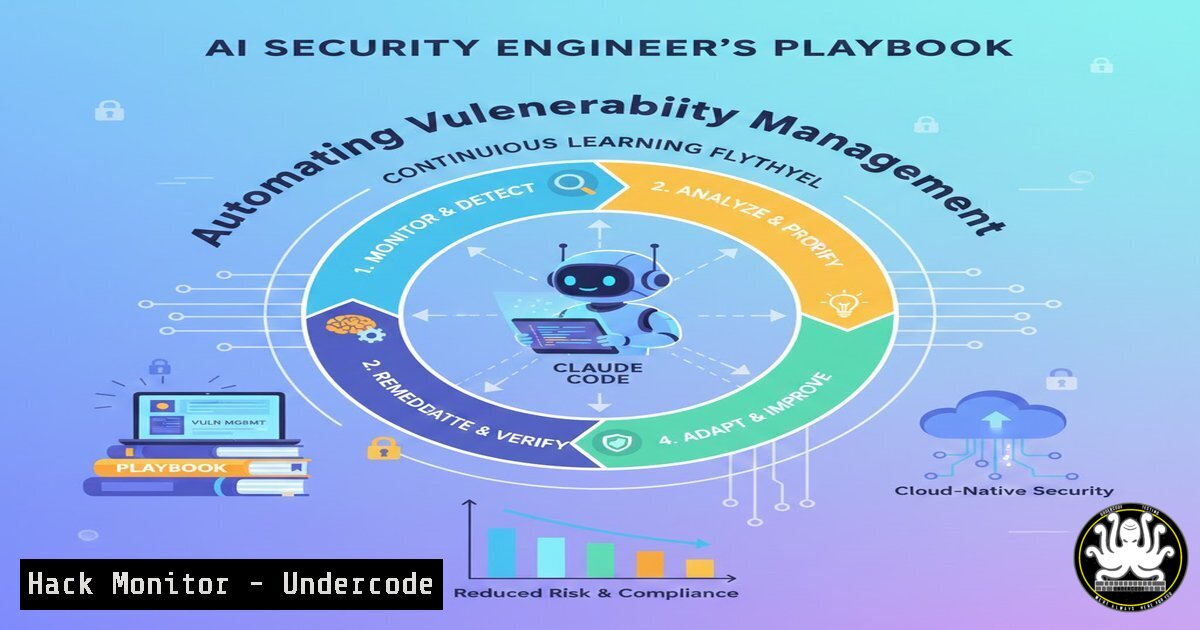
Introduction:
The traditional model of security engineering is buckling under the weight of alert fatigue and unactioned tickets. A transformative shift is underway, where security professionals leverage AI coding agents to transition from manual task executors to strategic overseers of autonomous security systems. This article delves into the practical implementation of AI agents like Claude Code, guiding you through creating a self-improving security automation framework that operates across your entire codebase and cloud environment.
Learning Objectives:
- Architect and implement an AI coding agent for autonomous security remediation and cloud hardening.
- Develop and maintain a persistent agent context (e.g., CLAUDE.md) to create a continuous learning loop.
- Integrate agent-driven workflows into CI/CD pipelines and cloud security posture management (CSPM) for scalable, proactive defense.
You Should Know:
- Foundations: Setting Up Your AI Agent for Security Work
The core premise is moving beyond one-off prompts to a persistent, context-aware AI partner. This begins with creating a dedicated documentation file that serves as the agent’s long-term memory and mission brief.
Step‑by‑step guide explaining what this does and how to use it.
First, initialize a project directory for your security agent. Then, create a `CLAUDE.md` or `AGENTS.md` file. This file is critical. It should contain:
– Security Context: Your organization’s tech stack (e.g., AWS, Kubernetes, Terraform), key application languages, and critical asset inventory.
– Security Policy: Rules for code safety (e.g., “never suggest disabling TLS”), vulnerability severity thresholds, and compliance requirements (PCI-DSS, HIPAA).
– Past Learnings: Logs of successful fixes, debugging insights, and patterns of recurring issues. Append to this after every session.
Example `CLAUDE.md` snippet:
 Security Agent Context - UNDERCODE Corp
Cloud: AWS (Primary), GCP (Legacy). Use Terraform for IaC.
Codebases: app/ (Python/Flask), api/ (Node.js), infra/ (Terraform modules).
Security Posture: All public S3 buckets must be non-listable. EC2 security groups must follow least privilege. Critical vulnerabilities are CVSS >= 7.0.
Last Session Fix: Automated the revocation of unnecessary IAM roles in AWS account <code>prod-01</code>. Code saved in <code>scripts/iam-cleanup-20231002.py</code>.
With this context, your initial prompt becomes powerful: “Based on our CLAUDE.md, review the new Terraform module in `infra/networking/vpc.tf` for security violations.”
- Automating the Ticket Triage: From Alert to Code Commit
Product security engineers often create tickets for dev teams that languish. Instead, use the agent to write the fix directly.
Step‑by‑step guide explaining what this does and how to use it.
1. Ingest Alert: Feed a vulnerability alert (e.g., from Wiz, Lacework, or a SAST tool) to the agent. Provide the alert context and the affected code/file.
2. Agent Analysis & Patch Generation: “Here is a CSPM alert: ‘S3 Bucket `prod-data-xyz` allows public write access.’ The related Terraform file is infra/storage/buckets.tf. Analyze the file, explain the risk, and generate a secure Terraform configuration patch.”
3. Review & Deploy: The agent will output an explanation and code. For the S3 example, it would generate corrected Terraform:
resource "aws_s3_bucket" "prod_data_xyz" {
bucket = "prod-data-xyz"
 ... other config

Explicitly block public access
block_public_acls = true
block_public_policy = true
ignore_public_acls = true
restrict_public_buckets = true
}
You review the code, test it in a sandbox, and commit. The agent’s output and your review notes are appended to CLAUDE.md.
3. Cloud Hardening with Agent-Scripted Remediations
Beyond one-off fixes, deploy the agent to perform bulk hardening across your cloud estate using cloud provider CLIs and SDKs.
Step‑by‑step guide explaining what this does and how to use it.
Task: Identify and tag all unencrypted EBS volumes in AWS.
1. Agent Scripting: “Write a Python script using boto3 that lists all EBS volumes in region us-east-1, filters for those without encryption, and tags them with Security:EncryptionRequired=True.”
2. Agent Output (Script):
import boto3
ec2 = boto3.client('ec2', region_name='us-east-1')
paginator = ec2.get_paginator('describe_volumes')
for page in paginator.paginate():
for volume in page['Volumes']:
if not volume.get('Encrypted'):
ec2.create_tags(
Resources=[volume['VolumeId']],
Tags=[{'Key': 'Security', 'Value': 'EncryptionRequired'}]
)
print(f"Tagged {volume['VolumeId']}")
3. Execution & Escalation: Run the script with appropriate AWS IAM permissions. The tags now allow your CSPM to filter and create high-priority tickets, or you can extend the script to automatically snapshot and encrypt the volumes.
- Integrating the Agent into CI/CD for Shift-Left Security
Embed the agent’s intelligence into your pipeline to prevent vulnerabilities from merging.
Step‑by‑step guide explaining what this does and how to use it.
1. Pipeline Job Configuration: In your `.gitlab-ci.yml` or GitHub Actions workflow, create a security-review job.
2. Agent-Powered Analysis: The job can call a script that uses the Claude Code API or a containerized agent. The prompt: “Review the git diff for this merge request. Flag any security issues: secrets in code, insecure API endpoints (missing auth), or non-compliant infrastructure code. Reference our `CLAUDE.md` for policy.”
3. Automated Feedback: The job outputs a comment on the merge request with findings and suggested code changes, enabling developers to fix issues before merge.
5. Building the Continuous Learning Flywheel
The system’s power grows as it learns. Every interaction must refine the agent’s context.
Step‑by‑step guide explaining what this does and how to use it.
1. After-Action Review: Every task completion, successful or not, triggers a context update.
2. Update “We just used the script you provided to tag unencrypted volumes. It worked, but we discovered it missed volumes in the `ap-southeast-2` region. Update the `CLAUDE.md` file in the ‘Cloud Context’ section to note that our multi-region audit scripts must iterate over all active regions: us-east-1, eu-west-1, ap-southeast-2.”
3. Curate Knowledge: Regularly prune and structure CLAUDE.md. Create sections like CommonVulnerabilityPatterns, EffectiveRemediationScripts, and EnvironmentSpecificQuirks. This curated document becomes a force multiplier for your entire team.
6. Windows & Linux Command-Line Integration for Agents
Agents can generate OS-level hardening commands for you to execute or package into configuration management.
Step‑by‑step guide explaining what this does and how to use it.
Linux Hardening Example:
Agent “Generate a bash script to audit Linux servers for weak file permissions on sensitive directories (/etc, /var/log).”
Agent Output:
!/bin/bash
 Audit sensitive directory permissions
for dir in /etc /var/log /root; do
perms=$(stat -c "%a" $dir)
if [[ $perms -gt 750 ]]; then
echo "[bash] $dir has permissions $perms (too permissive)."
fi
done
 Check for world-writable files
find / -type f -perm -0002 -exec ls -la {} \; 2>/dev/null | head -20
Windows Hardening Example:
Agent “Provide a PowerShell command to list all Windows services running under privileged accounts (LocalSystem, NetworkService) that have binary paths writable by non-administrators.”
Agent Output:
Get-WmiObject Win32_Service | Where-Object {
$<em>.StartName -in @("LocalSystem", "NetworkService", "LocalService")
} | ForEach-Object {
$path = $</em>.PathName.Trim('"')
$acl = Get-Acl $path -ErrorAction SilentlyContinue
if ($acl) {
$access = $acl.Access | Where-Object {
$<em>.FileSystemRights -match "Write|Modify|FullControl" -and
$</em>.IdentityReference -notmatch "BUILTIN\Administrators|NT AUTHORITY\SYSTEM"
}
if ($access) { $_ }
}
}
What Undercode Say:
- Key Takeaway 1: The future of product security engineering is not in manual ticket creation, but in architecting and curating autonomous AI-driven systems. The engineer’s primary role shifts to context provider, policy designer, and strategic reviewer.
- Key Takeaway 2: The persistent agent context (
CLAUDE.md) is the crown jewel. It transforms a generic AI model into a specialized, institutional knowledge engine that outlasts individual team members and continuously amplifies the team’s capability.
Analysis: The post highlights a fundamental efficiency breakthrough. The bottleneck in security has often been the translation of insight into action. AI coding agents bridge this gap, but their raw power is directionless without the guardrails and deep contextual knowledge provided by the security engineer. This synergy creates a “continuous learning flywheel”: each solved task makes the agent smarter for the next one, allowing the human engineer to focus on increasingly complex, strategic threats and architectural reviews. This model directly attacks the chronic problem of unactioned security findings, moving remediation velocity closer to real-time.
Prediction:
Within 18-24 months, AI coding agents, specialized through dynamic context files, will become a standard tool in the security engineer’s arsenal, as ubiquitous as vulnerability scanners are today. We will see the emergence of “Security Agent Management” as a sub-discipline, focusing on optimizing prompts, curating knowledge bases, and auditing agent-generated code. Furthermore, the integration of these agents with CSPM and SIEM platforms will become turn-key, enabling automated, closed-loop remediation for common vulnerabilities (like misconfigured S3 buckets or over-permissive IAM roles) at cloud scale. This will raise the baseline security posture industry-wide but will also shift the adversarial focus towards exploiting logic flaws and the AI agents themselves, leading to a new frontier in AI security and prompt injection attacks against operational infrastructures.
▶️ Related Video (76% Match):
🎯Let’s Practice For Free:
IT/Security Reporter URL:
Reported By: Sachafaust Tip – Hackers Feeds
Extra Hub: Undercode MoN
Basic Verification: Pass ✅


