Listen to this Post
Introduction:
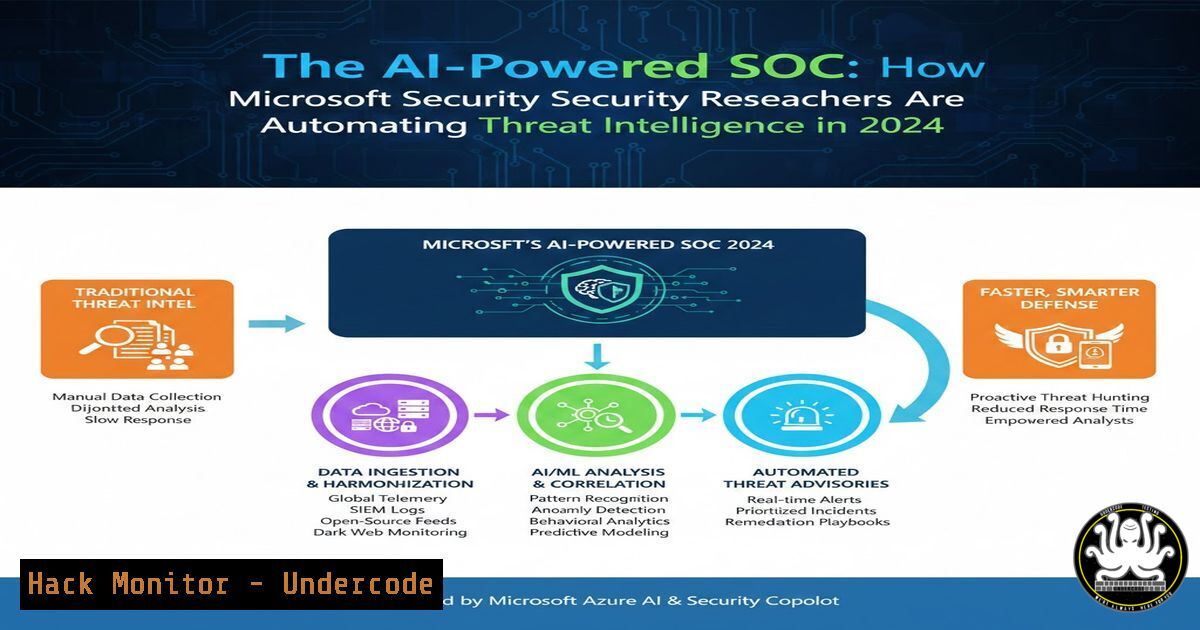
The modern Security Operations Center (SOC) is drowning in alerts, a challenge that Artificial Intelligence (AI) is uniquely positioned to solve. Leading security researchers, like those at Microsoft, are now leveraging AI to automate threat intelligence gathering, correlation, and analysis, transforming raw data into actionable defense strategies. This article deconstructs the practical workflows behind AI-enhanced security research, providing a technical blueprint for implementing similar automation.
Learning Objectives:
- Understand the core components of an AI-driven threat intelligence pipeline.
- Learn to automate OSINT gathering and data enrichment using scripting and AI APIs.
- Implement basic automation to correlate IOCs and generate preliminary threat reports.
You Should Know:
1. Automating Open-Source Intelligence (OSINT) Collection
The first step in an AI-powered workflow is the systematic, automated collection of data. Instead of manual searches, security professionals script the gathering of indicators of compromise (IOCs), threat actor profiles, and vulnerability data from various sources.
Step‑by‑step guide explaining what this does and how to use it.
Concept: Use Python with libraries like `requests` and `BeautifulSoup` to scrape security blogs, RSS feeds, or APIs (e.g., Twitter/X via approved APIs, CISA’s Known Exploited Vulnerabilities catalog). The collected data is then structured (e.g., JSON) for processing.
Example Command (Linux): A simple curl command to fetch a threat feed.
 Fetch the latest CISA KEV catalog
curl -s https://www.cisa.gov/sites/default/files/feeds/known_exploited_vulnerabilities.json -o kev_latest.json
Example Python Script Skeleton:
import requests, json
 Fetch data from a hypothetical threat intel API
api_url = "https://api.threatfeed.example/v1/iocs"
headers = {"Authorization": "Bearer YOUR_API_KEY"}
response = requests.get(api_url, headers=headers)
ioc_data = response.json()
 Save for enrichment stage
with open('raw_iocs.json', 'w') as f:
json.dump(ioc_data, f)
print(f"[+] Collected {len(ioc_data.get('indicators', []))} IOCs")
2. Enriching Data with AI and External APIs
Raw IOCs (IPs, domains, hashes) have limited value without context. This step enriches them with geographic data, WHOIS information, malware family associations, and—critically—AI-generated summaries.
Step‑by‑step guide explaining what this does and how to use it.
Concept: Pass collected data through a series of enrichment services. Use VirusTotal API for reputation, AbuseIPDB for historical abuse, and an AI LLM API (like OpenAI GPT-4 or Azure OpenAI) to summarize findings from technical reports.
Example Commands/Code:
 Use jq (Linux) to parse and extract IPs from our collected JSON for enrichment
cat raw_iocs.json | jq '.indicators[] | select(.type=="ipv4") | .value' > ips_to_enrich.txt
 Pseudocode for AI Enrichment
import openai
openai.api_key = "YOUR_AI_KEY"
 Feed a technical blog post text to AI for summary
with open('malware_analysis_blog.txt', 'r') as f:
blog_text = f.read()[:4000]  Token limit management
prompt = f"Summarize the key technical indicators (IPs, hashes, C2 domains) and TTPs from this report: {blog_text}"
response = openai.ChatCompletion.create(
model="gpt-4",
messages=[{"role": "user", "content": prompt}]
)
ai_summary = response.choices[bash].message.content
 Save AI-generated summary
3. Correlation and Link Analysis Automation
An isolated IOC is a clue; a correlated network of IOCs is evidence. This step uses simple databases and logic to link indicators, revealing broader campaigns.
Step‑by‑step guide explaining what this does and how to use it.
Concept: Use a lightweight SQLite database or even Python dictionaries to store enriched IOCs. Write logic to find relationships (e.g., same registering email, same ASN, same mentioned in the same AI-summarized report).
Example Code (Python with SQLite):
import sqlite3
conn = sqlite3.connect('threat_intel.db')
c = conn.cursor()
 Create a table for enriched IOCs
c.execute('''CREATE TABLE IF NOT EXISTS iocs
(id INTEGER PRIMARY KEY, type TEXT, value TEXT, source TEXT, summary TEXT)''')
 Insert an AI-enriched finding
c.execute("INSERT INTO iocs (type, value, source, summary) VALUES (?, ?, ?, ?)",
('domain', 'malicious.example.com', 'AI_Report_Summary', ai_summary))
conn.commit()
 Query for correlation
c.execute("SELECT  FROM iocs WHERE summary LIKE '%TrickBot%'")
related_findings = c.fetchall()
4. Generating Actionable Reports and Alerts
The final output of automation is a consumable report for SOC analysts or a formatted alert for a SIEM.
Step‑by‑step guide explaining what this does and how to use it.
Concept: Use a template engine (like Jinja2) to take the correlated data and generate a Markdown, PDF, or even a SIEM-specific alert (e.g., Splunk compatible JSON).
Example Command/Code:
 Use a command-line tool to convert a Markdown report to PDF (Linux)
pandoc automated_threat_report.md -o report_for_soc.pdf
 Generate a simple Markdown report
report_template = f"""
 Automated Threat Intelligence Report
Generated By: AI-Powered Pipeline
Summary: {ai_summary[:200]}...
Correlated IOCs:
- IP Addresses: 192.0.2.1, 203.0.113.5
- Domains: malicious.example.com
Recommended Action:
Block listed IOCs at firewall and endpoint.
"""
with open('auto_report.md', 'w') as f:
f.write(report_template)
- Hardening the Automation Pipeline (Security of the Security Tools)
The automation pipeline itself is a target. It uses API keys, accesses sensitive data, and must be secured.
Step‑by‑step guide explaining what this does and how to use it.
Concept: Never hardcode secrets. Use environment variables or secret managers. Implement logging and audit trails. Run the automation in a isolated container or VM.
Example Commands (Linux/Windows):
 Linux: Set API key as environment variable
export VIRUSTOTAL_API_KEY="your_key_here"
 Your script now securely accesses it via os.getenv('VIRUSTOTAL_API_KEY')
 Windows PowerShell: Set environment variable for the session
$env:OPENAI_API_KEY="your_key_here"
 Sample Dockerfile snippet for isolation
FROM python:3.9-slim
WORKDIR /app
COPY requirements.txt .
RUN pip install -r requirements.txt
COPY . .
CMD ["python", "./threat_intel_bot.py"]
What Undercode Say:
- Automation is Force Multiplication: The core takeaway from elite security research teams is not just using AI for analysis, but for orchestration. Automating the collection-to-correlation cycle frees human analysts for deep investigative work.
- Context is King: AI’s prime value in threat intelligence is synthesizing context from disparate data points—linking a forum post to a malware sample to a vulnerable service—faster than any human could manually.
- The Pipeline Itself is a Crown Jewel: Securing your automation scripts, API keys, and generated intelligence data is as critical as protecting your production servers. An adversary poisoning your automated threat feed would be a catastrophic failure.
The shift towards AI-augmented security research, as exemplified by leading Microsoft teams, is not a future concept but a present-day operational necessity. By building modular, secure automation pipelines for OSINT collection, AI enrichment, and correlation, security teams can transition from being overwhelmed by data to being guided by actionable intelligence. This approach directly counters the speed and scale of modern adversaries.
Prediction:
Within two years, AI-powered threat intelligence automation will become the baseline for Tier 1 and 2 SOC operations, with human analysts evolving into specialized roles overseeing, tuning, and acting upon the high-fidelity outputs of these systems. We will see the rise of standardized, open-source “Security AI Orchestrator” frameworks, and a concurrent arms race as adversaries develop AI to generate, obfuscate, and tailor their own malicious campaigns, making continuous adaptation of these automated defenses paramount.
▶️ Related Video (82% Match):
🎯Let’s Practice For Free:
IT/Security Reporter URL:
Reported By: Thomas Roccia – Hackers Feeds
Extra Hub: Undercode MoN
Basic Verification: Pass ✅


