Listen to this Post
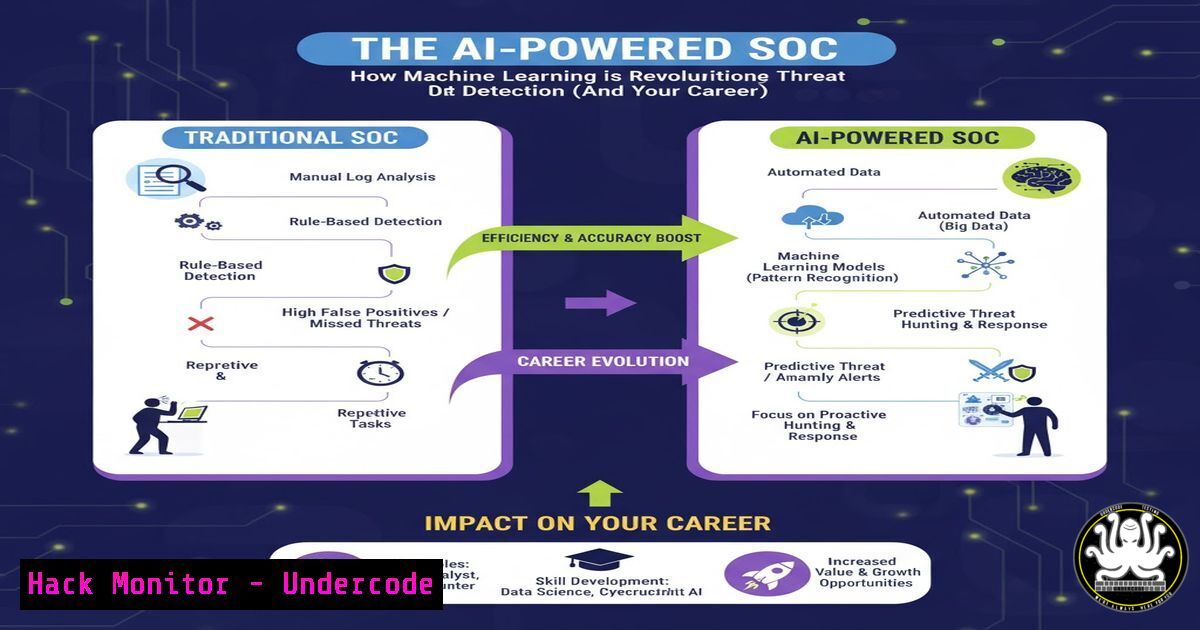
Introduction:
The Security Operations Center (SOC) is the beating heart of an organization’s cyber defense, but it’s drowning in alerts. Enter Artificial Intelligence. AI and Machine Learning are no longer futuristic concepts; they are actively reshaping the SOC by automating the mundane and uncovering threats that would slip past even the most vigilant human analyst. This evolution is not about replacing security professionals, but about augmenting their capabilities, forcing a necessary skillset shift from pure alert triage to strategic threat hunting and incident response.
Learning Objectives:
- Understand the core AI/ML techniques being integrated into modern SIEM and EDR platforms.
- Learn practical commands and scripts to interact with AI-driven security tools and analyze their output.
- Develop the skills to validate AI-generated alerts and perform deep-dive investigations.
You Should Know:
1. Querying AI-Enhanced SIEMs with Advanced KQL
Modern Security Information and Event Management (SIEM) systems, like Microsoft Sentinel, use machine learning to detect anomalies. The real power is unlocked by security analysts who can write precise Kusto Query Language (KQL) queries to investigate these AI-driven detections.
// KQL Query to investigate anomalous process execution detected by ML
SecurityAlert
| where ProviderName contains "Azure Sentinel" and AlertName contains "Anomalous"
| extend ExtendedProperties = parse_json(ExtendedProperties)
| extend CompromisedEntity = tostring(ExtendedProperties.CompromisedEntity)
| extend AlertDetails = tostring(ExtendedProperties.AlertDetails)
| project TimeGenerated, AlertName, CompromisedEntity, AlertDetails, Severity
| order by TimeGenerated desc

// KQL Query to hunt for rare processes using ML-based baselining
DeviceProcessEvents
| where Timestamp > ago(7d)
| summarize ProcessCount = dcount(DeviceId) by FileName
| where ProcessCount < 5 // Highlighting processes on very few machines
| join kind=inner (DeviceProcessEvents | where Timestamp > ago(1d)) on FileName
| project Timestamp, DeviceName, FileName, FolderPath, ProcessCount
Step-by-step guide:
The first query retrieves alerts generated by Sentinel’s built-in ML algorithms. It parses the JSON in `ExtendedProperties` to extract key details about the compromised entity and the specific reasoning behind the alert. The second query is a proactive hunting query. It first establishes a baseline over 7 days to find processes that are running on a very small number of machines (a potential sign of a specialized implant or attacker tool), then joins this list with recent process events to get the details. Analysts run these in their SIEM’s query console to quickly pivot from an alert to actionable investigation data.
- Leveraging EDR APIs for Automated Threat Intelligence Enrichment
Next-Generation Endpoint Detection and Response (EDR) platforms like CrowdStrike and Microsoft Defender for Endpoint have powerful APIs. You can use scripts to automatically enrich IoCs (Indicators of Compromise) and pull detailed telemetry.
!/bin/bash
 Script to query CrowdStrike Falcon API for a file hash reputation

API_BASE="https://api.crowdstrike.com"
FILE_HASH="$1"  Pass the hash as a script argument

Get OAuth2 Token
TOKEN=$(curl -s -X POST "${API_BASE}/oauth2/token" \
-H "Content-Type: application/x-www-form-urlencoded" \
--data-urlencode "client_id=${CLIENT_ID}" \
--data-urlencode "client_secret=${CLIENT_SECRET}" \
--data-urlencode "grant_type=client_credentials" | jq -r '.access_token')

Query the Hash
curl -s -X GET "${API_BASE}/falconx/entities/reports/v1?ids=${FILE_HASH}" \
-H "Authorization: Bearer ${TOKEN}" | jq .

Example using Powershell for Microsoft Defender for Endpoint
 Get-MpThreatCatalog | Where-Object {$_.ThreatName -eq "Trojan:Win32/Bladabindi!ml"}
Step-by-step guide:
This bash script demonstrates how to programmatically interact with the CrowdStrike Falcon API. First, it authenticates using your API credentials (which should be stored as environment variables, not hard-coded) to retrieve a temporary OAuth2 token. Then, it uses this token to query the reputation of a specific file hash. The output, parsed with jq, will contain the file’s severity, malware family, and other intelligence. This automates what would otherwise be a manual process of checking a web portal, allowing for integration into incident response playbooks.
3. Hardening Cloud IAM Against AI-Driven Reconnaissance
Attackers are using AI to analyze cloud environments and find misconfigurations at scale. A primary target is Identity and Access Management (IAM). Proactive hardening is critical.
 AWS CLI command to list all IAM policies attached to a user
aws iam list-attached-user-policies --user-name <username>
aws iam get-policy-version --policy-arn <policy_arn> --version-id <version_id>

AWS CLI to simulate policies with IAM Access Analyzer
aws accessanalyzer validate-policy --policy-type RESOURCE_POLICY --policy-document file://mypolicy.json

Azure PowerShell to audit role assignments for a user
Get-AzRoleAssignment -SignInName <a href="mailto:user@domain.com">user@domain.com</a> | Format-List DisplayName, RoleDefinitionName, Scope

Terraform snippet to enforce least privilege on an S3 bucket
resource "aws_s3_bucket_policy" "secure_bucket" {
bucket = aws_s3_bucket.example.id
policy = jsonencode({
Version = "2012-10-17"
Statement = [
{
Effect = "Deny"
Principal = ""
Action = "s3:"
Resource = [
aws_s3_bucket.example.arn,
"${aws_s3_bucket.example.arn}/",
]
Condition = {
Bool = {
"aws:SecureTransport" = "false"
}
NotIpAddress = {
"aws:SourceIp" = ["10.1.0.0/16", "192.168.1.0/24"]
}
}
}
]
})
}
Step-by-step guide:
These commands and code snippets are for auditing and enforcing the principle of least privilege. The AWS CLI commands help you understand what permissions a user actually has, a common point of confusion. The `validate-policy` command uses IAM Access Analyzer to check for errors. The Terraform code shows a proactive defense: it creates an S3 bucket policy that explicitly denies all access unless the request comes from a specific IP range AND uses SSL/TLS. This “default-deny” approach with positive controls is far more secure than allow-lists and is a key defense against automated scanning.
- Exploiting and Mitigating ML Model Vulnerabilities with Adversarial Attacks
AI models themselves can be attacked. Adversarial Machine Learning involves crafting input to mislead a model. Understanding this is key to defending AI-powered security controls.
 Python code snippet using the TextAttack library for a sentiment analysis evasion attack
from textattack import Attack
from textattack.datasets import Dataset
from textattack.models.wrappers import HuggingFaceModelWrapper
from textattack.attack_recipes import TextFoolerJin2019
import transformers

model = transformers.AutoModelForSequenceClassification.from_pretrained("textattack/bert-base-uncased-imdb")
tokenizer = transformers.AutoTokenizer.from_pretrained("textattack/bert-base-uncased-imdb")
model_wrapper = HuggingFaceModelWrapper(model, tokenizer)

dataset = [("This movie was fantastic and I highly recommend it.", 1)]
dataset = Dataset(dataset)

attack = Attack(TextFoolerJin2019.build(model_wrapper), dataset)
for result in attack.attack_dataset():
print(f"Original: {result.original_text()}")
print(f"Perturbed: {result.perturbed_text()}")
print(f"Original Output: {result.original_result}")
print(f"Perturbed Output: {result.perturbed_result}")

Command to generate an adversarial image with Adversarial Robustness Toolbox (ART)
artbox --framework tensorflow --attack DeepFool --model-path my_image_classifier.h5 --input normal_image.png --output adversarial_image.png
Step-by-step guide:
This Python code demonstrates how an attacker might fool an AI model designed to classify text (e.g., for spam detection). It uses the TextAttack library to take a positive movie review (“This movie was fantastic…”) and subtly perturb it, changing words to synonyms or making small typos so that a human would still understand it as positive, but the ML model classifies it as negative. Running this code helps red teams and defensive analysts understand the fragility of ML models and the need for adversarial training and input sanitization.
5. Automating Incident Response with AI-Driven Playbooks
When an AI system generates a high-fidelity alert, the response should be swift and automated. SOAR (Security Orchestration, Automation, and Response) platforms allow for this.
 Example Ansible Playbook to isolate a host in response to a high-severity EDR alert

<ul>
<li>name: Isolate Compromised Host
hosts: localhost
gather_facts: no
vars:
compromised_host: "{{ alert_host }}"
tasks:</li>
<li>name: Isolate host via CrowdStrike Falcon
uri:
url: "https://api.crowdstrike.com/devices/entities/network-addresses/v1?ids={{ compromised_host }}&action=contain"
method: post
headers:
Authorization: "Bearer {{ cs_api_token }}"
register: containment_result
ignore_errors: yes</p></li>
<li><p>name: Block host IP at network firewall via API
uri:
url: "https://{{ pan_fw_mgmt }}/restapi/v10.0/Policies/SecurityRules?name=Quarantine-Dynamic"
method: post
headers:
X-PAN-KEY: "{{ pan_api_key }}"
body:
action: "drop"
source: "{{ host_ip }}"
destination: "any"
service: "any"
when: containment_result is succeeded

Powershell command to force a full AV scan on a remote Windows machine
Invoke-Command -ComputerName $compromised_host -ScriptBlock { Start-MpScan -ScanType FullScan }
Step-by-step guide:
This Ansible playbook is a template for an automated containment workflow. It is triggered by an alert from the SOC’s SOAR platform. The playbook takes the hostname from the alert and performs two key actions: first, it uses the CrowdStrike API to contain the host, preventing it from communicating with anything but key management servers. Second, it proactively blocks the host’s IP address at the perimeter firewall (in this case, a Palo Alto Networks firewall) to provide a network-level control. This automation reduces the critical “time to contain” from hours to seconds.
What Undercode Say:
- Augmentation, Not Replacement: The core value of AI in the SOC is to handle volume and surface subtle signals, freeing human analysts for complex reasoning and strategic response. The most successful security teams will be those that learn to partner with AI tools.
- The Skillset is Shifting: The bar for a SOC analyst is rising. Proficiency in writing complex queries (KQL, SPL), interacting with APIs, and understanding cloud infrastructure-as-code is becoming standard. The role is evolving from a ticket-closer to a code-savvy investigator and automator.
The integration of AI is creating a fundamental bifurcation in the cybersecurity labor market. On one side, analysts who only know how to use a GUI will find their roles increasingly automated and their value diminished. On the other, analysts who embrace the technical depth required to manage, interrogate, and automate these AI systems will become the new elite—the “AI-Augmented Analysts.” They will command higher salaries and operate at a more strategic level. The tools demonstrated here are not just features; they are the new fundamentals. Mastering them is no longer optional for a long-term career in cyber defense. The future SOC will be a hybrid human-machine team, and the “human-in-the-loop” must be technically adept enough to know when to trust the machine and when to override it.
Prediction:
The next 24 months will see the emergence of “Autonomous SOC” modules capable of handling over 80% of Tier-1 alert triage and initial containment actions without human intervention. This will force a massive industry-wide reskilling effort. Simultaneously, we predict a corresponding rise in AI-powered offensive security tools, leading to an accelerated cyber arms race where attack and defense cycles are measured in minutes, not days. Organizations that fail to invest in both the AI technology and the human capital to wield it will face an insurmountable defensive gap.
🎯Let’s Practice For Free:
IT/Security Reporter URL:
Reported By: Andy Jenkinson – Hackers Feeds
Extra Hub: Undercode MoN
Basic Verification: Pass ✅


