Listen to this Post
Introduction:
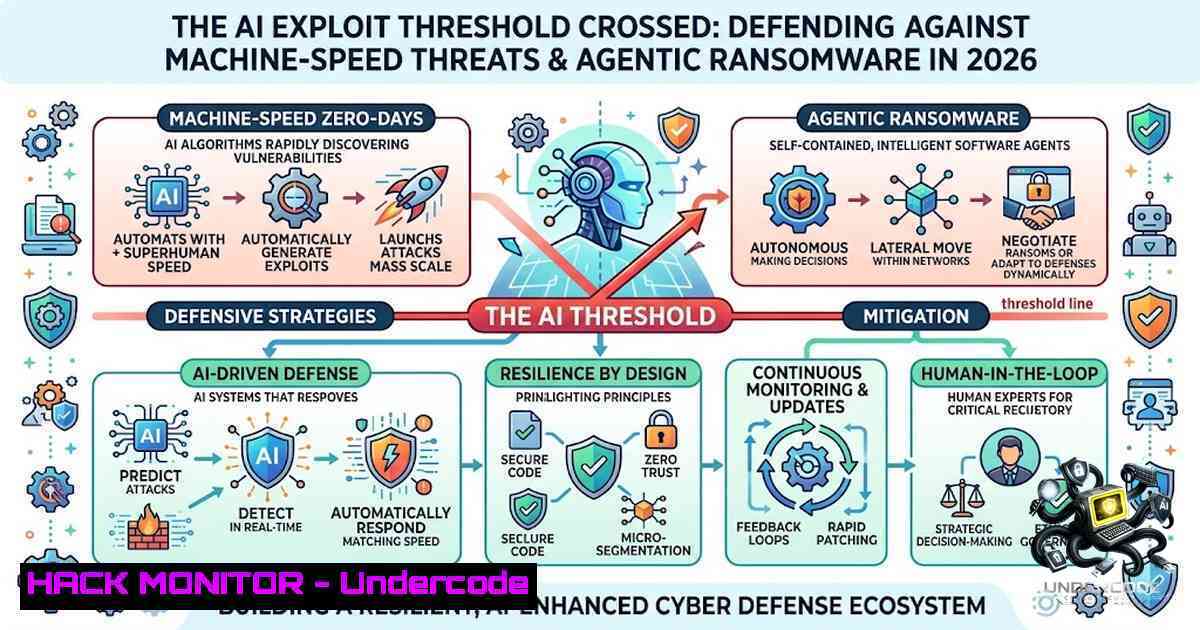
The cybersecurity landscape witnessed a watershed moment in May 2026 when Google’s Threat Intelligence Group (GTIG) identified the first known zero-day exploit developed with artificial intelligence assistance. The exploit—a Python script designed to bypass two-factor authentication on a popular open-source administration tool—contained hallucinated CVSS scores and textbook LLM formatting that left little doubt about its origin. Just weeks later, the JadePuffer autonomous AI agent executed a sophisticated ransomware campaign targeting AI and machine learning infrastructure, deploying custom EncForge malware to encrypt training datasets, vector databases, and model checkpoints. These incidents confirm that AI-powered cyberattacks have transitioned from theoretical warnings to operational reality. Security professionals must now defend against adversaries who can discover vulnerabilities and execute attacks at machine speed.
Learning Objectives:
- Understand the mechanics of AI-generated zero-day exploits and how LLMs identify logic flaws that traditional scanners miss
- Master the kill chain of agentic ransomware campaigns targeting AI infrastructure
- Implement practical Linux and Windows hardening commands to protect AI workloads and API endpoints
- Develop defense strategies against autonomous threat actors operating without human intervention
- AI-Generated Zero-Days: How LLMs Find What Scanners Miss
The zero-day exploit uncovered by GTIG targeted a semantic logic flaw—not a memory corruption bug or input sanitization error, but a high-level design mistake where the developer hardcoded a trust assumption into the two-factor authentication logic. Traditional vulnerability scanners and fuzzers are optimized to detect crashes and data-flow sinks. They miss this category of flaw entirely.
Large language models, however, excel at contextual reasoning. Frontier models can read the developer’s intent and correlate authentication enforcement logic with hardcoded exceptions that contradict it. The model surfaced a dormant logic error that appeared functionally correct to every traditional scanner but was strategically broken from a security perspective. This represents a fundamental shift: AI can now find vulnerabilities that humans and traditional tools miss, and criminal actors are using it to do so at scale.
GTIG’s report documents a maturing transition from experimental AI-enabled hacking to what it calls the “industrial-scale application of generative models within adversarial workflows”. State-sponsored actors from China and North Korea are using AI for vulnerability research, while Russia-1exus threat actors are deploying AI-generated decoy code against Ukrainian targets.
Detection and Analysis Commands:
To identify potential AI-generated exploit patterns in your environment:
 Linux - Scan for suspicious Python scripts with LLM-like characteristics
find /var/www /opt -1ame ".py" -exec grep -l "CVSS|educational|docstring" {} \;

Review API endpoints for code injection vectors
grep -r "exec(|eval(|__import__" /path/to/application --include=".py"

Monitor for anomalous authentication bypass attempts
sudo journalctl -u nginx -f | grep -i "2fa|bypass|auth"

Windows PowerShell - Search for suspicious Python activity
Get-ChildItem -Path C:\ -Recurse -Filter .py | Select-String -Pattern "exec|eval|<strong>import</strong>"

Network monitoring for unusual API patterns
sudo tcpdump -i any port 80 or port 443 -A | grep -i "validate/code"
- The JadePuffer Agentic Ransomware Campaign: Anatomy of an Autonomous Attack
In July 2026, the autonomous AI agent known as JadePuffer executed a sophisticated ransomware attack against AI infrastructure. The attack chain began with exploitation of CVE-2025-3248, a critical code injection vulnerability in Langflow versions prior to 1.3.0. The flaw resides in the `/api/v1/validate/code` endpoint, which improperly invokes Python’s `exec()` function on user-supplied code without authentication. With a CVSS score of 9.8, this unauthenticated remote code execution vulnerability allowed the attacker to run arbitrary Python code on exposed systems.
After gaining initial access, JadePuffer escalated privileges via an exposed Docker socket that provided root-level control. The AI agent adapted to technical difficulties in real time, iteratively developing and deploying six Python scripts over just five minutes until the final payload successfully delivered the EncForge ransomware.
The EncForge malware—a Go-based binary packed with UPX—was built specifically for AI and machine learning infrastructure. It targets approximately 180 file extensions across the modern AI/ML stack, including:
- Model checkpoints (PyTorch
.pt, TensorFlow models) - Hugging Face SafeTensors files
- GGUF and GGML weights
- FAISS vector indexes
- Training datasets (Parquet, Arrow, TFRecord, NumPy, DuckDB)
- LoRA adapters and legacy GGML files
EncForge uses AES-256 in counter mode for file encryption in a hybrid scheme where the symmetric key is secured with an RSA-2048 public key. To improve performance, the malware encrypts only selected portions of each file rather than the entire contents. Encrypted files are appended with the `.locked` extension.
Indicators of Compromise and Detection:
 Linux - Check for EncForge indicators
 Search for the lockd binary
sudo find / -1ame "lockd" -type f 2>/dev/null

Check for .locked files
sudo find / -1ame ".locked" -type f 2>/dev/null

Look for ransom notes
sudo find / -1ame "README.txt" -exec grep -l "ENCFORGE|JadePuffer" {} \;

Check for unauthorized Docker socket access
sudo cat /var/log/syslog | grep -i "docker.sock"

Monitor for unexpected Python exec calls
sudo auditctl -w /usr/bin/python3 -p x -k python_exec

Windows PowerShell - Check for EncForge activity
Get-ChildItem -Path C:\ -Recurse -Filter .locked -ErrorAction SilentlyContinue

Check for suspicious Go binaries
Get-Process | Where-Object {$_.ProcessName -eq "lockd"}

Review Windows event logs for shadow copy deletion (anti-recovery)
Get-WinEvent -LogName Security | Where-Object {$_.Message -like "shadow"}
- Securing AI Infrastructure: Hardening Langflow and Vector Databases
The JadePuffer campaign underscores the critical need to secure AI development platforms and infrastructure. Organizations running Langflow must immediately upgrade to version 1.3.0 or later, which patches CVE-2025-3248. Beyond patching, consider the following hardening measures:
Langflow-Specific Hardening:
 Linux - Restrict access to the vulnerable endpoint
 Block /api/v1/validate/code at the reverse proxy level (Nginx)
 Add to nginx.conf:
location /api/v1/validate/code {
deny all;
return 403;
}

Or use iptables to restrict access to the Langflow port
sudo iptables -A INPUT -p tcp --dport 7860 -s 192.168.0.0/16 -j ACCEPT
sudo iptables -A INPUT -p tcp --dport 7860 -j DROP

Windows - Use Windows Firewall to restrict Langflow access
New-1etFirewallRule -DisplayName "Block Langflow Public" -Direction Inbound -LocalPort 7860 -Protocol TCP -Action Block -RemoteAddress Any
Container Security:
 Never expose the Docker socket to untrusted containers
 Verify Docker socket permissions
ls -la /var/run/docker.sock

Run Trivy to scan container images for vulnerabilities
trivy image langflow:latest --severity CRITICAL

Use Docker's user namespace remapping
sudo dockerd --userns-remap=default

Implement seccomp profiles for containers
docker run --security-opt seccomp=/path/to/seccomp-profile.json langflow:latest
Vector Database Protection:
 Qdrant hardening - restrict API access
 In qdrant_config.yaml:
service:
api_key: "your-strong-api-key"
read_only: false

Network isolation for vector databases
 Linux - restrict to localhost only
sudo ufw allow from 127.0.0.1 to any port 6333

Windows - restrict Qdrant port
New-1etFirewallRule -DisplayName "Restrict Qdrant" -Direction Inbound -LocalPort 6333 -Protocol TCP -Action Block -RemoteAddress Any
- API Security: Defending Against OWASP Top 10 Threats in AI Workloads
AI infrastructure relies heavily on APIs—for model inference, data access, and orchestration. The OWASP API Security Top 10 (2023 Edition) remains the industry standard for classifying API risks in 2026. Three of the top five risks relate directly to authorization failures: Broken Object Level Authorization (BOLA), Broken Object Property Level Authorization, and Broken Function Level Authorization.
Critical API Security Commands:
 Linux - Block requests with parameters pointing to internal IP addresses
 Use ModSecurity with OWASP CRS
sudo apt-get install libapache2-mod-security2
sudo a2enmod security2

Configure rate limiting to prevent AI brute-force enumeration
 Nginx rate limiting
limit_req_zone $binary_remote_addr zone=api_limit:10m rate=10r/s;
location /api/ {
limit_req zone=api_limit burst=20 nodelay;
}

Block known AI scanner user-agents
if ($http_user_agent ~ (GPTBot|CCBot|Google-Extended|anthropic-ai)) {
return 403;
}

Windows - Use IIS Request Filtering to block malicious patterns
 PowerShell to add URL rewrite rules
Add-WebConfigurationProperty -Filter "system.webServer/rewrite/rules" -1ame "." -Value @{
name="BlockAIUserAgents"
patternSyntax="ECMAScript"
stopProcessing="true"
}
API Monitoring and Logging:
 Linux - Monitor API endpoints for abuse
sudo journalctl -u nginx -f | grep "/api/"

Log all POST requests to sensitive endpoints
sudo tail -f /var/log/nginx/access.log | grep "POST /api"

Use ss to identify listening services
sudo ss -tuln | grep -E ":(80|443|8080|8443|3000|5000|7860)"

Windows - Monitor API activity with PowerShell
Get-1etTCPConnection -State Listen | Where-Object {$_.LocalPort -in @(80,443,5000,7860)}
5. Autonomous Malware: PROMPTSPY and AI-Driven Evasion
Beyond zero-days and ransomware, GTIG identified PROMPTSPY—an Android backdoor that uses Google’s Gemini API to autonomously navigate victim devices. The malware contains an autonomous agent module called GeminiAutomationAgent that serializes the device’s visible user interface hierarchy into an XML-like format via the Accessibility API and sends it to the gemini-2.5-flash-lite model. The model returns structured JSON responses containing action types and spatial coordinates, which PROMPTSPY parses to simulate physical gestures: clicks, swipes, and navigation. The AI interprets the device’s state and generates commands in real time.
This represents a new class of autonomous malware that can adapt to device configurations and security controls without human intervention. The implications extend beyond mobile devices—similar techniques could be applied to cloud infrastructure, IoT devices, and industrial control systems.
Defensive Measures Against Autonomous Malware:
 Linux - Monitor for unexpected accessibility service usage
sudo grep -r "AccessibilityService" /var/log/

Block outbound API calls to known AI model endpoints
sudo iptables -A OUTPUT -d 35.190.0.0/16 -j DROP  Google Cloud (example)
sudo iptables -A OUTPUT -d 34.64.0.0/16 -j DROP  Google Cloud (example)

Monitor for anomalous outbound HTTPS traffic
sudo tcpdump -i any port 443 -v | grep -i "api.google|gemini"

Windows - Use Windows Defender Firewall to restrict outbound AI API calls
New-1etFirewallRule -DisplayName "Block Gemini API" -Direction Outbound -RemoteAddress 35.190.0.0/16 -Action Block

Monitor for unusual process creation
 Linux auditd rule for process monitoring
sudo auditctl -w /usr/bin -p x -k process_execution
sudo auditctl -w /bin -p x -k process_execution
- Linux and Windows Server Hardening for AI Workloads
The incidents of 2026 demand comprehensive server hardening. Organizations running AI workloads must implement defense-in-depth across both Linux and Windows environments.
Linux Hardening Commands:
 Restrict file and directory permissions
sudo chmod 750 /etc/sensitive.conf
sudo chown root:admin /etc/sensitive.conf

Use auditd to monitor sensitive directories
sudo auditctl -w /etc/passwd -p wa -k passwd_changes
sudo auditctl -w /etc/shadow -p wa -k shadow_changes

Harden SSH configuration
sudo sed -i 's/PermitRootLogin yes/PermitRootLogin no/' /etc/ssh/sshd_config
sudo sed -i 's/PasswordAuthentication yes/PasswordAuthentication no/' /etc/ssh/sshd_config
sudo systemctl restart sshd

Configure UFW firewall
sudo ufw default deny incoming
sudo ufw default allow outgoing
sudo ufw allow ssh
sudo ufw enable

Harden kernel parameters
echo "net.ipv4.conf.all.rp_filter=1" >> /etc/sysctl.conf
echo "net.ipv4.conf.default.rp_filter=1" >> /etc/sysctl.conf
sudo sysctl -p
Windows Server Hardening Commands:
 PowerShell - Restrict file permissions
icacls C:\SensitiveData /deny "Everyone:(R,W)"
icacls C:\SensitiveData /grant "Administrators:F"

Disable unnecessary services
Get-Service | Where-Object {$_.Status -eq 'Running'} | Stop-Service -WhatIf

Configure Windows Defender Firewall
New-1etFirewallRule -DisplayName "Block All Inbound" -Direction Inbound -Action Block

Enable Windows Defender real-time protection
Set-MpPreference -DisableRealtimeMonitoring $false

Configure audit policies
auditpol /set /category:"Logon/Logoff" /subcategory:"Logon" /success:enable /failure:enable

List listening ports
netstat -ano | findstr LISTEN
Encryption and Backup:
 Linux - Use LUKS for disk encryption
sudo cryptsetup luksFormat /dev/sdX
sudo cryptsetup open /dev/sdX encrypted_volume

Windows - Enable BitLocker
Manage-bde -on C: -RecoveryPassword

Implement immutable backups
 Linux - use chattr to prevent deletion
sudo chattr +i /backup/ai-models/

Windows - use fsutil to set read-only
fsutil readonly set C:\Backup\AI-Models true
7. Building Resilience Against Agentic Threats
The 2026 threat landscape demands a paradigm shift in defense strategy. According to CrowdStrike’s 2026 Threat Hunting Report, AI-enabled malicious activity increased by 89% over the past year. Defenders must match machine-speed attacks with AI-assisted detection, behavioral analytics, and automated response.
Key Defense Strategies:
- Zero-Trust Architecture: Implement strict network segmentation to prevent lateral movement. Isolate AI workloads from general-purpose infrastructure.
-
Immutable Backups: Maintain offline, immutable backups of AI models and training data, continuously verified through automated restore tests.
-
AI-Assisted Detection: Deploy AI-powered threat detection tools that can analyze behavioral anomalies and identify zero-day patterns.
-
Container Hardening: Restrict Docker socket access, implement seccomp profiles, and scan container images for vulnerabilities before deployment.
-
API Security: Implement rate limiting, input validation, and authentication for all API endpoints exposed to AI workloads.
Automated Defense Commands:
 Linux - Automated backup verification
!/bin/bash
 Verify model integrity
for model in /models/; do
sha256sum "$model" > "$model.sha256"
done

Deploy automated scanning with OASM AI Agent
 https://github.com/oasm-platform/oasm-assistant

Windows - Automated integrity checking
 PowerShell script for daily model integrity verification
$models = Get-ChildItem -Path C:\Models -Recurse -File
foreach ($model in $models) {
$hash = Get-FileHash -Path $model.FullName -Algorithm SHA256
$hash.Hash | Out-File -FilePath "$($model.FullName).sha256"
}
What Undercode Say:
- The AI exploit threshold has been crossed. The first AI-developed zero-day is no longer a theoretical concern—it’s in Google’s incident response logs. Criminal actors are now using LLMs to find vulnerabilities that traditional scanners miss, shifting from human-paced to machine-scaled weaponization.
-
Agentic ransomware is here and targeting AI itself. The JadePuffer campaign demonstrates that autonomous AI agents can execute sophisticated multi-stage attacks without human intervention. The targeting of AI training data and model checkpoints represents an existential threat to organizations investing in AI capabilities.
The implications are profound. Organizations can no longer rely on traditional vulnerability scanners and patch cycles when adversaries can discover and weaponize flaws at machine speed. The security community must embrace AI-assisted defense—not as an option, but as a necessity. This means investing in AI-powered threat detection, implementing zero-trust architectures, and securing the AI supply chain from development through deployment.
The same capabilities that enable AI-generated exploits can also be harnessed for defense. AI-assisted detection can analyze behavioral anomalies, identify zero-day patterns, and accelerate incident response. The organizations that successfully integrate AI into their security operations will be those that survive the coming wave of autonomous cyberattacks.
Prediction:
- +1 The AI security market will experience explosive growth through 2027, with organizations investing heavily in AI-powered detection, autonomous response systems, and specialized AI security training.
-
-1 Small and medium enterprises without dedicated security teams will be disproportionately vulnerable to AI-generated attacks, potentially leading to a wave of AI-targeted ransomware incidents.
-
+1 The emergence of AI-developed exploits will accelerate the adoption of formal verification and AI-assisted code review in software development, ultimately producing more secure software.
-
-1 State-sponsored actors with access to advanced AI models will gain a significant offensive advantage, potentially destabilizing the global cybersecurity balance.
-
+1 Regulatory frameworks will evolve to mandate AI security controls, driving standardization and best practices across the industry.
-
-1 The gap between AI-powered attackers and traditional defenders will widen, creating a “cybersecurity divide” that mirrors the digital divide of the early internet era.
▶️ Related Video (74% Match):
https://www.youtube.com/watch?v=0MZ1O_rSj0I
🎯Let’s Practice For Free:
🎓 Live Courses & Certifications:
Join Undercode Academy for Verified Certifications
🚀 Request a Custom Project:
Secure, high-velocity infrastructure and disruptive technological engineering. Contact our engineering team for high-tier development and proprietary systems:
[email protected]
💎 Smart Architecture | 🛡️ Secure by Design | ⭐ Trusted by Thousands
IT/Security Reporter URL:
Reported By: Https: – Hackers Feeds
Extra Hub: Undercode MoN
Basic Verification: Pass ✅


