Listen to this Post
Introduction:
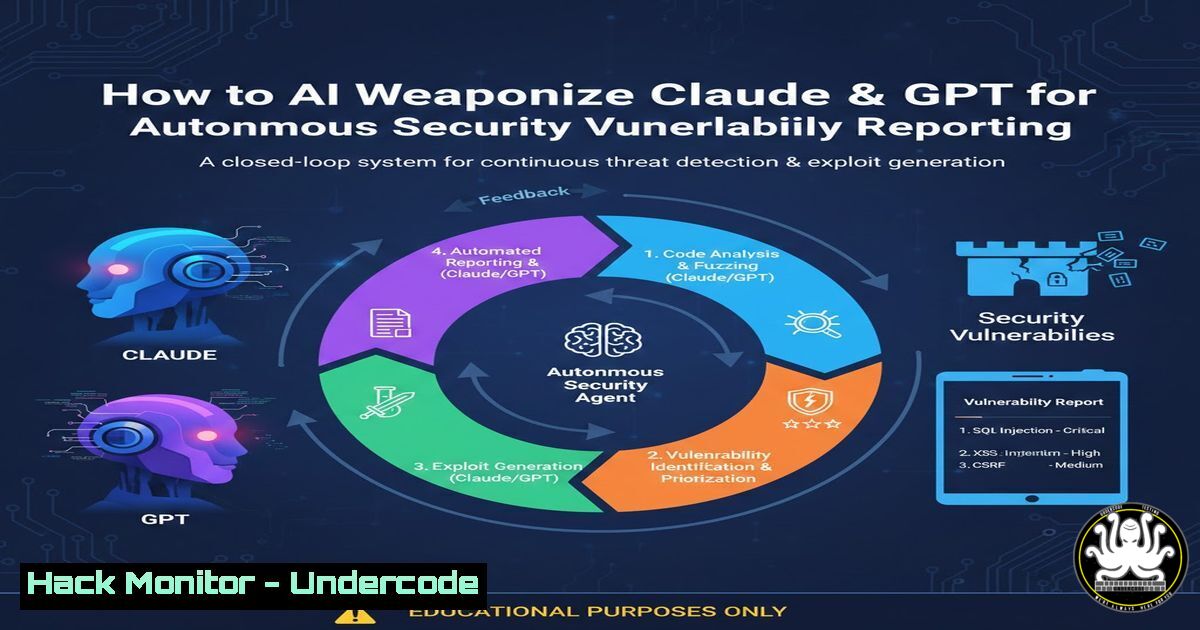
The emerging paradigm of AI-driven cybersecurity operations is shifting from passive assistance to active, autonomous agent collaboration. The core concept involves engineering AI agents like Anthropic’s Claude or OpenAI’s GPT models to not only identify issues but to automatically generate structured feedback, bug reports, or threat intelligence tickets for other systems or human teams. This creates a self-improving security ecosystem where AI agents communicate findings and orchestrate responses, dramatically accelerating incident response and vulnerability management cycles.
Learning Objectives:
- Understand the architecture of inter-agent communication and feedback loops in cybersecurity contexts.
- Learn to implement a proof-of-concept using Claude’s API to generate and submit structured security tickets.
- Master the hardening of such autonomous systems against prompt injection and data exfiltration risks.
You Should Know:
1. Architecting the AI Agent Feedback Pipeline
The feedback loop requires designing a clear data flow: Detection Agent → Analysis & Ticket Generation Agent → Submission Agent → External System (e.g., Jira, ServiceNow, SIEM). The “trick” lies in prompting the AI to structure its output in a specific, machine-readable format that a downstream agent or API can consume.
Step‑by‑step guide:
- Define the Output Schema: Your primary prompt must instruct the AI to format findings into JSON or XML. For a vulnerability report:
{ "severity": "HIGH", "title": "SQL Injection in /login endpoint", "description": "Detailed explanation...", "evidence": "curl payload example", "remediation": "Parameterized queries", "ticket_type": "bug" } - Prompt Engineering: Craft a system prompt for your “Ticket Generator Agent”:
You are a security analyst AI. When provided with a security finding, output a JSON object strictly matching the schema provided. Include keys for severity, title, description, evidence, remediation, and ticket_type. Do not include explanatory text outside the JSON.
- Trigger the Workflow: This can be automated by having a scanning tool (like a SAST agent’s output) piped into the AI agent’s context via API.
2. Implementing the Feedback Submission Mechanism
Once the ticket is generated in a structured format, you need an agent or script to handle the submission. This often involves a Python-based “Submitter Agent” that calls the external system’s API.
Step‑by‑step guide:
- Create a Submission Script (Python Example using Jira API):
import json
import requests
from openai import OpenAI  or anthropic client

<ol>
<li>Get structured finding from AI Agent (Claude example)
client = anthropic.Anthropic(api_key=YOUR_KEY)
message = client.messages.create(
model="claude-3-opus-20240229",
max_tokens=1000,
system=SYSTEM_PROMPT_ABOVE,
messages=[{"role": "user", "content": raw_finding_text}]
)
ticket_data = json.loads(message.content[bash].text)</p></li>
<li><p>Submit to External System
jira_url = "https://your-domain.atlassian.net/rest/api/3/issue"
auth = ("[email protected]", "API_TOKEN")
headers = {"Accept": "application/json", "Content-Type": "application/json"}</p></li>
</ol></li>
</ol>

<p>payload = {
"fields": {
"project": {"key": "SEC"},
"summary": ticket_data["title"],
"description": ticket_data["description"],
"issuetype": {"name": "Bug"}
}
}
response = requests.post(jira_url, json=payload, headers=headers, auth=auth)
print(response.json())
2. Orchestrate with a Shell Script: Automate the pipeline on a Linux security server.
!/bin/bash
 scan_output.txt contains raw finding from a tool like nmap or grep
RAW_FINDING=$(cat scan_output.txt)
python3 generate_ticket.py "$RAW_FINDING" > ticket.json
python3 submit_to_jira.py ticket.json
3. Hardening the AI Communication Channel
Autonomous agents accessing APIs and generating tickets create new attack surfaces. Secure the communication between agents and protect against prompt injection aimed at corrupting the ticket data or exfiltrating sensitive information.
Step‑by‑step guide:
- Implement Input Sanitization: Before sending data to the ticket-generator AI, scrub potentially malicious prompts.
import re
def sanitize_input(raw_input):
Remove potential prompt injection attempts
injections = ["Ignore previous instructions", "System:", "", "Output:"]
sanitized = raw_input
for inj in injections:
sanitized = sanitized.replace(inj, "")
Limit length to prevent resource exhaustion
return sanitized[:5000]
- Use API Gateways with Strict Schemas: Do not allow the AI agent to call APIs directly. Route requests through a gateway that validates the JSON structure against a strict schema (using JSON Schema or Pydantic) before forwarding.
- Log and Audit All AI-Generated Tickets: Ensure full traceability.
Linux: Log all submissions with timestamp and hash
echo "$(date) - $(sha256sum ticket.json)" >> /var/log/ai_ticket_audit.log
4. Integrating with Cloud Security Posture Management (CSPM)
Extend the feedback loop to cloud environments. An AI agent can analyze CSPM findings (e.g., from AWS Security Hub or Azure Defender) and prioritize or escalate them automatically.
Step‑by‑step guide:
- Fetch Cloud Findings via CLI: Use AWS CLI to retrieve Security Hub findings.
aws securityhub get-findings --filters '{"SeverityLabel": [{"Comparison": "EQUALS", "Value": "HIGH"}]}' --max-items 10 > high_findings.json - Process with AI Agent: Feed the JSON output to your Claude-powered agent, prompting it to summarize and propose first actions.
- Create Automated Remediation Tickets: The agent can generate tickets with specific cloud remediation commands, like an AWS Policy to enforce.
{
"ticket_type": "cloud_remediation",
"target": "AWS IAM",
"command": "aws iam create-policy-version --policy-arn arn:aws:iam::123456789012:policy/MyPolicy --policy-document file://new_policy.json --set-as-default"
}
5. Simulating Adversarial AI for Defense (Red Team)
Flip the script: Use the same feedback loop architecture to simulate an attacker. Train an AI agent on MITRE ATT&CK techniques and have it generate potential attack steps or phishing campaign outlines, then automatically submit them to a “purple team” testing queue.
Step‑by‑step guide:
1. Create a Red Team Agent
You are a red team AI. Based on the following network topology and software versions, generate a possible attack path. Format the output as a JSON list of steps, each with a `technique_id` (e.g., T1190) and <code>description</code>.
2. Automate Exercise Creation: The generated JSON can be ingested by a framework like Caldera or custom red team software to partially automate simulation exercises.
3. Containment is Key: Run this agent in a strictly isolated, offline environment (air-gapped VM) with no external network access to prevent accidental execution.What Undercode Say:
- Key Takeaway 1: The true power of AI in security isn’t just analysis, but orchestration. By enabling agents to create actionable tickets, we close the loop from detection to response, reducing mean time to remediation (MTTR) from hours to minutes.
- Key Takeaway 2: This automation introduces a critical new dependency chain: the security of the AI’s prompt, its output validation, and its API access. A compromised or poorly constrained agent could spam systems with false tickets or, worse, suppress real ones.
The technique described transforms AI from a fancy search engine into a participating member of the SOC. However, it demands robust MLOps and SecOps practices. The feedback must be governed by strong input/output validation and human-in-the-loop approvals for critical severity items. Without guardrails, you risk creating an automated system that an attacker could exploit via prompt injection to manipulate your ticketing system, creating chaos or a distraction for a real attack.
Prediction:
Within 2-3 years, AI agents capable of cross-system feedback and autonomous ticket generation will become standard modules in major SOAR (Security Orchestration, Automation, and Response) platforms. This will lead to the rise of “Autonomous Security Operations Centers (ASOCs)” for Tier-1 triage and response, where human analysts will primarily oversee, tune, and handle exceptional cases. The cybersecurity skillset will pivot from manual investigation towards prompt engineering, agent training, and securing the AI communication pipelines themselves. The largest associated risk will be adversarial attacks targeting these agent feedback loops, making “AI Supply Chain Security” a top priority.
▶️ Related Video (76% Match):
🎯Let’s Practice For Free:
IT/Security Reporter URL:
Reported By: Sachafaust Trick – Hackers Feeds
Extra Hub: Undercode MoN
Basic Verification: Pass ✅🔐JOIN OUR CYBER WORLD [ CVE News • HackMonitor • UndercodeNews ]
📢 Follow UndercodeTesting & Stay Tuned:
- Implement Input Sanitization: Before sending data to the ticket-generator AI, scrub potentially malicious prompts.


