Listen to this Post
Introduction:
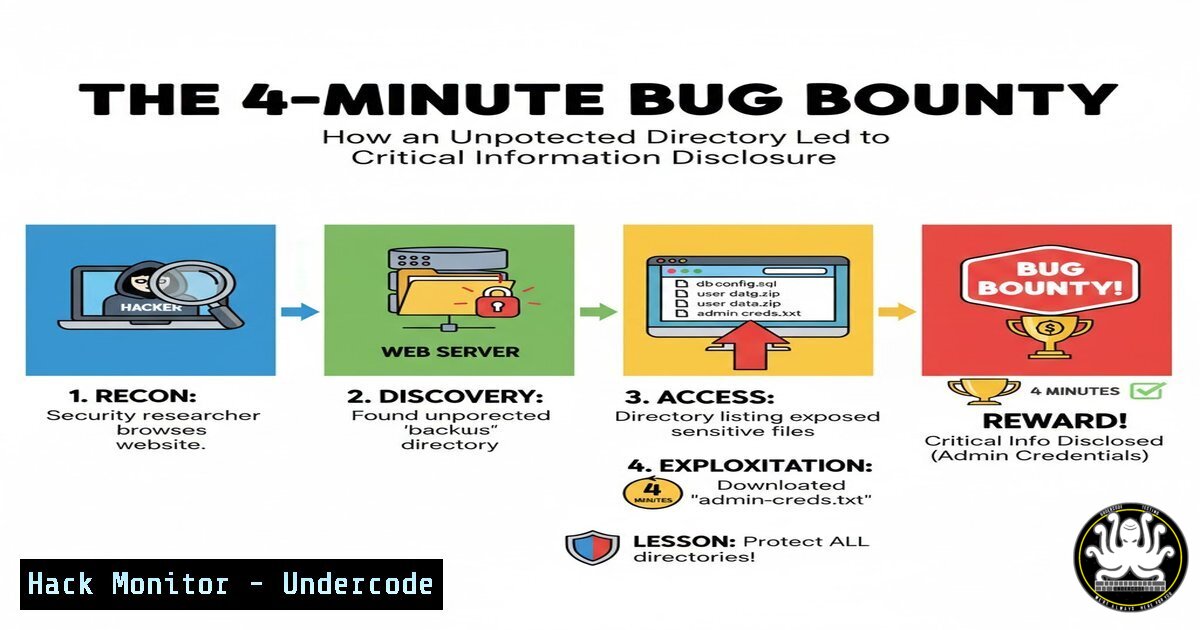
In a recent 100-day bug hunting challenge, a security researcher demonstrated how a fundamental misconfiguration—unprotected directory listing—can be discovered in mere minutes and lead to significant information disclosure. This vulnerability, often overlooked in complex web applications, exposes sensitive file structures and data that attackers can leverage for further exploitation.
Learning Objectives:
- Understand the mechanics and risks of unprotected directory listing vulnerabilities
- Master both manual and automated techniques for identifying exposed directories
- Learn mitigation strategies to secure directory configurations across web servers
You Should Know:
1. Manual Directory Discovery Techniques
 Linux/MacOS curl command to check directory listing
curl -I http://target.com/uploads/

Windows PowerShell equivalent
Invoke-WebRequest -Uri "http://target.com/uploads/" -Method Head

Common directory patterns to test
/documents /uploads /backup /admin /tmp /logs /config
Step-by-step guide: Begin by manually testing common directory paths using HTTP HEAD requests. The curl -I command sends a HEAD request to check if directory listing is enabled without downloading the entire content. Look for HTTP 200 responses with directory indexes rather than 403 Forbidden errors. Systematically test application-specific directories that might contain sensitive files.
2. Automated Directory Brute-Forcing with Gobuster
gobuster dir -u http://target.com/ -w /usr/share/wordlists/dirb/common.txt -x php,html,txt -t 50
Step-by-step guide: Gobuster automates directory discovery using wordlists. The `dir` flag specifies directory mode, `-u` sets the target URL, `-w` defines the wordlist path, `-x` checks for extensions, and `-t` sets thread count. Run this against target domains to quickly identify accessible directories that may expose sensitive information.
3. Web Server Configuration Hardening
 Apache .htaccess to disable directory listing
Options -Indexes

Nginx configuration to disable autoindex
location /uploads/ {
autoindex off;
}

IIS web.config setting
<configuration>
<system.webServer>
<directoryBrowse enabled="false" />
</system.webServer>
</configuration>
Step-by-step guide: Each web server requires specific configuration to disable directory listing. For Apache, add “Options -Indexes” to .htaccess files in vulnerable directories. In Nginx, ensure autoindex is set to “off” in server blocks. For IIS, modify web.config files to set directoryBrowse to “false.”
4. Identifying Exposed Sensitive Files
 Find common exposed file types
find /var/www/html -name ".bak" -o -name ".old" -o -name ".env" -o -name ".sql"

Search for configuration files exposed via directory listing
.config .conf .ini .xml .json .yml
Step-by-step guide: Once directory listing is enabled, attackers search for backup files, configuration files, and database dumps. Use the find command on compromised systems to locate these files, or manually browse through exposed directories looking for files with common sensitive extensions that shouldn’t be publicly accessible.
5. Information Disclosure Impact Assessment
 Extract emails from exposed directories
grep -r -E "\b[A-Za-z0-9._%+-]+@[A-Za-z0-9.-]+.[A-Z|a-z]{2,}\b" exposed_files/

Find API keys and credentials
grep -r -E "api[_-]?key|password|secret|token" exposed_files/
Step-by-step guide: After discovering exposed directories, assess the impact by searching for sensitive information within accessible files. Use grep with regular expressions to identify email addresses, API keys, and credentials that could lead to more severe breaches like account takeover or system compromise.
6. Advanced Detection with Nuclei Templates
 Custom Nuclei template for directory listing detection
id: directory-listing-exposure

info:
name: Directory Listing Exposure
author: researcher
severity: medium

http:
- method: GET
path:
- "{{BaseURL}}/uploads"
- "{{BaseURL}}/backup"
- "{{BaseURL}}/logs"

matchers:
- type: word
words:
- "Index of /uploads"
- "Index of /backup"
- "Parent Directory"
condition: or
Step-by-step guide: Create custom Nuclei templates to automate detection of directory listing across multiple targets. This template checks specific paths for directory index pages and can be integrated into continuous security testing pipelines to catch misconfigurations before production deployment.
7. Comprehensive Mitigation Strategy
 Web application firewall rule to block directory indexing
SecRule RESPONSE_BODY "@rx Index of.Directory" \
"id:1001,phase:4,deny,msg:'Directory listing detected'"

Regular security headers to implement
Header always set X-Content-Type-Options nosniff
Header always set X-Frame-Options DENY
Header always set Content-Security-Policy "default-src 'self'"
Step-by-step guide: Implement defense-in-depth strategies including WAF rules that detect and block directory listing responses. Additionally, security headers like X-Content-Type-Options prevent MIME sniffing that could expose directory contents, while Content-Security-Policy restricts resource loading to trusted sources only.
What Undercode Say:
- Unprotected directory listing remains one of the most common and easily exploitable vulnerabilities in web applications
- The speed of discovery (4 minutes) demonstrates how automated scanners and basic manual testing quickly identify this misconfiguration
- While often rated as medium severity, information disclosure can serve as the initial entry point for complex attack chains
- Proper server hardening and regular configuration audits are essential for prevention
- Bug bounty hunters should include comprehensive directory testing in their methodology, as these findings often lead to more critical vulnerabilities
The researcher’s experience highlights a critical reality in web security: fundamental misconfigurations persist despite advanced security controls. The 4-minute discovery timeframe underscores how efficiently modern tools can identify these weaknesses. Organizations must prioritize basic security hygiene and continuous monitoring, as these “simple” vulnerabilities frequently expose the path to more significant breaches when chained with other weaknesses.
Prediction:
As web applications continue to increase in complexity, unprotected directory listings will evolve from simple information disclosure to becoming initial access points for sophisticated attack chains. Within two years, we’ll see AI-powered reconnaissance tools that automatically map exposed directories across entire domains, correlating findings with other vulnerabilities to build complete attack pathways with minimal human intervention. The integration of directory listing vulnerabilities with automated exploitation frameworks will make remediation time even more critical, pushing organizations toward real-time configuration monitoring and automated hardening solutions.
🎯Let’s Practice For Free:
IT/Security Reporter URL:
Reported By: Deepak Saini – Hackers Feeds
Extra Hub: Undercode MoN
Basic Verification: Pass ✅


