Listen to this Post
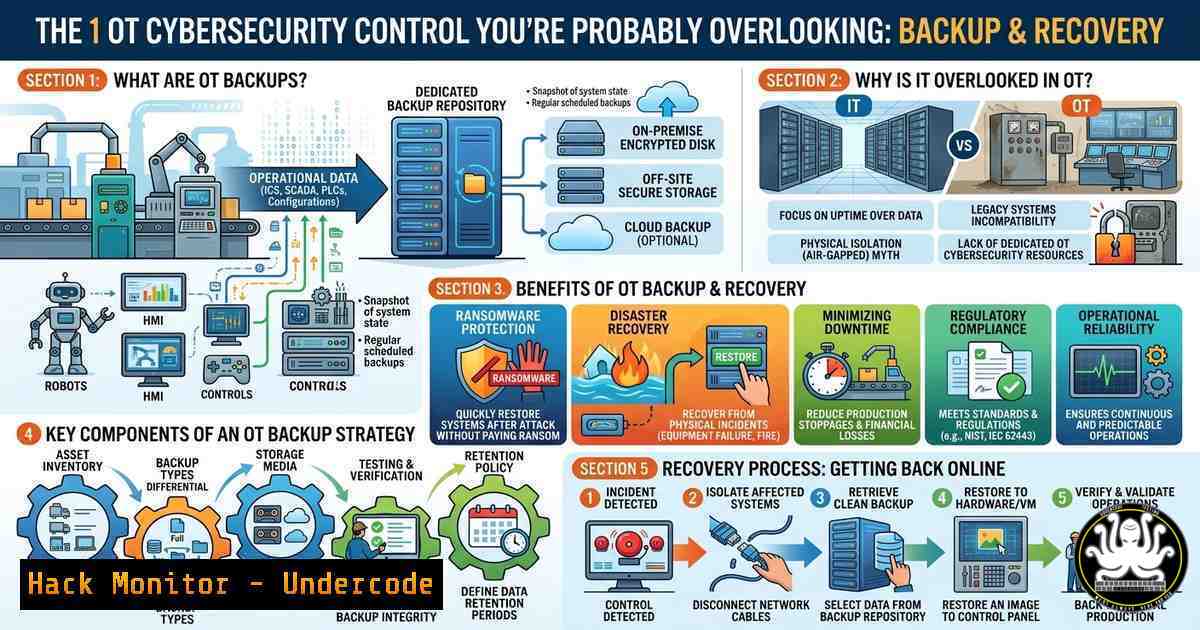
Introduction:
In the high-stakes world of Operational Technology (OT) and Industrial Control Systems (ICS), the focus is often on perimeter defense—firewalls, air gaps, and intrusion detection. However, the most critical control in both OT and IT is not prevention; it is resilience: specifically, backup and recovery. As highlighted in a recent industry webinar, many organizations are dangerously overconfident in their ability to recover from an incident, only discovering critical gaps in their response plans when a plant is down and safety is exposed.
Learning Objectives:
- Understand why backup and recovery is considered the 1 cybersecurity control in OT/ICS environments.
- Identify common gaps in OT recovery preparedness and how to validate them.
- Learn step-by-step commands and configurations to implement a robust backup strategy across Linux and Windows OT assets.
You Should Know:
- The OT/ICS Backup Paradox: Why Air-Gapped Systems Fail
Most OT engineers assume that because their network is air-gapped or segmented, they are safe from ransomware or data corruption. The reality is that insider threats, supply chain attacks (like the 2020 SolarWinds campaign targeting OT), and simple hardware failures can cripple a plant. The paradox is that “air-gapped” often means “unpatched and unmonitored,” creating a perfect environment for silent data degradation.
To ensure you are truly prepared, you must verify that backups are not just taken, but are restorable. In Linux-based OT systems (common in PLC programming workstations and HMIs), a simple validation can be performed using checksums to ensure data integrity:
 Generate a checksum of the original critical configuration file
sha256sum /opt/plc/config/hmi_settings.cfg > backup_checksum.txt

After backup restoration, verify integrity
sha256sum /opt/plc/config/hmi_settings.cfg | diff - backup_checksum.txt
If the diff command returns no output, the file integrity is intact. For Windows-based OT engineering workstations, PowerShell can achieve the same:
 Generate a file hash for integrity verification
Get-FileHash -Path "C:\ProgramData\PLC\Config\plant_logic.ldf" -Algorithm SHA256 | Out-File checksum_backup.txt

Verify after restore
Get-FileHash -Path "C:\ProgramData\PLC\Config\plant_logic.ldf" -Algorithm SHA256 | Compare-Object (Get-Content checksum_backup.txt)
- Building a Verifiable OT Backup Strategy: The 3-2-1-1-0 Rule
For OT environments, the standard 3-2-1 backup rule must evolve into the 3-2-1-1-0 rule to counter sophisticated threats. This means: 3 copies of data, 2 different media types, 1 off-site copy, 1 offline (air-gapped/immutable) copy, and 0 errors after verification.
To implement this, you must automate verification. On a Linux backup server acting as a repository for OT configurations, you can create a script that tests restoration in a sandboxed environment:
!/bin/bash
 Test restoration script for OT configurations
BACKUP_DIR="/mnt/backup/ot_assets"
TEST_DIR="/tmp/restore_test"

Restore configuration to a test directory
tar -xzf $BACKUP_DIR/plc_config_$(date +%Y%m%d).tar.gz -C $TEST_DIR

Validate the restored files against known good checksums
if sha256sum -c $BACKUP_DIR/checksums.sha256; then
echo "Backup validation PASSED at $(date)" >> /var/log/ot_backup.log
else
echo "FAILURE: Checksum mismatch at $(date)" | mail -s "OT Backup Failure" [email protected]
fi
For Windows environments, leveraging Windows Server Backup or a third-party tool via the command line allows for scripting recovery tests:
 List available backups on a Windows Backup target
wbadmin get versions -backupTarget:\backupserver\ot_backups

Perform a test recovery of a specific application folder to an alternate location
wbadmin start recovery -version:03/15/2026-10:00 -itemType:File -items:"E:\PLC_Projects" -recoveryTarget:D:\Test_Restore
3. Automation and API Security in Backup Workflows
Modern OT environments are converging with IT, requiring APIs to manage backups. However, unsecured backup APIs are a massive vulnerability. If an attacker compromises your backup server’s API key, they can delete your recovery points before deploying ransomware.
When configuring backup solutions (like Veeam, Commvault, or native cloud tools), ensure you harden API access. Using `curl` to test API security headers is a crucial step:
 Check if the backup server API exposes sensitive data without strict headers
curl -I -H "Authorization: Bearer YOUR_API_KEY" https://backup-server.local:8200/api/v1/backups
 Look for the absence of HSTS or overly permissive CORS headers
To mitigate this, restrict API access to specific management VLANs using `iptables` on the backup server:
 Allow API access only from the management subnet (192.168.10.0/24)
iptables -A INPUT -p tcp --dport 8200 -s 192.168.10.0/24 -j ACCEPT
iptables -A INPUT -p tcp --dport 8200 -j DROP
4. Cloud Hardening for Hybrid OT Recovery
As OT adopts cloud-based orchestration (e.g., for backup storage), misconfiguration becomes a primary risk. If you are storing backups in AWS S3 or Azure Blob, you must enforce immutability to prevent ransomware from encrypting your backups.
For AWS S3, enabling Object Lock is critical. This can be enforced via CLI to ensure compliance:
 Put an object with retention settings to make it immutable
aws s3api put-object-retention --bucket ot-backup-bucket --key critical_plc_config.bak --retention '{"Mode":"GOVERNANCE", "RetainUntilDate":"2027-01-01T00:00:00Z"}'

List bucket policies to ensure no "Delete" permissions exist for standard IAM roles
aws s3api get-bucket-policy --bucket ot-backup-bucket
For Azure, similar immutability is achieved via Blob Storage policies. You should audit these regularly using the Azure CLI:
 Check if immutability policy is set on the backup container
az storage container immutability-policy show --container-name ot-backups --account-name otbackupstorage
5. Vulnerability Exploitation and Mitigation in Backup Software
Backup software itself is a high-value target for attackers (e.g., exploitation of CVE-2023-27532 in Veeam). Treat your backup infrastructure as a crown jewel. If you are running a Linux-based backup appliance, you must harden the OS and monitor for anomalies.
A simple way to detect if an attacker is attempting to tamper with backup processes is to monitor for unusual process execution via auditd:
 Audit execution of backup deletion commands or unexpected binaries
auditctl -w /usr/bin/vbkiller -p x -k backup_tampering
auditctl -w /usr/sbin/rm -p x -k backup_tampering

Search audit logs for attempts to stop backup services
ausearch -k backup_tampering
For Windows, using Sysmon or PowerShell logging can track modifications to backup tasks:
 Query scheduled tasks for unexpected modifications
Get-ScheduledTask | Where-Object {$_.TaskName -like "backup"} | Get-ScheduledTaskInfo | Select-Object TaskName, LastRunTime, NextRunTime

Check for disabled Windows Defender (a common precursor to ransomware)
Get-MpComputerStatus | Select-Object AntivirusEnabled, RealTimeProtectionEnabled
What Undercode Say:
- Key Takeaway 1: Backup is not a passive IT chore; it is the primary active defense against OT ransomware. Without verifiable restorations, you do not have a backup—you have a placebo.
- Key Takeaway 2: Immutability and offline copies are non-negotiable. Ransomware groups specifically target backup repositories; if they can encrypt or delete your backups, the negotiation is already over.
- Analysis: The disconnect between perceived preparedness and actual recovery capability is the silent killer in OT security. While organizations invest heavily in detection, the webinar highlighted a critical gap: the lack of rehearsed recovery. OT environments often rely on legacy systems where manual rebuilds take weeks, not hours. The integration of immutable storage (air-gapped clouds) and automated restoration testing is shifting the paradigm from “if we get hit” to “when we get hit, how fast can we resume operations?” Safety systems are directly tied to uptime; a failure to recover means valves remain stuck, temperatures run uncontrolled, and physical damage occurs. Moving forward, backup strategies must be embedded in the SOC (Security Operations Center) monitoring, treating backup systems not as mere storage, but as critical safety systems.
Prediction:
Over the next 18 months, regulatory bodies (such as NERC CIP and TSA directives) will begin mandating not just the existence of backups, but the proof of recovery testing within critical infrastructure. We will see a surge in “Recovery-as-a-Service” (RaaS) models specifically for OT, where vendors guarantee recovery times under penalty. Furthermore, AI-driven anomaly detection will be applied to backup logs to predict failures before they occur, shifting cybersecurity from a reactive posture to a predictive resilience posture in industrial environments.
▶️ Related Video (86% Match):
🎯Let’s Practice For Free:
IT/Security Reporter URL:
Reported By: Mikeholcomb Macriumpartner – Hackers Feeds
Extra Hub: Undercode MoN
Basic Verification: Pass ✅


