Listen to this Post
Introduction
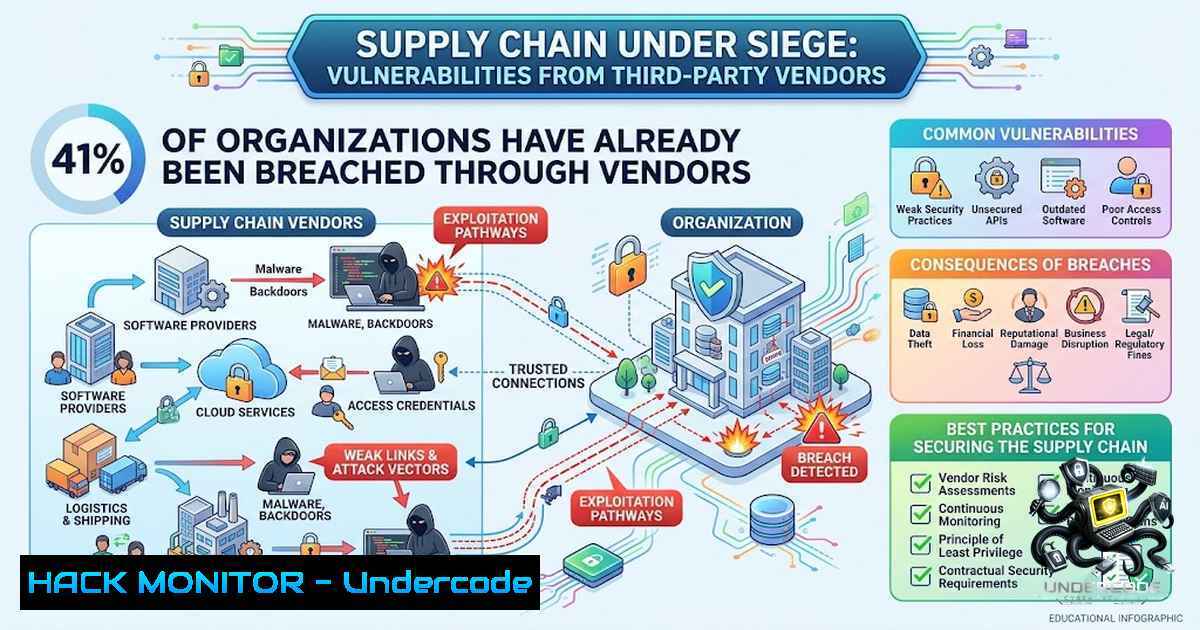
The modern enterprise no longer operates as an isolated fortress—it is an interconnected ecosystem where external vendors, contractors, and service providers hold privileged access to critical infrastructure. Yet this interdependence has become the Achilles’ heel of corporate security. Recent research by Kontur.Egida and Staffcop, surveying 1,200 IT and security professionals across multiple industries, reveals a startling reality: 41% of organizations have experienced a cybersecurity incident linked to external collaborators within the last two years. From data breaches and unauthorized access to ransomware infections and complete system lockdowns, the consequences are devastating—and the liability remains squarely on the hiring organization. A single compromised vendor account, an insecure application, or an employee error is all it takes for an attacker to pivot from the supplier’s network into the heart of your enterprise.
Learning Objectives
- Understand the scope and mechanics of supply chain cyberattacks, including the most common attack vectors and their business impact
- Master the technical implementation of third-party risk management through identity governance, privileged access controls, and continuous monitoring
- Acquire hands-on skills for auditing vendor security posture using both manual techniques and automated tools across Linux and Windows environments
- Develop an incident response playbook tailored specifically for vendor-originated breaches
You Should Know
1. The Anatomy of a Vendor-Driven Breach
According to the study, the consequences of supply chain incidents are both severe and diverse. 29% of affected organizations suffered data breaches, 26% experienced unauthorized access to customer information, and 22% reported compromised employee accounts. 21% faced service disruptions or malware infiltrations, 20% sustained reputational damage, 18% incurred direct financial losses, and 17% experienced complete system lockdowns. Only 21% of respondents escaped without serious consequences.
The threat does not require malicious intent on the vendor’s part. External specialists managing IT systems, developing software, operating contact centers, or handling personal data can inadvertently open the door to attackers through insecure applications, credential mismanagement, or simple human error. The legal reality is unforgiving: courts have consistently held that data controllers remain fully liable for breaches even when vendor negligence is proven. A one-time preliminary audit is insufficient—continuous monitoring of access rights, verification of necessity, timely account closure, and predefined incident response plans are essential.
Technical Deep Dive: Auditing Third-Party Access
To effectively manage vendor risk, security teams must implement rigorous technical controls. Below are verified commands and configurations for assessing and monitoring third-party access across common platforms.
Linux: Auditing SSH and Service Accounts
 List all user accounts with shell access (potential vendor accounts)
grep -E ":/bin/bash|:/bin/sh|:/bin/zsh" /etc/passwd

Identify accounts that have never logged in (possible stale vendor accounts)
lastlog | grep "Never logged in"

Review sudo privileges for all users
cat /etc/sudoers | grep -v "^" | grep -v "^$"

Check for active SSH sessions from external IP ranges
ss -tunap | grep :22 | grep ESTAB

Audit cron jobs that may have been configured by vendors
for user in $(cut -f1 -d: /etc/passwd); do crontab -u $user -l 2>/dev/null; done

Monitor failed authentication attempts (potential brute-force against vendor accounts)
grep "Failed password" /var/log/auth.log | tail -20
Windows: Auditing Service Accounts and Privileged Access
 List all service accounts with their associated services
Get-WmiObject Win32_Service | Where-Object {$<em>.StartName -1e "LocalSystem" -and $</em>.StartName -1e "NT AUTHORITY\NetworkService"} | Format-Table Name, StartName, State

Identify local administrators (including vendor-added accounts)
Get-LocalGroupMember -Group "Administrators"

Review scheduled tasks that may have been created by vendors
Get-ScheduledTask | Where-Object {$_.TaskPath -1otlike "\Microsoft\"} | Format-Table TaskName, State, Author

Check for RDP sessions from external IPs
Get-WinEvent -LogName Security | Where-Object {$<em>.Id -eq 4624 -and $</em>.Message -match "Logon Type:\s+10"} | Select-Object TimeCreated, Message -First 20

Audit PowerShell transcript logs for suspicious vendor activity
Get-ChildItem -Path C:\Users\Documents\PowerShell_transcript -ErrorAction SilentlyContinue
API Security: Monitoring Third-Party Integrations
 Using OWASP ZAP to audit API endpoints exposed to vendors
 Baseline scan against vendor-facing API
zap-cli --zap-url http://localhost:8080 quick-scan --spider -r "https://api.yourcompany.com/vendor/"

Using curl to test for common API misconfigurations
 Check for excessive data exposure
curl -X GET "https://api.yourcompany.com/vendor/users" -H "Authorization: Bearer $VENDOR_TOKEN" | jq .

Test for improper rate limiting (potential DoS vector)
for i in {1..100}; do curl -s -o /dev/null -w "%{http_code}\n" "https://api.yourcompany.com/vendor/endpoint" -H "Authorization: Bearer $VENDOR_TOKEN"; done | sort | uniq -c
Cloud Hardening: AWS IAM Vendor Access Review
 List all IAM roles assumable by external accounts
aws iam list-roles --query 'Roles[?AssumeRolePolicyDocument.Statement[?Principal.AWS]]' --output table

Review policies attached to vendor roles for over-privilege
aws iam list-attached-role-policies --role-1ame VendorRoleName

Check for unused IAM keys (potential stale vendor credentials)
aws iam list-access-keys --user-1ame VendorUserName

Enable CloudTrail for vendor API activity monitoring
aws cloudtrail create-trail --1ame VendorAuditTrail --s3-bucket-1ame your-audit-bucket --is-multi-region-trail
- Vendor Selection and Due Diligence: Beyond the Checklist
The research reveals that 71% of organizations have refused to collaborate with a vendor at least once due to information security concerns, and 30% have made this decision multiple times. While 40% of organizations conduct due diligence on all vendors and 45% evaluate only those with access to critical information systems, the reality is that security posture can deteriorate after contract signing—team compositions change, access rights expand, and compliance weakens.
Step-by-Step Guide: Implementing a Vendor Security Assessment Framework
- Categorize vendors by risk level: Assign risk tiers (Critical, High, Medium, Low) based on data sensitivity, access scope, and integration depth. Critical vendors require full-spectrum assessments including on-site audits.
-
Deploy continuous security monitoring: Implement a vendor risk management platform that continuously scans for:
– Dark web exposure of vendor credentials
– Changes in vendor security certifications (ISO 27001, SOC 2)
– Publicly disclosed vulnerabilities in vendor software
– Vendor network reputation and past breach history
3. Conduct technical assessments using automated tools:
Nmap for external vendor infrastructure scanning:
 Scan vendor external-facing assets for open ports and services
nmap -sV -sC -O -T4 vendor-domain.com

Detect potentially vulnerable services
nmap -sV --script=vuln vendor-domain.com
OpenVAS for vulnerability scanning:
 Perform authenticated vulnerability scan on vendor systems
gvm-cli socket --gmp-username admin --gmp-password password socket --xml "<create_task><name>Vendor Scan</name><target id='$TARGET_ID'/><config id='daba56c8-73ec-11df-a475-002264764cea'/></create_task>"
TruffleHog for secrets exposure:
 Scan vendor repositories for exposed credentials
trufflehog git https://github.com/vendor/repo.git
- Establish contractual security requirements: Mandate specific controls including:
– Multi-factor authentication for all vendor access
– Regular penetration testing (minimum quarterly)
– Incident notification within 24 hours
– Right-to-audit clauses with technical verification rights
- Implement just-in-time (JIT) access provisioning: Instead of permanent access, grant vendors time-limited, purpose-specific credentials.
Azure JIT Configuration:
 Enable JIT on Azure VMs
Set-AzVMAccessExtension -ResourceGroupName "RG-Vendor" -VMName "VendorVM" -1ame "JITAccess" -TypeHandlerVersion "2.4" -Location "eastus"

Configure JIT policy
$jitPolicy = @{
"id" = "/subscriptions/{subscription-id}/resourceGroups/RG-Vendor/providers/Microsoft.Security/locations/eastus/jitNetworkAccessPolicies/default"
"properties" = @{
"virtualMachines" = @(
@{
"id" = "/subscriptions/{subscription-id}/resourceGroups/RG-Vendor/providers/Microsoft.Compute/virtualMachines/VendorVM"
"ports" = @(
@{
"number" = 3389
"protocol" = "TCP"
"allowedSourceAddressPrefix" = "x.x.x.x/32"
"maxRequestAccessDuration" = "PT3H"
}
)
}
)
}
}
3. Continuous Monitoring and Access Governance
A one-time audit is insufficient—organizations must maintain perpetual vigilance over vendor access. The research emphasizes that clients must monitor granted rights, verify access necessity, close accounts promptly, and define incident response plans in advance.
Step-by-Step Guide: Building a Vendor Monitoring Program
1. Implement identity governance and administration (IGA) :
- Establish a formal access certification process requiring periodic (quarterly) recertification of all vendor access rights
- Automate orphaned account detection and removal
- Implement role-based access control (RBAC) with vendor-specific roles
Linux: Automating Account Review:
 Generate monthly vendor account review report
!/bin/bash
echo "Vendor Account Review Report - $(date)" > vendor_review.txt
echo "========================================" >> vendor_review.txt
echo "Active Vendor Accounts:" >> vendor_review.txt
grep -E ":/bin/bash|:/bin/sh|:/bin/zsh" /etc/passwd | awk -F: '{print $1, $3, $6}' >> vendor_review.txt
echo "" >> vendor_review.txt
echo "Last Login Activity:" >> vendor_review.txt
lastlog | grep -v "Never" | awk '{print $1, $4, $5, $6}' >> vendor_review.txt
echo "" >> vendor_review.txt
echo "Sudo Privileges:" >> vendor_review.txt
cat /etc/sudoers | grep -v "^" | grep -v "^$" >> vendor_review.txt

Email the report to security team
mail -s "Vendor Account Review Report" [email protected] < vendor_review.txt
Windows: PowerShell Vendor Audit Script:
 Automated vendor account review
$reportPath = "C:\SecurityReports\VendorReview_$(Get-Date -Format 'yyyyMMdd').html"

$vendorAccounts = Get-LocalUser | Where-Object {$_.Name -match "vendor|external|consultant"}

$html = "<html><head><style>body{font-family:Arial}table{border-collapse:collapse}td,th{border:1px solid black;padding:8px}</style></head><body>"
$html += "

<h1>Vendor Account Review Report</h1>

"
$html += "

<table><tr><th>Account</th><th>Enabled</th><th>Last Login</th><th>Password Last Set</th></tr>"

foreach ($account in $vendorAccounts) {
$lastLogin = (Get-LocalUser -1ame $account.Name).LastLogin
$passwordLastSet = (Get-LocalUser -1ame $account.Name).PasswordLastSet
$html += "<tr><td>$($account.Name)</td><td>$($account.Enabled)</td><td>$lastLogin</td><td>$passwordLastSet</td></tr>"
}

$html += "</table>

</body></html>"
$html | Out-File -FilePath $reportPath

Send report via email
Send-MailMessage -To "[email protected]" -Subject "Vendor Account Review" -Body "Please review the attached vendor account report." -Attachments $reportPath -SmtpServer "smtp.company.com"
- Deploy User and Entity Behavior Analytics (UEBA) :
– Establish baseline behavioral profiles for vendor accounts
– Alert on anomalies including off-hours access, abnormal data transfer volumes, and geographic irregularities
Splunk Query for Vendor Anomaly Detection:
index=authentication vendor_account=
| eval hour_of_day=strftime(_time, "%H")
| eval day_of_week=strftime(_time, "%A")
| stats count by vendor_account, hour_of_day, day_of_week, src_ip
| where count > (avg(count)  2)
| table vendor_account, src_ip, hour_of_day, day_of_week, count
3. Implement privileged access management (PAM) :
- Require vendors to use a PAM solution for all privileged operations
- Automatically rotate credentials after each session
- Record and audit all privileged sessions
CyberArk REST API for Credential Rotation:
 Trigger automated password rotation for vendor account
curl -X POST "https://cyberark.company.com/PasswordVault/API/Accounts/$ACCOUNT_ID/Rotate" \
-H "Authorization: Bearer $API_TOKEN" \
-H "Content-Type: application/json" \
-d '{"Reason": "Scheduled vendor credential rotation"}'
4. Establish a vendor incident response playbook:
- Define escalation procedures for vendor-related alerts
- Conduct tabletop exercises simulating vendor compromise scenarios
- Maintain up-to-date contact information for all vendor security teams
- Pre-define legal and communication protocols for vendor breach notification
4. Supply Chain Attack Mitigation: Technical Controls
The research underscores that external specialists do not need malicious intent to pose a serious threat. Therefore, organizations must implement defense-in-depth controls that assume vendor compromise is inevitable.
Zero Trust Architecture for Vendor Access:
- Network segmentation: Isolate vendor-accessible systems in dedicated network segments with strict firewall rules.
iptables for Vendor Network Segmentation:
 Create a dedicated vendor zone
iptables -1 VENDOR_INPUT
iptables -A INPUT -i eth1 -j VENDOR_INPUT

Allow only specific vendor IPs
iptables -A VENDOR_INPUT -s 203.0.113.0/24 -p tcp --dport 443 -j ACCEPT
iptables -A VENDOR_INPUT -j DROP

Log all dropped vendor traffic for monitoring
iptables -A VENDOR_INPUT -j LOG --log-prefix "VENDOR_BLOCKED: "
- Application whitelisting: Restrict vendor systems to execute only approved applications.
Windows AppLocker Configuration:
 Create AppLocker rules for vendor-specific applications
$Rule = New-AppLockerPolicy -RuleType Exe -User Everyone -Path "C:\VendorApps\" -Action Allow
Set-AppLockerPolicy -Policy $Rule -Merge
- Data loss prevention (DLP) : Monitor and control data exfiltration by vendors.
Linux: Auditd for File Access Monitoring:
 Monitor access to sensitive files by vendor accounts
auditctl -w /data/sensitive/ -p rwxa -k vendor_access
auditctl -w /etc/shadow -p r -k vendor_access

Generate report of vendor file access
ausearch -k vendor_access -i | aureport -f -i
- API gateway with rate limiting and authentication: Protect vendor-facing APIs.
NGINX API Gateway Configuration:
 Rate limiting for vendor APIs
limit_req_zone $binary_remote_addr zone=vendorapi:10m rate=10r/m;

server {
location /api/vendor/ {
limit_req zone=vendorapi burst=5 nodelay;
auth_request /auth;
proxy_pass http://backend_vendor;
}

location = /auth {
internal;
proxy_pass http://auth_service/validate;
proxy_pass_request_body off;
proxy_set_header Content-Length "";
proxy_set_header X-Original-URI $request_uri;
}
}
What Undercode Say
- The liability shift is non-1egotiable: The research confirms that legal responsibility for data breaches remains with the hiring organization regardless of vendor fault. This fundamentally changes the risk calculus—outsourcing does not outsource accountability. Organizations must treat vendor security as an extension of their own security program, not a separate concern.
-
Trust but verify is obsolete: A one-time vendor audit is no longer sufficient. The dynamic nature of vendor relationships—changing teams, expanding access rights, weakening compliance—demands continuous, automated monitoring. Organizations should implement vendor risk management platforms that provide real-time visibility into vendor security posture, not periodic snapshots.
-
The 41% figure is likely understated: Given that only 21% of respondents reported no serious consequences, and considering the challenges of detecting vendor-originated breaches (which often blend into legitimate traffic), the true incidence rate may be significantly higher. Organizations that have not yet experienced a vendor-related incident should view themselves as fortunate, not immune.
-
Vendor selection is becoming a competitive advantage: With 71% of organizations refusing collaboration due to security concerns, robust vendor security practices are no longer just a compliance checkbox—they are a business enabler. Organizations with mature vendor risk management programs can move faster in partnerships while their competitors remain paralyzed by due diligence paralysis.
Prediction
-
+1 Regulatory frameworks will increasingly mandate specific vendor security controls, shifting from general “reasonable measures” language to prescriptive requirements including mandatory third-party penetration testing, continuous monitoring, and immediate breach notification. The EU’s NIS2 Directive and DORA are precursors to a global regulatory trend that will make vendor risk management a board-level imperative.
-
-1 The sophistication of supply chain attacks will escalate dramatically as threat actors recognize that compromising a single vendor yields access to multiple targets simultaneously. We can expect to see state-sponsored groups developing “vendor-as-a-pivot” capabilities, actively targeting managed service providers, software development firms, and cloud service providers as primary attack vectors rather than secondary ones.
-
+1 Artificial intelligence will revolutionize vendor risk assessment, enabling organizations to continuously monitor thousands of vendors at scale—analyzing everything from dark web credential exposure to vulnerability disclosure timelines to geopolitical risk factors. This will democratize enterprise-grade vendor risk management, making it accessible to mid-market organizations that previously lacked the resources for comprehensive assessments.
-
-1 The concentration of cloud services and managed security providers creates systemic risk. A successful compromise of a major cloud provider or MSSP could trigger cascading failures across hundreds of organizations simultaneously. The industry must urgently address this concentration risk through standardized incident response coordination and mutual aid agreements.
-
+1 Zero Trust architectures will become the de facto standard for vendor access, eliminating the implicit trust traditionally granted to partners. The principle of “never trust, always verify” will extend to vendor relationships, with just-in-time access, continuous authentication, and micro-segmentation becoming mandatory for any organization serious about supply chain security.
▶️ Related Video (78% Match):
https://www.youtube.com/watch?v=0eQDx38tMZ4
🎯Let’s Practice For Free:
🎓 Live Courses & Certifications:
Join Undercode Academy for Verified Certifications
🚀 Request a Custom Project:
Secure, high-velocity infrastructure and disruptive technological engineering. Contact our engineering team for high-tier development and proprietary systems:
[email protected]
💎 Smart Architecture | 🛡️ Secure by Design | ⭐ Trusted by Thousands
IT/Security Reporter URL:
Reported By: https://lnkd.in/p/dP46K-bM – Hackers Feeds
Extra Hub: Undercode MoN
Basic Verification: Pass ✅


