Listen to this Post
Introduction:
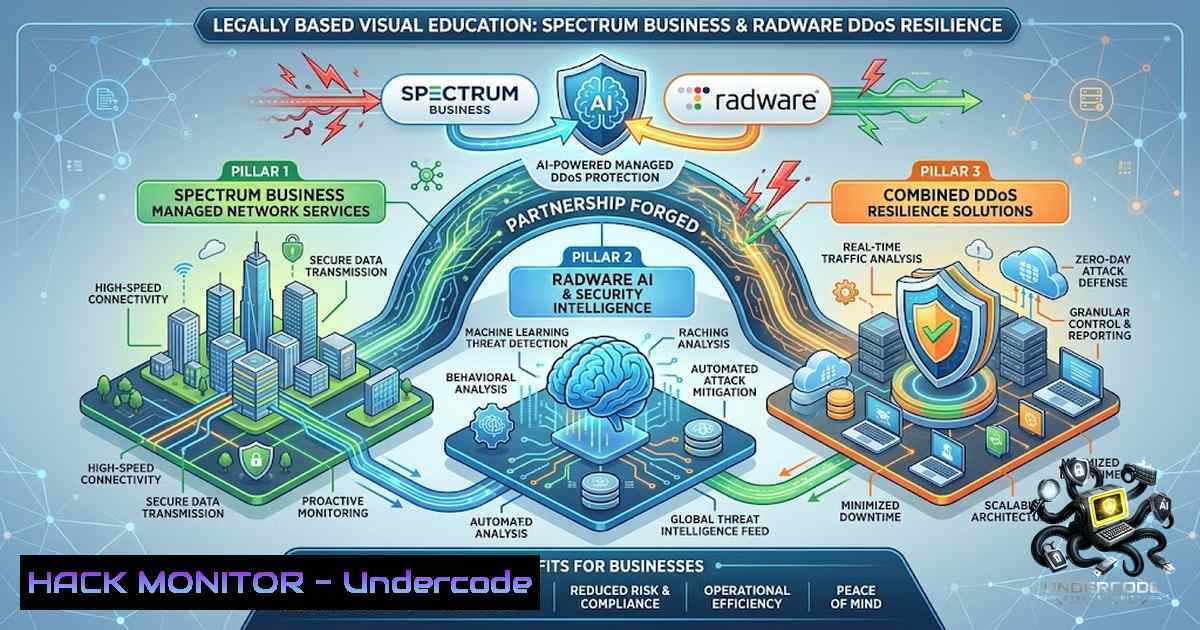
The escalating sophistication of distributed denial-of-service (DDoS) attacks—now leveraging AI to evade traditional defenses—demands a paradigm shift in how organizations approach cyber resilience. In response, Spectrum Business has been named Radware’s U.S. Managed Security Services Partner of the Year for its rapid expansion of managed DDoS protection services, making enterprise-grade, AI-powered security accessible to organizations of all sizes. This recognition underscores a critical evolution: the integration of behavioral AI, global cloud scrubbing infrastructure, and per-circuit service models that democratize protection against tsunami-size Web DDoS attacks.
Learning Objectives:
- Understand the technical architecture behind Radware’s AI-powered Cloud DDoS Protection Service and its behavioral algorithms.
- Learn to deploy and configure layered DDoS mitigation strategies using native Linux iptables and Windows netsh commands.
- Explore API security, LLM firewall implementation, and cloud hardening best practices for multi-cloud environments.
- Analyze the managed security service model that enables scalable, per-circuit DDoS protection for enterprise and mid-market customers.
You Should Know:
1. The AI-Powered DDoS Protection Architecture
Radware’s Cloud DDoS Protection Service operates on a globally distributed network of scrubbing centers—currently 19 centers with over 10 Tbps of mitigation capacity, interconnected via full-mesh Anycast-based routing. When traffic destined for a protected asset is redirected to a Radware Scrubbing Center, advanced behavioral algorithms analyze patterns in real time, distinguishing malicious floods from legitimate requests without requiring TLS decryption.
This architecture is further enhanced by a cloud-augmented protection layer for DefensePro X, which combines AI-powered cloud algorithms with inline enforcement capabilities, keeping traffic inspection and private TLS keys on-premises while leveraging over 65 cloud centers for Layer 7 attack detection. The service establishes a baseline of normal traffic patterns using machine-learning models, then continuously monitors for anomalies associated with application-layer DDoS activity.
Step‑by‑step guide: Deploying a Basic DDoS Mitigation Layer with Linux iptables
While Radware provides enterprise-grade protection, native firewall tools offer a first line of defense. Below are verified commands for rate-limiting and connection tracking.
1. Limit New Connection Rates (SYN Flood Mitigation):
 Limit SYN packets to 3 per second per source IP (adjust burst as needed)
sudo iptables -A INPUT -p tcp --syn -m limit --limit 3/s --limit-burst 5 -j ACCEPT
sudo iptables -A INPUT -p tcp --syn -j DROP
2. Restrict Concurrent Connections per IP:
 Using connlimit module to allow max 20 concurrent connections per client IP
sudo iptables -A INPUT -p tcp --dport 80 -m connlimit --connlimit-above 20 --connlimit-mask 32 -j REJECT
sudo iptables -A INPUT -p tcp --dport 443 -m connlimit --connlimit-above 20 --connlimit-mask 32 -j REJECT
- Block Invalid Packet Flags (Scans & Fragmented Attacks):
Drop TCP packets with invalid flag combinations (e.g., NULL, FIN without ACK)
sudo iptables -A INPUT -p tcp --tcp-flags ALL NONE -j DROP
sudo iptables -A INPUT -p tcp --tcp-flags ALL ALL -j DROP
4. Enable SYN Cookies (Kernel-level Protection):
 Enable SYN cookies to handle SYN flood without dropping legitimate connections
sudo sysctl -w net.ipv4.tcp_syncookies=1
 Make permanent by adding to /etc/sysctl.conf
echo "net.ipv4.tcp_syncookies=1" | sudo tee -a /etc/sysctl.conf
5. Monitor Rate Limit Hits:
 View iptables rule counters to identify blocked traffic
sudo iptables -L -v -1 | grep -E "DROP|REJECT"
2. Hardening Windows Servers Against DDoS Attacks
Windows environments require distinct mitigation strategies, primarily leveraging the `netsh` command and advanced firewall rules.
Step‑by‑step guide: Windows DDoS Protection Configuration
- Enable Memory Pressure Protection (MPP) to Mitigate SYN Attacks:
Enable MPP to protect against denial-of-service attempts
netsh int tcp set security mpp=enabled
Verify current setting
netsh int tcp show security
This feature helps guard against DDoS by managing TCP stack resources.
2. Configure IPsec DoS Protection (IPv6):
 Create an IPsec DoS protection setting (affects ESP-protected IPv6 connections)
netsh ipsecdosprotection
 Alternatively, use PowerShell
New-1etIPsecDospSetting -1ame "DDoSProtection" -Type ICMPV6,IPV6_NEGOTIATION
This cmdlet adds IPsec DoS protection settings to the target computer.
- Disable Explicit Congestion Notification (ECN) if Causing Connectivity Issues:
Disable ECN to prevent potential DoS exploitation
netsh int tcp set global ecncapability=disabled
ECN can be abused in certain DDoS scenarios; disabling it may improve stability.
-
Implement Dynamic Connection Rate Limiting with Windows Firewall:
Create a firewall rule to limit SYN rate (example: block if exceeding threshold)
netsh advfirewall firewall add rule name="Limit SYN Rate" dir=in action=block protocol=TCP localport=any enable=yes profile=any security=notrequired
Combine this with third-party scripts to dynamically blacklist offending IPs.
5. Enable TCP Timestamping and RST Mitigation:
 Reduce TIME-WAIT state to free resources
netsh int ipv4 set dynamicport tcp start=10000 num=55535
netsh int ipv4 set dynamicport udp start=10000 num=55535
3. Radware SecureLink: Managed Service Provider Integration
Radware SecureLink integrates directly with MSSP network infrastructure, creating an end-to-end DDoS defense workflow. The process begins with traffic telemetry collected from edge routers using NetFlow, which feeds into Radware’s cloud-based protection platform. Spectrum Business leverages this to package DDoS protection on a per-circuit basis, enabling scalable services that increase customer value and create new revenue opportunities.
Step‑by‑step guide: Configuring Radware DefensePro DDoS Mitigation (CLI)
- Access the DefensePro CLI and Navigate to Protection Profiles:
Enter configuration perspective
configure terminal
Navigate to Network Protection
network-protection
2. Configure Burst-Attack Protection (BDoS):
 Set burst threshold (number of bursts that trigger identification)
dp behavioral-DoS profiles-bt <value>
Values define the burst count that causes the BDoS profile to identify an attack.
3. Configure Connection PPS Profiles:
 Create a new Connection PPS profile
connection-pps-profiles
 Add protections (up to 50 PPS protections per profile)
pps-protection <name>
Each Connection PPS profile can contain up to 50 PPS protections.
4. Apply Blacklist/Whitelist Rules:
 Access Control Lists
access-control
 Add IP to Blacklist
black-list add <IP_address>
Up to 256 network blocks can be defined per rule.
5. Use APSolute Vision for Automation:
Radware’s APSolute Vision provides predefined Toolbox scripts that automate common configuration and management actions for DefensePro.
4. API Security and LLM Firewall Implementation
As organizations adopt AI agents and autonomous tools, API security becomes paramount. Radware’s API Security Service delivers end-to-end protection, including continuous discovery, runtime posture management, business logic protection, pre-production testing, and runtime enforcement. Its LLM Firewall and Agentic AI Protection extend this to prompt-based applications, safeguarding against prompt injection, tool abuse, and data exposure risks.
Step‑by‑step guide: Securing APIs and AI Agents with Radware
1. Enable API Discovery and Posture Management:
- Navigate to the Radware Cloud portal (`https://portal.radwarecloud.com`).
- Under “API Security,” enable continuous discovery to automatically catalog all active APIs.
- Review posture management reports to identify misconfigurations and overly permissive permissions.
2. Implement Runtime Protection for APIs:
- Deploy Radware’s Cloud WAF with API-specific protection rules.
- Enable business logic protection to detect and block abuse of application workflows.
- Configure behavioral baselines for each API endpoint to detect anomalies.
3. Deploy LLM Firewall for Generative AI Security:
- Activate the LLM Firewall within the Cloud Application Protection suite.
- Define guardrails for LLM interactions, blocking malicious prompts and preventing sensitive data leakage.
- Monitor prompt-level traffic for injection attempts and policy violations.
4. Secure AI Agents with Agentic AI Protection:
- Deploy Agentic AI Protection to gain visibility into AI agent interactions with tools, APIs, and external services.
- Enable governance and compliance reporting to ensure agents adhere to security policies.
- Monitor locally installed AI agents and workflows for anomalous behavior.
5. Cloud Hardening and Misconfiguration Detection
Radware’s Cloud Native Protector delivers comprehensive cloud security by detecting gaps between used and granted permissions, providing smart hardening recommendations to reduce attack surfaces. It offers misconfiguration detection, compliance assurance, and malicious activity alerts across AWS, Azure, and other multi-cloud environments.
Step‑by‑step guide: Cloud Security Hardening with Radware
1. Assess Cloud Permissions (CIEM):
- Enable Cloud Infrastructure Entitlement Management (CIEM) to analyze IAM roles and policies.
- Review the “used vs. granted” permissions report to identify excessive privileges.
- Apply smart hardening recommendations to eliminate unnecessary permissions.
2. Enforce Strict WAF Policies:
- In the Radware Cloud portal, select “Strict” WAF template for applications requiring high security.
- This policy enforces strong security-hardened rules, ideal for financial, healthcare, and critical infrastructure.
3. Configure SecurePath for API Protection:
- Under Security, enable SecurePath and create a SecurePath policy.
- Provide the required API Key and Value for authentication.
- Apply the policy to protect specific application traffic flows.
4. Monitor for Public Exposure Alerts:
- Regularly review public exposure alerts generated by Cloud Native Protector.
- Remediate any misconfigured storage buckets, open ports, or overly permissive security groups.
- Use compliance assurance reports to maintain regulatory adherence (e.g., PCI-DSS, HIPAA).
5. Automate Response with Malicious Behavior Indicators (MBI):
Radware’s CTDR uses specialized Malicious Behavior Indicators tailored to cloud threats. Configure automated responses to trigger when MBIs are detected, such as isolating compromised instances or revoking suspicious access tokens.
What Undercode Say:
- Key Takeaway 1: The Spectrum Business–Radware partnership demonstrates that managed DDoS protection is no longer a luxury for large enterprises; the per-circuit packaging model makes AI-powered resilience accessible to mid-market and even small businesses, effectively democratizing enterprise-grade security.
-
Key Takeaway 2: Radware’s cloud-augmented architecture—combining AI-driven behavioral algorithms with on-premises inline enforcement—represents a significant leap forward. By keeping TLS keys and sensitive traffic local while leveraging global cloud intelligence, organizations achieve both privacy and protection without trade-offs.
Analysis: The integration of AI into DDoS mitigation is not merely incremental; it’s a response to attackers who now use AI to craft tsunami-size, encrypted, and highly evasive attacks. Radware’s ability to defend encrypted traffic without TLS decryption is a game-changer, eliminating the performance and privacy penalties traditionally associated with SSL inspection. Furthermore, the expansion into API security and LLM firewalls signals a recognition that the attack surface has shifted—AI agents and APIs are the new vectors, and protection must evolve accordingly. For MSSPs like Spectrum Business, this creates a compelling value proposition: bundling connectivity with advanced security not only drives revenue but also builds customer stickiness and trust.
Prediction:
- +1 The per-circuit DDoS protection model will become an industry standard, with more ISPs and MSSPs adopting similar packaging to drive security-as-a-service revenue. This will accelerate the democratization of advanced DDoS protection, reducing the average cost of mitigation and raising the baseline security posture for SMBs globally.
-
+1 AI-driven behavioral algorithms will increasingly replace signature-based detection, making DDoS protection more adaptive and capable of stopping zero-day attack patterns. This shift will reduce false positives and improve the accuracy of mitigation, particularly for encrypted traffic.
-
-1 As AI-powered defenses become more prevalent, attackers will escalate their own use of generative AI to craft even more sophisticated, polymorphic DDoS campaigns that mimic legitimate user behavior more convincingly. This will trigger an arms race, requiring continuous innovation in behavioral modeling and real-time threat intelligence.
-
+1 The convergence of DDoS protection, API security, and LLM firewalls into unified platforms will simplify security operations for MSSPs, enabling them to offer comprehensive protection suites without juggling multiple vendors. This consolidation will drive operational efficiencies and improve incident response times.
-
-1 Organizations that fail to adopt AI-powered protection will face increasing risk of prolonged downtime and reputational damage, as traditional DDoS mitigation solutions prove inadequate against AI-enhanced attacks. The gap between protected and unprotected organizations will widen, creating a digital divide in cyber resilience.
▶️ Related Video (84% Match):
https://www.youtube.com/watch?v=-CC7sbHXgcA
🎯Let’s Practice For Free:
🎓 Live Courses & Certifications:
Join Undercode Academy for Verified Certifications
🚀 Request a Custom Project:
Secure, high-velocity infrastructure and disruptive technological engineering. Contact our engineering team for high-tier development and proprietary systems:
[email protected]
💎 Smart Architecture | 🛡️ Secure by Design | ⭐ Trusted by Thousands
IT/Security Reporter URL:
Reported By: Paula Andrea – Hackers Feeds
Extra Hub: Undercode MoN
Basic Verification: Pass ✅


