
Listen to this Post
Introduction
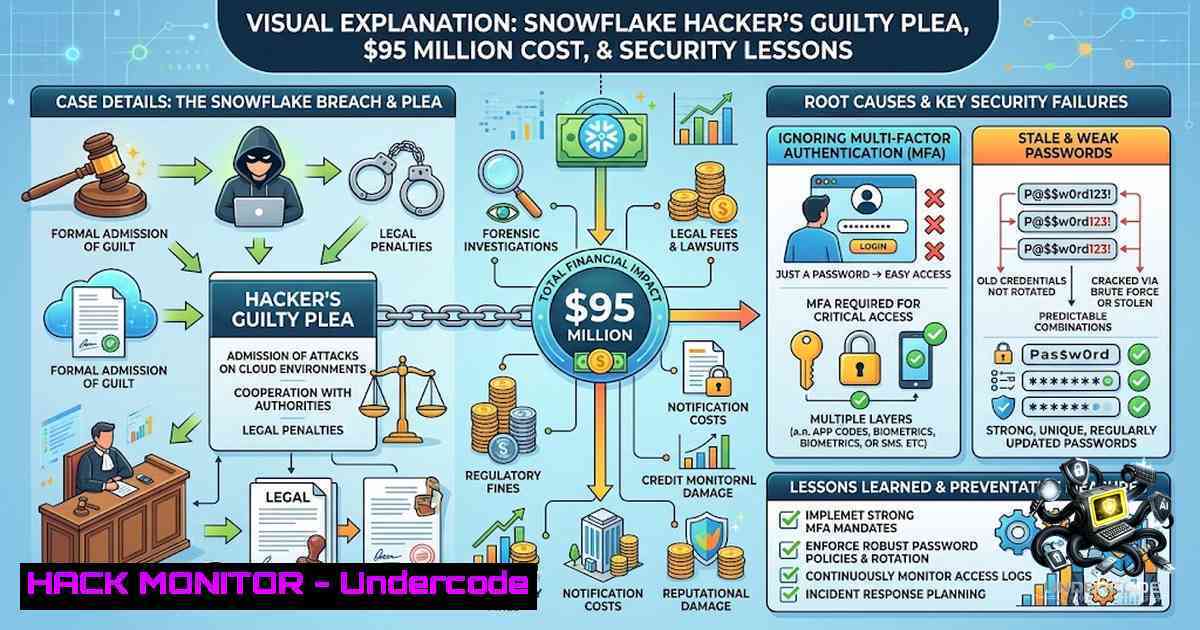
The Department of Justice announced that Connor Riley Moucka, a 26-year-old from Kitchener, Ontario, pleaded guilty to a hacking and extortion campaign that compromised more than 165 victim organizations, stole billions of sensitive customer records, and affected roughly 100 million people. Moucka and his co-conspirators collected over $2.5 million in ransom and caused victim companies to absorb more than $9.5 million in losses. The attack vector was not an exotic zero-day exploit but rather valid usernames and passwords stolen by infostealer malware—some harvested as far back as November 2020—that had never been rotated and were not protected by multi-factor authentication (MFA). This case serves as a stark reminder that basic security hygiene remains the most critical defense against modern cyber threats.
Learning Objectives & Secrets
- Objective 1: Enforce Regular Credential Rotation – Implement and enforce password expiration policies and immediately reset credentials after any suspected infostealer infection. A password from 2020 should not open anything in 2024. Mandiant’s investigation found that at least 79.7% of the accounts the group used had prior credential exposure.
-
Objective 2 Secret Tip: Mandatory MFA for All Cloud and SaaS Environments – Multi-factor authentication is the highest-leverage control against credential-based attacks. A stolen password is far less useful when a second factor stands in the way. Prioritize cloud and SaaS environments that hold sensitive data. The compromised instances in this case had no network allow lists.
-
Objective 3 Secret Tip: Kill Stale Sessions and Invalidate Tokens – Infostealers grab session cookies too, which can bypass passwords entirely. Expire sessions and invalidate tokens on a regular schedule. The campaign, as Mandiant noted, “is not the result of any particularly novel or sophisticated tool, technique, or procedure”—it succeeded because of basic security gaps.
You Should Know
1. Understanding Infostealer Malware and Credential Harvesting
Infostealers like Vidar, RedLine, Lumma, and their variants are responsible for exfiltrating credentials from infected endpoints. These credentials are then sold or traded on dark web forums. In the Moucka case, the credentials were harvested as far back as November 2020 and remained valid for years. The attackers fed bulk credential logs into scraping software to identify cloud environments without MFA protection and walked right in.
How to Monitor for Infostealer Infections:
On Linux:
 Check for suspicious outbound connections
sudo netstat -tunap | grep ESTABLISHED

Monitor for known infostealer-related processes
ps aux | grep -E "redline|vidar|lumma|stealer"

Review recent authentication logs for anomalies
sudo tail -f /var/log/auth.log
On Windows (PowerShell):
 Check for suspicious network connections
Get-1etTCPConnection | Where-Object {$_.State -eq "Established"}

Review recent logon events (Event ID 4624)
Get-WinEvent -LogName Security | Where-Object {$_.Id -eq 4624} | Select-Object -First 20

Check for known infostealer indicators in registry
Get-ChildItem -Path "HKCU:\Software\Microsoft\Windows\CurrentVersion\Run" -ErrorAction SilentlyContinue
Step‑by‑Step Guide:
- Deploy endpoint detection and response (EDR) solutions across all endpoints.
- Configure alerts for suspicious process execution and outbound connections to known malicious IPs.
- Regularly review credential exposure using services like HaveIBeenPwned or dark web monitoring tools.
- Immediately rotate credentials for any user whose account appears in a credential dump.
2. Implementing MFA Across Cloud and SaaS Environments
MFA is the single most effective control against credential theft. In the Moucka case, accounts with no MFA were the primary entry point. The compromised instances had no network allow lists, making them particularly vulnerable.
How to Enforce MFA:
For AWS:
 Enable MFA for all IAM users (AWS CLI)
aws iam list-users --query 'Users[].UserName' --output text | xargs -I {} aws iam enable-mfa-device --user-1ame {} --serial-1umber "arn:aws:iam::123456789012:mfa/{}" --authentication-code1 123456 --authentication-code2 789012
For Azure AD (PowerShell):
 Enforce MFA for all users
$users = Get-AzureADUser -All $true
foreach ($user in $users) {
$auth = New-Object -TypeName Microsoft.Open.AzureAD.Model.AuthenticationRequirement
$auth.Requirement = "MultiFactorAuth"
Set-AzureADUser -ObjectId $user.ObjectId -AuthenticationRequirement $auth
}
For Google Workspace (gcloud):
 Enforce MFA for all users
gcloud alpha identity groups update GROUP_EMAIL --require-mfa
Step‑by‑Step Guide:
- Audit all cloud and SaaS environments to identify accounts without MFA.
- Enforce MFA policies for all users, prioritizing privileged accounts.
- Use conditional access policies to require MFA based on risk signals (e.g., unusual location, device).
- Regularly review MFA enrollment and enforce re-authentication for sensitive actions.
3. Credential Rotation and Password Hygiene
The Moucka case demonstrates that credentials harvested years ago can still be viable attack vectors. Mandiant found that at least 79.7% of the accounts used by the group had prior credential exposure.
How to Implement Credential Rotation:
On Linux (Automated Password Expiry):
 Set password expiry for a user (90 days)
sudo chage -M 90 -W 7 username

Check password expiry for all users
sudo chage -l username

Force password change at next login
sudo passwd -e username
On Windows (PowerShell – Active Directory):
 Set maximum password age to 90 days
Set-ADDefaultDomainPasswordPolicy -MaxPasswordAge (New-TimeSpan -Days 90)

Force password change for a specific user
Set-ADUser -Identity username -ChangePasswordAtLogon $true

Get users with passwords older than 90 days
Search-ADAccount -PasswordExpired | Select-Object Name, SamAccountName
Step‑by‑Step Guide:
- Establish and enforce a password policy requiring rotation every 60–90 days.
- Immediately reset credentials after any suspected infostealer infection.
- Implement a password manager to generate and store complex, unique passwords.
- Use breach monitoring services to detect if your organization’s credentials appear in data dumps.
4. Session Management and Token Invalidation
Infostealers can capture session cookies, allowing attackers to bypass passwords entirely. In the Moucka case, session tokens may have played a role in maintaining persistent access.
How to Manage Sessions and Invalidate Tokens:
For Web Applications (Example using Redis for session storage):
 Invalidate all sessions for a user
import redis
r = redis.Redis(host='localhost', port=6379, db=0)
user_session_keys = r.keys(f"session::user_{user_id}")
for key in user_session_keys:
r.delete(key)
For AWS (Revoke IAM User Sessions):
 Revoke all active sessions for an IAM user
aws iam delete-login-profile --user-1ame username
aws iam create-login-profile --user-1ame username --password NewPassword123! --password-reset-required
For Azure AD (Revoke Sessions):
 Revoke all sessions for a user
Revoke-AzureADUserAllRefreshToken -ObjectId [email protected]
Step‑by‑Step Guide:
- Implement short-lived session timeouts (e.g., 15–30 minutes of inactivity).
- Invalidate tokens and sessions after password changes or suspected compromise.
- Use refresh token rotation to reduce the risk of token replay attacks.
- Regularly audit active sessions and terminate stale or suspicious ones.
5. Monitoring and Incident Response for Credential-Based Attacks
The Moucka case underscores the importance of proactive monitoring for credential-based attacks. The attackers used scraping software to find unprotected environments and walked right in.
How to Set Up Monitoring:
On Linux (Monitoring Authentication Logs):
 Monitor failed login attempts in real-time
sudo tail -f /var/log/auth.log | grep "Failed password"

Alert on multiple failed attempts from a single IP
sudo grep "Failed password" /var/log/auth.log | awk '{print $11}' | sort | uniq -c | sort -1r

Set up fail2ban to block brute-force attempts
sudo apt-get install fail2ban
sudo systemctl enable fail2ban
sudo systemctl start fail2ban
On Windows (PowerShell – Event Log Monitoring):
 Monitor failed logon events (Event ID 4625)
Get-WinEvent -LogName Security | Where-Object {$_.Id -eq 4625} | Select-Object TimeCreated, Message

Create a scheduled task to alert on multiple failed logins
$action = New-ScheduledTaskAction -Execute "Send-MailMessage" -Argument "-To [email protected] -Subject 'Brute Force Alert' -Body 'Multiple failed logins detected'"
$trigger = New-ScheduledTaskTrigger -AtStartup
Register-ScheduledTask -Action $action -Trigger $trigger -TaskName "BruteForceAlert"
Step‑by‑Step Guide:
- Deploy SIEM solutions to aggregate and analyze logs from all systems.
- Set up alerts for anomalies such as logins from unusual locations, multiple failed attempts, or concurrent sessions from different geographies.
- Regularly review and update detection rules based on emerging threat intelligence.
- Conduct tabletop exercises to test incident response procedures for credential-based attacks.
6. Cloud Security Hardening
The Moucka case involved compromising cloud-hosted data belonging to at least 165 customers of a U.S.-based SaaS provider. The attackers stole billions of sensitive records, including call and text history, banking information, payroll records, DEA registration numbers, driver’s license numbers, passport numbers, and Social Security numbers.
How to Harden Cloud Environments:
For AWS:
 Enforce MFA for root account
aws iam update-account-password-policy --require-uppercase-characters --require-lowercase-characters --require-symbols --require-1umbers --minimum-password-length 14 --password-reuse-prevention 24 --max-password-age 90

Enable CloudTrail for audit logging
aws cloudtrail create-trail --1ame my-trail --s3-bucket-1ame my-bucket --is-multi-region-trail
aws cloudtrail start-logging --1ame my-trail

Restrict public S3 buckets
aws s3api get-public-access-block --bucket my-bucket
aws s3api put-public-access-block --bucket my-bucket --public-access-block-configuration BlockPublicAcls=true,IgnorePublicAcls=true,BlockPublicPolicy=true,RestrictPublicBuckets=true
For Azure:
 Enable Azure Defender for cloud workloads
Set-AzSecurityPricing -1ame "VirtualMachines" -PricingTier "Standard"

Configure Just-In-Time VM access
Set-AzJitNetworkAccessPolicy -ResourceGroupName "myRG" -VirtualMachine "myVM" -Port "3389" -Protocol "TCP" -MaxRequestAccessDuration "PT3H"

Enable diagnostic logging for all resources
$resources = Get-AzResource
foreach ($resource in $resources) {
Set-AzDiagnosticSetting -ResourceId $resource.ResourceId -StorageAccountId $storageAccountId -Enabled $true
}
Step‑by‑Step Guide:
- Implement the principle of least privilege for all cloud accounts.
- Enable comprehensive audit logging and monitor for unauthorized access.
- Use network segmentation and allow lists to restrict access to sensitive data.
- Regularly conduct security assessments and penetration tests of cloud environments.
-
The Cost of Negligence: Financial and Reputational Impact
The Moucka case resulted in over $2.5 million in ransom payments and more than $9.5 million in actual losses to victim companies, excluding losses to their own customers. Moucka faces up to 30 years in prison, with sentencing set for October. Beyond the financial impact, the reputational damage and loss of customer trust can be catastrophic.
Key Metrics to Track:
- Mean Time to Detect (MTTD) and Mean Time to Respond (MTTR) for security incidents.
- Number of accounts with MFA enabled vs. total accounts.
- Percentage of credentials that are rotated within policy.
- Number of infostealer infections detected and remediated.
What Undercode Say
- Key Takeaway 1: Basic Security Hygiene Is Non-1egotiable – The Moucka case proves that sophisticated attacks often succeed because of basic failures: unrotated passwords and no MFA. Organizations must prioritize these fundamental controls over chasing the latest threat intelligence.
-
Key Takeaway 2: Proactive Monitoring and Incident Response Save Millions – The attackers were arrested just six months after the breaches began, demonstrating the importance of rapid detection and response. Investing in monitoring, logging, and incident response capabilities can significantly reduce the impact of a breach.
-
Key Takeaway 3: The Infostealer Economy Fuels Cybercrime – Credentials harvested by infostealers are the lifeblood of modern cybercrime. Organizations must monitor for infostealer infections, rotate credentials immediately after detection, and use MFA to render stolen credentials useless.
-
Key Takeaway 4: International Cooperation Is Essential – The investigation involved the FBI, Royal Canadian Mounted Police, Australian Federal Police, Spain’s Guardia Civil, the Security Service of Ukraine, and the Turkish National Police. Cybercrime knows no borders, and neither should law enforcement.
-
Key Takeaway 5: Extortion Tactics Are Evolving – Moucka used “re-extortion” tactics, threatening further disclosure using stolen data. Organizations must prepare for repeated extortion attempts and have a clear response plan.
-
Key Takeaway 6: Cloud Security Requires Shared Responsibility – The compromised instances had no network allow lists, highlighting that cloud security is a shared responsibility. Customers must secure their own environments, not just rely on the provider.
-
Key Takeaway 7: The Human Factor Remains the Weakest Link – Stolen credentials ultimately come from users who fall victim to infostealer malware. Security awareness training and endpoint protection are critical to reducing the risk.
-
Key Takeaway 8: Compliance Is Not Security – Even organizations that meet regulatory requirements can fall victim to credential-based attacks. Security must go beyond compliance checkboxes.
-
Key Takeaway 9: The Cost of Inaction Is High – With over $9.5 million in losses and up to 30 years in prison for the attacker, the stakes are clear. Investing in security is far cheaper than paying the price of a breach.
-
Key Takeaway 10: The Lesson Never Changes – As Brian Levine noted, “The tools keep changing. The lesson does not.” The fundamentals of cybersecurity—password rotation, MFA, and monitoring—remain the most effective defenses against even the most determined attackers.
Prediction
-
+1 Organizations will increasingly adopt phishing-resistant MFA (e.g., FIDO2/WebAuthn) to counter the rising threat of infostealer malware that steals session cookies and credentials.
-
+1 The infostealer-as-a-service market will face increased law enforcement pressure following the Moucka case, potentially disrupting the credential economy that fuels ransomware and extortion campaigns.
-
-1 Despite high-profile cases like Moucka, many organizations will continue to neglect basic security hygiene, leading to similar breaches in the coming years.
-
-1 The success of the Moucka case may embolden attackers to adopt more sophisticated techniques, such as AI-powered credential scraping and automated vulnerability discovery.
-
+1 The DOJ’s success in prosecuting Moucka will encourage more international cooperation in cybercrime investigations, making it harder for attackers to evade justice.
-
-1 The financial and reputational damage from credential-based attacks will continue to rise as attackers refine their extortion tactics, including re-extortion and targeting of executives and their families.
-
+1 Security awareness training will evolve to focus on infostealer detection and response, helping employees recognize and report suspicious activity before credentials are stolen.
-
-1 The average time to detect breaches may increase as attackers use stolen credentials to blend in with legitimate activity, making traditional detection methods less effective.
-
+1 Cloud providers will enhance their native security controls, including mandatory MFA and automated credential rotation, to reduce the risk of customer-side misconfigurations.
-
-1 The Moucka case will not be the last of its kind; as long as credentials are stolen and left unprotected, attackers will continue to exploit these gaps for financial gain.
▶️ Related Video (78% Match):
https://www.youtube.com/watch?v=8JgzCKXjavc
🎯Let’s Practice For Free:
🎓 Live Courses & Certifications:
Join Undercode Academy for Verified Certifications
🚀 Request a Custom Project:
Secure, high-velocity infrastructure and disruptive technological engineering. Contact our engineering team for high-tier development and proprietary systems:
[email protected]
💎 Smart Architecture | 🛡️ Secure by Design | ⭐ Trusted by Thousands
IT/Security Reporter URL:
Reported By: https://lnkd.in/p/eCZzjNpj – Hackers Feeds
Extra Hub: Undercode MoN
Basic Verification: Pass ✅


