Listen to this Post
Introduction
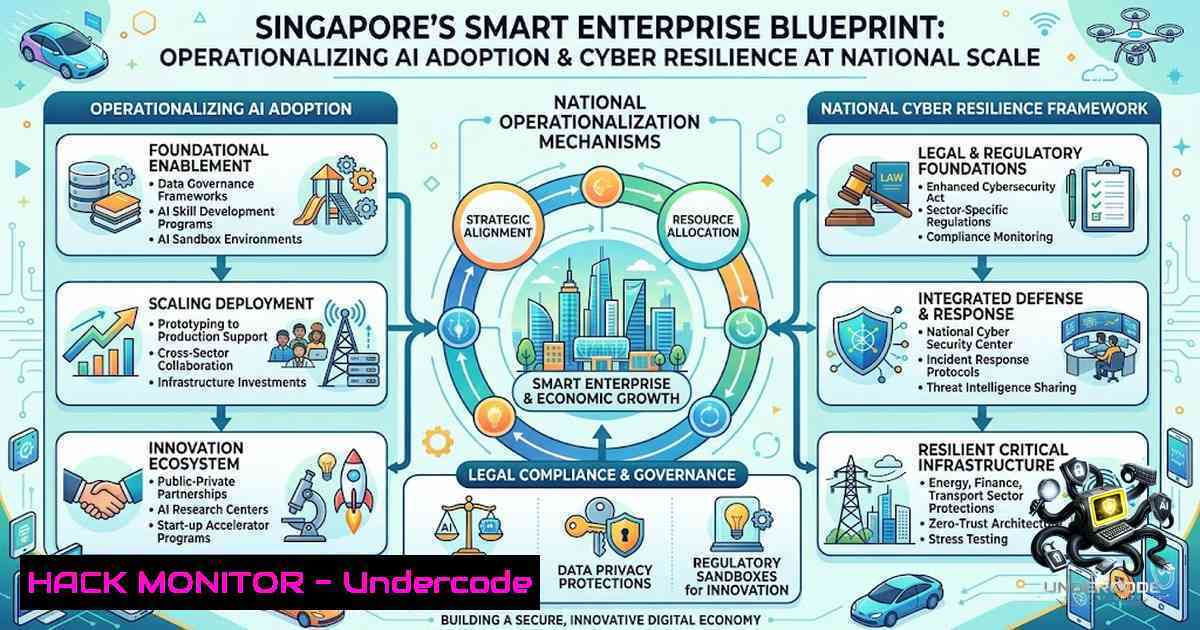
As enterprises accelerate AI adoption, the challenge has shifted from experimentation to secure deployment at scale—yet more than eight in 10 organisations experience at least one cybersecurity incident annually. Singapore’s Smart Enterprise initiative, spearheaded by the Singapore Business Federation (SBF) in partnership with IMDA and CSA, represents a national-scale response that integrates AI adoption, cybersecurity defence, digital project implementation, and workforce upskilling under a single unified framework. With AI adoption among SMEs more than tripling from 4.2% to 14.5% in just one year, and cybersecurity ranked as a top priority by 68% of businesses, the imperative for structured, secure AI implementation has never been more urgent.
Learning Objectives
- Secure AI Deployment: Master the frameworks, tools, and command-line techniques for deploying AI systems with robust security controls across Linux and Windows environments
- Cyber Resilience Operations: Implement proactive defence mechanisms including AI-driven threat detection, incident response automation, and continuous vulnerability management
- Enterprise-Grade Implementation: Apply structured pathways for moving from AI pilots to production-scale deployment while maintaining governance, risk management, and compliance
You Should Know
- Hardening AI Infrastructure: Secure Deployment from the Command Line
The Cyber Security Agency of Singapore (CSA) has published comprehensive Guidelines on Securing AI Systems, emphasising that AI systems themselves are becoming attractive targets with vulnerabilities that could have cascading security implications. Securing AI infrastructure begins at the operating system and container level.
Linux: Securing AI Model Serving Environments
For organisations deploying AI models using tools like TensorFlow Serving or Triton Inference Server, implement the following security hardening measures:
 Restrict model directory permissions
sudo chown -R root:ml-team /opt/models
sudo chmod -R 750 /opt/models

Implement mandatory access control with AppArmor
sudo aa-status
sudo aa-genprof /usr/bin/tensorflow_model_server

Harden container runtime for AI workloads (Docker)
cat > /etc/docker/daemon.json << EOF
{
"icc": false,
"log-driver": "json-file",
"log-opts": {
"max-size": "10m",
"max-file": "3"
},
"userland-proxy": false,
"live-restore": true
}
EOF

Run AI containers with minimal privileges
docker run --rm \
--cap-drop=ALL \
--cap-add=NET_BIND_SERVICE \
--security-opt=no-1ew-privileges \
--read-only \
--tmpfs /tmp:rw,noexec,nosuid,size=64m \
-v /opt/models:/models:ro \
my-ai-inference:latest
Windows: Securing AI Workloads on Windows Server
For organisations leveraging Windows-based AI platforms (Azure ML, ONNX Runtime):
 Apply Windows Defender Application Control (WDAC) for AI binaries
Set-RuleOption -FilePath .\AIPolicy.xml -Option 3
Set-RuleOption -FilePath .\AIPolicy.xml -Option 4
Set-CIPolicyPolicy -FilePath .\AIPolicy.xml

Restrict AI service accounts using Group Policy
$aiServiceAccount = "DOMAIN\ai_svc"
Set-ADUser -Identity $aiServiceAccount -Replace @{userAccountControl=0x1024}

Enable PowerShell logging for AI orchestration scripts
Set-ItemProperty -Path "HKLM:\SOFTWARE\Policies\Microsoft\Windows\PowerShell\ScriptBlockLogging" -1ame "EnableScriptBlockLogging" -Value 1

Implement Windows Firewall rules for AI API endpoints
New-1etFirewallRule -DisplayName "AI Inference API" -Direction Inbound -LocalPort 8501,8502 -Protocol TCP -Action Allow -RemoteAddress "10.0.0.0/8","172.16.0.0/12"
Step-by-Step Guide: What This Does and How to Use It
- Principle of Least Privilege: AI model files and serving binaries should be accessible only to dedicated service accounts or containers with minimal system permissions. The Linux commands above restrict model directory access to root and the designated ML team group, while container configurations drop all unnecessary Linux capabilities.
-
Attack Surface Reduction: By running containers with `–read-only` filesystems and
--cap-drop=ALL, you prevent attackers from writing malicious code or escalating privileges even if the AI serving process is compromised. The Windows WDAC policies ensure only authorised AI binaries can execute. -
Network Segmentation: AI inference endpoints must be isolated from general corporate networks. The Windows firewall rule demonstrates restricting inbound connections to trusted internal subnets only. For production deployments, combine this with network policies in Kubernetes or cloud security groups.
-
Audit and Monitoring: Enable comprehensive logging for all AI system access. On Linux, configure auditd to monitor model directory access:
auditctl -w /opt/models -p wa -k ai_model_access. On Windows, enable PowerShell ScriptBlock logging to detect malicious orchestration attempts.
2. AI-Driven Cybersecurity: Building a Proactive Defence Posture
CSA’s Singapore Cyber Landscape 2025/2026 report highlights that agentic AI is reshaping the threat environment—autonomous AI systems can now automate significant portions of the cyber kill chain, compressing attacks that once unfolded over days into hours. However, AI also presents powerful defensive opportunities. SBF’s Smart Enterprise framework emphasises “AI-driven cybersecurity: proactive risk management – the way forward”.
Linux: Deploying AI-Powered Threat Detection
 Install and configure Wazuh (open-source SIEM with ML-based anomaly detection)
curl -s https://packages.wazuh.com/key/GPG-KEY-WAZUH | apt-key add -
echo "deb https://packages.wazuh.com/4.x/apt/ stable main" > /etc/apt/sources.list.d/wazuh.list
apt-get update && apt-get install wazuh-manager

Configure ML-based anomaly detection for system logs
cat > /var/ossec/etc/rules/ai_anomaly_rules.xml << EOF
<group name="ai_anomaly,">
<rule id="100001" level="10">
<if_sid>550</if_sid>
<match>^.anomaly_score: [0-9]+.[0-9]+</match>
<description>AI-detected anomalous system behaviour</description>
</rule>
</group>
EOF

Deploy Falco for Kubernetes AI workload runtime security
helm repo add falcosecurity https://falcosecurity.github.io/charts
helm install falco falcosecurity/falco --set falco.jsonOutput=true \
--set falco.jsonIncludeOutputProperty=true \
--set falco.httpOutput.enabled=true \
--set falco.httpOutput.url=http://ai-soc:8080/events
Windows: Implementing AI-Enhanced Endpoint Detection
 Enable Windows Defender with cloud-delivered AI protection
Set-MpPreference -CloudBlockLevel High
Set-MpPreference -CloudTimeout 50
Set-MpPreference -SubmitSamplesConsent 2

Deploy Microsoft Sentinel with AI-driven threat intelligence
Install-Module -1ame Az.SecurityInsights -Force
$workspace = New-AzOperationalInsightsWorkspace -ResourceGroupName "AI-SOC" -1ame "ai-sentinel" -Location "southeastasia"
New-AzSentinelDataConnector -Workspace $workspace -1ame "AzureActivity"

Configure automated AI incident response playbooks
$playbook = @"
{
"trigger": "AI_Anomaly_Detected",
"actions": [
{"type": "isolate_endpoint"},
{"type": "capture_memory_dump"},
{"type": "notify_soc"}
]
}
"@
$playbook | Out-File -FilePath "C:\Sentinel\Playbooks\ai_response.json"
Step-by-Step Guide: What This Does and How to Use It
- ML-Powered Log Analysis: Wazuh’s machine learning module analyses system logs, network traffic, and file integrity data to establish baseline behaviour patterns. When deviations exceed statistical thresholds (anomaly_score > 0.8), alerts are triggered for SOC investigation.
-
Runtime Container Security: Falco monitors Kubernetes workloads for suspicious system calls—unauthorised process execution, file writes to sensitive directories, or network connections to known malicious IPs. AI models running in containers are continuously profiled for behavioural anomalies.
-
Cloud-Delivered AI Defence: Windows Defender’s cloud-block level determines how aggressively it uses AI models hosted in Microsoft’s cloud to classify suspicious files. Level “High” provides real-time protection against zero-day threats identified through global threat intelligence.
-
Automated Incident Response: The Sentinel playbook demonstrates automated response to AI-detected anomalies—isolating compromised endpoints, capturing forensic data, and alerting security teams without human intervention, reducing mean time to respond (MTTR) from hours to minutes.
-
The Cyber Resilience Centre: Operationalising Cyber Hygiene at Scale
The Cyber Resilience Centre (CRC), launched in October 2025 and operated by SBF in partnership with CSA, SCCCI, and SGTech, provides structured pathways for enterprises to strengthen their cyber posture. Key initiatives include Cyber Starter (basic hygiene via CISO-as-a-Service), Cyber Plus (enhanced posture for SMEs with co-curated curriculum), and a Cyber Helpline for pre- and post-incident advisory.
Linux: Implementing CISO-as-a-Service Automation
 Automated vulnerability scanning with OpenVAS
gvm-cli --gmp-username admin --gmp-password password socket --socket-path /var/run/gvmd.sock \
--xml "<create_task><name>Weekly AI-System Scan</name><config id='daba56a8-73ec-11df-a475-002264764cea'/> \
<target id='$(gvm-cli --gmp-username admin --gmp-password password socket --socket-path /var/run/gvmd.sock \
--xml '<create_target><name>AI Infrastructure</name><hosts>10.0.0.0/24</hosts></create_target>' \
| grep -oP '(?<=id=")[^"]')'/></create_task>"

Deploy OSQuery for continuous endpoint monitoring
curl -L https://github.com/osquery/osquery/releases/download/5.10.2/osquery_5.10.2_1.linux.amd64.deb -o osquery.deb
dpkg -i osquery.deb
cat > /etc/osquery/osquery.conf << EOF
{
"options": {
"enable_syslog": true,
"logger_plugin": "filesystem",
"logger_path": "/var/log/osquery",
"schedule_splay_percent": 10
},
"schedule": {
"ai_model_integrity": {
"query": "SELECT  FROM file WHERE path LIKE '/opt/models/%' AND (mtime > strftime('%s','now','-1 day'));",
"interval": 3600
}
}
}
EOF
systemctl start osqueryd
Windows: Enforcing Cyber Essentials Compliance
 Cyber Essentials compliance checker script
$requirements = @{
"MFA_Enabled" = (Get-MsolUser -All | Where-Object {$<em>.StrongAuthenticationMethods.Count -gt 0}).Count -gt 0
"BitLocker_Active" = (Get-BitLockerVolume -MountPoint "C:").ProtectionStatus -eq "On"
"Defender_RealTime" = (Get-MpPreference).DisableRealtimeMonitoring -eq $false
"Patch_Current" = (Get-HotFix | Where-Object {$</em>.InstalledOn -gt (Get-Date).AddDays(-30)}).Count -gt 0
}

Generate Cyber Essentials compliance report
$requirements | ConvertTo-Json | Out-File -FilePath "C:\CyberEssentials\compliance_$(Get-Date -Format 'yyyyMMdd').json"

Configure automatic security baseline application
$baseline = "C:\Windows\Security\Baselines\AI_Workload.inf"
secedit /configure /db "%windir%\security\database\ai_workload.sdb" /cfg $baseline /overwrite /quiet
Step-by-Step Guide: What This Does and How to Use It
- Automated Vulnerability Assessment: The OpenVAS command schedules weekly vulnerability scans targeting AI infrastructure subnets. Scans identify missing patches, misconfigurations, and exposed services that could be exploited by threat actors.
-
Continuous Integrity Monitoring: OSQuery schedules queries to detect unauthorised changes to AI model files. Any modification to model binaries or weights outside approved update windows triggers alerts for investigation—critical given that AI model poisoning is an emerging attack vector.
-
Cyber Essentials Validation: The Windows script automates verification against CSA’s Cyber Essentials requirements—MFA enforcement, BitLocker encryption, real-time endpoint protection, and patch currency. Organisations can generate compliance reports for audit purposes and board reporting.
-
Security Baseline Application: The `secedit` command applies Microsoft’s security baseline for AI workloads, enforcing registry settings, user rights assignments, and audit policies that align with CSA’s Cyber Trust certification requirements for cloud and AI security.
-
Technology Implementation Advisory Services: Bridging the Execution Gap
SBF’s Technology Implementation Advisory Services (TIAS) recognises that most technology projects fail not from poor tool selection but from implementation gaps—buying technology before defining the problem, unclear ownership, overly broad first projects, weak user adoption, and absence of success metrics. The TIAS engagement approach follows a structured path: Discovery (pain points and objectives), Solutioning (architecture and specifications), Vendor sourcing and assessment, and Project deployment with results tracking.
Linux: Infrastructure-as-Code for AI Deployment
 Terraform template for secure AI infrastructure on AWS/Azure/GCP
cat > main.tf << EOF
terraform {
required_providers {
aws = {
source = "hashicorp/aws"
version = "~> 5.0"
}
}
}

resource "aws_vpc" "ai_vpc" {
cidr_block = "10.0.0.0/16"
enable_dns_hostnames = true
tags = { Name = "AI-Infrastructure" }
}

resource "aws_security_group" "ai_sg" {
name = "ai-inference-sg"
description = "Security group for AI inference endpoints"
vpc_id = aws_vpc.ai_vpc.id

ingress {
from_port = 443
to_port = 443
protocol = "tcp"
cidr_blocks = ["10.0.0.0/8", "172.16.0.0/12"]
description = "HTTPS from internal networks only"
}

egress {
from_port = 0
to_port = 0
protocol = "-1"
cidr_blocks = ["0.0.0.0/0"]
description = "Allow all outbound"
}
}

resource "aws_iam_role" "ai_role" {
name = "ai-inference-role"
assume_role_policy = jsonencode({
Version = "2012-10-17"
Statement = [{
Action = "sts:AssumeRole"
Effect = "Allow"
Principal = { Service = "ec2.amazonaws.com" }
}]
})
}
EOF

Deploy infrastructure with validation
terraform init
terraform validate
terraform plan -out=tfplan
terraform apply tfplan
Windows: CI/CD Pipeline for AI Security Validation
 Azure DevOps pipeline for AI security scanning
$pipeline = @"
trigger:
- main

pool:
vmImage: 'ubuntu-latest'

steps:
- task: UsePythonVersion@0
inputs:
versionSpec: '3.11'

<ul>
<li>script: |
pip install bandit safety pylint
bandit -r ./ai_models -f json -o bandit_report.json
safety check -r requirements.txt --json > safety_report.json
displayName: 'AI Security Scanning'</p></li>
<li><p>task: PublishBuildArtifacts@1
inputs:
PathtoPublish: 'bandit_report.json'
ArtifactName: 'security_reports'
"@</p></li>
</ul>

<p>$pipeline | Out-File -FilePath "azure-pipelines.yml"
Step-by-Step Guide: What This Does and How to Use It
- Infrastructure as Code (IaC): The Terraform template defines AI infrastructure as code—VPC configuration, security groups restricting inference endpoints to internal networks only, and IAM roles with minimal permissions. This approach ensures consistent, auditable, and repeatable deployments.
-
Security Validation Gates: The CI/CD pipeline integrates security scanning at build time. Bandit checks Python code for security vulnerabilities; Safety scans dependencies for known CVEs. Any critical finding blocks the pipeline, preventing insecure AI models from reaching production.
-
Change Management: Infrastructure changes are reviewed through pull requests, with security teams reviewing network configurations and IAM policies before deployment. This addresses the “unclear ownership” failure factor identified by TIAS.
-
Success Metrics: The pipeline publishes security reports as build artifacts, providing measurable success metrics—number of vulnerabilities detected, remediation time, and compliance status—that align with the “results tracking” phase of TIAS.
-
Workforce Transformation: Upskilling for AI-Fluent and Cyber-Resilient Teams
SBF’s consolidated enterprise initiative recognises that technology adoption succeeds only when people are ready—leaders must sponsor change, managers redesign workflows, staff use tools with confidence, and champions model adoption. IMDA’s Skills Pathway for Cybersecurity has already enabled over 180 individuals to secure internships and employment, while new programmes target training 40,000 AI-ready professionals.
Linux: Security Training Environment Setup
 Deploy a Cyber Range for hands-on AI security training
git clone https://github.com/OWASP/owasp-webgoat.git
cd owasp-webgoat
docker-compose up -d

Deploy AI security challenge environment
git clone https://github.com/NVIDIA/trt-llm-benchmark.git
cd trt-llm-benchmark
docker build -t ai-security-lab -f Dockerfile .

Create training user accounts with restricted environments
for user in trainee{1..20}; do
sudo useradd -m -s /bin/bash -G docker $user
echo "$user:TempPass123!" | sudo chpasswd
sudo chage -d 0 $user  Force password change on first login
done
Windows: AI Literacy and Security Awareness Deployment
 Deploy Microsoft Learn AI security training modules
Install-Module -1ame Microsoft.Learn -Force
$trainingPlan = @{
"AI Security" = @(
"SC-900: Microsoft Security, Compliance, and Identity Fundamentals",
"AI-900: Microsoft Azure AI Fundamentals",
"Secure AI workloads with Microsoft Defender for Cloud"
)
"Cyber Resilience" = @(
"SC-200: Microsoft Security Operations Analyst",
"SC-100: Microsoft Cybersecurity Architect"
)
}

Configure automated training reminders via Microsoft Teams
$webhook = "https://your-tenant.webhook.office.com/webhookb2/..."
$message = @{
title = "Weekly AI Security Training Reminder"
text = "Complete your mandatory AI security module this week: $(Get-Date -Format 'yyyy-MM-dd')"
}
Invoke-RestMethod -Uri $webhook -Method Post -Body ($message | ConvertTo-Json) -ContentType "application/json"
Step-by-Step Guide: What This Does and How to Use It
- Hands-On Cyber Range: The OWASP WebGoat container provides a deliberately vulnerable environment where teams can practise identifying and exploiting AI-related security weaknesses—prompt injection, model inversion, and data poisoning attacks.
-
AI Security Lab: The NVIDIA TensorRT-LLM benchmark environment can be repurposed as a secure testing ground for evaluating AI model security controls, including input validation, output filtering, and adversarial robustness testing.
-
Structured Learning Pathways: Microsoft Learn modules provide role-based training aligned with Singapore’s Skills Framework for ICT. The AI-900 and SC-900 certifications establish foundational knowledge in AI concepts and security fundamentals.
-
Continuous Awareness: Automated reminders via Microsoft Teams ensure ongoing engagement with security training, addressing the “lack of knowledge and expertise” challenge cited by 61% of businesses in SBF’s National Business Survey.
-
Quantum-Safe and Agentic AI Governance: Preparing for the Next Threat Horizon
Singapore has introduced the world’s first Model Governance Framework for Agentic AI and is actively developing quantum-safe migration strategies. The CSA has published a Quantum-Safe Migration Handbook and Quantum Readiness Index, while the draft addendum on Securing Agentic AI Systems builds on existing AI security guidelines.
Linux: Implementing Post-Quantum Cryptography
 Install liboqs (Open Quantum Safe) for post-quantum algorithm testing
git clone --branch main https://github.com/open-quantum-safe/liboqs.git
cd liboqs
mkdir build && cd build
cmake -DOQS_ENABLE_KEM_ALGS="kyber_1024;ntru_hps_2048_509" -DOQS_ENABLE_SIG_ALGS="dilithium_5;falcon_1024" ..
make -j$(nproc)
sudo make install

Configure OpenSSL with post-quantum algorithms
wget https://github.com/open-quantum-safe/openssl/releases/download/OQS-OpenSSL_3_3_1_stable/oqs-openssl-3.3.1.tar.gz
tar -xzf oqs-openssl-3.3.1.tar.gz
cd oqs-openssl-3.3.1
./configure --prefix=/opt/oqs-openssl
make -j$(nproc)
sudo make install

Test Kyber-1024 key exchange
/opt/oqs-openssl/bin/openssl s_client -connect example.com:443 -groups kyber1024 -tls1_3
Windows: Agentic AI Security Assessment
 Deploy AI security assessment framework
$agenticAIAssessment = @"
{
"AgenticAISecurity": {
"autonomy_controls": {
"human_in_the_loop": true,
"action_approval_threshold": "high_impact",
"max_autonomous_actions": 10
},
"observability": {
"action_logging": true,
"decision_trace_enabled": true,
"alert_on_anomaly": true
},
"resilience": {
"circuit_breakers_enabled": true,
"fallback_to_manual": true,
"rollback_capability": true
}
}
}
"@
$agenticAIAssessment | Out-File -FilePath "C:\Security\AgenticAI\assessment.json"

Generate compliance report against CSA Agentic AI framework
$compliance = @{
"CSA_Securing_Agentic_AI" = @{
"perception_security" = "Implemented"
"reasoning_integrity" = "In_Progress"
"action_safety" = "Implemented"
"learning_security" = "Not_Started"
}
}
$compliance | ConvertTo-Json | Out-File -FilePath "C:\Security\AgenticAI\csa_compliance.json"
Step-by-Step Guide: What This Does and How to Use It
- Post-Quantum Readiness: The liboqs library enables testing of NIST-standardised post-quantum algorithms (Kyber for key exchange, Dilithium for digital signatures). Organisations should begin inventorying cryptographic assets and planning migration to quantum-resistant algorithms.
-
Agentic AI Governance: The assessment framework addresses CSA’s concerns about autonomous AI systems—implementing human-in-the-loop controls for high-impact actions, comprehensive observability through decision tracing, and circuit breakers to prevent runaway autonomous behaviour.
-
Compliance Mapping: The compliance report provides visibility against CSA’s Securing Agentic AI framework dimensions—perception security (protecting AI inputs), reasoning integrity (ensuring decisions aren’t manipulated), action safety (validating outputs), and learning security (securing training pipelines).
-
Risk-Based Implementation: Organisations should prioritise agentic AI governance based on autonomy level and business impact—high-autonomy systems (e.g., autonomous SOC agents, automated trading) require stricter controls than low-autonomy AI assistants.
What Undercode Say
Key Takeaway 1: National-Scale AI Adoption Requires Structured, Not Fragmented, Approaches
SBF’s Smart Enterprise initiative consolidates AI adoption, cybersecurity, and workforce transformation into a single framework. The TIAS approach—“Start small. Learn fast. Scale what works.”—recognises that successful digital transformation requires more than technology selection; it demands clear ownership, defined success metrics, and human-centred change management. The 49% of businesses citing high costs and 48% citing lack of expertise as adoption barriers reflect the need for structured advisory services like those offered through SBF’s complimentary TIAS support.
Key Takeaway 2: Cyber Resilience Must Evolve from Compliance to Continuous Proactive Defence
The CSA’s expanded Cyber Essentials and Cyber Trust certifications now include mandatory cloud and AI security requirements, while the Cyber Resilience Centre provides CISO-as-a-Service and incident response support. However, the 142% increase in infected infrastructure units detected in 2025 and the emergence of agentic AI-enabled attacks signal that compliance alone is insufficient. Organisations must implement AI-driven threat detection, automated incident response, and continuous vulnerability management—the commands and configurations provided above offer practical pathways to operationalise these capabilities.
Analysis: Jai Thampi’s move to SBF’s Smart Enterprise team represents a strategic alignment of private-sector execution expertise with national-scale capability building. Singapore’s approach—combining regulatory frameworks (CSA guidelines), financial support (Productivity Solutions Grant, Enterprise Development Grant), and practical advisory services (TIAS, CRC)—addresses the three critical barriers to technology adoption: cost (73% of businesses), skills (47%), and implementation complexity. The Smart Enterprise initiative’s integration of AI and cybersecurity under a single programme is particularly significant, as 45% of businesses have already implemented AI for cybersecurity defence—demonstrating that these domains are converging in practice. The challenge ahead lies in scaling these programmes to reach 30,000 SMEs through SBF’s network while maintaining quality and measurable outcomes.
Prediction
+1 Singapore’s national AI and cyber resilience programmes will serve as a template for other small, open economies facing similar digital transformation challenges. The integration of AI adoption, cybersecurity, and workforce upskilling under a single framework addresses the root cause of technology implementation failures—fragmented approaches that neglect the human and organisational dimensions of change.
+1 The Cyber Resilience Centre’s CISO-as-a-Service model will democratise access to security expertise, enabling SMEs to achieve security postures previously available only to large enterprises. This will reduce the cybersecurity gap between large firms (94% confident) and SMEs (75% confident).
-1 The 142% increase in infected infrastructure and the rise of agentic AI-enabled attacks suggest that threat actors are adopting AI faster than many organisations can defend. Without accelerated upskilling—the National AI Impact Programme aims to support 10,000 enterprises and 100,000 workers—the defender’s gap may widen before it narrows.
+1 Post-quantum cryptography readiness, guided by CSA’s Quantum-Safe Migration Handbook, will become a competitive differentiator for Singapore enterprises by 2028, as early adopters secure their data against future quantum-enabled decryption threats.
-1 Agentic AI governance frameworks, while progressive, may struggle to keep pace with the rapid evolution of autonomous AI capabilities. The draft addendum on Securing Agentic AI Systems will require continuous updating to address emerging threats such as AI agent collaboration and autonomous exploit development.
+1 The SME AI Impact Awards Trustmark will create a virtuous cycle—recognising AI trailblazers while providing verified marks of excellence that strengthen business credibility, encouraging broader adoption across Singapore’s enterprise ecosystem.
▶️ Related Video (82% Match):
🎯Let’s Practice For Free:
🎓 Live Courses & Certifications:
Join Undercode Academy for Verified Certifications
🚀 Request a Custom Project:
Secure, high-velocity infrastructure and disruptive technological engineering. Contact our engineering team for high-tier development and proprietary systems:
[email protected]
💎 Smart Architecture | 🛡️ Secure by Design | ⭐ Trusted by Thousands
IT/Security Reporter URL:
Reported By: Jaithampi Sbf – Hackers Feeds
Extra Hub: Undercode MoN
Basic Verification: Pass ✅


