
Listen to this Post
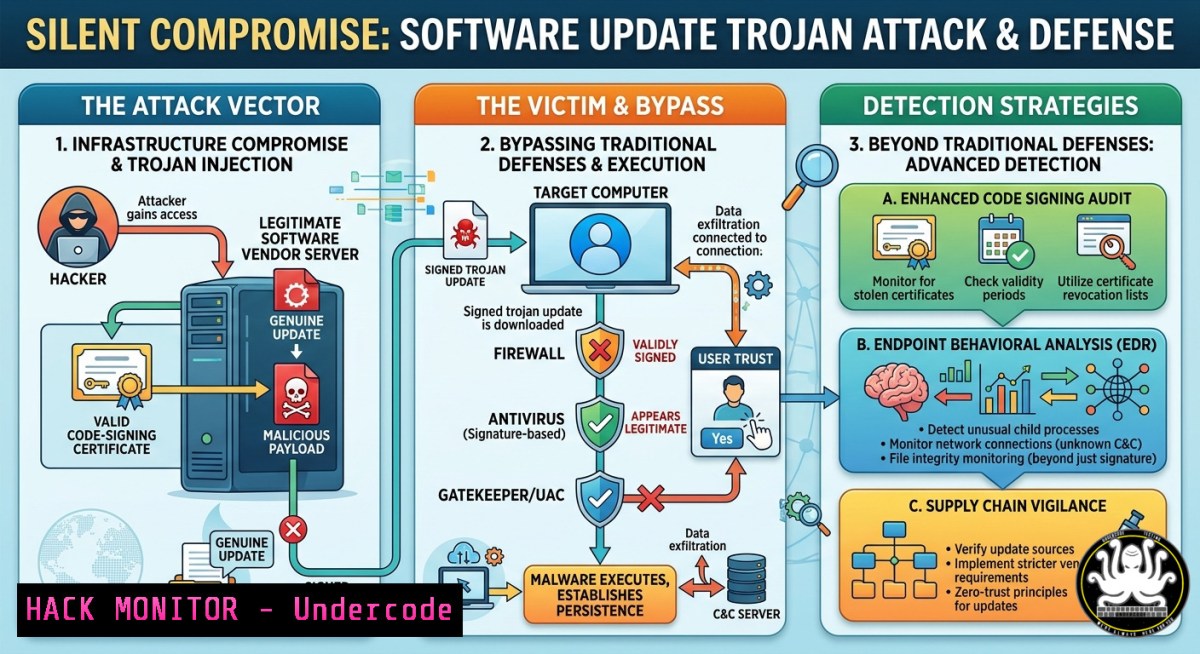
Introduction:
Modern cyberattacks no longer rely on phishing links or malicious downloads—they exploit the very trust placed in routine software updates. In a recent incident, a seemingly legitimate update file delivered a novel trojan that bypassed traditional signature-based defenses, triggering a Security Operations Center (SOC) alert only through behavioral anomaly detection. This article dissects the attack vector, provides hands-on forensic and hardening techniques, and outlines a zero‑trust approach to prevent similar supply‑chain compromises.
Learning Objectives:
- Detect and analyze malicious code hidden within signed software update packages using integrity validation and runtime monitoring.
- Implement automated network isolation and micro‑segmentation to contain compromised endpoints in real time.
- Harden software update mechanisms on Windows and Linux with cryptographic checks, secure boot, and application control policies.
You Should Know:
- Anatomy of the Attack: Weaponizing Trust in Software Updates
The attack described by Joachim Dahlke’s SOC began as a routine update—no user interaction beyond accepting the patch. The trojan leveraged a compromised software vendor’s update channel or a man‑in‑the‑middle injection. Unlike classic malware, it did not require a “click” or administrator override; it executed under the guise of an authentic update process. This technique, known as a “software supply chain attack” or “trojanized update,” exploits the inherent trust users and systems place in signed, automated update mechanisms. The SOC’s Adlumin platform detected anomalies (unusual network beaconing, unexpected registry changes) within seconds, isolating the notebook before any data exfiltration or lateral movement occurred.
Step‑by‑step guide to simulate detection and initial triage:
On Windows (PowerShell as Admin):
 Monitor newly created processes with network connections (suspicious update behavior)
Get-NetTCPConnection | Where-Object {$<em>.State -eq "Established"} |
Select-Object LocalAddress, LocalPort, RemoteAddress, RemotePort, OwningProcess |
ForEach-Object { $proc = Get-Process -Id $</em>.OwningProcess -ErrorAction SilentlyContinue;
[bash]@{ Process=$proc.Name; PID=$<em>.OwningProcess;
RemoteIP=$</em>.RemoteAddress; RemotePort=$_.RemotePort } }

Check for unsigned or tampered executables in common update directories
Get-ChildItem "C:\Program Files\", "C:\Program Files (x86)\" -Recurse -Include .exe, .dll |
Get-AuthenticodeSignature | Where-Object {$_.Status -ne "Valid"}
On Linux (bash):
 Audit file integrity for critical binaries (e.g., apt, yum, update-manager)
sudo sha256sum /usr/bin/apt /usr/bin/dpkg /usr/bin/curl > /tmp/update_hashes.baseline
 After an update, recompute and compare
sudo sha256sum -c /tmp/update_hashes.baseline 2>&1 | grep -v "OK"

Real-time monitoring of update-related processes with auditd
sudo auditctl -w /usr/bin/apt -p x -k update_execution
sudo ausearch -k update_execution --start recent
Forensic artifact extraction:
- Windows: `wevtutil qe System /f:text /c:50 | findstr “WindowsUpdate”` to review update event logs.
- Linux: `grep “Install” /var/log/dpkg.log` and
journalctl -u apt-daily.service.
2. Real‑Time Detection: Configuring EDR/SIEM for Anomaly‑Based Alerting
Traditional signature‑based antivirus failed because the trojan’s payload was either zero‑day or polymorphic. The SOC’s success relied on behavioral rules: unexpected outbound connections, fileless execution, or privilege escalation attempts. Below are concrete configurations for open‑source and commercial tools to replicate this detection capability.
Step‑by‑step guide using Sysmon (Windows) and Wazuh (Linux):
Windows Sysmon configuration (install sysmon64.exe first):
<!-- sysmon-config.xml snippet -->
<Sysmon schemaversion="4.22">
<EventFiltering>
<ProcessCreate onmatch="exclude">
<CommandLine condition="contains">C:\Windows\SoftwareDistribution\</CommandLine>
</ProcessCreate>
<NetworkConnect onmatch="include">
<DestinationPort condition="is">443</DestinationPort>
<DestinationPort condition="is">80</DestinationPort>
<Image condition="contains">update</Image>
</NetworkConnect>
</EventFiltering>
</Sysmon>
Apply: `sysmon64 -accepteula -i sysmon-config.xml`
Wazuh (OSSEC‑based) custom rule for anomalous update behavior:
<rule id="100010" level="12">
<if_sid>5500</if_sid>
<match>update|upgrade|patch</match>
<regex>wget|curl|invoke-webrequest</regex>
<description>Potential trojanized update - unexpected download command from update process</description>
<group>supply_chain,</group>
</rule>
Network isolation trigger (Windows built‑in):
 Automatically block internet access upon high‑severity alert (e.g., from Sysmon event 3)
New-NetFirewallRule -DisplayName "Compromised_Update_Isolation" -Direction Outbound -Action Block -RemoteAddress Any -Profile Any
 To isolate a specific process (e.g., updater.exe) without blocking all traffic
$proc = Get-Process -Name "updater" -ErrorAction SilentlyContinue
Stop-Process -Id $proc.Id -Force
- Forensic Analysis: Tracing the Trojan’s Entry and Propagation
After containment, the SOC initiated a forensic deep‑dive. Questions included: Was the update source compromised? Was the digital signature stolen or faked? Did the trojan drop persistence mechanisms? Below are commands to answer these questions on live or disk images.
Step‑by‑step guide for update‑specific forensics:
Verify digital signature and hash:
 Windows: Check Authenticode signature of a suspicious update file
Get-AuthenticodeSignature -FilePath "C:\Windows\Temp\update_package.msi" | Format-List
 Compare hash with vendor's published hash (if available)
Get-FileHash "C:\Windows\Temp\update_package.msi" -Algorithm SHA256
Linux: Verify GPG signature of repository metadata (APT):
 Check APT repository signature validity
apt-key list
gpg --verify /var/lib/apt/lists/partial/.gpg
 Extract and verify a .deb package's control signature
ar p suspicious.deb control.tar.gz | tar xzO ./control | grep -i "signature"
Persistence checks (Windows):
 Look for scheduled tasks created by the updater process
Get-ScheduledTask | Where-Object {$<em>.TaskPath -like "Update" -or $</em>.Actions.Execute -like "temp"}
 Check WMI event consumers (common for fileless trojans)
Get-WmiObject -Namespace root\subscription -Class __EventFilter
Lateral movement detection:
 Linux: Check for unexpected SSH keys or cron jobs added during update window
sudo find /home -name "authorized_keys" -exec ls -la {} \;
sudo grep "CRON" /var/log/syslog | grep -i "update"
- Hardening Update Mechanisms: Code Signing, Secure Boot, and Integrity Validation
To prevent similar attacks, organizations must enforce cryptographic verification at every stage of the update process. Comments from the original discussion highlighted code‑signing, hash validation, and secure boot as critical controls.
Step‑by‑step hardening guide:
Enable and enforce Windows Defender Application Control (WDAC):
 Create a base policy that allows only Microsoft and signed vendor binaries
New-CIPolicy -Level Publisher -FilePath "C:\WDAC\UpdatePolicy.xml" -UserPEs
 Convert to binary format and deploy
ConvertFrom-CIPolicy -XmlFilePath "C:\WDAC\UpdatePolicy.xml" -BinaryFilePath "C:\WDAC\UpdatePolicy.bin"
 Deploy via Group Policy: Computer Configuration -> Administrative Templates -> System -> Device Guard
Linux: Implement signed package verification (APT and DPKG):
 Force APT to require valid signatures for all repositories
echo 'APT::Get::AllowUnauthenticated "false";' | sudo tee /etc/apt/apt.conf.d/99authenticated
 Enable package signature verification for local .deb files
dpkg-sig --verify suspicious.deb
 Set up a custom update proxy that validates hashes before forwarding
sudo apt install squid-deb-proxy
 Configure client to use only your internal proxy with known‑good hashes
Secure Boot configuration (both platforms):
- Windows: `Confirm-SecureBootUEFI` to verify enabled; `Get-SecureBootPolicy` to check policy.
- Linux (Ubuntu):
mokutil --sb-state; enroll custom keys withmokutil --import new_key.der.
5. Zero‑Trust Micro‑Segmentation: Containment Without Network Re‑architecture
Once a trojanized update executes, preventing lateral movement is paramount. The original post mentioned automatic isolation of the notebook—this is achievable via micro‑segmentation, even on flat networks, using host‑based firewalls and software‑defined perimeters.
Step‑by‑step guide using native OS tools:
Windows: Use PowerShell to apply per‑application firewall rules (allow only update‑specific destinations):
 Block all outbound by default for the updater process, then allow only vendor IPs
New-NetFirewallRule -DisplayName "Block_Updater_Default" -Direction Outbound -Program "C:\Program Files\Vendor\updater.exe" -Action Block
 Allow only to known update CDNs (e.g., .windowsupdate.com)
$allowedDomains = @(".windowsupdate.com", ".dl.delivery.mp.microsoft.com")
foreach ($domain in $allowedDomains) {
$ips = Resolve-DnsName $domain | Select-Object -ExpandProperty IPAddress
foreach ($ip in $ips) {
New-NetFirewallRule -DisplayName "Allow_Update_$ip" -Direction Outbound -Program "C:\Program Files\Vendor\updater.exe" -RemoteAddress $ip -Action Allow
}
}
Linux iptables with process owner matching (requires iptables owner module):
 Block all outbound from the updater except to a known IP
sudo iptables -A OUTPUT -m owner --uid-owner update_user -j DROP
sudo iptables -I OUTPUT -m owner --uid-owner update_user -d 192.168.1.100 -j ACCEPT
 Log any blocked attempts for SOC alerts
sudo iptables -A OUTPUT -m owner --uid-owner update_user -j LOG --log-prefix "BLOCKED_UPDATE_BEACON "
Software‑defined perimeter (SDP) with free tools (OpenZiti):
 Deploy a zero‑trust tunnel that authenticates every packet
curl -sSL https://get.openziti.io/quickstart/install.sh | bash
ziti edge create service "update-service" --role-attributes "updater"
 Enroll the endpoint – only after successful posture check (e.g., file hash match)
- Building a Resilient Response: From Incident to Threat Intelligence
The SOC’s final step—sharing forensic findings with international security feeds—transforms a single compromise into collective defense. Organizations should automate the generation of Indicators of Compromise (IOCs) from isolated updates.
Step‑by‑step guide to extract and share IOCs:
Extract IOCs from a suspicious update file (using Python + pefile on Windows/Linux):
import pefile
import hashlib
pe = pefile.PE("suspicious_update.exe")
print("MD5:", hashlib.md5(open("suspicious_update.exe","rb").read()).hexdigest())
print("SHA256:", hashlib.sha256(open("suspicious_update.exe","rb").read()).hexdigest())
for section in pe.sections:
print(f"Section {section.Name.decode().rstrip(chr(0))} entropy: {section.get_entropy()}")
Automated YARA rule generation (using yarGen):
git clone https://github.com/Neo23x0/yarGen.git
cd yarGen
python3 yarGen.py -m /path/to/suspicious_update.exe -o update_trojan.yar
Submit to open threat intelligence platforms:
- VirusTotal API: `curl -X POST https://www.virustotal.com/api/v3/files -H “x-apikey: YOUR_KEY” -F file=@suspicious_update.exe`
– MISP (Malware Information Sharing Platform): `python3 misp_upload.py -u https://your.misp/ -k API_KEY -e “Trojanized update” -f suspicious_update.exe`
What Undercode Say:
- Trust but verify is obsolete. Every software update—signed or not—must be treated as untrusted until runtime behavior is validated. The attack succeeded because the update looked “normal,” proving that code signing alone is insufficient.
- Isolation must be automated and immediate. Manual containment is too slow. Using host‑based firewalls, micro‑segmentation, and EDR triggers (like the Adlumin SOC) can stop an attack within seconds, as demonstrated. The true defense lies in combining cryptographic integrity checks with real‑time anomaly detection and forced network segmentation.
The incident underscores a paradigm shift: updates are now a primary attack surface. Organizations must implement layered controls—hash verification, secure boot, application allowlisting, and behavioral monitoring—while assuming any update could be malicious. The forensic commands and hardening steps provided enable both blue teams and system administrators to proactively defend against supply‑chain trojans.
Prediction:
Within 18 months, supply‑chain attacks targeting automated update mechanisms will surpass phishing as the primary initial access vector for ransomware groups. We will see the emergence of “update‑aware” EDR solutions that sandbox every patch in a micro‑VM before deployment, and regulatory bodies (e.g., NIS2, SEC) will mandate cryptographic attestation of update integrity from software vendors. Organizations that fail to implement code‑signing pinning and behavioral isolation will face catastrophic breaches originating from their own patch Tuesday.
▶️ Related Video (86% Match):
🎯Let’s Practice For Free:
IT/Security Reporter URL:
Reported By: Joachim Dahlke – Hackers Feeds
Extra Hub: Undercode MoN
Basic Verification: Pass ✅


