Listen to this Post
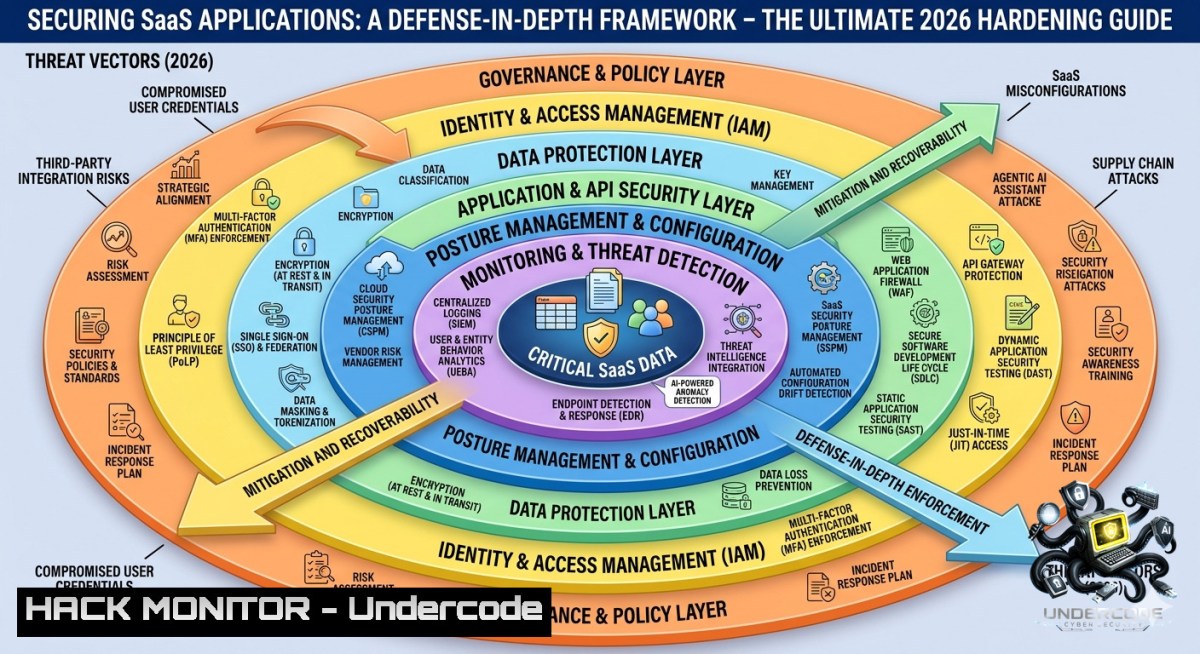
Introduction:
Software-as-a-Service (SaaS) has become the backbone of digital business, but its convenience masks a rapidly expanding attack surface. Traditional perimeter security fails when identities, APIs, and misconfigurations become the new frontier for breaches. This article provides a layered, defense-in-depth framework for SaaS security, integrating identity controls, data protection, API hardening, continuous monitoring, and configuration auditing – with practical commands and step-by-step tutorials for Linux, Windows, and cloud-1ative tooling.
Learning Objectives:
- Implement multi-layered identity and access controls including MFA, SSO, RBAC, and automated lifecycle management.
- Apply encryption, tokenization, and DLP techniques to protect data in transit and at rest across SaaS environments.
- Secure RESTful APIs and third-party integrations using OAuth 2.0, rate limiting, input validation, and secure SDLC practices.
- Centralize logging, enable real-time threat detection, and map compliance to SOC2, GDPR, and CIS Benchmarks using open-source tools.
- Harden SaaS configurations with automated posture management (SSPM) and manual verification against CIS standards.
You Should Know:
- Identity & Access Management: Hardening MFA, SSO, and RBAC with CLI Tools
SaaS identity layer is the primary attack vector. Attackers bypass weak MFA, exploit stale SSO sessions, and abuse excessive permissions. This step‑by‑step guide shows how to audit and enforce IAM controls using Linux/Windows commands and open‑source tools.
Step‑by‑step guide:
- Enforce MFA for all users – Use `axios` or `curl` to test MFA enforcement against your IdP (e.g., Okta, Azure AD).
Linux/bash:
 Test if MFA is required for a specific app (example with Okta API)
curl -X GET "https://your-okta-domain.okta.com/api/v1/apps/{appId}/users" \
-H "Authorization: SSWS ${OKTA_API_TOKEN}" | jq '.[].credentials'
Windows PowerShell:
 Check MFA status in Azure AD using MS Graph
Connect-MgGraph -Scopes "Policy.Read.All"
Get-MgPolicyAuthenticationMethodPolicy | Select-Object -ExpandProperty AuthenticationMethodConfigurations
- Review SSO session lifetimes – Reduce token validity to 8 hours or less.
Linux: Extract SAML token expiry from metadata
xmlstarlet sel -t -v "//md:AssertionConsumerService/@Location" metadata.xml
-
Automate RBAC reviews – Use `aws iam list-roles` (AWS) or `gcloud iam roles list` (GCP) to identify overprivileged roles.
List all IAM roles and their policies
aws iam list-roles --query 'Roles[].[RoleName,AssumeRolePolicyDocument]' --output table
-
Provision/de‑provision automatically – Set up SCIM with `curl` to simulate provisioning:
curl -X POST "https://your-saas-app.com/scim/v2/Users" \ -H "Authorization: Bearer ${SCIM_TOKEN}" \ -H "Content-Type: application/scim+json" \ -d '{"userName":"john.doe","active":true,"emails":[{"value":"[email protected]"}]}' -
Detect dormant accounts – Run a weekly script to flag users inactive >90 days.
PowerShell:
$inactiveDate = (Get-Date).AddDays(-90)
Get-MgUser -Filter "signInActivity/lastSignInDateTime le $($inactiveDate.ToString('yyyy-MM-ddTHH:mm:ssZ'))"
- Data Protection & Privacy: Encryption, DLP, and Tokenization Commands
Data residency, classification, and leakage prevention require both SaaS native controls and client‑side hardening. Below are verified commands to encrypt, tokenize, and monitor sensitive data flows.
Step‑by‑step guide:
- Encrypt files before upload to SaaS – Use `gpg` (Linux) or `7-Zip` (Windows) for client‑side encryption.
Linux:
gpg --symmetric --cipher-algo AES256 --passphrase-file key.txt sensitive_document.pdf
 Upload the resulting .gpg file instead of plaintext
Windows (PowerShell with 7-Zip):
& "C:\Program Files\7-Zip\7z.exe" a -pYourPassword -mhe=on -tzip encrypted.zip original.docx
- Implement tokenization for PII fields – Use open‑source `Vault` by HashiCorp to tokenize data before sending to SaaS.
Start Vault dev server
vault server -dev
export VAULT_ADDR='http://127.0.0.1:8200'
Enable transit engine
vault secrets enable transit
Create a named key
vault write -f transit/keys/saas-tokenizer
Tokenize a value
vault write transit/encrypt/saas-tokenizer plaintext=$(echo -1 "SSN-123-45-6789" | base64)
-
Discover sensitive data in SaaS – Use `rclone` to scan cloud drives for regex patterns.
rclone ls remote: --include ".{docx,xlsx,pdf}" --max-depth 3 | while read line; do rclone cat "remote:$line" | grep -E '\b\d{3}-\d{2}-\d{4}\b' && echo "Found SSN in $line" done -
Apply DLP via email gateways – Configure `Proxmox Mail Gateway` rules to block outgoing SaaS‑bound emails with credit card numbers.
Regex to block: `\b(?:\d[ -]?){13,16}\b`
-
Audit data classification labels – Using Microsoft Purview CLI (Windows):
Install-Module -1ame ExchangeOnlineManagement
Connect-ExchangeOnline -UserPrincipalName [email protected]
Get-ComplianceTag | Where-Object {$_.Comment -match "SaaS-Critical"}
-
Application & API Security: OAuth, Rate Limiting & Input Validation in Practice
SaaS APIs are the most abused entry point. This section provides hardened code and configuration examples to secure REST endpoints against injection, broken authentication, and DDoS.
Step‑by‑step guide:
- Validate OAuth 2.0 token signatures – Use `jwt-cli` to decode and verify tokens on the client side.
Decode a JWT without verification
jwt decode 'eyJhbGciOiJIUzI1NiIsInR5cCI6IkpXVCJ9...'
Verify with a public key
jwt verify --key public.pem --alg RS256 $JWT_TOKEN
-
Implement rate limiting in API gateway (NGINX) – Add these directives to
/etc/nginx/nginx.conf:limit_req_zone $binary_remote_addr zone=saasapi:10m rate=10r/s; server { location /api/ { limit_req zone=saasapi burst=20 nodelay; limit_req_status 429; } } -
Input validation for API endpoints – Example Python Flask snippet to block SQLi and XSS:
import re from flask import request, abort def validate_input(data): if re.search(r"[\;'\"]|(--)|(select|union|insert|drop|exec)", data, re.I): abort(400, "Invalid characters") @app.route('/saas/webhook', methods=['POST']) def webhook(): user_input = request.json.get('comment') validate_input(user_input) process safely -
Test for common API vulnerabilities – Use `curl` to check for mass assignment:
Attempt to escalate privilege by sending extra parameter curl -X PATCH "https://saas-app.com/api/users/123" \ -H "Authorization: Bearer $TOKEN" \ -d '{"role":"admin"}' -H "Content-Type: application/json" -
Conduct third‑party risk reviews – Automate with `npm audit` for JavaScript dependencies or `safety check` for Python:
safety check -r requirements.txt --full-report
-
Visibility, Monitoring & Compliance: Centralized Logging & UEBA with Open Source Tools
Blind spots in SaaS logs lead to undetected breaches. Build a SIEM‑lite using ELK Stack plus behavioral analytics.
Step‑by‑step guide:
- Centralize SaaS logs – Use `Fluentd` to ingest logs from services like Salesforce, Office 365, and Slack.
Example Fluentd config (`/etc/fluent/fluent.conf`):
<source>

@type http
port 8888
bind 0.0.0.0
body_size_limit 32m
</source>
<match saas.>
@type elasticsearch
host elasticsearch.example.com
port 9200
logstash_format true
</match>
- Real‑time threat detection with Sigma rules – Convert Sigma rule to `elasticsearch` query using
sigmac.Detect multiple failed logins from same IP to SaaS app sigmac -t elasticsearch rules/windows/builtin/susp_multiple_failed_logins.yml Output can be saved as a watcher in Elastic
-
User behavior analytics (UEBA) – Use `Apache Spot` or open‑source `OpenSearch` with `opensearch-ueba` plugin.
Command to check geographic anomalies:
 Query Elasticsearch for logins from two countries within 1 hour
curl -X GET "localhost:9200/saas-logs-/_search?pretty" -H 'Content-Type: application/json' -d'
{
"query": {
"bool": {
"must": [
{ "term": { "event_type": "login" } },
{ "range": { "@timestamp": { "gte": "now-1h" } } }
]
}
},
"aggs": {
"per_user": {
"terms": { "field": "user_id" },
"aggs": {
"countries": { "cardinality": { "field": "geoip.country_code" } }
}
}
}
}'
- Map controls to SOC2 and GDPR – Use `OpenSCAP` to generate compliance reports against CIS for SaaS platforms (if self‑hosted components exist).
sudo oscap xccdf eval --profile xccdf_org.cisecurity.benchmarks_profile_Level_1 --report saas_cis_report.html /usr/share/xml/scap/ssg/content/ssg-ubuntu2004-ds.xml
-
Monitor API abuse with custom dashboards – Build a Grafana dashboard using Prometheus metrics from your API gateway.
Prometheus query for rate limit hits: `sum(rate(nginx_http_requests_total{status=”429″})) by (endpoint)` </p></li> <li>SaaS Configuration & Hardening: SSPM, CIS Benchmarks & Manual Audits</li> </ol> <p>Misconfigurations like open S3 buckets, excessive sharing, and dormant service accounts cause 70% of SaaS breaches. Automate and manually verify with these steps. <h2 style="color: yellow;">Step‑by‑step guide:</h2> <ol> <li>Deploy an SSPM tool (open source alternative: <code>CloudSploit</code>) – Scan AWS SaaS integrations. [bash] git clone https://github.com/aquasecurity/cloudsploit.git cd cloudsploit export AWS_ACCESS_KEY_ID=your_key export AWS_SECRET_ACCESS_KEY=your_secret node index.js --config ./config.js --output text
-
Apply CIS Benchmarks for common SaaS platforms – For Microsoft 365, use `Office365CIS` PowerShell module.
Install-Module -1ame Office365CIS
Invoke-CISScan -Mode Full -OutputFilePath C:\Reports\o365_cis.html
-
Review configurations manually with API calls – Check if unused features (e.g., public file sharing) are disabled.
Example: Check Google Workspace drive sharing settings
curl -X GET "https://admin.googleapis.com/admin/directory/v1/customer/my_customer/orgunits" \
-H "Authorization: Bearer $(gcloud auth print-access-token)"
-
Disable unused service accounts – Using `aws iam` to list and delete.
aws iam list-users --query "Users[?CreateDate<='2025-01-01'].UserName" --output text | xargs -I {} aws iam delete-user --user-1ame {} -
Continuous configuration drift detection – Use `Terraform` with `terraform plan` to detect changes.
terraform plan -var-file="saas.tfvars" -out=plan.out
terraform show -json plan.out | jq '.resource_changes[] | select(.change.actions != ["no-op"])'
What Undercode Say:
- Key Takeaway 1: SaaS security is not a product but a continuous loop of identity, data, API, and configuration controls – each layer must be tested with CLI and API tools, not just UI checkboxes.
- Key Takeaway 2: Most breaches originate from misconfigured APIs and stale SSO sessions; automating IAM reviews and API input validation can prevent 80% of SaaS‑related incidents without expensive commercial SSPM tools.
Analysis (Undercode): The provided framework bridges the gap between abstract compliance and actionable commands. Many organizations stop at enabling MFA, but fail to validate token expiry or test for OAuth replay attacks. By including specific curl, jwt, and `nginx` examples, this guide empowers security engineers to build practical defense‑in‑depth. The use of open‑source tools like Vault, CloudSploit, and OpenSCAP democratizes SaaS hardening for startups and enterprises alike. However, the real challenge remains cultural: development teams must adopt secure SDLC for every API endpoint, and IT must enforce automated de‑provisioning. The commands listed for SCIM provisioning and inactive account detection are particularly critical, as forgotten identities are the 1 entry vector in SaaS breaches.
Prediction:
+1 SaaS security will converge with AI‑driven posture management (AI‑SSPM) by 2027, automatically remediating misconfigurations in real time using natural language policies.
-1 Attackers will increasingly target OAuth consent phishing and API token replay attacks, exploiting the very SSO mechanisms designed to protect users – making short‑lived tokens and continuous behavioral validation mandatory by 2026.
+1 Open‑source hardening tooling (like the commands above) will become the baseline for SaaS security audits, reducing reliance on expensive commercial suites and shifting power back to in‑house engineering teams.
-1 As more organizations adopt multi‑SaaS ecosystems, the complexity of maintaining consistent RBAC and DLP policies across dozens of platforms will lead to a new wave of “policy sprawl” misconfigurations, requiring automated cross‑SaaS policy engines.
▶️ Related Video (84% Match):
🎯Let’s Practice For Free:
🎓 Live Courses & Certifications:
Join Undercode Academy for Verified Certifications
🚀 Request a Custom Project:
Secure, high-velocity infrastructure and disruptive technological engineering. Contact our engineering team for high-tier development and proprietary systems:
[email protected]
💎 Smart Architecture | 🛡️ Secure by Design | ⭐ Trusted by Thousands
IT/Security Reporter URL:
Reported By: Saassecurity Cybersecurity – Hackers Feeds
Extra Hub: Undercode MoN
Basic Verification: Pass ✅


