Listen to this Post
Introduction
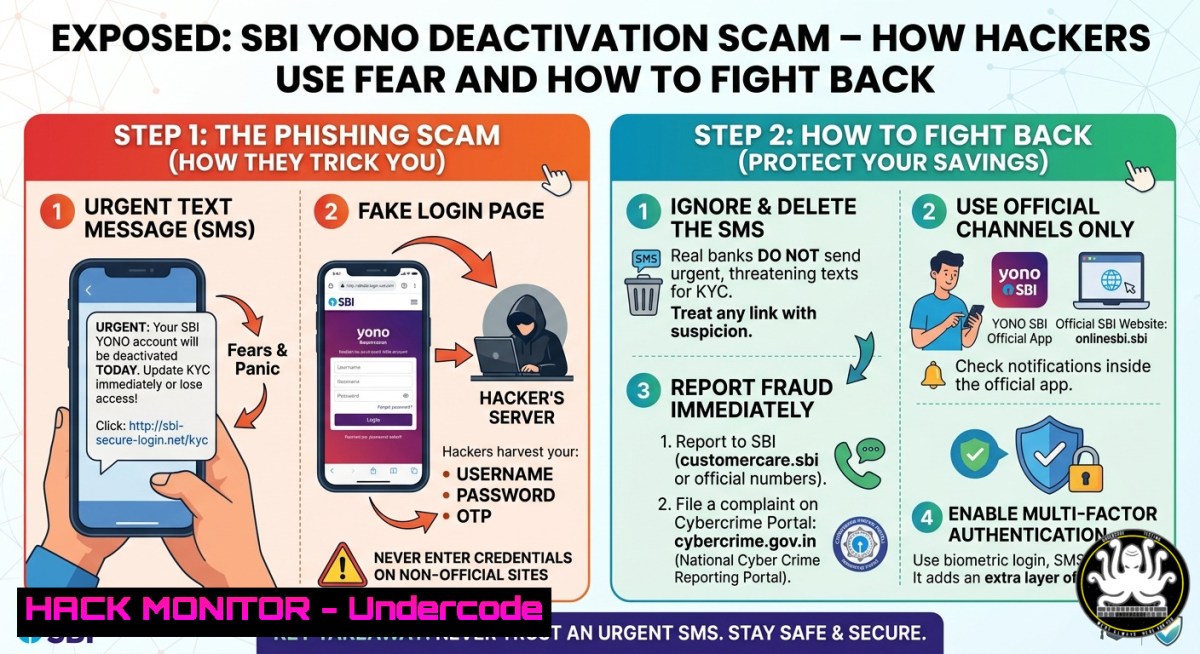
The State Bank of India (SBI) has issued an urgent cybersecurity alert warning millions of digital banking customers about a sophisticated phishing campaign that leverages fear and urgency to compromise sensitive financial data. Scammers are sending fake messages via SMS, WhatsApp, and email claiming that users’ YONO apps will be permanently deactivated unless they immediately update their Aadhaar numbers — a tactic designed to trigger panic and prompt victims to click malicious links or download dangerous Android Package Kit (APK) files that install banking trojans, enabling remote access and theft of banking credentials, OTPs, and personal information.
Learning Objectives
- Understand the technical mechanics of the SBI YONO deactivation scam, including social engineering, malicious APK distribution, and MITM exploitation.
- Learn how to identify, analyze, and neutralize fraudulent messages and malicious applications across Linux, Windows, and mobile platforms.
- Acquire practical cybersecurity skills to harden your digital banking environment, detect emerging threats, and implement effective incident response procedures.
You Should Know
- Anatomy of the Scam: Social Engineering Meets Technical Exploitation
The attack chain begins with a fraudulent message that appears to be an official SBI communication, often reading: “Urgent announcement: Dear SBI customer, your SBI Yono account will be blocked tonight due to Aadhaar no. is not updated in your account. Please install our official SBI Aadhaar update app and update your Aadhaar immediately.” This false ultimatum exploits a common psychological vulnerability — fear of losing banking access — to bypass critical thinking. Once the victim clicks the link or downloads the attached APK, they are redirected to a sophisticated phishing website mimicking the official SBI YONO portal, where they are prompted to enter Aadhaar numbers, banking credentials, and OTPs.
The technical sophistication varies: some campaigns use a simple phishing website for credential harvesting, while others distribute a multi-stage malicious APK designed to evade detection and propagate further. Cybersecurity analysts reverse-engineered one such APK that contained a hidden second-stage payload inside an assets folder named dummy.apk. The loader APK installed a native C/C++ library called libsb1bank.cpp.so, which contained functions referencing backend servers and JWT secrets for credential exfiltration and command-and-control (C2) communication. This APK also had the ability to access WhatsApp and spread the same malicious link to all contacts of the victim, amplifying the attack scope automatically.
Step‑by‑step analysis guide (Kali Linux):
1. Set up an isolated sandbox environment
Install VirtualBox and create a Kali Linux VM. Ensure network is set to “Host-Only” or “NAT” to avoid accidental infection spread. Use sudo apt update && sudo apt install -y apktool jadx burpsuite mobsf.
2. Extract APK for static analysis
Run `apktool d suspicious.apk -o extracted/` to decode resources. Navigate to `extracted/original/AndroidManifest.xml` and search for `READ_SMS, RECEIVE_SMS, INTERNET, ACCESS_FINE_LOCATION, and BIND_ACCESSIBILITY_SERVICE, as these are common in banking malware.
3. Decompile to Java source code
Use `jadx -d jadx_output/ suspicious.apk` to view the decompiled code. Search for strings containing “Firebase”, “C2”, “server”, “JWT”, or “domain” to locate C2 infrastructure.
4. Analyze embedded payloads
List the APK’s assets folder: ls -la extracted/assets/. If you find additional APK files (e.g., dummy.apk), extract them recursively using the same process to uncover hidden second-stage malware.
5. Perform dynamic analysis in a sandbox
Install the APK on a rooted Android emulator (e.g., Genymotion). Use `adb logcat | grep -i “error\|malware\|c2″` to monitor runtime behavior. Run Burp Suite as a proxy to intercept network traffic and identify any unencrypted transmissions or C2 callbacks. Search for cleartext HTTP traffic to detect CWE-319 (Cleartext Transmission of Sensitive Information).
2. CVE-2025-45080: The Critical Man-in-the-Middle Vulnerability
Beyond third-party malware, a significant security flaw was discovered in YONO SBI version 1.23.36 (obsolete as of 2021). Designated as CVE-2025-45080 with a CVSS v3.1 score of 8.8 (High), this vulnerability allows man-in-the-middle (MITM) attacks on the Android app due to an insecure network configuration setting. The app’s `AndroidManifest.xml` explicitly sets android:usesCleartextTraffic=”true”, which permits unencrypted HTTP connections and overrides Android’s secure defaults for API level 28+ (Android 9 and later). This configuration violates CWE-319: Cleartext Transmission of Sensitive Information, exposing login credentials, account details, and transactional data to eavesdropping and manipulation on the same network segment.
Although SBI has stated that this version is obsolete and the current version (1.24.24) is secure, users who have not updated their app remain at risk, especially when using public Wi-Fi or untrusted networks. Attackers on the same network can intercept unencrypted traffic and capture or modify banking data in real time.
Step‑by‑step MITM detection and prevention guide:
1. Check your installed YONO app version (Android)
Go to Settings > Apps > YONO SBI > App info. Scroll to the bottom to see the version number. If you see 1.23.36, update immediately from the Google Play Store or Apple App Store.
2. Manually verify network security configuration (advanced)
Use `apktool` to decode the APK, then inspect `AndroidManifest.xml` for the `android:usesCleartextTraffic` attribute. Secure apps should have this set to `”false”` or omit the attribute entirely to default to secure settings.
3. Test for MITM vulnerability using Burp Suite (ethical testing only on your own device)
– Configure your Android device to use Burp Suite’s proxy (IP of your machine, port 8080).
– Install Burp’s CA certificate on the device.
– Launch YONO SBI and perform a login. Look for HTTP requests instead of HTTPS — these indicate cleartext traffic.
– If you see POST requests to paths like `/api/login` or `/api/transact` over HTTP, the app is vulnerable.
4. Simulate an MITM attack (educational)
Use `ettercap` or `bettercap` on the same network as a test device running the vulnerable version. Run `sudo bettercap -eval “set arp.spoof.targets
5. Mitigation for users
- Never use banking apps on public Wi‑Fi without a VPN.
- Always keep your YONO app updated to the latest version.
- Regularly monitor bank statements for unauthorized transactions and enable transaction alerts via SMS and email.
3. APK Malware Analysis: Unpacking Banking Trojans
The malicious APK distributed in this campaign is not a simple phishing page; it’s a fully functional Android banking trojan. Security researchers have identified that the malware often masquerades as “SBI YONO” using Unicode homoglyphs (e.g., `Υονο ЅВІ` with Greek characters) to appear legitimate in app lists. Once installed, the malicious app requests Accessibility Service permissions — a common technique used to bypass Android’s security controls and allow the attacker to read screen content, simulate touches, and intercept OTP messages automatically. The malware can then perform overlay attacks: when the user opens the real YONO app, the malware overlays a fake login screen on top of it, capturing the credentials without the user’s knowledge.
Step‑by‑step malware detection and removal:
1. Manual inspection of suspicious apps (Android)
Go to Settings > Apps > See all apps. Look for apps with suspicious names (e.g., “SBI Aadhaar Update”, “System Update”, “YONO KYC”). Check if the app has Accessibility permissions enabled — go to Settings > Accessibility > Installed services. Immediately disable any unknown services.
2. Use Linux command-line tools to analyze APK hashes
Download the suspicious APK to a Linux sandbox. Run `sha256sum suspicious.apk` to generate its hash. Then check the hash against VirusTotal’s API:
`curl –request GET –url “https://www.virustotal.com/api/v3/files/
This will instantly tell you if the APK is known malware.
3. Extract permissions and suspicious capabilities (Linux/Windows)
Use `aapt dump permissions suspicious.apk` (from Android SDK) to list all requested permissions. Red flags include RECEIVE_SMS, READ_SMS, SEND_SMS, BIND_ACCESSIBILITY_SERVICE, and REQUEST_INSTALL_PACKAGES.
4. Check for Firebase C2 infrastructure
Search the decompiled code for Firebase Realtime Database URLs (e.g., https://<project-name>.firebaseio.com). Attackers often use Firebase as a cheap, anonymous C2 channel. Use `strings suspicious.apk | grep -i “firebase”` to locate these URLs and report them to Google.
5. Automated malware removal (Windows)
If you suspect infection, boot into Safe Mode with Networking. Run a full scan with Microsoft Defender offline: Start-MpScan -ScanType FullScan -Force. Alternatively, use the free Malwarebytes scanner specifically for Android malware. If the malware persists, perform a factory reset and restore only verified backups.
- OSINT and Threat Intelligence Gathering for Emerging Scams
Proactive OSINT techniques can help you identify new phishing campaigns targeting SBI before they reach your inbox. Attackers frequently use URL shorteners (e.g., bit.ly, tinyurl) and domain names that mimic official SBI URLs, such as `sbi-update[.]com` or yono-aadhaar[.]net. Security researchers have noted a surge in campaigns using shortened URLs designed to evade traditional email filters.
Step‑by‑step OSINT investigation:
1. Analyze suspicious URLs without clicking
Use `curl -I http://malicious-link.com` to retrieve the HTTP headers and see where the redirect leads. Alternatively, use online tools like urlscan.io or VirusTotal URL scanner to visualize the page safely.
2. Extract WHOIS data for fake domains
Run `whois suspicious-domain.com(Linux/macOS) or use a web-based WHOIS tool. Look for recently registered domains (less than 30 days old), hidden WHOIS protection, and registrars known for hosting malicious content.[email protected]`, or call the national helpline 1930 for real-time fraud assistance.
<h2 style="color: yellow;">3. Monitor known threat intelligence feeds</h2>
Subscribe to AlienVault OTX pulses for “YONO”, “SBI”, “Aadhaar”. Use the following Linux one-liner to fetch recent indicators:
`curl –silent “https://otx.alienvault.com/api/v1/pulses/subscribed” | jq ‘.results[].indicators[] | select(.indicator | contains(“sbi”))’`
<h2 style="color: yellow;">4. Set up automated phishing URL detection (Python)</h2>
Write a script that takes a URL, expands it, checks domain age, and compares against known blocklists. Use libraries like `pysafebrowsing` (Google Safe Browsing API) to instantly classify URLs.
<h2 style="color: yellow;">5. Report malicious sites to authorities</h2>
Submit phishing URLs to the Indian Cybercrime Coordination Centre (I4C) at https://cybercrime.gov.in, email
- Cloud and API Security Hardening for Financial Apps
While individual users are the primary target, organizations and developers must also secure their APIs and cloud infrastructure against similar social engineering attacks. Banking trojans often target API endpoints with weak authentication, rate limiting, or exposed JWT secrets. A common technique is to reverse-engineer the official YONO app to find API endpoints and then launch credential-stuffing or MITM attacks against those endpoints.
Step‑by‑step API security best practices for developers:
1. Enforce HTTPS everywhere
Ensure your `AndroidManifest.xml` has `android:usesCleartextTraffic=”false”` or uses a Network Security Config file to restrict cleartext traffic. For server-side, configure HSTS and redirect all HTTP traffic to HTTPS using a web server rule:
`RewriteEngine On RewriteCond %{HTTPS} off RewriteRule (.) https://%{HTTP_HOST}%{REQUEST_URI} [R=301,L]`
2. Implement API request signing
To prevent API abuse and replay attacks, implement HMAC request signing for sensitive endpoints. The client sends a signature generated from the HTTP method, path, timestamp, and a shared secret. The server validates the signature and rejects expired requests.
3. Deploy rate limiting and geofencing
Use a web application firewall (WAF) or API gateway to limit requests per IP and enforce geolocation restrictions. For NGINX, add:
`limit_req_zone $binary_remote_addr zone=login:10m rate=5r/m;`
`limit_req zone=login burst=10 nodelay;`
4. Conduct regular penetration testing
Use Burp Suite Professional to fuzz API endpoints for injection flaws, broken authentication, and excessive data exposure. Automated scanners like OWASP ZAP can be run headlessly:
`zap-api-scan.py -t https://api.sbi.co.in/v1/openapi.json -f openapi -r report.html`
5. Monitor for anomalous API traffic
Set up cloud-based detection using AWS GuardDuty, Azure Sentinel, or Google Chronicle. Create custom alerts for high volumes of failed authentication attempts, unexpected user agents, or access from TOR exit nodes.
What Undercode Say:
- Key Takeaway 1: The SBI YONO deactivation scam demonstrates that the most dangerous cyber threats are not zero-day vulnerabilities, but rather classic social engineering combined with readily available malware toolkits. Attackers succeeded not by breaking encryption, but by breaking human trust — the weakest link in any security chain.
- Key Takeaway 2: CVE-2025-45080 serves as a critical reminder that secure defaults matter. The use of `cleartextTraffic=”true”` in a banking app is inexcusable, even in an obsolete version. Financial institutions must enforce stricter secure-by-design principles, including mandatory code reviews, automated security scanning in CI/CD pipelines, and rapid deprecation of insecure app versions.
The YONO scam is part of a broader trend where attackers weaponize regulatory compliance fears (Aadhaar, KYC, PAN updates) to create urgency. This campaign’s multi‑channel approach — combining SMS, WhatsApp, email, and phone calls — shows that attackers are moving beyond single-vector attacks to comprehensive psychological operations. Future attacks will likely target mobile devices exclusively, given the widespread adoption of UPI and mobile banking in India. The only long-term solution is a combination of real-time threat intelligence sharing between banks, automated takedown of phishing domains, and continuous user education — not just annual awareness emails, but proactive, in-app warnings triggered by suspicious activity.
Prediction:
As digital banking adoption accelerates, we will see a significant shift from traditional phishing to AI-generated personalized voice scams (vishing) and deepfake video calls impersonating bank officials. By 2027, attackers will leverage large language models to craft perfectly localized, grammatically flawless messages that bypass spam filters and mimic the exact tone of bank communications. In response, banks will begin implementing behavioral biometrics (keystroke dynamics, mouse movements, touchscreen pressure) and on-device AI models to detect anomalies in real time, even before the user enters credentials. However, until such technologies become ubiquitous, the most effective defense remains user vigilance — and the technical skills to analyze, dismantle, and report threats before they cause harm.
▶️ Related Video (68% Match):
🎯Let’s Practice For Free:
IT/Security Reporter URL:
Reported By: Tushar Subhra – Hackers Feeds
Extra Hub: Undercode MoN
Basic Verification: Pass ✅
🎓 Live Courses & Certifications:
Join Undercode Academy for Verified Certifications
🚀 Request a Custom Project:
Secure, high-velocity infrastructure and disruptive technological engineering. Contact our engineering team for high-tier development and proprietary systems:
[email protected]


