Listen to this Post
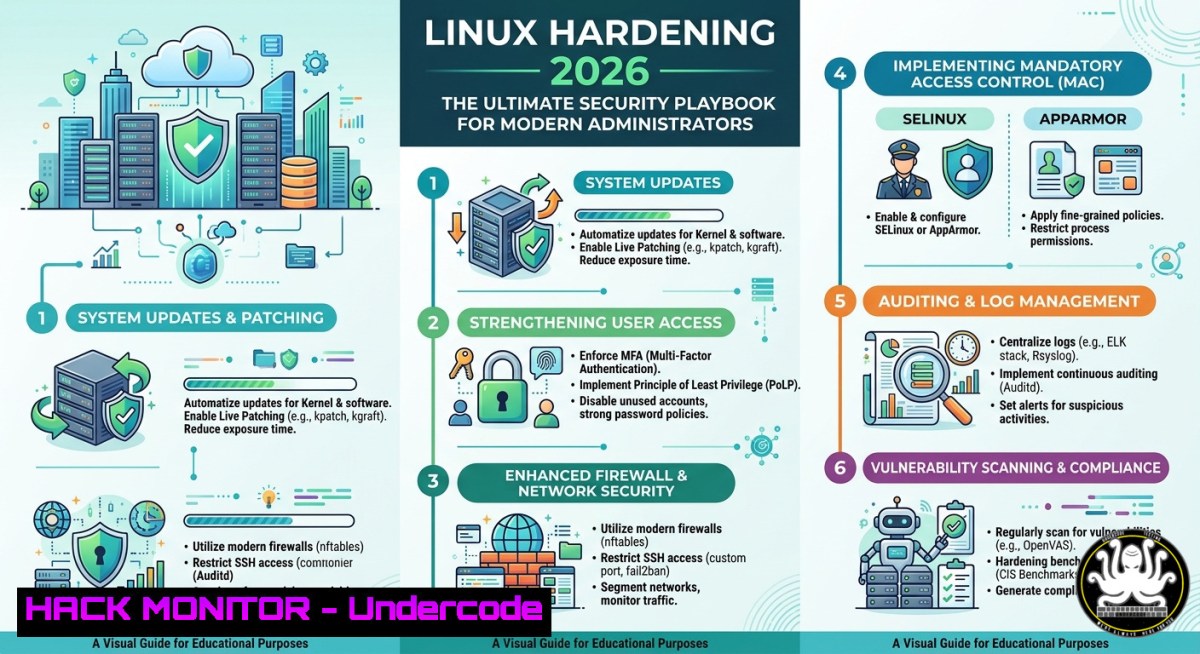
Introduction:
Linux powers the vast majority of web servers, cloud infrastructure, and enterprise applications worldwide, making Linux administrators the backbone of modern IT infrastructure. However, this dominance also makes Linux systems a primary target for sophisticated cyberattacks, requiring a proactive, multi-layered security approach that goes beyond basic configuration to encompass continuous vulnerability management, advanced monitoring, and automated defense mechanisms.
Learning Objectives:
- Master essential system hardening techniques, including SSH security, firewall configuration, and mandatory access control with SELinux/AppArmor.
- Implement robust monitoring and performance tuning using tools like
sar,perf, and `journalctl` to detect anomalies and optimize system health. - Automate security patching and system administration tasks using Bash scripting and Ansible to maintain a resilient, up-to-date infrastructure.
You Should Know:
1. System Hardening: Fortifying the Linux Foundation
Linux security begins with reducing the attack surface. In 2026, hardening focuses on minimizing unnecessary exposure while maintaining production stability. This layered strategy includes SSH hardening, firewall configuration, and implementing Mandatory Access Control (MAC).
The first line of defense is securing remote access. Attackers consistently target SSH, so immediate steps include disabling direct root login and password authentication in favor of public-key authentication. Additionally, restricting allowed users and groups makes access explicit, significantly reducing brute-force risks.
Step-by-Step SSH Hardening Guide:
 1. Edit SSH daemon configuration
sudo nano /etc/ssh/sshd_config

<ol>
<li>Apply critical security directives:
PermitRootLogin no
PasswordAuthentication no
PubkeyAuthentication yes
AllowUsers admin username</p></li>
<li><p>Restart SSH service to apply changes
sudo systemctl restart sshd
Beyond SSH, firewalls are essential. While `iptables` has been the standard, `nftables` is now the modern Linux firewall framework, offering streamlined syntax and unified handling of IPv4 and IPv6.
Implementing nftables Firewall:
 Install and enable nftables
sudo apt install nftables && sudo systemctl enable --now nftables

Create a filtering table and base chains
sudo nft add table inet linuxconfig_filter
sudo nft add chain inet linuxconfig_filter input { type filter hook input priority 0\; }
sudo nft add chain inet linuxconfig_filter forward { type filter hook forward priority 0\; }
sudo nft add chain inet linuxconfig_filter output { type filter hook output priority 0\; }

Allow established connections and SSH, drop everything else
sudo nft add rule inet linuxconfig_filter input ct state established,related accept
sudo nft add rule inet linuxconfig_filter input tcp dport 22 accept
sudo nft add rule inet linuxconfig_filter input drop

Save rules permanently
sudo nft list ruleset > /etc/nftables.conf
For advanced mandatory access control, SELinux (on RHEL-based systems) and AppArmor (on Debian-based systems) provide granular process restrictions. AppArmor uses text profiles located in `/etc/apparmor.d/` to define exactly which files and capabilities each program can access. Key commands include `sudo aa-status` to monitor profiles and `sudo aa-enforce /path/to/profile` to activate restrictions.
2. Continuous Monitoring and Performance Tuning
Proactive monitoring is crucial for detecting security incidents and performance bottlenecks before they impact operations. Modern Linux administrators rely on a suite of powerful tools. The System Activity Reporter (sar), part of the `sysstat` package, collects and reports comprehensive system activity data, including CPU, memory, disk, and network metrics, writing them to binary files for historical analysis.
Essential Monitoring Commands:
 Install sysstat for SAR
sudo apt install sysstat -y

Enable and start system activity collection
sudo systemctl enable sysstat && sudo systemctl start sysstat

Real-time CPU and memory monitoring with top or htop
top
 Or install and use htop for an interactive interface
sudo apt install htop -y && htop

Check kernel ring buffer for hardware and driver errors
dmesg | tail -20

Review systemd journal for service-specific logs
journalctl -xe -p err -b
For deeper performance analysis, the `perf` tool provides low-level access to hardware performance counters, allowing you to profile application and system performance without requiring root privileges in many cases.
Using perf for Analysis:
 Install perf tool (on Ubuntu/Debian)
sudo apt install linux-tools-common linux-tools-$(uname -r) -y

Statically count CPU cycles for a specific command
perf stat ls -lR /var/log/

Record a system-wide profile for 30 seconds
sudo perf record -a -g -- sleep 30

Report the recorded profile data
sudo perf report
Furthermore, the 60-Second Linux Analysis methodology provides a quick health check: use `uptime` for load averages, `dmesg | tail` for kernel issues, and `vmstat 1` for memory and CPU bottlenecks. This rapid triage is invaluable during incident response.
3. Automation and Vulnerability Management
In a dynamic threat landscape, manual patching is unsustainable. Automation is key to maintaining a secure and compliant infrastructure. Vulnerability management must shift from reactive CVE tracking to proactive patch prioritization, as the real signal of exploitation often appears in kernel patch activity before a CVE is even assigned.
Automated Patching with Ansible:
Ansible provides a robust framework for automating security updates across entire fleets. Below is a playbook that ensures all managed nodes are updated and secured:
<ul>
<li>name: Automated Security Patching
hosts: all
become: yes
tasks:</li>
<li>name: Update APT cache and upgrade security packages (Debian/Ubuntu)
apt:
upgrade: safe
update_cache: yes
cache_valid_time: 3600
when: ansible_os_family == "Debian"</p></li>
<li><p>name: Install security updates only (RHEL/CentOS)
dnf:
name: ""
state: latest
security: yes
when: ansible_os_family == "RedHat"</p></li>
<li><p>name: Reboot if required after patching
reboot:
reboot_timeout: 300
when: ansible_facts['kernel'] is defined
For critical kernel vulnerabilities, Livepatch solutions allow applying security patches without rebooting, minimizing downtime for essential services. To further automate vulnerability scanning, tools like `dnf-automatic` can be configured on Fedora/RHEL systems to automatically download and apply security updates daily.
Implementing a Daily Security Update Schedule with Cron:
 Edit the root user's crontab
sudo crontab -e

Add line to run security updates at 2:00 AM daily
0 2    /usr/bin/apt update && /usr/bin/apt upgrade -y >> /var/log/auto-upgrade.log 2>&1

For more granular control (Debian/Ubuntu), install and configure unattended-upgrades
sudo apt install unattended-upgrades -y
sudo dpkg-reconfigure --priority=low unattended-upgrades
What Undercode Say:
- Proactive Hardening is Non-Negotiable: Modern Linux security requires a layered defense, starting with SSH hardening, moving to strict firewall rules via
nftables, and enforcing mandatory access controls with SELinux or AppArmor. - Visibility Through Monitoring is Key: Continuous performance monitoring using tools like
sar,perf, and `journalctl` enables rapid detection of both security incidents and system anomalies, providing crucial forensic data. - Automation is the Force Multiplier: Leveraging automation (Ansible, cron jobs, Livepatch) for vulnerability management transforms security from a periodic chore into a continuous, reliable process, drastically reducing the window of exposure for critical exploits.
Expected Output:
The article provides a comprehensive, actionable guide to securing Linux systems in 2026. It moves beyond basic theory, offering verified commands and step-by-step configurations for SSH hardening, `nftables` firewalls, mandatory access control (SELinux/AppArmor), performance monitoring (sar, perf, journalctl), and automated security patching using Ansible and cron. By following this playbook, administrators can significantly reduce their attack surface, enhance system visibility, and maintain resilient, compliant infrastructure against evolving cyber threats.
Prediction:
As Linux continues to dominate cloud and edge computing, the role of the Linux administrator will evolve into a hybrid security-systems engineer. The increasing sophistication of kernel-level exploits and the speed of automated attacks will drive near-total adoption of automated patch management and runtime defense mechanisms, such as emergency kernel “killswitches” for vulnerable functions. Administrators who fail to embrace full-stack automation—from configuration management to incident response—will find themselves unable to keep pace with the accelerating threat landscape, making proactive hardening and continuous monitoring not just best practices, but fundamental survival skills for modern infrastructure management.
▶️ Related Video (88% Match):
🎯Let’s Practice For Free:
IT/Security Reporter URL:
Reported By: Gmfaruk Linux – Hackers Feeds
Extra Hub: Undercode MoN
Basic Verification: Pass ✅
🎓 Live Courses & Certifications:
Join Undercode Academy for Verified Certifications
🚀 Request a Custom Project:
Secure, high-velocity infrastructure and disruptive technological engineering. Contact our engineering team for high-tier development and proprietary systems:
[email protected]


