
Listen to this Post
Introduction:
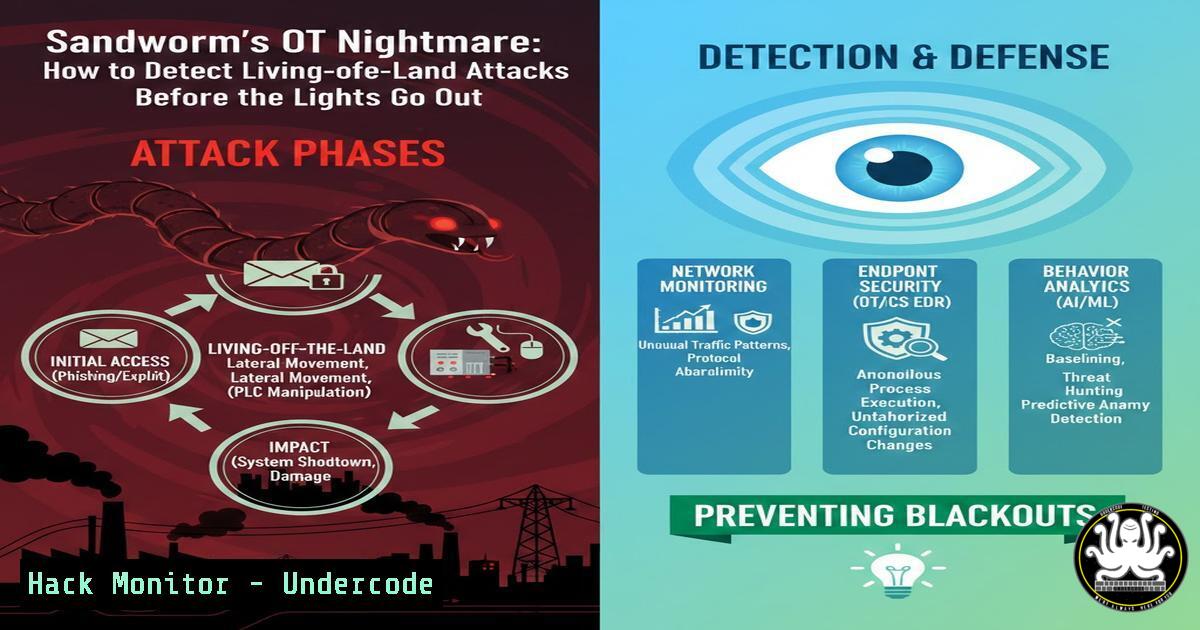
The recent cyberattack on Poland’s energy grid, attributed to the Russian-aligned groups BerserkBear and Sandworm, has exposed a critical blind spot in global critical infrastructure. The attack did not rely solely on novel malware, but rather on the exploitation of poorly monitored edge devices within Operational Technology (OT) environments. This incident highlights the failure of traditional IT-centric security models to account for the unique risks of OT/ICS, specifically regarding asset visibility, third-party supplier risk, and the use of “living-off-the-land” tradecraft to blend in with normal network operations.
Learning Objectives:
- Analyze the methodologies used by advanced persistent threat (APT) groups to preposition on OT edge devices.
- Identify exposed industrial control system (ICS) assets using open-source intelligence (OSINT) techniques.
- Understand how to monitor for “living-off-the-land” (LotL) techniques specific to Windows-based engineering workstations.
- Assess third-party and Original Equipment Manufacturer (OEM) risk through infrastructure analysis.
- Implement vulnerability prioritization strategies based on active exploitation rather than CVSS scores alone.
You Should Know:
- Identifying Exposed OT/ICS Edge Devices via Attack Surface Intelligence
The Poland grid attack succeeded because edge devices were exposed to the internet and lacked monitoring. Adversaries often scan for specific OT protocols and default web interfaces. To understand your own exposure, you must view your infrastructure from an attacker’s perspective.
Step‑by‑step guide: Using Nmap for OT Asset Discovery
Before an adversary exploits a device, they find it. Security teams can use these commands to identify unsecured or forgotten OT assets on their network perimeter.
- Scan for common ICS protocols: Use Nmap to detect devices responding to specific OT ports. This helps identify rogue or misconfigured PLCs and RTUs.
Scan for Modbus (Port 502)
nmap -p 502 --script modbus-discover <target_ip_range>

Scan for Siemens S7 (Port 102)
nmap -p 102 --script s7-info <target_ip_range>

Scan for BACnet (Building automation, Port 47808)
nmap -sU -p 47808 --script bacnet-info <target_ip_range>
-
Identify Web Interfaces on Industrial Devices: Many edge devices have web dashboards for management. Attackers look for default login pages.
Scan for common industrial web interfaces (e.g., on ports 80, 443, 8080)
nmap -p 80,443,8080 -sV --http-title <target_ip_range>
-
Passive Monitoring with Wireshark: To avoid disrupting fragile OT systems, passive monitoring is key. Capture traffic to identify device communications without sending intrusive packets.
– Filter: `modbus || s7comm || bacnet || (udp.port == 47808)`
– Action: Analyze the source IPs of these packets to build a map of actual OT devices currently communicating on the network.
2. Hunting “Living-off-the-Land” (LotL) Tradecraft in OT
Attackers like Sandworm use LotL techniques to avoid writing custom malware that would trigger antivirus. They abuse built-in Windows tools (like PowerShell, WMI, and PsExec) and legitimate vendor software to move laterally from the IT environment into the OT environment via engineering workstations.
Step‑by‑step guide: Detecting LotL on a Windows Engineering Workstation
Monitoring a “jump box” or engineering workstation requires focusing on process ancestry and unusual usage of native tools.
- Monitor WMI for Lateral Movement: Attackers use WMI to execute processes remotely. Enable logging via Group Policy or review existing Security Event Logs.
– Event ID 4688 (Process Creation): Look for `wmic.exe` or `powershell.exe` being launched with arguments pointing to remote systems.
– PowerShell Command to hunt: Run this on a centralized log collector to search for remote process execution.
 Search Security Log for WMI Process Creation targeting OT subnets
Get-WinEvent -FilterHashtable @{LogName='Security'; ID=4688} | Where-Object { $<em>.Message -match "wmic.exe" -and $</em>.Message -match "process call create" }
- Detect PsExec Usage: PsExec is a legitimate Sysinternals tool but is frequently abused for lateral movement. Monitor for its execution and the service it creates.
– Event ID 7045 (Service Installation): Look for a service named `PSEXESVC` being installed on an OT asset. This is a high-fidelity alert.
– Sysmon Event ID 1: If Sysmon is deployed, filter for `PsExec.exe` execution.
3. Monitor for Abnormal PowerShell Usage:
- Script Block Logging (Event ID 4104): Enable PowerShell logging to see the actual code being executed. Look for base64-encoded commands or attempts to disable logging.
- Example Hunting Query (Splunk/ELK):
index=windows EventCode=4104 ScriptBlockText=System.Net.WebClient OR ScriptBlockText=DownloadString OR ScriptBlockText=-EncodedCommand
3. Third-Party and OEM Risk Assessment
The Poland incident highlighted that vulnerabilities often reside in third-party components integrated into OT environments. Attackers target the supply chain. Security teams must assess not just their own code, but the infrastructure of their vendors.
Step‑by‑step guide: Investigating Vendor Infrastructure
Use OSINT to check if your critical vendors have exposed assets or are hosted on infrastructure associated with malicious activity.
1. WHOIS and DNS Lookups:
- Use `dig` or `nslookup` to find the IP addresses of your vendor’s primary domains.
- Perform a reverse DNS lookup on those IPs to see what other domains are hosted there (indicating shared hosting, which could be a risk).
Find IP of vendor domain
dig vendor-example.com

Reverse lookup the IP (e.g., 192.0.2.1)
nslookup 192.0.2.1
2. SSL Certificate Analysis:
- Use `crt.sh` (Certificate Transparency logs) to find all certificates issued for the vendor’s domain. This reveals subdomains and staging environments that might be exposed (e.g.,
dev.vendor-example.com,backup-plc.vendor-example.com). - Command to check certificate details:
echo | openssl s_client -connect vendor-example.com:443 2>/dev/null | openssl x509 -text | grep -A2 "Subject Alternative Name"
3. Shodan Intelligence Gathering:
- Query Shodan for the vendor’s IP range or specific product names. This identifies if the vendor themselves have vulnerable industrial systems online.
- Search String: `”Siemens” “S7” net:
` or "Schneider Electric" port:502.
4. Vulnerability Intelligence: Prioritizing Exploited CVEs
The report emphasizes prioritizing vulnerabilities that are actively exploited in the wild, rather than just those with high CVSS scores. Adversaries don’t care about theoretical severity; they care about ease of exploitation and reliability.
Step‑by‑step guide: Correlating CVEs with Adversary Campaigns
You must automate the process of filtering the noise.
1. Fetch Known Exploited Vulnerabilities (KEV) Catalog:
- CISA maintains a KEV catalog. Use a simple script to cross-reference your asset inventory against this list.
Download the CISA KEV catalog
curl -s https://www.cisa.gov/sites/default/files/feeds/known_exploited_vulnerabilities.json | jq '.vulnerabilities[] | {cveID: .cveID, vulnerabilityName: .vulnerabilityName, dueDate: .dueDate}'
2. Contextualize with Threat Intelligence Feeds:
- If you have a STIX/TAXII feed (like Recorded Future), ingest indicators of compromise (IOCs) and correlate them with CVE IDs.
- Linux Command to grep for specific CVEs in logs:
Search for exploitation attempts of Log4j (CVE-2021-44228) in web logs
grep -i '${jndi:' /var/log/nginx/access.log
3. Patch Management Integration:
- Create a hotfix script for Windows-based engineering stations that prioritizes patches from the KEV list.
Check if a specific patch (KB) is installed
$PatchList = Get-HotFix | Select-Object HotFixID
if ($PatchList -match "KB5021234") {
Write-Host "Critical patch is installed."
} else {
Write-Host "WARNING: Critical exploited vulnerability patch missing!"
}
What Undecode Say:
- Key Takeaway 1: Visibility Trumps Patching. The Poland attack proves that an unmonitored device is a compromised device. You cannot protect what you cannot see. Traditional vulnerability management fails in OT because it focuses on software flaws while ignoring the architectural flaws of network exposure and lack of visibility.
- Key Takeaway 2: Adversaries are Blending In, Not Breaking In. The use of “living-off-the-land” techniques means that security teams can no longer rely on malware signatures. Defense must shift to behavioral analysis—monitoring how legitimate tools are being used and for what purpose, specifically focusing on process ancestry and anomalous administrative activity on critical engineering workstations.
The shift from “patch faster” to “see earlier” is not just a slogan; it is a fundamental architectural necessity. For critical infrastructure, resilience depends on the ability to detect adversary activity during the reconnaissance and prepositioning phases, long before any attempt at kinetic disruption. The Poland incident serves as a stark reminder that in the world of OT/ICS, a lack of visibility is an open invitation to disaster.
Prediction:
We will see a significant rise in “hybrid” attacks targeting the intersection of IT and OT. Future campaigns will not only aim for data theft but will increasingly focus on prepositioning malware on edge devices to hold physical processes for ransom. This will force regulatory bodies to mandate “passive monitoring” and “network segmentation validation” as compliance requirements, moving beyond simple checklists to continuous, evidence-based security postures. The integration of AI-driven behavioral analytics will become standard to baseline “normal” engineering activity and detect the subtle anomalies indicative of LotL tradecraft in real-time.
▶️ Related Video (82% Match):
🎯Let’s Practice For Free:
IT/Security Reporter URL:
Reported By: Mikaelhabte Berserkbear – Hackers Feeds
Extra Hub: Undercode MoN
Basic Verification: Pass ✅


