Listen to this Post
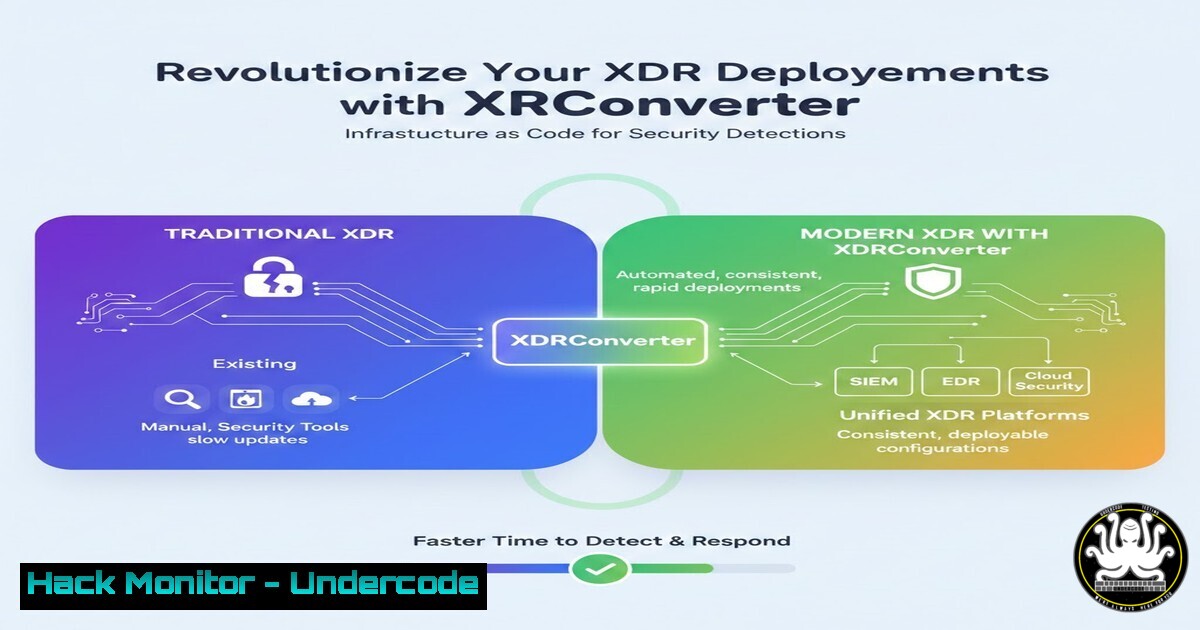
Introduction:
In the rapidly evolving landscape of cybersecurity, managing custom detection rules across multiple tenants has become a Herculean task for security operations centers (SOCs). XDRConverter, a new open-source tool released at ELDK26, empowers defenders to treat their XDR detections as code by leveraging YAML files as the single source of truth. This approach not only streamlines deployment but also ensures consistency, version control, and easy migration of detection logic across environments, fundamentally shifting how organizations operationalize threat hunting.
Learning Objectives:
- Understand the core functionality and benefits of XDRConverter for managing Microsoft XDR detections.
- Learn how to deploy a custom detection from a YAML file using PowerShell commands.
- Master the process of backing up existing detections into portable YAML format for version control and multi-tenant management.
You Should Know:
- What Is XDRConverter and Why You Need It
XDRConverter is a PowerShell-based tool designed to simplify the lifecycle management of custom detection rules in Microsoft XDR (Extended Detection and Response) environments. By storing detection logic in YAML—a human-readable data-serialization language—security teams can apply DevOps principles to their detection engineering. This eliminates the manual, error‑prone process of recreating rules in each tenant and enables automated deployments via CI/CD pipelines. The tool also embeds a unique GUID in each detection’s description, allowing for seamless tracking and updates even when the same rule is deployed to multiple tenants.
2. Prerequisites and Installation
Before using XDRConverter, ensure you have the following:
- A Windows machine (or any platform with PowerShell Core 7+)
- Appropriate permissions in your Microsoft XDR environment (typically Global Admin or Security Admin)
- The Microsoft Graph PowerShell SDK installed
- Git (to clone the repository) or direct download from the project’s GitHub page.
Installation Steps:
 Clone the repository
git clone https://github.com/fabian-bader/XDRConverter.git
cd XDRConverter

Install required modules (if not already present)
Install-Module -Name Microsoft.Graph -Force -AllowClobber

Import the module
Import-Module .\XDRConverter.psm1 -Verbose
Alternatively, you can download the latest release from the project’s releases page and manually place the files in your PowerShell modules directory.
- Deploying an XDR Detection from a YAML File
The primary function `Deploy-CustomDetection` reads a properly formatted YAML file and creates or updates a detection rule in your XDR environment. A sample YAML file (CSOC-CUD-SecurityEventsCleared.yaml) might look like this:
displayName: "Security Events Cleared"
severity: Medium
enabled: true
query: |
SecurityEvent
| where EventID == 1102
| project TimeGenerated, Computer, Account
queryFrequency: 4h
queryPeriod: 4h
triggerOperator: GreaterThan
triggerThreshold: 0
description: |
This detection alerts when security event logs are cleared.
GUID: 123e4567-e89b-12d3-a456-426614174000
tactics: ["DefenseEvasion"]
techniques: ["T1070"]
To deploy this detection, run:
Deploy-CustomDetection -Path .\CSOC-CUD-SecurityEventsCleared.yaml
The cmdlet authenticates using your Microsoft Graph credentials, validates the YAML, and then creates/updates the detection. If a detection with the same GUID already exists, it will be updated; otherwise, a new rule is created.
4. Backing Up Existing Detections as YAML
To take control of your existing detections and convert them to infrastructure as code, use the `Get-CustomDetection` cmdlet combined with the conversion utility:
 Retrieve all custom detections and export them as YAML files
Get-CustomDetection | ConvertTo-CustomDetectionYaml -UseDisplayNameAsFilename -Verbose
This command fetches every custom detection rule from your tenant, extracts its properties (query, severity, tactics, etc.), and writes each rule to a separate YAML file named after the detection’s display name. The `-Verbose` switch provides detailed output, showing which files are created and any warnings about missing fields. This backup process ensures you have a version‑controllable copy of all your detection logic.
5. Advanced Multi‑Tenant Management with GUIDs
One of the standout features of XDRConverter is its use of a globally unique identifier (GUID) embedded in the detection’s description. This GUID remains constant even if the rule’s name or properties change. To manage a detection across multiple tenants:
– Export the detection from your source tenant (as shown in section 4).
– Copy the YAML file to a target tenant’s management machine.
– Run `Deploy-CustomDetection` against the target tenant.
The tool will match the GUID in the description and update the existing rule if present, or create a new one if not. This makes synchronizing detection logic between development, test, and production environments trivial.
6. Integrating XDRConverter into CI/CD Pipelines
To fully automate detection deployment, integrate XDRConverter into a CI/CD pipeline (e.g., Azure DevOps, GitHub Actions). Here’s a basic example using a PowerShell script in an Azure DevOps pipeline:
steps:
- powershell: |
Install-Module -Name Microsoft.Graph -Force
Import-Module .\XDRConverter.psm1
Connect-MgGraph -Scopes "SecurityEvents.ReadWrite.All"
Get-ChildItem -Path $(System.DefaultWorkingDirectory)/detections/.yaml | ForEach-Object {
Deploy-CustomDetection -Path $_.FullName
}
displayName: 'Deploy XDR Detections'
Ensure your pipeline has a service connection or managed identity with the necessary permissions. This setup allows you to treat detection changes like any other code change, with pull requests and automated testing before production deployment.
7. Comparison with SentinelARConverter
XDRConverter is the sibling of SentinelARConverter, a tool that performs similar functions for Azure Sentinel (now Microsoft Sentinel) analytics rules. While SentinelARConverter focuses on Azure Sentinel’s workspace-based detections, XDRConverter targets Microsoft 365 Defender’s custom detection rules. Both tools share the same philosophy: YAML-based representation, GUID tracking, and PowerShell cmdlets. If your organization uses both platforms, adopting both converters provides a unified approach to detection-as-code across your entire security estate.
What Undercode Say:
- Key Takeaway 1: XDRConverter transforms detection management from a manual, GUI‑driven chore into a repeatable, automated process that aligns with infrastructure‑as‑code best practices.
- Key Takeaway 2: By storing a GUID in the detection description, the tool solves the multi‑tenant synchronization problem, enabling consistent rule sets across development, staging, and production environments without duplication.
The release of XDRConverter marks a significant step toward modernizing security operations. It empowers defenders to leverage version control, peer review, and automated deployment pipelines for their detection logic—capabilities long standard in software development but only now becoming accessible to SOC teams. As threats evolve, the ability to rapidly iterate and deploy detections will become a competitive advantage for organizations that embrace this tooling.
Prediction:
In the next two years, detection-as-code frameworks like XDRConverter will become the norm in enterprise security. We predict that major XDR and SIEM vendors will either build native YAML support or provide official APIs that enable such tools, leading to a new ecosystem of shared detection content and community-driven threat hunting. This shift will lower the barrier for small teams to implement robust detection strategies and force attackers to adapt to a faster, more resilient defensive posture. The fusion of DevOps and security operations—DevSecOps—will finally extend to the very core of threat detection.
▶️ Related Video (84% Match):
🎯Let’s Practice For Free:
IT/Security Reporter URL:
Reported By: Fabianbader Eldk26 – Hackers Feeds
Extra Hub: Undercode MoN
Basic Verification: Pass ✅


